TP-Link Archer BE400 Review: WiFi 7 Speeds with Dual-Band Design
The TP-Link Archer BE400 delivers next-generation WiFi 7 performance with dual 2.5Gbps ports and robust security features, though its dual-band architecture may limit throughput in dense device environments.
 By Elvis Dicki
Updated October 20, 2026
By Elvis Dicki
Updated October 20, 2026
The TP-Link Archer BE400 is a dual-band WiFi 7 router designed to future-proof home networks with the latest wireless standard. It targets tech-savvy households, remote workers, and gamers seeking ultra-low latency and multi-gigabit speeds for demanding applications like 8K streaming and AR/VR gaming. This router promises to blanket up to 2,400 square feet with reliable coverage for up to 90 devices, backed by TP-Link’s HomeShield security suite and easy mesh expansion capabilities. For users ready to upgrade their network infrastructure, the Archer BE400 offers a compelling entry point into WiFi 7 technology.

Positioned as an accessible gateway to WiFi 7, the Archer BE400 balances cutting-edge features like Multi-Link Operation (MLO) and 4K-QAM with practical considerations like a quad-core CPU and intuitive app management. Its core value proposition lies in delivering significantly faster speeds and lower latency than previous WiFi generations, particularly for compatible devices like the latest smartphones and laptops. While it requires WiFi 7 clients to unlock its full potential and a multi-gig modem for optimal wired performance, this router provides a solid foundation for modern connected homes.
TP-Link Archer BE400 WiFi 7 BE6500 Router







As an Amazon Associate we earn from qualifying purchases. Product prices and availability are accurate as of the date/time indicated.
TP-Link Archer BE400 at a Glance
| Specification | Detail |
|---|---|
| WiFi Standard | WiFi 7 (802.11be) |
| Total Bandwidth | 6.5 Gbps |
| Frequency Bands | Dual-Band (2.4 GHz & 5 GHz) |
| Coverage Area | Up to 2,400 sq. ft. |
| Maximum Supported Devices | 90 |
| Port Configuration | 1x 2.5G WAN/LAN, 1x 2.5G LAN, 3x 1G LAN, 1x USB 3.0 |
| Antennas | 6 Fixed High-Performance |
| Processor | Quad-Core CPU |
| Security | WPA3, HomeShield, Private IoT Network |
| Management | Tether App, Web Interface, Voice Control |
Design and Build
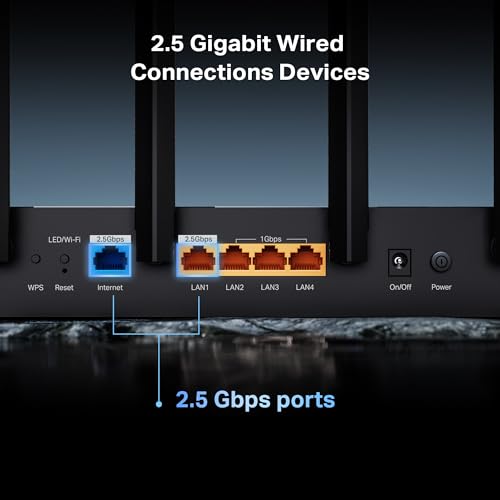
The TP-Link Archer BE400 features a black, low-profile design measuring 10.6 x 6 x 1.9 inches, making it relatively compact for a router with six internal antennas. Its build incorporates six high-performance fixed antennas that work with beamforming technology to direct signals toward connected devices, enhancing reliability and range. The router’s physical layout includes clearly labeled ports on the rear: a versatile 2.5Gbps WAN/LAN port, a dedicated 2.5Gbps LAN port, three standard 1Gbps LAN ports, a USB 3.0 port for network storage or printer sharing, and the power connector. LED indicators on the front provide basic status information for power, internet, and wireless bands.
The overall aesthetic is functional rather than flashy, designed to blend into home or office environments without drawing attention. The unit weighs 1.4 pounds and operates on a 12V power adapter. While the manufacturer does not specify materials, TP-Link routers typically feature durable plastic housings. The design supports both vertical and horizontal placement, offering flexibility for different setups. The inclusion of a USB 3.0 port adds versatility for connecting external storage devices, though specific performance benchmarks for NAS functionality are not provided by the manufacturer.
Performance and Features
Wireless Performance and WiFi 7 Technology
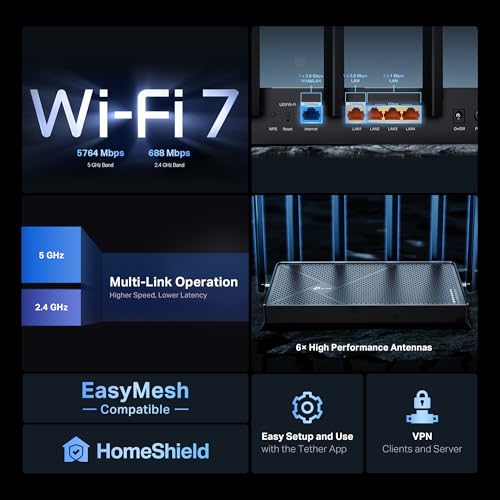
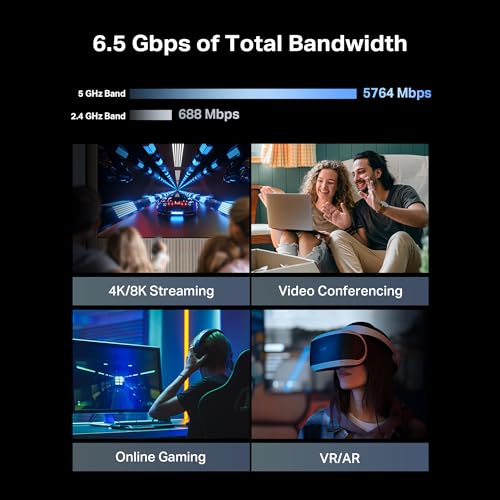
The Archer BE400 leverages the WiFi 7 standard (802.11be) to deliver a total theoretical bandwidth of 6.5 Gbps across its dual bands. The 5GHz band supports speeds up to 5764 Mbps, while the 2.4GHz band reaches up to 688 Mbps, facilitated by six simultaneous data streams. Key WiFi 7 innovations include Multi-Link Operation (MLO), which allows simultaneous data transfer across both frequency bands to reduce latency and improve reliability. The router also implements 4K-QAM (Quadrature Amplitude Modulation) for increased data density and Multi-RU (Resource Unit) technology for more efficient spectrum utilization. These features collectively aim to provide seamless experiences for 4K/8K video streaming, high-fidelity gaming, and large file transfers, particularly when used with compatible WiFi 7 devices like recent flagship smartphones and laptops.
Connectivity and Ports
Wired connectivity is a strong point for the Archer BE400, featuring two multi-gigabit 2.5Gbps Ethernet ports. One serves as a configurable WAN/LAN port, allowing connection to high-speed internet modems, while the other is a dedicated LAN port for connecting high-performance devices like gaming PCs, NAS systems, or workstations. Three additional 1Gbps LAN ports accommodate standard wired devices. The USB 3.0 port enables network-attached storage or printer sharing, though transfer speeds are not specified by the manufacturer. This port configuration supports creating a multi-gigabit backbone within a home network, essential for users with internet plans exceeding 1 Gbps or those who frequently transfer large files between local devices.
Software and Security Features
TP-Link’s HomeShield security suite forms the core of the Archer BE400’s software offerings, providing real-time threat detection, robust parental controls with content filtering and time management, and Quality of Service (QoS) tools for prioritizing bandwidth to specific devices or applications. The router supports WPA3 encryption for enhanced wireless security and includes a Private IoT Network feature that lets users create a separate, isolated WiFi SSID for smart home devices, reducing potential attack surfaces. TP-Link emphasizes its cybersecurity commitment as a signatory of the U.S. CISA Secure-by-Design pledge. Management occurs primarily through the intuitive Tether mobile app (available for Android and iOS) or a traditional web interface, both offering network monitoring, access control, and settings customization.
Advanced Networking Capabilities
Beyond basic routing, the Archer BE400 supports several advanced features. It includes VPN functionality, acting as both a client and server, allowing home devices to access remote VPN services without individual software installations. EasyMesh compatibility enables seamless integration with other EasyMesh-certified TP-Link routers or range extenders to create a whole-home mesh network, expanding coverage beyond the base unit’s 2,400 square foot range. Other supported technologies noted in the specifications include MU-MIMO for efficient multi-device communication, OFDMA for reduced latency in crowded networks, Beamforming for targeted signal strength, and DFS (Dynamic Frequency Selection) to access less congested 5GHz channels. The router also supports Alexa and Google Assistant for voice control and offers cloud services for automatic firmware updates.
Setup, Support and Ownership
TP-Link promotes a quick setup process for the Archer BE400, achievable in minutes through the Tether app that guides users through connection and configuration. The router includes a physical Quick Installation Guide and an RJ45 Ethernet cable in the box. For expanding coverage, the EasyMesh feature allows pairing with compatible TP-Link routers or extenders without complex configuration, though specific compatible model numbers are not listed. The manufacturer provides free expert support via email ([email protected]) and phone, with a highly trained team available to resolve setup or operational issues.
Ownership considerations include the router’s compatibility with a wide range of devices, from gaming consoles and PCs to smart TVs and security cameras, as noted in the specifications. It operates on standard 110V AC power and includes a two-year manufacturer warranty. The Tether app facilitates ongoing management, from checking connected devices to adjusting security settings. While the router supports automatic firmware updates via cloud services, the frequency and long-term support window for updates are not specified by TP-Link. The dual-band design means it may not offer the same level of dedicated backhaul channel as tri-band routers when used in mesh configurations, which could impact performance in very large homes with many nodes.
What Owners Say
The TP-Link Archer BE400 maintains a strong overall rating based on user feedback. Owners generally praise its ease of setup through the Tether app and the noticeable improvement in wireless speeds, especially when used with WiFi 7 compatible devices. The reliable coverage across the advertised area and stable connections for multiple simultaneous users are frequently mentioned positives. The dual 2.5Gbps ports receive appreciation from users with high-speed internet plans or local network transfer needs.
Some user considerations note that to fully benefit from the WiFi 7 capabilities, clients must also support the new standard, meaning older devices won’t see the same dramatic speed leaps. The dual-band architecture, while cost-effective, is occasionally mentioned in contexts where very dense device environments might benefit from a tri-band design’s additional dedicated band. The security features, particularly HomeShield’s parental controls, are valued by families. Overall, the sentiment suggests the router delivers on its core promises of faster speeds, wider coverage, and modern features for users ready to step into the WiFi 7 ecosystem.
Pros and Cons
Pros
- Implements next-generation WiFi 7 with MLO and 4K-QAM
- Dual 2.5Gbps multi-gig Ethernet ports for high-speed wired connections
- Comprehensive HomeShield security suite with real-time protection
- EasyMesh compatibility for simple whole-home coverage expansion
- Intuitive Tether app for quick setup and network management
- Strong signal coverage powered by six antennas and beamforming
Cons
- Dual-band design lacks a dedicated backhaul channel for maximum mesh throughput
- Full WiFi 7 performance requires compatible client devices
- Optimal multi-gig wired speeds depend on having a compatible internet modem
- Advanced features like VPN server may require technical knowledge to configure
- No specified long-term firmware update commitment
- USB 3.0 storage performance benchmarks not provided
Who Should Buy It (and Who Should Skip It)
The TP-Link Archer BE400 is ideally suited for early adopters and tech-forward households seeking to future-proof their networks with WiFi 7. It’s an excellent choice for users with internet plans at or approaching 1 Gbps who need the multi-gigabit wired ports to avoid bottlenecks. Gamers, remote workers requiring stable video conferencing, and families with numerous streaming devices will appreciate the low latency and robust device handling. Those invested in smart home ecosystems will benefit from the Private IoT Network for enhanced security. Users looking for an accessible entry into advanced features like mesh networking and comprehensive security without a steep learning curve will find it accommodating.
Conversely, users with exclusively older WiFi 5 or WiFi 4 devices may not realize sufficient value from the WiFi 7 upgrade to justify the cost. Those in extremely large homes requiring an immediate multi-node mesh system might prefer a dedicated tri-band mesh kit for optimal performance. Individuals with basic internet needs (under 100 Mbps) and few connected devices might find a more basic router sufficient. Users who require extensive, out-of-the-box VPN configuration with detailed logs or enterprise-grade traffic analysis may need to look at more specialized networking equipment.
Final Verdict
The TP-Link Archer BE400 successfully brings core WiFi 7 advantages within reach of mainstream users. Its combination of Multi-Link Operation, high theoretical speeds, and multi-gigabit wired connectivity addresses the growing demands of modern internet use. The inclusion of HomeShield’s security and parental controls adds significant value for family households concerned about online safety. While the dual-band design represents a practical compromise that keeps costs down, it does mean this router may not be the ultimate solution for the most extreme high-density device environments where a tri-band system would excel.
For those ready to upgrade their network foundation, the Archer BE400 offers a compelling package. It delivers on the promise of faster, more reliable wireless connections, especially as more WiFi 7 devices enter the market. The easy setup and management lower the barrier to enjoying advanced features. When considering a new router, also explore our guides on the best VPN routers for enhanced privacy and the best enterprise servers for network security management for business contexts. Ultimately, the Archer BE400 stands as a solid, forward-looking choice for users aiming to maximize their home network’s performance and security for the coming years.
FAQs
What is Multi-Link Operation (MLO) and why is it important?
Multi-Link Operation (MLO) is a cornerstone feature of WiFi 7 that allows the Archer BE400 to simultaneously transmit data across both the 2.4GHz and 5GHz frequency bands. This creates a more stable and efficient connection by aggregating bandwidth and providing redundant paths for data packets. The result is significantly reduced latency, which is crucial for real-time applications like competitive gaming, video conferencing, and VR experiences. It also improves reliability, as the connection can dynamically switch bands if one becomes congested or experiences interference.
Do I need a special modem to use the Archer BE400’s 2.5Gbps WAN port?
To fully utilize the 2.5Gbps WAN port and achieve internet speeds above 1 Gbps, you will need a cable modem or fiber ONT that also has a multi-gigabit Ethernet port (2.5Gbps, 5Gbps, or 10Gbps). If your current modem only has a standard 1Gbps port, your internet connection will be limited to approximately 940 Mbps due to overhead, regardless of your service plan. The router will still function perfectly with a 1Gbps modem, but the multi-gigabit capability of the WAN port will only be leveraged for future upgrades or for creating a high-speed backbone between the router’s own 2.5Gbps LAN port and other local devices.
How does the Private IoT Network feature enhance security?
The Private IoT Network allows you to create a separate, isolated WiFi network specifically for your Internet of Things devices, such as smart lights, thermostats, cameras, and speakers. By placing these devices on their own network segment, you limit their ability to communicate with your main computers, phones, and tablets that may contain sensitive personal data. This containment strategy helps prevent a compromised smart device from being used as a stepping stone to attack more critical devices on your network. You can manage this feature through the Tether app, making it accessible even for users without deep networking knowledge.
Can I use the Archer BE400 with my existing WiFi 5 or WiFi 6 devices?
Yes, the TP-Link Archer BE400 is fully backward compatible with previous WiFi standards, including WiFi 6 (802.11ax), WiFi 5 (802.11ac), and older generations. These devices will connect and operate normally on the router. However, they will not benefit from the exclusive WiFi 7 features like MLO, 4K-QAM, or the full 6.5 Gbps bandwidth. They will experience the router’s robust signal strength, coverage from the six antennas, and general performance improvements, but to unlock the lowest latency and highest speeds advertised, you need client devices that also support the WiFi 7 standard. The router’s compatibility is listed as spanning 802.11g through 802.11be.
About the author

Elvis Dicki writes reviews and buying guides for CyberSecLabs.