Zotac ZBOX-CI337NANO-U Review: How Silent Can a Triple 4K Mini PC Be?
The Zotac ZBOX-CI337NANO-U is a fanless, barebones mini PC that trades raw power for absolute silence and triple 4K display support, making it a niche choice for specific setups.
 By Elvis Dicki
Updated October 22, 2026
The Zotac ZBOX-CI337NANO-U is a barebones, fanless mini PC designed for users who prioritize silent operation and compact form over high-performance computing. Powered by an Intel N100 processor, this system is built for light productivity, media playback, and digital signage applications where noise is a critical distraction. This review examines its specifications, design, and potential use cases to determine who would benefit most from its unique feature set.

At its core, the ZBOX CI337 Nano is a specialized tool, not a general-purpose powerhouse. Its standout feature is a completely passive cooling system, eliminating all moving parts and the associated noise. This makes it an intriguing option for environments like home theaters, quiet offices, or public displays where reliability and silence are paramount. The bottom line is this: if you need a small, utterly quiet computer for basic tasks and multi-monitor setups, this Zotac model warrants a close look, but be prepared to supply your own memory, storage, and operating system.
ZOTAC ZBOX CI337 Nano Fanless Mini PC Intel N100


As an Amazon Associate we earn from qualifying purchases. Product prices and availability are accurate as of the date/time indicated.
Zotac ZBOX-CI337NANO-U at a Glance
| Specification | Detail |
|---|---|
| Processor | Intel Processor N100 (quad-core, up to 3.4GHz) |
| Graphics | Intel UHD Graphics |
| Cooling | Fanless, passive cooling |
| Memory Slot | 1 x DDR5-4800 SODIMM (up to 16GB) |
| Storage Options | 1 x M.2 NVMe PCIe 3.0 x1/SATA SSD (2242), 1 x 2.5-inch SATA HDD/SSD bay |
| Display Outputs | 2 x HDMI 2.0, DisplayPort 1.4, DP via USB-C (supports triple 4K @ 60Hz) |
| Connectivity | Wi-Fi 6, Bluetooth 5.2, Dual Gigabit Ethernet, 4 x USB 3.2 (1 Type-C) |
| Dimensions | 127.8mm x 126.8mm x 56.8mm (5.03″ x 4.99″ x 2.24″) |
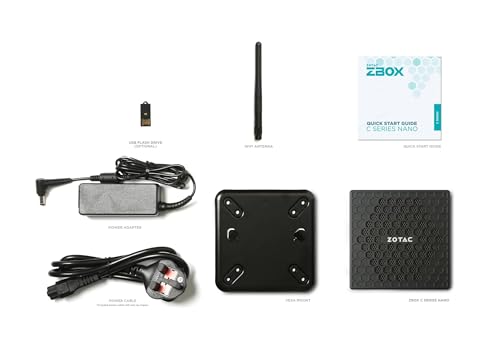
| Included Accessories | VESA Mount bracket, Wi-Fi antenna, power adapter |
Design and Build
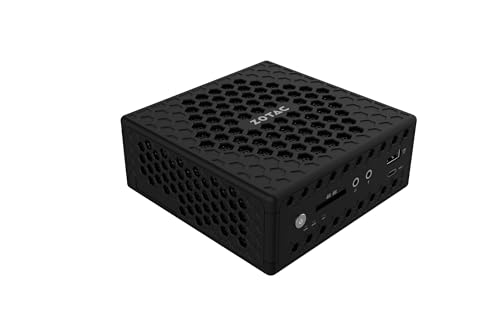
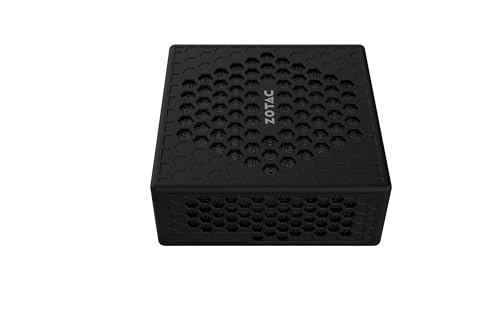
The Zotac ZBOX CI337 Nano embraces a minimalist, black chassis defined by its signature honeycomb vent pattern. This design is not merely aesthetic; it is integral to the fanless cooling system, enhancing passive exhaust flow across a large internal aluminum heatsink. The compact dimensions, slightly larger than many ultra-compact models, provide the necessary surface area for heat dissipation without resorting to a fan. The build quality focuses on durability, with the lack of moving parts cited by the manufacturer as a contributor to extended system reliability.
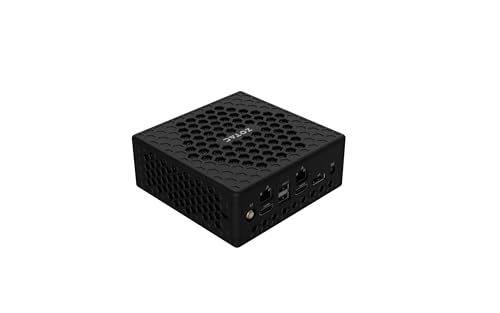
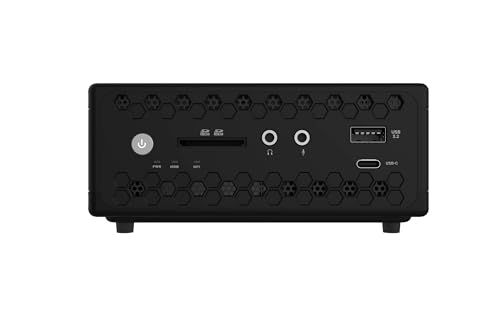
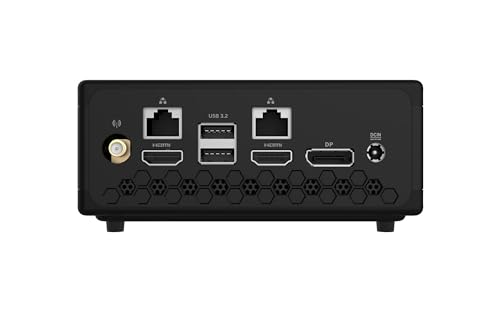
Practical design elements include a front-facing 3-in-1 card reader and USB port for easy access, while the majority of ports, including dual HDMI, DisplayPort, dual Ethernet, and additional USB connections, are located on the rear for clean cable management. The unit includes a VESA mount bracket, allowing it to be discreetly attached to the back of a monitor or under a desk, a crucial feature for digital signage or space-constrained setups. The overall design philosophy is clear: function-driven simplicity aimed at enabling silent, reliable operation in as many environments as possible.
Performance and Features
Processor and Capabilities
Driving the system is the Intel Processor N100, a low-power, quad-core chip with a base frequency of 0.8 GHz and a burst frequency up to 3.4 GHz. This processor is designed for efficiency, not intensive computation. It is well-suited for the defined use cases: everyday tasks like web browsing, document editing, and media playback. It supports 4K video decoding via Intel Quick Sync Video, making it competent for home theater or digital signage content. However, users should not expect it to handle demanding applications, multitasking with many heavy programs, or any form of gaming beyond the very casual.
Connectivity and Ports
Connectivity is a significant strength of the ZBOX CI337 Nano. It supports a triple-display setup through its two HDMI 2.0 ports and one DisplayPort 1.4 output (the latter also available via the USB-C port). All outputs can drive 4K resolution at 60Hz, providing flexibility for productivity or multi-screen digital signage. Network options are robust, featuring dual Gigabit Ethernet ports for wired redundancy or network segmentation, alongside modern Wi-Fi 6 and Bluetooth 5.2 for wireless peripherals. Four USB 3.2 ports (including one Type-C) offer ample connectivity for keyboards, mice, storage, and other accessories.
Key Features: Silence and Expandability
The defining feature is its fanless, passive cooling. By eliminating the fan, Zotac removes the most common point of mechanical failure and the primary source of acoustic noise in a PC. This results in a completely silent operation, a trait highly valued in recording studios, libraries, bedrooms, or professional display environments. For expandability, the barebones system provides one DDR5 memory slot, one M.2 slot for a short SSD, and a bay for a 2.5-inch SATA drive. This allows for customization based on storage speed and capacity needs, though the single memory slot limits maximum RAM.
Setup, Support and Ownership
Potential owners must be aware that this is a barebones system. It does not come with memory, storage, or an operating system pre-installed. Setup requires purchasing compatible DDR5 SODIMM memory, an M.2 or 2.5-inch SATA drive, and acquiring a Windows license or other OS. The process is straightforward for anyone familiar with computer hardware, involving opening the chassis to install the components. The included quick install guide should assist with this process.
Long-term ownership is bolstered by the fanless design’s inherent reliability due to fewer moving parts. Support is provided through Zotac’s dedicated website. The system is listed as compatible with Microsoft Windows 11, and it includes standard security features like Windows Defender and support for Windows Hello biometric login, assuming a compatible peripheral is connected. As with any PC, long-term usability will depend on software updates and the inherent limitations of the Intel N100 platform for future software demands.
What Owners Say
Owner feedback, as reflected in the rating distribution, shows a polarized experience. A significant portion of users awards the highest rating, likely appreciating the silent operation, compact size, and connectivity for their specific use cases. However, a notable segment awards lower ratings. This divergence often stems from the product meeting, or failing to meet, specific expectations. Some negative experiences may relate to the barebones nature requiring additional purchases, the performance ceiling of the N100 processor, or setup challenges. The overall rating suggests it successfully serves a niche audience with clear requirements.
Pros and Cons
Pros
- Completely silent fanless operation
- Robust connectivity with dual Ethernet and Wi-Fi 6
- Supports triple 4K displays simultaneously
- Compact and VESA-mountable design
- Energy-efficient Intel N100 processor
- Potential for high reliability with no moving parts
Cons
- Barebones system requires separate purchase of RAM, storage, and OS
- Performance is limited to light everyday tasks
- Only one memory slot restricts maximum RAM upgrade
- M.2 slot is limited to PCIe 3.0 x1 speed
- Not suitable for any demanding computational or graphics work
- Initial setup effort required for component installation
Who Should Buy It (and Who Should Skip It)
The Zotac ZBOX-CI337NANO-U is an ideal fit for users who need a discreet, silent computer for very specific scenarios. This includes digital signage operators, home theater PC enthusiasts who value silence above all, users in noise-sensitive environments like recording studios, or as a dedicated terminal for light office work in a multi-monitor configuration. Its dual LAN ports also make it a candidate for lightweight network appliance duties.
Conversely, it should be skipped by anyone needing performance for multitasking, content creation, gaming, or software development. General users looking for a plug-and-play experience should avoid it due to its barebones nature. Those who need extensive upgrade paths or future-proofing will find the single memory slot and low-power processor limiting. It is a specialist tool, not a general-purpose desktop replacement. For those considering other compact options, exploring resources on fanless mini PCs or Intel N100-based systems can provide valuable context.
Final Verdict
The Zotac ZBOX-CI337NANO-U carves out a distinct niche by masterfully executing on its core promise: silent, reliable operation in a compact form. Its excellent connectivity, including triple 4K display support and dual Ethernet, adds significant value for targeted applications. When evaluated as a complete system (including the cost and effort of adding memory, storage, and an OS), its value proposition becomes clear only for those whose needs align precisely with its strengths.
For the right user, this mini PC is a compelling solution. For everyone else, its limitations are too pronounced. It serves as a reminder that in the world of computing, specialization often requires trade-offs. If your priority is a whisper-quiet, low-power hub for displays or basic tasks, the Zotac ZBOX-CI337NANO-U deserves serious consideration. If your needs are broader or your performance expectations higher, other mini PCs, perhaps even those discussed in our overview of mini PC options, will be a better fit.
FAQs
Does the Zotac ZBOX CI337 Nano come ready to use out of the box?
No, it is a barebones system. It does not include memory (RAM), storage (a hard drive or SSD), or an operating system. You must purchase these components separately and install them yourself before the computer can function.
What kind of tasks is the Intel N100 processor good for?
The Intel N100 processor is designed for light, everyday computing. It handles web browsing, email, document editing, video streaming (including 4K), and basic photo viewing competently. It is not suitable for video editing, gaming, 3D rendering, heavy multitasking with demanding applications, or use as a server for complex tasks.
Can I really connect three 4K monitors at the same time?
Yes, according to the manufacturer’s specifications. The system has two HDMI 2.0 ports and one DisplayPort 1.4 output (which is also available via the USB-C port). It is designed to support up to three simultaneous displays, each at 4K resolution and a 60Hz refresh rate.
Is the fanless design likely to cause overheating?
The system is engineered around its passive cooling solution, which uses a large aluminum heatsink and the chassis itself to dissipate heat. It is designed to operate within safe thermal limits for the included Intel N100 processor under normal load for its intended tasks. However, it should be used in a well-ventilated area and not enclosed in a way that blocks the honeycomb vents. It is not designed for sustained high-performance workloads that would generate excessive heat.
About the author

Elvis Dicki writes reviews and buying guides for CyberSecLabs.