Wyze Cam v4 Review: 2.5K QHD with Color Night Vision, Outdoor Adapter Sold Separately
The Wyze Cam v4 delivers exceptional 2.5K QHD video quality and vibrant color night vision, offering a versatile and affordable home security solution that works indoors and out, though advanced AI features require a subscription.
 By Elvis Dicki
Updated October 21, 2026
In the crowded market of smart home security, the Wyze Cam v4 stands out by offering high-resolution monitoring at a remarkably accessible price point. This latest model is a versatile indoor/outdoor camera designed for homeowners, pet owners, and anyone seeking reliable surveillance without a mandatory monthly fee. It combines a sharp 2.5K QHD sensor with enhanced color night vision and a motion-activated spotlight, positioning itself as a comprehensive yet budget-friendly guardian for your property. For those needing clear, detailed video for security, baby monitoring, or pet watching with the flexibility of local storage, the Wyze Cam v4 presents a compelling package that balances advanced features with straightforward usability.

The core appeal of this camera lies in its no-subscription-required approach for basic functionality, allowing users to record footage locally via a microSD card. With an IP65 weather resistance rating, it promises durability for outdoor use, though this requires a separately purchased adapter. Its design emphasizes easy setup via Bluetooth and integration with major smart home platforms. This review analyzes the Wyze Cam v4’s specifications, features, and real-world owner feedback to determine if its high-resolution promise and versatile design translate into a reliable security solution for your needs.
Wyze Cam v4 2.5K QHD Security Camera



As an Amazon Associate we earn from qualifying purchases. Product prices and availability are accurate as of the date/time indicated.
Wyze Cam v4 at a Glance
| Specification | Detail |
|---|---|
| Video Resolution | 2.5K QHD (4 MP) |
| Field of View | 120 Degrees |
| Night Vision | Enhanced Color Night Vision |
| Weather Resistance | IP65 (Outdoor adapter required/sold separately) |
| Connectivity | 2.4GHz Wi-Fi, Bluetooth for setup |
| Audio | Enhanced 2-Way Audio with microphone & speaker |
| Storage Options | Local microSD (up to 512GB) or Cloud (subscription) |
| Smart Home Integration | Amazon Alexa, Google Assistant, IFTTT |
| Deterrence Features | Motion-activated spotlight, voice warning, built-in siren |
| Form Factor | Cube (2 x 2 x 2.3 inches) |
Design and Build
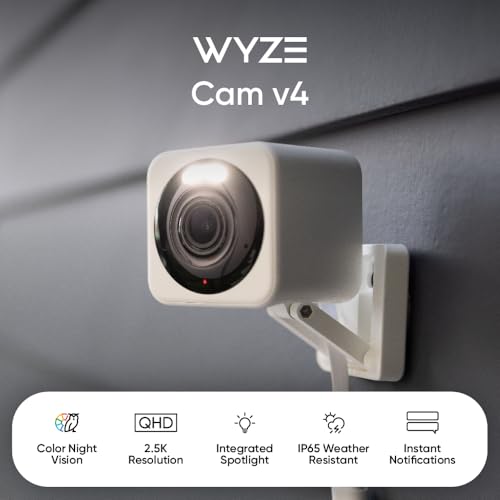
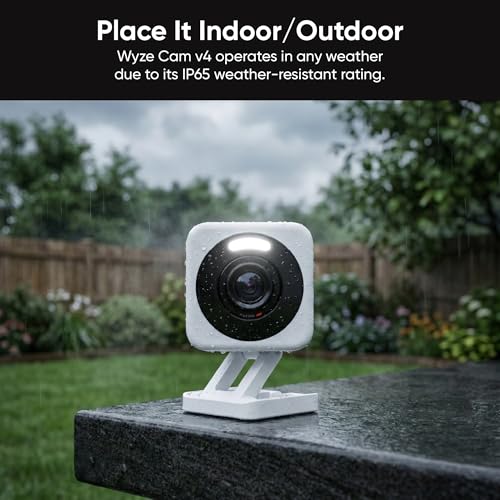
The Wyze Cam v4 adopts a compact, cubic form factor measuring 2 x 2 x 2.3 inches, making it discreet for indoor placement on a shelf or mounted on a wall. Its white finish is minimalist, allowing it to blend into most home decors. The build quality is centered around its IP65 weatherproof rating, which signifies protection against dust and low-pressure water jets from any direction. This engineering makes it suitable for outdoor installation in areas like covered porches or under eaves, but it is crucial to note that for full outdoor functionality, a Wyze Outdoor Adapter must be purchased separately. The unit includes a magnetic base for flexible positioning and supports various installation types, including freestanding and wall mount.
Performance and Features
Video and Image Quality
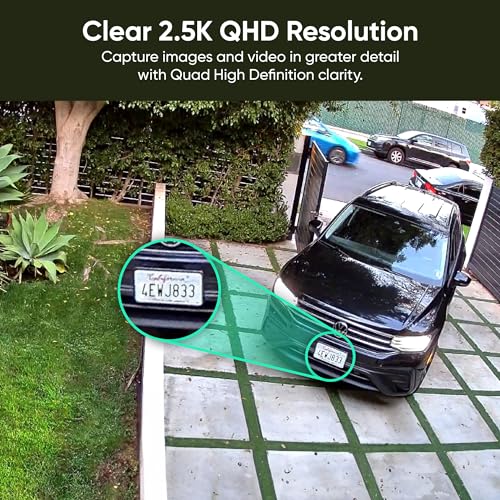
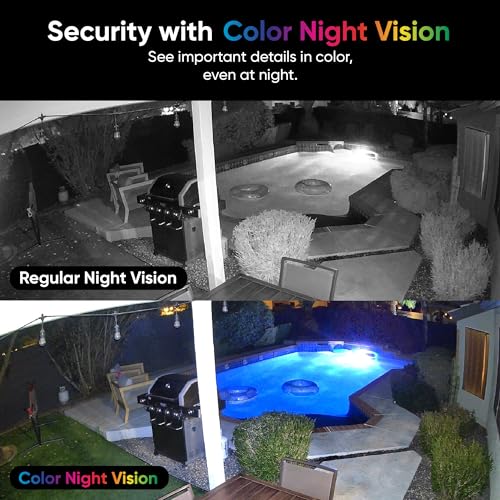
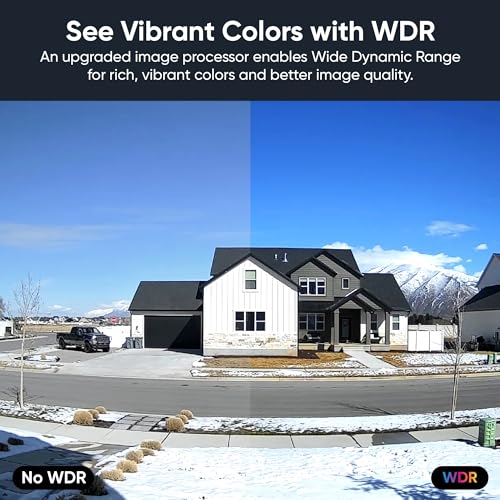
The standout feature is the 2.5K Quad HD resolution, which provides a 4-megapixel image. This represents a significant clarity upgrade over standard 1080p cameras, capturing finer details crucial for identification. The camera employs a wide 120-degree viewing angle, offering broad coverage of a room or outdoor area. A key advancement is the Enhanced Color Night Vision, which uses a combination of infrared LEDs and a spotlight to deliver vibrant color video in low-light or total darkness, a step above traditional monochrome night vision. This is complemented by Wide Dynamic Range (WDR) technology, which helps balance exposure in scenes with both bright and dark areas, preventing washed-out or overly dark images.
Security and Deterrence
The Wyze Cam v4 is equipped with proactive security features. Its motion detection can trigger an integrated LED spotlight, a customizable voice warning, and a built-in siren. This trio acts as a deterrent, potentially startling intruders before an incident occurs. The motion detection sensitivity is adjustable within the app, allowing users to fine-tune alerts to reduce false notifications from passing cars or rustling leaves.
Audio and Connectivity
Communication is handled by an enhanced audio system featuring an updated microphone and a more powerful amplifier for the speaker. This facilitates clear two-way conversations, useful for talking to a delivery person, calming a pet, or checking in on family members. For connectivity, the camera operates on 2.4GHz Wi-Fi networks and is not compatible with 5GHz bands. Setup is simplified via Bluetooth, eliminating the need to scan a QR code during initial configuration.
Recording and AI Features
Users have two primary recording paths. The first is local, continuous 24/7 recording to a microSD card (sold separately) with support for capacities up to 512GB. The second is cloud-based recording through optional Cam Plus or Cam Unlimited subscriptions. These paid plans unlock advanced AI detection for specific objects like people, packages, pets, and vehicles, sending more targeted alerts. Without a subscription, the camera still records motion-triggered events to the cloud with a cooldown period, but the intelligent recognition features are not active.
Setup, Support and Ownership
Setup is designed to be hassle-free. The Bluetooth-assisted process guides users through connecting the camera to power and their Wi-Fi network via the Wyze app. The magnetic mount offers flexible placement, and the included power cable provides adequate length for many installations. For permanent outdoor use, the separately sold Outdoor Adapter is essential. The camera integrates with Amazon Alexa, Google Assistant, and IFTTT for voice control and automation. Wyze provides free expert help and backs the product with a one-year manufacturer’s warranty. Firmware updates are delivered through the app to maintain performance and security. Ownership costs can increase if users opt for cloud subscriptions, larger microSD cards, or the outdoor adapter, but the core camera functionality remains accessible without ongoing fees.
What Owners Say
Owner feedback for the Wyze Cam v4 is overwhelmingly positive, reflected in its high rating distribution where the majority of reviews are top-rated. Users consistently praise the crystal-clear 2.5K picture quality, the effectiveness of the color night vision, and the straightforward, minute-long setup process. Many highlight the value compared to subscription-heavy brands like Ring, appreciating the ability to use local storage and avoid monthly fees. The motion detection, spotlight, and two-way audio are frequently mentioned as reliable and useful features. Some notes for improvement within the reviews point to the app experience, which while functional, could benefit from further refinements. A small percentage of critical reviews mention connectivity issues, which is common for devices reliant on 2.4GHz Wi-Fi networks.
Pros and Cons
Pros
- Exceptional 2.5K QHD resolution and vibrant color night vision
- Versatile indoor/outdoor use with IP65 weather resistance
- No subscription required for core features and local storage
- Motion-activated spotlight, voice warning, and siren for added deterrence
- Easy Bluetooth setup and smart home integration
- Enhanced two-way audio for clear communication
Cons
- Outdoor adapter required for outdoor use and sold separately
- Advanced AI detections (person, pet, vehicle) require a subscription
- MicroSD card for local continuous recording sold separately
- Limited to 2.4GHz Wi-Fi, not compatible with 5GHz networks
- Some users desire further app improvements
Who Should Buy It (and Who Should Skip It)
The Wyze Cam v4 is an ideal purchase for budget-conscious homeowners, renters, pet owners, and parents seeking high-definition security monitoring without locking into a monthly subscription. Its combination of sharp daytime video, color night vision, and flexible local storage makes it perfect for monitoring living rooms, nurseries, porches, or small businesses. It’s also excellent for tech users who appreciate smart home integration with Alexa or Google Assistant. For more insights on integrating smart tech into a secure home setup, explore our guide on the best VPN routers.
Conversely, those seeking a completely wire-free, battery-powered camera for remote locations should look elsewhere, as the Wyze Cam v4 requires a constant power connection. Users who need advanced, subscription-free AI person detection or who exclusively have a 5GHz Wi-Fi network may find the limitations here a dealbreaker. For environments requiring extensive, multi-camera enterprise surveillance with advanced network management, a different system would be more appropriate, such as those discussed in our review of the best enterprise servers for network security.
Final Verdict
The Wyze Cam v4 successfully delivers on its promise of bringing premium features to an affordable price point. Its 2.5K QHD resolution and enhanced color night vision provide image quality that rivals more expensive competitors, making it a strong contender for anyone prioritizing video clarity. The flexibility to operate indoors or outdoors (with an additional purchase), coupled with the option for free local recording, gives users significant control over their security system and costs. The added deterrents of the motion-activated spotlight and siren enhance its proactive security value beyond passive recording.
While the necessity to buy separate accessories for outdoor use and local storage slightly offsets the low entry price, and the best AI features are behind a paywall, the core functionality remains robust and highly usable. For those building a multi-camera system or seeking reliable monitoring for pets, property, or family, the Wyze Cam v4 offers outstanding value and performance. It stands as a testament to how accessible effective smart home security has become. For further reading on essential tools for security professionals and students, consider our expert picks for the best laptops for cybersecurity students.
FAQs
Does the Wyze Cam v4 work outdoors without any extra equipment?
While the camera body itself has an IP65 weather-resistant rating, it is not designed for direct, prolonged outdoor exposure in its standard form. To use it safely outdoors, you must purchase the separate Wyze Outdoor Adapter, which provides the necessary waterproofing for the power connection. Without this adapter, outdoor use is not recommended and could void the warranty.
Can I use the Wyze Cam v4 without paying for a subscription?
Yes, you can use the Wyze Cam v4 fully without a subscription. By inserting a microSD card (sold separately), you can enable 24/7 continuous local recording or record motion-triggered events. You will still have access to live view, two-way audio, color night vision, and motion alerts with a cooldown period. The paid Cam Plus subscription is only required for advanced AI detection of people, pets, packages, and vehicles, and for more extended cloud video history.
What is the difference between the Wyze Cam v4 and the older v3 model?
The key upgrades in the v4 model include a higher 2.5K QHD resolution (compared to 1080p on the v3), an integrated motion-activated spotlight for color night vision and deterrence, and an enhanced audio system for clearer two-way conversation. The v4 also features a slightly different cube design and utilizes Bluetooth for easier setup. Both models share an IP65 rating and local storage capability.
Can I view multiple Wyze Cam v4 feeds on one screen?
Yes, the Wyze app supports a multi-camera live view, allowing you to see feeds from several Wyze cameras simultaneously on your smartphone or tablet. Furthermore, you can log into the Wyze website from a desktop or laptop computer to view all your camera feeds on a larger monitor, providing a convenient central monitoring station. For optimal multi-tasking on such setups, a quality display is key, as highlighted in our review of the best ultra-wide monitors.
About the author

Elvis Dicki writes reviews and buying guides for CyberSecLabs.