TP-Link Deco X55 Pro Review: Wi-Fi 6 Mesh with 2.5G Ports, Lacks Wi-Fi 6E
The TP-Link Deco X55 Pro delivers robust whole-home coverage and multi-gigabit wired connectivity, though its security suite has a paid tier and it operates on the Wi-Fi 6 standard.
 By Elvis Dicki
Updated October 21, 2026
By Elvis Dicki
Updated October 21, 2026
In the crowded market of home mesh networking systems, the TP-Link Deco X55 Pro positions itself as a powerful solution for eliminating dead zones and handling high-speed internet plans. This three-pack AX3000 Wi-Fi 6 system is designed for users with large homes and a growing number of connected devices, offering features like AI-driven optimization and multi-gigabit Ethernet ports. For households struggling with inconsistent coverage or those upgrading to gigabit-plus internet, the Deco X55 Pro presents a compelling blend of performance and user-friendly management, though it makes certain trade-offs to hit its price point.

This review analyzes the TP-Link Deco X55 Pro based on its published specifications, manufacturer features, and aggregated user feedback. We will examine its design, performance capabilities, setup process, and the value of its integrated security features. The bottom line: this mesh system excels at providing seamless, high-capacity coverage and future-proof wired connectivity, but potential buyers should be aware of its reliance on Wi-Fi 6 and the subscription model for advanced security.
TP-Link Deco X55 Pro AX3000 WiFi 6 Mesh System





As an Amazon Associate we earn from qualifying purchases. Product prices and availability are accurate as of the date/time indicated.
TP-Link Deco X55 Pro at a Glance
| Specification | Detail |
|---|---|
| Wi-Fi Standard | Wi-Fi 6 (802.11ax) |
| Total Speed Rating | AX3000 (2402 Mbps + 574 Mbps) |
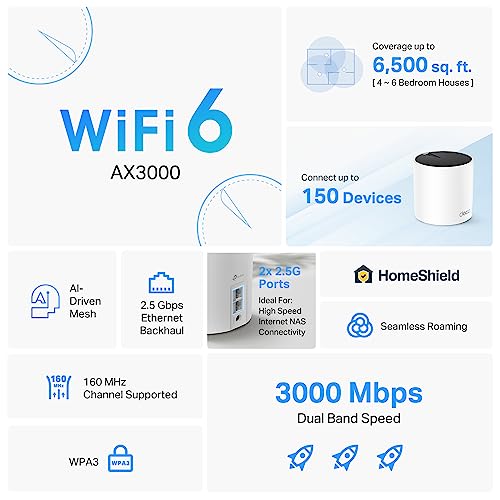
| Coverage Area (3-Pack) | Up to 6,500 square feet |
| Device Capacity | 150+ devices |
| Ethernet Ports per Unit | 2 x 2.5 Gbps (WAN/LAN auto-sensing) |
| Key Features | AI-Driven Mesh, Wired Ethernet Backhaul, HomeShield Security |
| Control Method | Deco App, Amazon Alexa, Google Assistant |
| Frequency Bands | Dual-Band (2.4 GHz & 5 GHz) |
| Security Protocols | WPA-PSK, WPA2-PSK, WPA3-PSK |
| Warranty | 2 years |
Design and Build
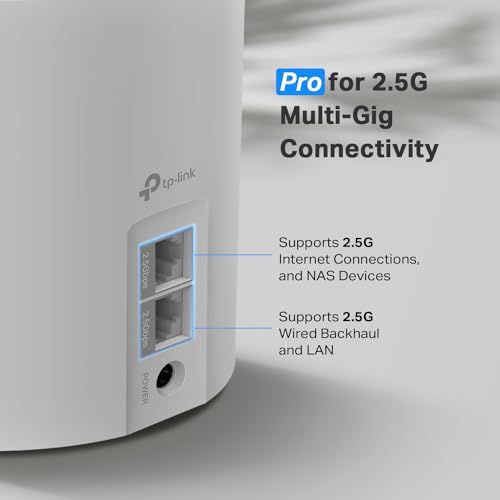
The TP-Link Deco X55 Pro units feature a minimalist, cylindrical design intended to blend into home decor rather than stand out as technical hardware. Each unit is compact, housing internal fixed antennas to maintain its clean aesthetic. The build is functional, with status indicated by a small LED ring on the top. The rear of each unit houses its key physical differentiator: two 2.5 Gigabit Ethernet ports. These ports are auto-sensing for WAN or LAN use, providing significant flexibility for connecting to a modem, creating a wired backhaul between units, or hooking up a high-speed device like a NAS or gaming PC. The package includes three identical units, three power adapters, one RJ45 Ethernet cable, and a quick installation guide.
Performance and Features
Coverage and Wireless Performance
As an AX3000 Wi-Fi 6 mesh system, the Deco X55 Pro is rated to cover up to 6,500 square feet with the included three units, aiming to eliminate dead zones and buffering. The AX3000 designation breaks down into a 2×2/HE160 2402 Mbps stream on the 5 GHz band and a 2×2 574 Mbps stream on the 2.4 GHz band. This dual-band setup supports the latest Wi-Fi 6 efficiencies like OFDMA and MU-MIMO, which help manage traffic from multiple devices. A key performance feature is the AI-Driven Mesh, which TP-Link states intelligently learns the network environment to optimize connectivity and roaming for devices throughout the home. The system is powerful enough to support more than 150 devices, making it suitable for smart homes densely packed with IoT gadgets, phones, tablets, and computers.
Connectivity and Ports
The “Pro” in Deco X55 Pro primarily refers to its upgraded Ethernet connectivity. Each unit in the system is equipped with two 2.5 Gigabit ports. This is a significant step up from the standard Gigabit ports found on many mesh nodes. These ports serve multiple purposes: they are ideal for households with internet service subscriptions above 1 Gigabit, they support superior wired Ethernet backhaul for the most stable and fast interconnection between nodes, and they allow for multi-gig device connectivity. This makes the system a good fit for users with a home server, NAS, or a high-end gaming rig that benefits from a wired connection exceeding 1 Gbps.
Software and Security Features
Network management is handled through the free Deco app, which provides control over setup, monitoring, and key features. TP-Link includes its HomeShield security service. The free tier offers several valuable tools: a security scan to detect potential network threats, IoT device identification, basic parental controls for managing online time and blocking content, and Quality of Service (QoS) to prioritize traffic to specific devices. TP-Link emphasizes its cybersecurity commitment as a signatory of the U.S. CISA Secure-by-Design pledge, stating the device is designed with advanced security as a core requirement. For more advanced features like enhanced threat prevention and detailed reports, a subscription to HomeShield Pro is available. The system also supports Access Point and Guest modes.
Setup, Support and Ownership
Setup is designed to be user-friendly via the Deco app, which guides users through placement and configuration in minutes. The system supports hands-free voice commands through Amazon Alexa and Google Assistant for basic network controls. TP-Link offers 24/7 technical support for this product. The Deco X55 Pro comes with a 2-year manufacturer warranty, which the company notes is one year longer than many networking brands. The system can integrate with older TP-Link Deco mesh units, allowing for network expansion. For outdoor coverage, TP-Link offers weatherproof units that can be added to the mesh. Firmware updates are delivered through the app to maintain performance and security.
What Owners Say
Owner feedback for the TP-Link Deco X55 Pro is generally positive, with high ratings for ease of setup and significant improvements in whole-home coverage. Users with large homes report reliable speeds and the elimination of dead zones, even in basements and detached buildings. The seamless single network name (SSID) is frequently praised as a major quality-of-life improvement over traditional extenders. Some technical users appreciate the ability to use wired backhaul and the inclusion of 2.5G ports. The weekly security reports from HomeShield are also noted as a useful feature. On the critical side, a small number of users mention occasional setup hiccups where a unit might need coaxing to connect. The most common critique acknowledges that while the system’s Wi-Fi 6 performance is excellent, it does not include the newer Wi-Fi 6E standard for the 6 GHz band. The rating distribution shows a majority of high scores, with a smaller percentage of lower ratings typically relating to specific connectivity issues or feature expectations.
Pros and Cons
Pros
- Exceptional coverage for large homes up to 6,500 sq ft.
- High device capacity supports 150+ connections.
- Future-proof 2.5G Ethernet ports on every unit.
- Supports wired Ethernet backhaul for maximum stability.
- AI-driven optimization for network performance.
- Easy app-based setup and management.
- Useful free security and parental control features.
Cons
- Advanced HomeShield security requires a paid subscription.
- Based on Wi-Fi 6, lacks Wi-Fi 6E for the 6 GHz band.
- Network management is primarily app-based with limited web interface.
- Some users report occasional setup quirks.
Who Should Buy It (and Who Should Skip It)
The TP-Link Deco X55 Pro is an ideal choice for users with large homes (up to 6,500 sq ft) who experience Wi-Fi dead zones and need to connect a multitude of devices. It is perfectly suited for households with gigabit or multi-gigabit internet subscriptions who want to fully utilize that speed, especially via wired connections to NAS devices or high-performance PCs. The easy setup and AI features make it great for non-technical users who still want powerful, whole-home coverage. For more insights on routers tailored for large homes, see our guide on the best routers for large homes.
This system may not be the best fit for users who specifically require the latest Wi-Fi 6E standard for accessing the uncongested 6 GHz frequency band. Those who prefer extensive, advanced configuration through a traditional web browser interface might find the app-centric management limiting. Users with very small apartments or who only need to connect a handful of devices might find a simpler, single router more cost-effective. If your primary need is supporting an extremely high number of concurrent devices, exploring options for the best routers for multiple devices can provide additional context.
Final Verdict
The TP-Link Deco X55 Pro successfully delivers on its core promises of whole-home coverage and high-capacity connectivity. Its standout feature is the inclusion of 2.5 Gigabit Ethernet ports on every node, which future-proofs the system for fast internet plans and wired backhaul setups. The AI-driven mesh and straightforward app make it accessible, while the free tier of HomeShield provides solid baseline security and controls. Performance feedback from owners confirms it reliably blankets large areas with a strong, consistent signal, solving common problems with dead zones and multiple network names.
However, the product’s positioning requires acknowledging its trade-offs. It is a Wi-Fi 6 system, not a Wi-Fi 6E system, which may matter to early adopters seeking the absolute latest wireless standard. The full suite of security features is locked behind a HomeShield Pro subscription. Despite these considerations, for the majority of users upgrading from an older router or a patchwork of extenders, the Deco X55 Pro offers a powerful, streamlined solution. It is a strong contender in the mesh market for those prioritizing coverage, device support, and wired multi-gigabit potential. For those specifically optimizing for gigabit internet plans, our analysis of the best routers for gigabit internet offers further comparison.
FAQs
Does the TP-Link Deco X55 Pro replace my existing modem?
No, the Deco X55 Pro is a router and mesh Wi-Fi system. It does not have a built-in modem. You will need to connect its WAN port to a standalone cable or fiber modem, or to the modem component of an ISP-provided gateway device (often placed into bridge mode). The system is compatible with most internet service providers’ modems.
What is the difference between the Deco X55 and the Deco X55 Pro?
According to the manufacturer, the Deco X55 Pro is an upgrade of the Deco X55 with upgraded Ethernet port speed. The key difference is that the Deco X55 Pro units each have two 2.5 Gigabit ports, whereas the standard Deco X55 typically has Gigabit Ethernet ports. This makes the Pro model ideal for internet plans above 1 Gigabit and for faster wired backhaul and device connections.
Can I use a wired connection between the Deco units?
Yes, the TP-Link Deco X55 Pro supports wired Ethernet backhaul. You can connect the 2.5G ports on the satellite units back to the main unit (or to a switch connected to the main unit) using Ethernet cables. This creates a dedicated, high-speed backbone for the mesh network, which can improve overall stability and performance compared to a purely wireless backhaul.
What features are included in the free HomeShield service?
The free version of TP-Link HomeShield includes several core features: a security scan to detect potential network threats, identification of IoT devices on your network, basic parental controls for managing screen time and blocking inappropriate content, and Quality of Service (QoS) to prioritize bandwidth for specific devices or activities. Advanced features like enhanced threat prevention and detailed historical reports require a HomeShield Pro subscription.
About the author

Elvis Dicki writes reviews and buying guides for CyberSecLabs.