TP-Link Archer BE550 Review: A Tri-Band Wi-Fi 7 Router with Full 2.5G Ports
The TP-Link Archer BE550 delivers cutting-edge Wi-Fi 7 performance with multi-gigabit ports and EasyMesh expansion, making it a future-proof choice for demanding home networks.
 By Elvis Dicki
Updated October 20, 2026
By Elvis Dicki
Updated October 20, 2026
The TP-Link Archer BE550 is a tri-band Wi-Fi 7 router designed to bring the next generation of wireless networking into the home. It targets users with high-bandwidth needs, such as gamers, 4K/8K streamers, and smart home enthusiasts who require stable, high-speed connections across numerous devices. This router stands out by combining the latest Wi-Fi 7 standard with a full suite of 2.5G Ethernet ports, promising a network that is both fast and ready for future internet service upgrades. In short, it’s a spec-heavy router built for performance and expansion.

At its core, the Archer BE550 aims to eliminate network bottlenecks, whether from wireless congestion or wired limitations. It leverages Wi-Fi 7 features like 320 MHz channels and 4K-QAM to achieve combined speeds up to 9.2 Gbps across its three bands. For users building a connected home with gaming consoles, PCs, and IoT devices, its built-in security and mesh compatibility offer a comprehensive solution. The bottom line: the TP-Link Archer BE550 is a forward-looking router that prioritizes raw speed, multi-gig connectivity, and whole-home coverage.
Prime TP-Link Archer BE550 WiFi 7 Router




As an Amazon Associate we earn from qualifying purchases. Product prices and availability are accurate as of the date/time indicated.
TP-Link Archer BE550 at a Glance
| Specification | Detail |
|---|---|
| Wi-Fi Generation | Wi-Fi 7 (802.11be) |
| Frequency Bands | Tri-Band (6 GHz, 5 GHz, 2.4 GHz) |
| Maximum Combined Speed | 9.3 Gbps (BE9300) |
| Ethernet Ports | 1x 2.5G WAN, 4x 2.5G LAN |
| Antennas | 6 Internal High-Gain |
| Coverage Area | Up to 2,000 sq. ft. |
| Mesh Support | EasyMesh Compatible |
| Security | TP-Link HomeShield, WPA3, Private IoT Network |
| Management | Tether App (iOS/Android), Web Interface |
| Warranty | 2-Year Manufacturer |
Design and Build
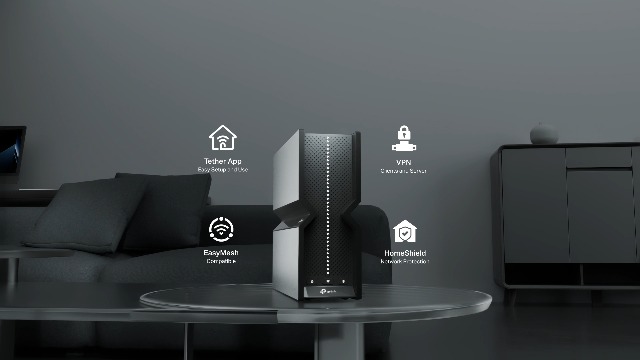
The TP-Link Archer BE550 features a low-profile design with six internal antennas. This internal placement gives it a cleaner look compared to routers with external antenna arrays, allowing it to blend more easily into a home office or living room setup. The unit’s construction is focused on housing the premium components and strategic antenna positioning mentioned by the manufacturer, which are intended to reduce interference and promote reliable connections. The router includes physical ports on the rear: one 2.5G WAN port, four 2.5G LAN ports, a power input, a reset button, and a WPS button. The inclusion of a USB port is not listed in the provided specifications. Its design prioritizes function and future-proofing, as evidenced by the prominent multi-gigabit Ethernet ports.
Performance and Features
Wi-Fi 7 Speed and Technology
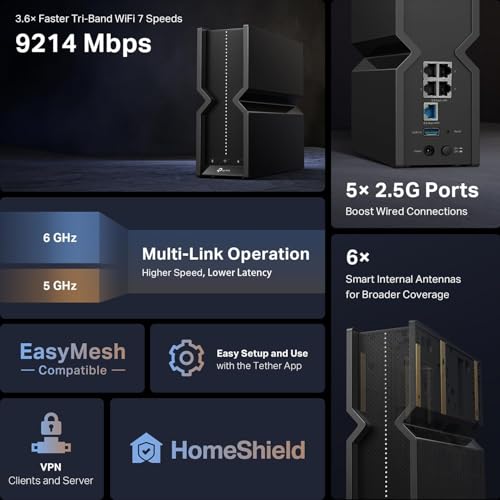
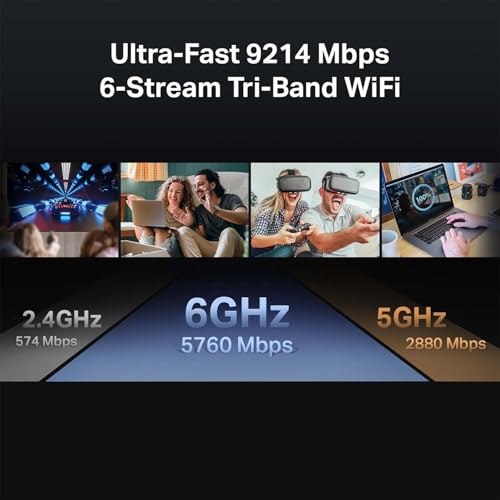
The Archer BE550 is built around the new Wi-Fi 7 (802.11be) standard. Its key performance features include Multi-Link Operation (MLO), 320 MHz channel bandwidth, and 4K-QAM modulation. These technologies work together to increase total throughput, reduce latency, and improve efficiency, especially in crowded wireless environments. The router operates on three separate bands: a 6 GHz band with a maximum speed of 5760 Mbps, a 5 GHz band at 2880 Mbps, and a 2.4 GHz band at 574 Mbps, for a combined theoretical maximum of 9.3 Gbps. This tri-band design helps distribute devices across different frequencies to minimize congestion, ensuring smoother performance for high-demand activities like 8K video streaming and AR/VR gaming.
Connectivity and Ports
A standout feature of the Archer BE550 is its comprehensive wired connectivity. It is equipped with one 2.5 Gigabit WAN port and four 2.5 Gigabit LAN ports. This configuration is notably future-proof, allowing it to handle multi-gigabit internet connections from ISPs and provide high-speed wired backhaul for mesh nodes or connections to NAS devices and powerful gaming PCs. The full 2.5G suite ensures that the wired network will not be a bottleneck, even as internet speeds and internal network demands increase. The router is also backward compatible with all previous Wi-Fi generations, so older smartphones, laptops, and smart home devices will connect without issue.
Coverage and Mesh Capability
TP-Link rates the Archer BE550 for coverage up to 2,000 square feet, aided by its six internal high-gain antennas and beamforming technology. For larger homes or areas with challenging layouts, the router supports EasyMesh. This means you can add compatible TP-Link routers, range extenders, or powerline adapters to create a seamless whole-home mesh network, eliminating dead zones and allowing devices to roam without dropping connection. This expandability is a crucial feature for ensuring consistent performance in every corner of a modern smart home.
Software and Security
The router is managed primarily through the TP-Link Tether app, which facilitates quick setup and day-to-day management from an iOS or Android device. For security, it includes TP-Link HomeShield, which offers real-time network protection, robust parental controls with scheduling and content filtering, and specific IoT device security monitoring. A particularly useful security feature is the ability to create a separate Private IoT Network. This isolates smart home devices like cameras and speakers on their own Wi-Fi network with WPA3 encryption, protecting the main network from potential vulnerabilities. Additionally, the router supports both VPN client and server functions, allowing all home devices to use a VPN without individual software installation or enabling remote secure access to the home network.
Setup, Support and Ownership
Setup is designed to be user-friendly via the Tether app, with the manufacturer claiming it can be completed in just a few minutes. The router is compatible with any internet service provider, though a modem is required for most. For expansion, the EasyMesh system provides a clear path to add compatible hardware as needed. TP-Link includes a 2-year manufacturer’s warranty with the product and offers free expert support. The company provides firmware updates to address security and performance, though a specific update policy or schedule is not detailed in the provided data. Features like Access Point Mode, Guest Mode, and QoS (Quality of Service) are also listed, giving users advanced control over their network’s behavior and prioritization.
What Owners Say
As a new release, detailed owner feedback for the TP-Link Archer BE550 is limited. The product holds a rating, but no specific review excerpts are available to summarize user experiences with real-world performance, reliability, or the setup process. Potential buyers should consider that the benefits of Wi-Fi 7, while significant on paper, require compatible client devices (like new smartphones and laptops) to be fully realized. Early adopters are typically evaluating these cutting-edge features against their existing hardware.
Pros and Cons
Pros
- Next-generation Wi-Fi 7 features including 320 MHz channels and 4K-QAM
- Full suite of 2.5G WAN and LAN ports for future-proof multi-gig connectivity
- EasyMesh compatibility for seamless whole-home coverage expansion
- Comprehensive security with HomeShield, WPA3, and a Private IoT Network
- User-friendly setup and management via the Tether mobile app
- Extensive compatibility with Alexa, Google Assistant, and all prior Wi-Fi standards
Cons
- Maximum Wi-Fi 7 benefits require new, compatible client devices
- Limited real-world user reviews as a newly launched product
- Potential overkill for users with basic internet needs and few devices
- Coverage for very large homes may still require additional mesh nodes
Who Should Buy It (and Who Should Skip It)
The TP-Link Archer BE550 is an ideal choice for early tech adopters and users with demanding network requirements. This includes gamers seeking the lowest possible latency, households with multiple 4K/8K video streams, and individuals with smart homes packed with IoT devices. It’s also perfect for anyone with a current or planned multi-gigabit internet connection who wants to fully utilize that speed both wirelessly and wired. If you’re planning to build or expand a mesh network, its EasyMesh support makes it a strong central hub.
Conversely, you should likely skip this router if your internet plan is under 1 Gbps and you only use the web for browsing, email, and occasional standard-definition video streaming. Users with small apartments and few devices may not see a justifiable benefit from the Wi-Fi 7 and 2.5G port features. Additionally, if you own no Wi-Fi 7 compatible devices and don’t plan to upgrade your laptops or phones soon, you won’t be able to leverage its most advanced wireless capabilities for several years. For more insights on building a high-performance home setup, explore our guides on the best monitors and best ergonomic chairs.
Final Verdict
The TP-Link Archer BE550 is a compelling entry into the Wi-Fi 7 router market, particularly due to its thoughtful combination of next-gen wireless and robust wired connectivity. Its full 2.5G Ethernet portfolio is a standout, ensuring the router won’t become a bottleneck as internet speeds increase. Features like EasyMesh for expansion, a dedicated IoT network for security, and built-in VPN support create a well-rounded package for the power user. While its rated coverage of 2,000 square feet is solid, the mesh capability provides a clear upgrade path for larger environments.
However, its value is inherently tied to your ecosystem. To experience the full speed and latency benefits of Wi-Fi 7, you need compatible client devices, which are still emerging in the market. For those with such devices or who are planning near-future upgrades, the Archer BE550 offers a strong, future-proof foundation. It’s a router that anticipates needs rather than just meeting current ones. For users interested in other cutting-edge home tech, our review of AI smart home devices provides further context on the connected ecosystem this router supports.
FAQs
What is Wi-Fi 7 and do I need it?
Wi-Fi 7 (802.11be) is the latest wireless standard, offering higher speeds, lower latency, and better efficiency in crowded networks than Wi-Fi 6 or 6E. You need it if you have a very fast internet plan (multi-gigabit), frequently transfer large files over your local network, engage in competitive online gaming, or use bandwidth-intensive applications like VR. If your current Wi-Fi 5 or Wi-Fi 6 router handles your daily tasks without issue, an immediate upgrade may not be necessary.
What are the benefits of the 2.5G Ethernet ports?
The 2.5 Gigabit Ethernet ports allow for wired connections that are two and a half times faster than standard 1 Gigabit ports. This is beneficial for connecting to a multi-gigabit internet modem, creating a high-speed backbone for a mesh system (wired backhaul), or linking a NAS (Network Attached Storage) device for faster file transfers. They ensure your wired network is ready for faster internet services and high-performance internal networking.
Can I use this router with my older devices?
Yes, the TP-Link Archer BE550 is fully backward compatible with all previous Wi-Fi generations, including Wi-Fi 6, Wi-Fi 5 (802.11ac), and earlier. Your existing smartphones, laptops, smart TVs, and IoT devices will connect to it without any problems. They will operate at their maximum supported speed and capability, while newer Wi-Fi 7 devices can take advantage of the router’s advanced features.
What is the Private IoT Network feature?
The Private IoT Network is a security feature that lets you create a separate, isolated Wi-Fi network specifically for your smart home devices (like cameras, lights, and speakers). This network uses WPA3 encryption and is managed by the HomeShield security suite. Isolating these devices helps protect your main network (where your computers and phones are connected) from potential vulnerabilities that might exist in less secure IoT gadgets, enhancing your overall network security. For more on securing your digital life, check out our resources in the Cybersecurity section.
About the author

Elvis Dicki writes reviews and buying guides for CyberSecLabs.