TP-Link Archer AX80 Review: Wi-Fi 6 Router with a 2.5 Gbps Port
The TP-Link Archer AX80 delivers strong Wi-Fi 6 performance and future-proofs your network with a multi-gigabit port, making it a solid choice for homes with high-speed internet and many devices.
 By Elvis Dicki
Updated October 20, 2026
By Elvis Dicki
Updated October 20, 2026
The TP-Link Archer AX80 is a dual-band Wi-Fi 6 router designed to handle the demands of modern, connected homes. It targets users looking to eliminate network bottlenecks, whether from multi-gigabit internet service provider connections or from the simultaneous strain of numerous smart devices, gaming consoles, and 8K streaming. This router’s core promise is to deliver AX6000-class wireless speeds and provide a crucial 2.5 Gbps Ethernet port to break past traditional gigabit limits, all while offering extensive coverage and flexible expansion options. For households seeking to future-proof their network and support heavy usage without lag, the Archer AX80 presents a compelling package.

In essence, the Archer AX80 aims to be a central hub for high-performance home networking. It is built for compatibility, working with all major internet service providers, though a separate modem is required for most. Its feature set includes technologies like MU-MIMO and OFDMA to manage multiple devices efficiently, OneMesh support for easy network expansion, and basic security and parental controls through TP-Link’s HomeShield platform. The bottom line is that this router focuses on delivering robust, high-speed connectivity for large homes and tech-heavy environments, balancing advanced features with user-friendly setup via a mobile app.
TP-Link Archer AX80 AX6000 Wi-Fi 6 Router



As an Amazon Associate we earn from qualifying purchases. Product prices and availability are accurate as of the date/time indicated.
TP-Link Archer AX80 at a Glance
| Specification | Detail |
|---|---|
| Wi-Fi Standard | Wi-Fi 6 (802.11ax) |
| Dual-Band Speed | AX6000 (4804 Mbps on 5 GHz, 1148 Mbps on 2.4 GHz) |
| Key Port | 1 x 2.5 Gbps Multi-Gigabit WAN/LAN Port |
| Other Ports | 4 x Gigabit LAN Ports (10/100/1000 Mbps) |
| Antennas | 8 Fixed High-Gain Antennas |
| Coverage | Designed for 3+ Bedroom Houses |
| Key Technologies | Beamforming, MU-MIMO, OFDMA |
| Security | WPA3, TP-Link HomeShield (Basic features free) |
| Special Features | OneMesh Support, Access Point Mode, VPN Client, QoS, Alexa Compatibility |
| RAM | 512 MB |
Design and Build
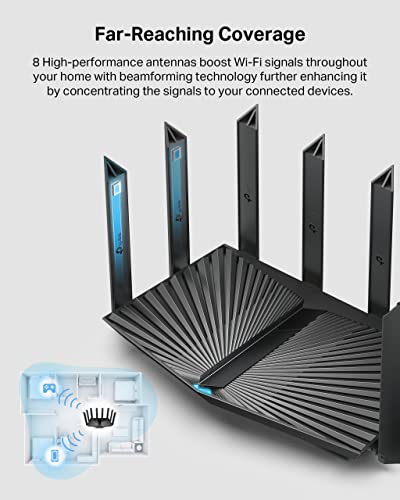
The TP-Link Archer AX80 has a substantial physical presence, measuring 10.9 inches long by 7.2 inches wide and 2.3 inches high, and weighing 2 pounds. Its black chassis is dominated by eight fixed high-gain antennas, which are a key component in its claimed long-range coverage for large homes. The design is functional, focusing on signal propagation and heat dissipation rather than minimalist aesthetics. The router includes a power adapter, a quick installation guide, and an RJ45 Ethernet cable in the box. The build quality aligns with TP-Link’s reputation for producing reliable networking hardware, as noted in user feedback mentioning it as a replacement for previous TP-Link models.
Performance and Features
Wireless Performance and Range
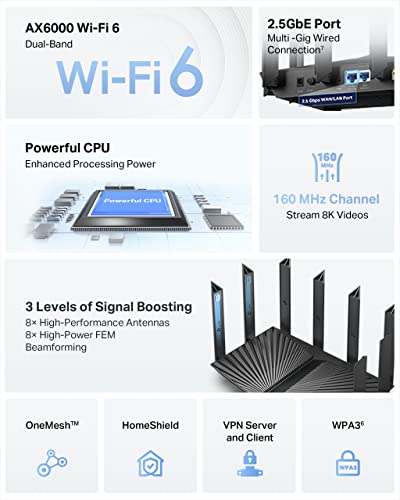
At its core, the Archer AX80 utilizes Wi-Fi 6 technology across two bands. It offers a maximum theoretical speed of 4804 Mbps on the 5 GHz band and 1148 Mbps on the 2.4 GHz band, combining for an AX6000 rating. This performance is engineered for data-intensive tasks like 8K video streaming and handling numerous connected devices simultaneously. The eight antennas are equipped with Beamforming technology, which focuses wireless signals towards connected devices rather than broadcasting uniformly, aiming to improve strength and consistency, especially at longer ranges. Manufacturer data suggests it is suitable for coverage in homes with three or more bedrooms. Owner reviews frequently praise its “amazing range” and ability to cover entire houses and yards where previous routers, including other high-end models, created dead zones.
Connectivity and Ports
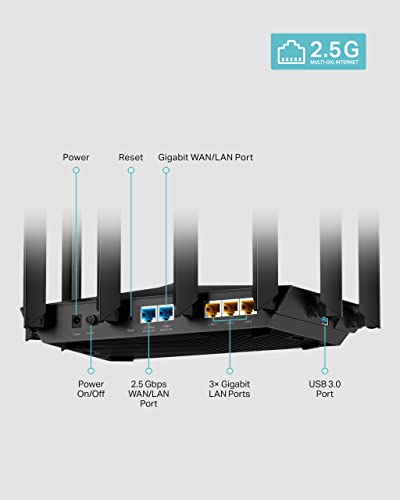
The standout hardware feature of the Archer AX80 is its 2.5 Gbps Multi-Gigabit port. This port can serve as either a WAN input for connecting to a modem with a multi-gigabit internet service provider plan or as a high-speed LAN port for a local device like a NAS or gaming PC. This addresses a potential bottleneck for users subscribing to internet plans above 1 Gbps. Additionally, the router provides four standard 1 Gbps Ethernet LAN ports for wired connections. It also includes USB connectivity, though the specific version and capabilities are not detailed in the provided data. This port selection makes the router a flexible hub for both cutting-edge and legacy wired devices.
Key Networking Technologies
To manage network traffic efficiently, the Archer AX80 incorporates several advanced technologies. MU-MIMO (Multi-User, Multiple-Input, Multiple-Output) allows the router to communicate with multiple devices at the same time, rather than sequentially. OFDMA (Orthogonal Frequency-Division Multiple Access) enables it to divide a single data stream to serve multiple clients simultaneously, improving overall network efficiency and reducing latency. These features are designed to work together, supporting a high number of connected devices—from smartphones and laptops to smart home IoT devices and security cameras—without significant performance degradation during peak usage.
Software and Security
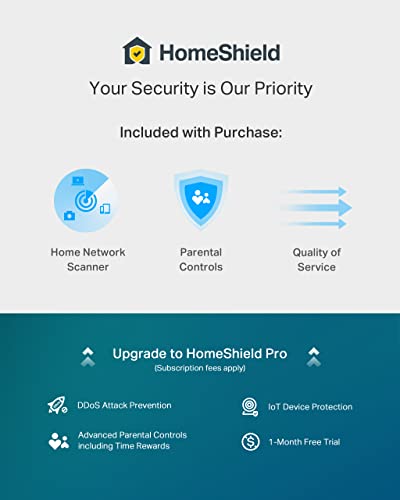
The router runs on TP-Link’s Archer firmware and can be managed via a web interface or the Tether mobile app, which users report makes setup straightforward. It supports the latest WPA3 security protocol for enhanced wireless protection. TP-Link’s HomeShield service offers network security features, but it operates on a freemium model. The free tier includes basic network security scans, IoT device identification, basic parental controls for managing time online and blocking content, Quality of Service (QoS) tools, and basic weekly or monthly reports. More advanced protections require a paid subscription to HomeShield Pro. A notable feature for privacy-conscious users is the built-in VPN client support, which allows all devices on the home network to route their traffic through a remote VPN server without needing individual software installations on each device.
Setup, Support and Ownership
Setup is facilitated through the TP-Link Tether app, which guides users through the process. Owner reviews confirm the setup is “easy,” though one noted that even when retaining previous network names and passwords, it took a couple of hours to get all smart home devices reconnected and responding properly. The router offers flexible operation modes; it can function as a standard router, as an Access Point to extend an existing network, or as the foundation for a OneMesh system. OneMesh compatibility allows users to add supported TP-Link range extenders to create a seamless whole-home Wi-Fi network without dead zones, providing a path for future expansion. The product is listed as compatible with all major internet service providers, including Comcast, AT&T, Verizon, and Spectrum, though a modem is required for most. TP-Link provides a 2-year manufacturer’s warranty, and the router’s firmware can presumably receive updates through the management interface to address security and performance over time.
What Owners Say
Owner feedback for the TP-Link Archer AX80 is overwhelmingly positive, reflected in its high rating where the vast majority of reviews are five-star. Users consistently highlight its exceptional range and stable signal, with many reporting it eliminated dead zones in their homes and backyards where previous routers and even mesh system components struggled. The powerful performance is a common theme, with owners noting it handles a large number of devices, including extensive IoT ecosystems and security cameras, without issue. The web interface and feature set, including a built-in speed test, receive praise from more advanced users. A minor point mentioned is that the setup process for smart home devices can require some additional patience despite an otherwise easy initial configuration. The consensus is that it delivers reliable, high-performance Wi-Fi coverage for large spaces.
Pros and Cons
Pros
- Future-proof 2.5 Gbps port for multi-gig internet connections
- Excellent Wi-Fi 6 range and coverage for large homes
- Efficiently handles a high number of simultaneous devices
- Flexible expansion via OneMesh and Access Point mode
- Includes useful free basic security and parental controls
- Built-in VPN client support for the entire network
Cons
- Advanced security features require a paid subscription
- Needs a separate modem for most internet providers
- Advanced settings may be complex for novice users
- Reconnecting smart home devices post-setup can be time-consuming
- Full potential requires compatible multi-gig internet plan
- Large physical size may not suit all spaces
Who Should Buy It (and Who Should Skip It)
The TP-Link Archer AX80 is an ideal choice for users with specific needs. It’s perfect for households subscribing to or planning to upgrade to multi-gigabit internet plans, as its 2.5 Gbps port prevents a router bottleneck. It’s also well-suited for large homes (3+ bedrooms) where consistent, long-range Wi-Fi coverage is a priority, especially those with many connected devices like smart home gadgets, streaming boxes, and gaming consoles. Users who value the option to expand their network seamlessly with mesh-compatible extenders via OneMesh will find it a flexible foundation. For more on routers suited for large homes, see our guide on the best routers for large homes.
Conversely, this router might be overkill for others. Users with basic internet plans under 1 Gbps living in small apartments who don’t need extreme range or device handling may find a simpler, less expensive model sufficient. Those uncomfortable with any level of technical setup, even via an app, or who desire the most advanced security features without paying a subscription fee might want to look at alternatives. If your primary need is for a device to run advanced open-source firmware, you might explore our resource on the best routers for OpenWrt.
Final Verdict
The TP-Link Archer AX80 successfully carves out a niche as a performance-oriented Wi-Fi 6 router with a crucial forward-looking feature: the 2.5 Gbps Ethernet port. Its combination of strong wireless speeds, effective range enhancement via eight antennas and Beamforming, and technologies like MU-MIMO and OFDMA for device management makes it a robust solution for busy, device-heavy households. The flexibility offered by OneMesh support, AP mode, and VPN client functionality adds to its appeal for users who want a network that can grow and adapt. While its full security suite requires a subscription and its advanced capabilities may be more than a casual user needs, the core performance it delivers is solid and well-regarded by owners.
For those seeking to eliminate Wi-Fi dead zones and prepare their home network for next-generation internet speeds, the TP-Link Archer AX80 represents a compelling investment. It balances high-end specifications with user-friendly operation, making advanced networking features accessible. It stands as a strong contender in the market for routers designed for gigabit and multi-gigabit environments, which you can learn more about in our overview of the best routers for gigabit internet. For general networking advice and other tech gear, visit our Tech Gear hub.
FAQs
Does the TP-Link Archer AX80 work with my internet provider?
Yes, the manufacturer lists compatibility with all major internet service providers, including Comcast (Xfinity), Charter (Spectrum), AT&T, Verizon, Cox, CenturyLink, and others. It’s important to note that for most of these providers, you will need a separate modem. The router connects to that modem to distribute your internet connection wirelessly and via Ethernet throughout your home.
What is the benefit of the 2.5 Gbps port?
The 2.5 Gbps Multi-Gigabit port allows the router to handle internet connections faster than 1 Gigabit per second (1000 Mbps). If your internet service provider offers a plan with speeds between 1 Gbps and 2.5 Gbps, this port ensures your router is not a bottleneck. Alternatively, you can use this port as a high-speed LAN connection for a local device like a network-attached storage (NAS) server for incredibly fast file transfers within your home network.
Is TP-Link HomeShield security free?
TP-Link HomeShield offers both free and paid features. The free tier includes basic network security scans, identification of IoT devices on your network, basic parental controls for scheduling and content filtering, Quality of Service (QoS) management, and basic activity reports. More advanced security protections and features are part of HomeShield Pro, which requires a monthly or annual subscription fee.
Can I use this router to extend my existing Wi-Fi?
Yes, the Archer AX80 supports an Access Point (AP) mode. In this mode, you can connect it via Ethernet to your existing router or modem-router combo, and it will create a new, powerful Wi-Fi network. This is an effective way to upgrade the wireless coverage and performance in a specific area of your home without replacing your main gateway device.
About the author

Elvis Dicki writes reviews and buying guides for CyberSecLabs.