TP-Link Archer AX55 Pro Review: Multi-Gig Ports Meet AX3000 WiFi 6
The TP-Link Archer AX55 Pro is a feature-rich WiFi 6 router with two 2.5 Gbps ports, offering strong multi-device handling and VPN support for households with high-speed internet plans.
 By Elvis Dicki
Updated October 20, 2026
By Elvis Dicki
Updated October 20, 2026
In the crowded market of home networking, the TP-Link Archer AX55 Pro positions itself as a strategic upgrade for users ready to embrace multi-gigabit connectivity without venturing into the premium price tiers of WiFi 6E or 7. This dual-band AX3000 router is designed for households with burgeoning device counts and internet service plans that exceed the standard gigabit bottleneck. It promises to deliver the efficiency of WiFi 6 alongside future-proof wired ports, all wrapped in TP-Link’s ecosystem with security and expansion features. For users seeking to leverage faster ISP speeds and improve network efficiency for streaming and gaming, the Archer AX55 Pro presents a compelling package that balances advanced features with accessibility.

This review analyzes the TP-Link Archer AX55 Pro based on its specifications, manufacturer-provided features, and aggregated user feedback. We will examine its design, performance capabilities centered on its multi-gig ports and WiFi 6 technologies, and the value of its software features like HomeShield and VPN support. The bottom line: the TP-Link Archer AX55 Pro is a capable router for tech-savvy households and small offices that need to manage many connected devices and want to prepare for internet speeds above 1 Gbps, though it requires a separate modem and lacks the latest wireless spectrum.
TP-Link Archer AX55 Pro AX3000 WiFi 6 Router




As an Amazon Associate we earn from qualifying purchases. Product prices and availability are accurate as of the date/time indicated.
TP-Link Archer AX55 Pro at a Glance
| Specification | Detail |
|---|---|
| WiFi Standard | WiFi 6 (802.11ax) |
| Dual-Band Speed | AX3000 (Up to 3.0 Gbps combined) |
| 5 GHz Band Speed | Up to 2402 Mbps |
| 2.4 GHz Band Speed | Up to 574 Mbps |
| Ethernet Ports | 1x 2.5 Gbps WAN/LAN, 1x 2.5 Gbps LAN, 3x 1 Gbps LAN |
| USB Port | 1x USB 3.0 |
| Antennas | 4 Fixed High-Performance Antennas |
| Key Technologies | OFDMA, MU-MIMO, Beamforming, 160 MHz Channel |
| Security | WPA3, TP-Link HomeShield (Threat Detection, Parental Controls) |
| VPN Support | Client & Server (OpenVPN, PPTP, L2TP, WireGuard) |
| Mesh Compatibility | Works with EasyMesh |
| Voice Assistant | Compatible with Alexa and Google Assistant |
Design and Build
The TP-Link Archer AX55 Pro follows a conventional router aesthetic with a black chassis measuring 10.28 inches long, 5.3 inches wide, and 1.62 inches high. It is equipped with four non-detachable, high-performance antennas positioned to provide omnidirectional coverage. The build is described as sturdy, with a weight of 1.2 pounds giving it a substantial feel. Ventilation grilles are present to aid heat dissipation during operation. The front panel houses LED indicators for power, internet, WiFi bands, and Ethernet port activity, allowing for quick status checks. The physical design is functional rather than decorative, meant to blend into a home office or entertainment center setup.
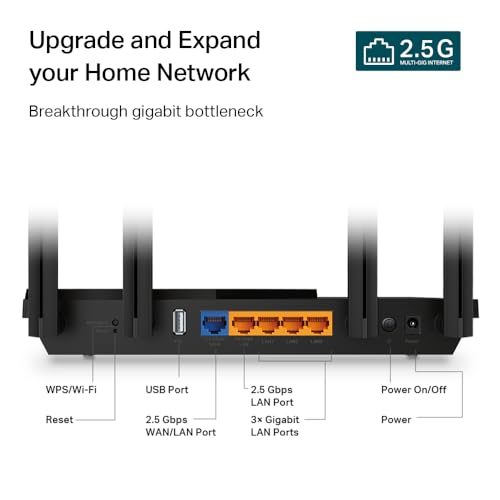
All connectivity ports and buttons are located on the rear panel. This includes the distinctive multi-gigabit ports, the standard gigabit LAN ports, the USB 3.0 port for shared storage, a WPS button, a reset button, and the power input. The placement is logical for cable management. The router’s dimensions are not listed as particularly compact, so users should ensure they have adequate space, especially considering the antenna span. The design prioritizes signal propagation and heat management, which are critical for maintaining stable performance under load from multiple devices and potential high-speed wired connections.
Performance and Features
Wireless Performance and WiFi 6 Technologies
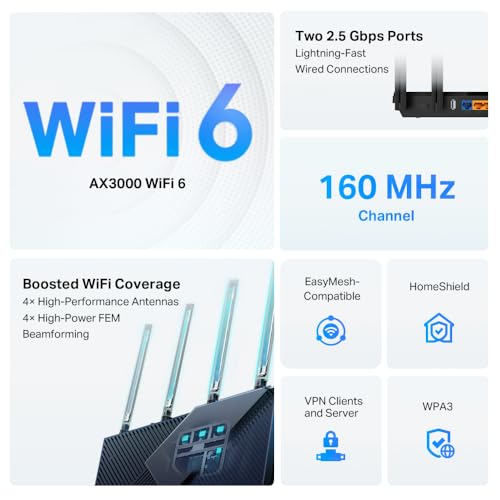
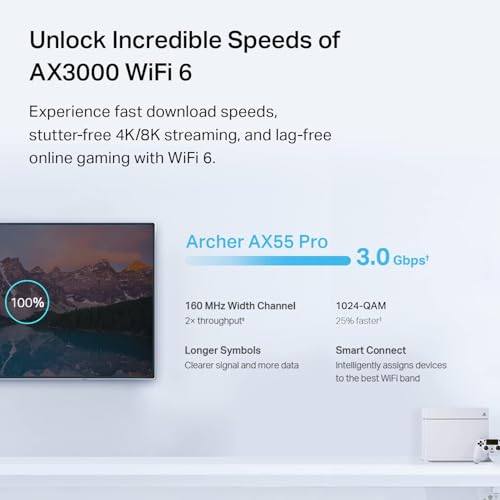
The Archer AX55 Pro is an AX3000-class router, offering combined dual-band speeds up to 3.0 Gbps. This breaks down to up to 2402 Mbps on the 5 GHz band and up to 574 Mbps on the 2.4 GHz band, facilitated by support for the 160 MHz channel width. This bandwidth is designed to enable smooth 8K/4K video streaming and lag-free online gaming, provided client devices also support these advanced WiFi 6 features. The router employs key WiFi 6 enhancements: OFDMA (Orthogonal Frequency Division Multiple Access) and MU-MIMO (Multi-User, Multiple-Input, Multiple-Output). OFDMA improves efficiency by allowing a single data stream to be split among multiple devices, reducing latency for smart home gadgets and phones. MU-MIMO allows the router to communicate with multiple devices simultaneously, which is beneficial for households with several active users streaming or gaming at once.
Beamforming technology works in conjunction with the four antennas to detect connected devices and focus WiFi signals toward them, aiming to provide stronger and more reliable coverage in hard-to-reach areas of a home. The manufacturer states it provides strong and reliable WiFi coverage throughout a house. It is important to note that the maximum wireless classification is AX3000; it does not support the 6 GHz band found in WiFi 6E routers, which may be a consideration for users in extremely congested wireless environments seeking the absolute latest spectrum.
Connectivity and Ports
The standout hardware feature of the Archer AX55 Pro is its multi-gigabit connectivity. It is equipped with two 2.5 Gbps Ethernet ports: one can function as either a WAN or LAN port, and the other is a dedicated LAN port. This configuration is strategically designed to “break through the 1G bottleneck,” allowing users to connect to internet service plans that offer speeds above 1 Gbps and also to create a high-speed 2.5 Gbps link to a compatible NAS, PC, or other wired device. The remaining three LAN ports are standard 1 Gbps (10/100/1000 Mbps) ports for connecting other wired devices like smart TVs, gaming consoles, or printers.
A USB 3.0 port is included, enabling users to connect an external hard drive or flash drive for simple network-attached storage (NAS) functions, allowing file sharing across the network. This adds a layer of functionality for media streaming or backups. The router’s compatibility is broad, working with major internet service providers like Comcast, Charter, AT&T, Verizon, Xfinity, and Starlink, though a separate modem is required for most cable or fiber connections.
Software, Security, and Advanced Features
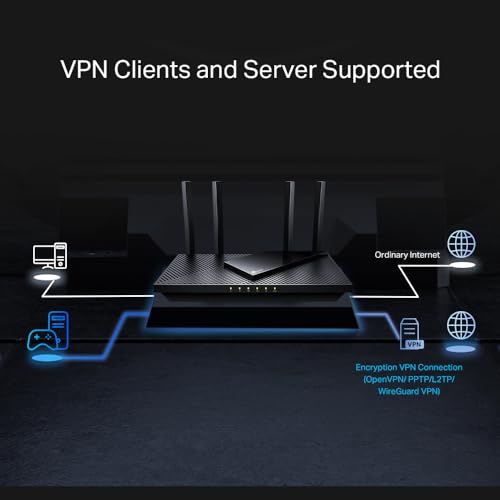
TP-Link equips the Archer AX55 Pro with its HomeShield security suite. This software provides real-time IoT device protection, robust parental controls with content filtering and scheduling, and network security scanning. HomeShield aims to offer a safer internet experience by identifying vulnerabilities and blocking malicious sites. For more advanced users, the router supports both VPN client and server functionality. The VPN client feature is particularly notable, as it allows specified devices on the home network to access a remote VPN service without needing to install VPN software on each individual device. It supports major protocols including OpenVPN, WireGuard, PPTP, and L2TP. The manufacturer notes that a VPN service subscription is not included and must be obtained separately from providers like Surfshark or NordVPN.
For network expansion, the router is compatible with TP-Link’s EasyMesh standard. This means it can be paired with compatible EasyMesh extenders (like the RE715X, not included) to create a seamless whole-home mesh network with a single SSID and smooth roaming. The router also supports voice control via Amazon Alexa and Google Assistant for simple commands like turning guest WiFi on or off. Management is handled through a mobile app or web interface, offering control over settings like port forwarding, device IP assignment, and QoS.
Setup, Support and Ownership
Setup is described as straightforward, typically managed through the TP-Link Tether app or web interface. The package includes a quick installation guide, a power adapter, and an RJ45 Ethernet cable. Some users note that during setup, entering the router’s MAC address (found on the label on the back) may be required. The router operates on a networking operating system and receives firmware updates from TP-Link to address security and performance issues. The manufacturer provides a 2-year warranty, which is a standard offering for networking equipment.
Ownership considerations include the fact that this is a standalone router, so a modem is necessary for most internet connections. For expansion, users can leverage the EasyMesh compatibility to add extenders, providing a path to whole-home coverage without replacing the core router. The USB 3.0 port offers basic network storage capabilities. As the router lacks a built-in modem, it is not an all-in-one solution for cable or DSL users, who will need to maintain or purchase a separate modem. For more information on routers suited for specific needs, such as handling gigabit internet or large homes, you can explore our guides on the best routers for gigabit internet and best routers for large homes.
What Owners Say
Owner feedback for the TP-Link Archer AX55 Pro is overwhelmingly positive, with a high proportion of five-star ratings. Users frequently highlight the significant performance upgrade over older routers, particularly praising the stability and reliability of the connection. Many report that issues like dropped WiFi signals and unreliable streaming have been resolved after installation. The multi-gigabit 2.5 Gbps port is a frequently mentioned standout, with users appreciating the ability to fully utilize internet plans above 1 Gbps, with one owner noting it finally delivered the full speed they were paying for.
The user interface and feature set receive commendation. Owners find the parental controls and content filtering effective and value the easy management of port-forwarding and device settings. The VPN client feature is appreciated by those who use it, as it simplifies securing the entire network’s traffic. Some users mention the setup is generally easy, though slightly more involved than some basic models. The critical feedback tends to focus on the need for a separate modem, which is a stated requirement, and the fact that the VPN service itself is a separate purchase. The overall sentiment from owners is that the router “just works” and delivers on its promises of speed, coverage, and advanced features.
Pros and Cons
Pros
- Two 2.5 Gbps ports for multi-gig WAN and LAN connectivity.
- Effective WiFi 6 features (OFDMA, MU-MIMO) for multi-device households.
- Built-in VPN client for network-wide secure access.
- Comprehensive HomeShield security with parental controls.
- EasyMesh compatibility for seamless network expansion.
- Stable performance and reliable coverage reported by owners.
Cons
- Requires a separate modem for most internet connections.
- VPN service requires a separate subscription from a third party.
- AX3000 speed class lacks WiFi 6E’s 6 GHz band.
- Setup may be slightly more complex than very basic routers.
- Antennas are fixed and not detachable.
Who Should Buy It (and Who Should Skip It)
The TP-Link Archer AX55 Pro is an ideal choice for users with internet service plans at or above 1 Gbps who want to eliminate the wired bottleneck. It’s also excellent for tech-savvy households with many connected devices where the efficiency of WiFi 6, MU-MIMO, and OFDMA will make a tangible difference in simultaneous streaming, gaming, and smart home operation. Users who desire built-in VPN client functionality for their entire network or who want robust parental controls and security features will find significant value here. It’s a strong candidate for those planning a future mesh network via EasyMesh.
This router may not be the best fit for users with internet speeds significantly below 1 Gbps who won’t benefit from the 2.5 Gbps ports. Those seeking an all-in-one modem-router combo unit should look elsewhere, as a separate modem is required. Users who must have the absolute latest wireless technology, like WiFi 6E or 7 for the 6 GHz band, should consider more advanced models. For simpler needs with fewer devices, a more basic WiFi 6 or even a high-quality WiFi 5 router might be sufficient and more cost-effective. If you’re interested in compact computing solutions that complement a home network, our coverage of fanless mini PCs explores quiet, efficient devices for network-attached tasks.
Final Verdict
The TP-Link Archer AX55 Pro successfully executes a specific mission: to bring future-proof multi-gigabit wired connectivity and robust WiFi 6 features to a mainstream price point. Its dual 2.5 Gbps ports are its defining advantage, offering a clear path for users with fast internet plans and high-speed local network needs. The implementation of OFDMA, MU-MIMO, and Beamforming, combined with positive owner reports on stability and coverage, suggests it handles dense device environments competently. The added value from HomeShield security and the unique VPN client functionality broadens its appeal to security-conscious users and those who utilize VPN services.
While the requirement for a separate modem and the lack of WiFi 6E are legitimate limitations, they are consistent with the router’s positioning in the market. For the target user—someone with gigabit-plus internet, a house full of devices, and an interest in advanced network features—these are acceptable trade-offs for the performance and capability offered. The Archer AX55 Pro stands out as a well-rounded, feature-packed router that delivers on its core promises of speed, efficiency, and control. It represents a smart, forward-looking investment for upgrading a home network to handle today’s demands and tomorrow’s faster connections. For other networking options, including routers optimized for custom firmware, see our resource on the best routers for OpenWRT.
FAQs
Does the TP-Link Archer AX55 Pro have a built-in modem?
No, the Archer AX55 Pro is a standalone wireless router. It does not contain a built-in modem for cable, DSL, or fiber connections. You will need to connect it to a separate modem provided by your internet service provider or purchased separately to access the internet.
What is the benefit of the 2.5 Gbps WAN port?
The 2.5 Gbps WAN port allows the router to connect to internet service plans that offer speeds greater than 1 Gbps (1000 Mbps). A standard 1 Gbps port would bottleneck such connections, preventing you from utilizing the full speed you’re paying for. This port future-proofs your network for upcoming high-speed internet offerings.
Can I use the VPN feature without paying for a subscription?
The router supports VPN client and server protocols (OpenVPN, WireGuard, etc.), but the VPN service itself is not included. To use the VPN client to route your traffic through a secure server, you must subscribe to a third-party VPN service provider like NordVPN or ExpressVPN and configure the router with your account details.
How do I extend the WiFi coverage with this router?
The Archer AX55 Pro is compatible with TP-Link’s EasyMesh standard. You can extend your WiFi coverage by adding an EasyMesh-compatible range extender (such as the TP-Link RE715X) to create a seamless mesh network. This system will use one network name and allow devices to roam smoothly between the router and extender.
About the author

Elvis Dicki writes reviews and buying guides for CyberSecLabs.