Thetis MB000493 Review: A Versatile Security Key with Dual Ports & NFC
The Thetis MB000493, or Thetis Pro FIDO2 Security Key, offers a versatile and durable hardware authentication solution with broad compatibility, though it has some specific platform limitations.
 By Elvis Dicki
Updated October 21, 2026
By Elvis Dicki
Updated October 21, 2026
In the evolving landscape of digital security, hardware authentication keys have become essential tools for protecting online identities. The Thetis MB000493, marketed as the Thetis Pro FIDO2 Security Key, is a modern security key designed to offer passwordless FIDO2 authentication, passkey storage, and OATH code generation. It targets users seeking to enhance their account security across major platforms like Google, Microsoft, social media, and password managers, while demanding a durable, portable device.

This key aims to be a one-stop solution by combining dual USB connectors (A and C), NFC support, and a substantial credential storage capacity. The bottom line up front: the Thetis Pro is a versatile and rugged security key with excellent connectivity options, but potential buyers must be aware of its specific compatibility constraints, particularly with mobile banking apps and desktop NFC functionality.
Prime Thetis Pro FIDO2 Security Key NFC 2FA USB C


As an Amazon Associate we earn from qualifying purchases. Product prices and availability are accurate as of the date/time indicated.
Thetis MB000493 at a Glance
| Specification | Detail |
|---|---|
| Model | Thetis MB000493 (Thetis Pro FIDO2 Key) |
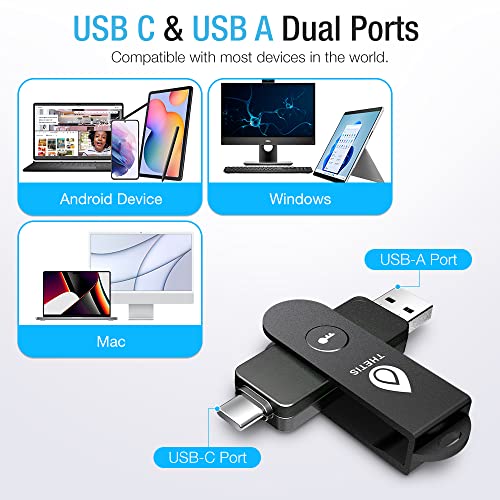
| Connectors | USB-A & USB-C |
| NFC Support | Yes (Mobile authentication only) |
| Passkey Slots | 50 |
| OATH (TOTP) Slots | 50 |
| Key Features | FIDO2/U2F, Passkey Storage, TOTP Code Generation, Secure Password Manager |
| Compatible OS | Windows, MacOS, Linux, Chrome OS |
| Design | Foldable with 360° rotating aluminum shield |
| Dimensions | 2.9″ D x 0.72″ W x 0.5″ H |
| Special Features | Dual USB Connector, NFC Ready |
Design and Build
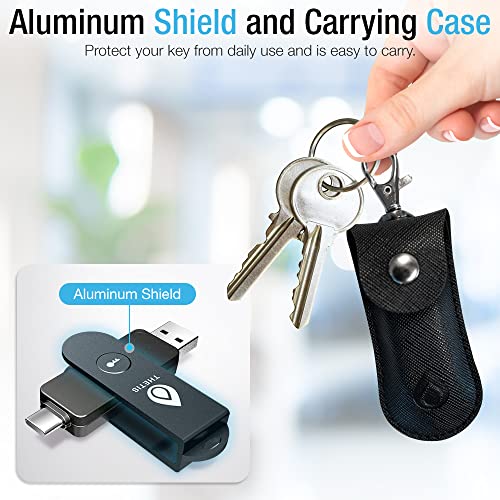
The Thetis Pro FIDO2 Security Key is built with portability and durability as primary concerns. The device features a compact, keychain-ready form factor measuring 2.9 inches in depth, 0.72 inches in width, and 0.5 inches in height, with a weight of one ounce. Its standout physical feature is the 360-degree rotating metal cover that shields the USB connectors. This foldable aluminum shield design is promoted as being tamper-resistant, water-resistant, and crush-resistant, intended to withstand the rigors of daily carry. The black finish and minimalist branding contribute to a professional, discreet appearance. The dual-port design, with both USB-A and USB-C connectors housed in the same unit, eliminates the need for adapters and is a core part of its versatile appeal.
Performance and Features
Authentication Standards and Storage
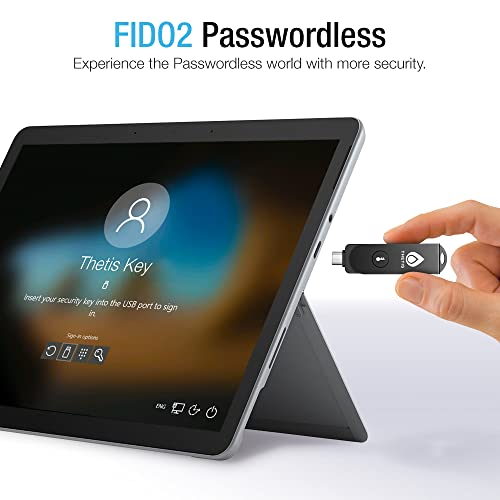
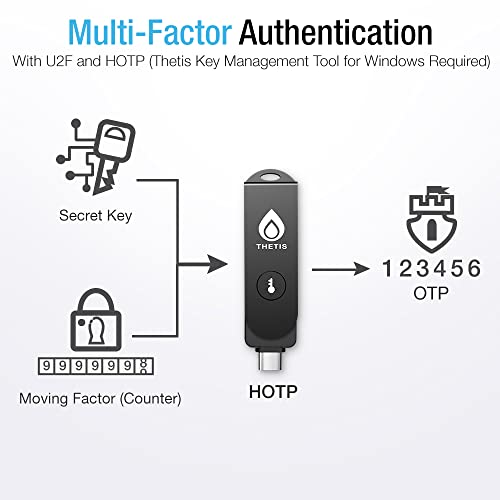
The Thetis MB000493 supports the FIDO2/WebAuthn and FIDO U2F standards, enabling passwordless login and two-factor authentication on compatible websites and services. A significant capability is its passkey functionality, allowing it to store up to 50 cryptographic passkeys. Additionally, it provides 50 slots for OATH-based time-based one-time passwords (TOTP), meaning it can generate 2FA codes for services like Google Authenticator or Authy without needing a separate app on your phone. It also includes a secure password manager feature. The key utilizes cryptographic algorithms including SHA256, AES, HMAC, ECDH, and ECDSA, and carries FIDO2 Level 1 certification alongside CE, FCC, RoHS, and WEEE marks.
Connectivity and Compatibility
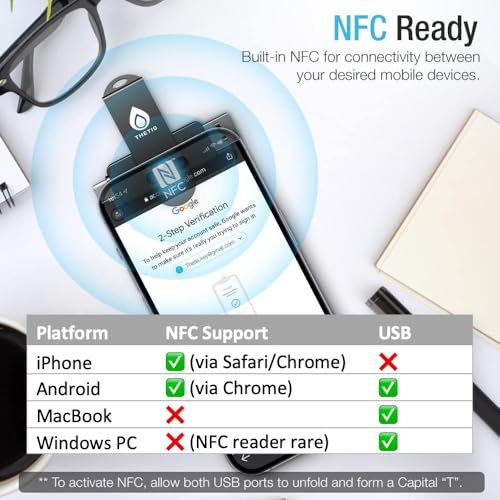
Connectivity is a major strength of this key. The dual USB-A and USB-C ports ensure compatibility with a vast range of computers, from older systems to modern laptops. The integrated NFC (Near Field Communication) allows for tap-to-authenticate functionality, but this is explicitly limited to mobile devices; it does not work for authentication on MacOS or Windows desktops. For mobile use, you align the key with your phone’s NFC area and hold it for a few seconds. The key is compatible with Windows, MacOS, Linux (both Debian-based and Red Hat-based distributions), and Chrome OS. It works with major online accounts including Google, Microsoft, and Zoho; password managers like 1Password and LastPass Premium; and social platforms like Facebook and Instagram. A critical compatibility note is its limitation with Bank of America: it works exclusively with the web version and is incompatible with the BofA mobile app.
Software and Management
Managing the credentials stored on the Thetis Pro requires its dedicated software. The Thetis Key Manager is a desktop application for PC or MAC and is mandatory for the initial key setup. For mobile devices, Thetis provides an authenticator app. This software ecosystem is used to manage passkeys, OATH codes, and the built-in password manager.
Setup, Support and Ownership
Initial setup requires connecting the key to a computer and using the Thetis Key Manager software. This step is necessary to initialize the device before it can be used for authentication. The manufacturer provides a standard express warranty, though the specific duration is not listed in the provided data. The key requires no batteries or network connectivity to operate, contributing to low long-term ownership costs. Firmware or software update processes are not detailed by the manufacturer. For support, users would rely on the manufacturer’s resources, as no dedicated support portal or community details are provided in the specifications.
What Owners Say
Based on the aggregated rating distribution, user reception is generally positive. The product holds a rating where the majority of feedback is favorable, with a significant portion of users giving the highest rating. A smaller percentage of users have reported issues, as reflected in the lower-tier ratings. The overall consensus from the rating pattern suggests that most users find it a reliable and functional security key, though a notable minority have experienced drawbacks significant enough to warrant lower scores. For a deeper dive into user experiences with security tools, our guide on the best resources for beginners can provide foundational context.
Pros and Cons
Pros
- Versatile dual USB-A and USB-C connectivity
- NFC support for convenient mobile authentication
- High storage capacity for passkeys and OATH codes
- Durable, portable metal construction with a rotating shield
- No requirement for batteries or an internet connection
- Broad compatibility with major online services and OS platforms
Cons
- NFC functionality is limited to mobile devices, not desktops
- Incompatible with the Bank of America mobile banking app
- Initial setup requires proprietary desktop software
- Windows Hello login only works with specific Enterprise editions
- Does not support ID Austria (requires FIDO2 Level 2)
- Lacks biometric (fingerprint) or Bluetooth authentication options
Who Should Buy It (and Who Should Skip It)
The Thetis MB000493 is an excellent choice for users who need a single, durable hardware key for use across multiple devices with different ports (USB-A and USB-C). It’s ideal for individuals heavily invested in the FIDO2 ecosystem who want to consolidate passkeys and TOTP codes onto one physical device. Users who value the convenience of NFC tap-to-login on their smartphones will also find it beneficial. It suits environments requiring rugged hardware, such as for IT professionals, students, or travelers. For those researching tools for a security-focused setup, exploring the best laptops for cybersecurity students can help complete a robust workstation.
Conversely, users who primarily need desktop NFC authentication should skip this key, as that functionality is absent. It is not suitable for Bank of America customers who rely exclusively on the mobile app for banking. Those requiring FIDO2 Level 2 certification for specific government or high-security applications (like ID Austria) will need to look elsewhere. Users who prefer authentication methods like built-in fingerprint readers or Bluetooth connectivity may find other security keys more aligned with their preferences.
Final Verdict
The Thetis Pro FIDO2 Security Key (MB000493) successfully delivers a versatile and robust hardware authentication solution for the mainstream user. Its combination of dual USB ports, NFC for mobile, and high credential storage capacity in a tough, compact package makes it a compelling all-in-one option for securing numerous online accounts. The ability to handle both passwordless FIDO2 logins and time-based 2FA codes adds significant daily utility, moving users beyond basic U2F keys. The thoughtful design, with its protective rotating cover, instills confidence for keychain carry.
However, its value is contingent on the user’s specific ecosystem. The limitations surrounding NFC on desktops and compatibility with certain banking apps are not minor quirks but important considerations. For the right user—someone with a mix of USB-C and USB-A devices, who uses NFC on their phone, and who does not rely on the incompatible services—the Thetis Pro represents a strong, future-proofed investment in personal cybersecurity. As with any security tool, understanding its boundaries is key. For broader perspectives on securing your digital life, our review section and cybersecurity category offer further insights.
FAQs
Does the Thetis Pro Security Key work with Windows Hello?
The Thetis Pro can be used for Windows Hello login, but only under specific conditions. According to the manufacturer, this functionality is limited to Windows Enterprise editions that support Entra ID. It will not work for Windows Hello login on standard Home or Pro editions of Windows.
Can I use the NFC feature to log in on my laptop?
No, the NFC functionality on the Thetis Pro Security Key is designed exclusively for mobile authentication. It does not work for logging into websites or services on MacOS or Windows desktop or laptop computers. You must use the USB ports for computer-based authentication.
How many accounts can I store on this security key?
The Thetis Pro provides storage for two types of credentials. It can hold up to 50 FIDO2 passkeys for passwordless login. Separately, it can store seeds for up to 50 OATH TOTP accounts for generating time-based 2FA codes, like those used by Google Authenticator.
Is the Thetis Key compatible with Bank of America?
The compatibility is limited. The Thetis Security Key works exclusively with Bank of America’s web-based banking platform. It is not compatible with the Bank of America mobile app, so users who primarily bank via the smartphone application will not be able to use this key for that service.
About the author

Elvis Dicki writes reviews and buying guides for CyberSecLabs.