Omada by TP-Link Fusion 2.5G Review: A Business-Grade Wired Router with a Touchscreen
The Omada by TP-Link Fusion 2.5G router delivers high-speed wired performance and advanced network management features in one device, ideal for small businesses and demanding home networks.
 By Elvis Dicki
Updated October 20, 2026
By Elvis Dicki
Updated October 20, 2026
The Omada Fusion 2.5G Multi-WAN Wired VPN Router is a networking device designed for users who prioritize wired connectivity, advanced security, and centralized management. This router, part of TP-Link’s Omada ecosystem for business environments, integrates several features typically found in separate appliances into a single unit. It is positioned for small to medium businesses, tech enthusiasts with complex home labs, and IT managers seeking a reliable wired backbone with simplified oversight. The bottom line: it’s a feature-packed wired router that consolidates a controller, a high-speed switch, and on-device monitoring into one package.

Standing out with its built-in touchscreen and controller, the Omada Fusion 2.5G eliminates the need for a separate hardware controller or constant laptop access for basic troubleshooting. Its core promise is to deliver robust 2.5GbE connectivity, multi-WAN reliability with load balancing, and professional-grade security features like IPS/IDS, all managed through a unified, license-free cloud interface. For anyone building a wired network that demands performance, redundancy, and easy manageability, this router presents a compelling all-in-one solution.
Prime TP-Link Omada Fusion 2.5G Multi-WAN VPN Router


As an Amazon Associate we earn from qualifying purchases. Product prices and availability are accurate as of the date/time indicated.
Omada by TP-Link Fusion 2.5G at a Glance
| Specification | Details |
|---|---|
| Brand & Model | Omada by TP-Link Fusion 2.5G |
| Ports | 5 x 2.5 Gigabit Ethernet |
| WAN Support | Multi-WAN (Up to 4 ports for load balancing/failover) |
| CPU | Quad-Core |
| Key Features | Built-in Omada Controller, 2.51″ Touchscreen, VPN, ACL, QoS, IPS/IDS |
| Management | Omada Cloud (License-Free), Bluetooth & App Setup |
| Connectivity Tech | Ethernet (Wired), Bluetooth for Setup |
| Security Features | Router Firewall, IPS/IDS, Access Control Lists (ACL) |
| Special Features | LED Indicator, Remote Access |
| Warranty | 5-Year Manufacturer Warranty |
Design and Build
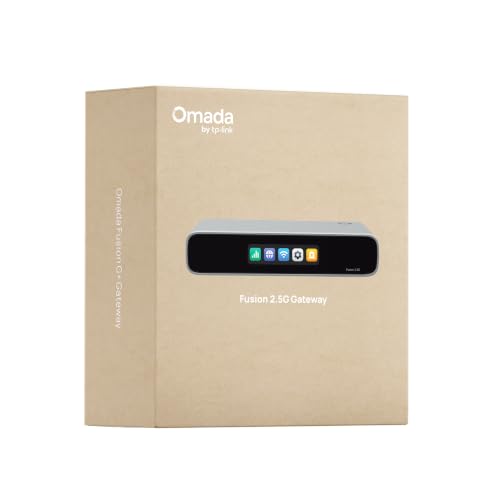
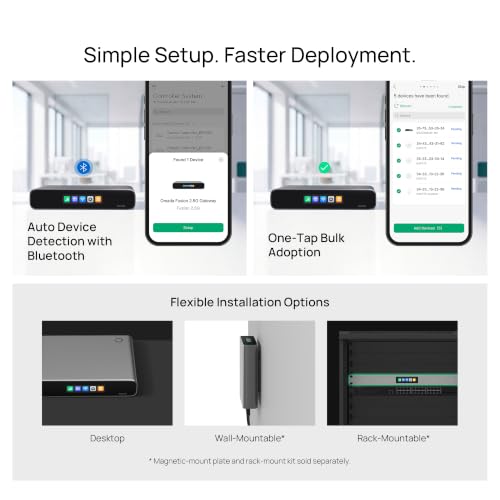
The physical design of the Omada Fusion 2.5G router centers on its most distinctive feature: the 2.51-inch touchscreen display mounted on the front panel. This screen is intended for quick, on-site diagnostics without needing external devices. The unit itself is built for rack or desktop placement, consistent with business-grade networking hardware. The front panel also houses LED indicators for system status and port activity, providing a clear visual overview of network health.
On the rear, you find the five 2.5 Gigabit Ethernet ports. These ports are not dedicated as solely LAN or WAN; their function is configurable, offering flexibility to assign up to four as WAN ports for multi-WAN strategies. The build quality, as suggested by the manufacturer’s specifications and five-year warranty, indicates a focus on durability for continuous operation in business environments. The included components are listed as the product body and a power adapter, confirming it’s a ready-to-deploy wired solution without integrated wireless capabilities.
Performance and Features
Processing Power and Data Transfer
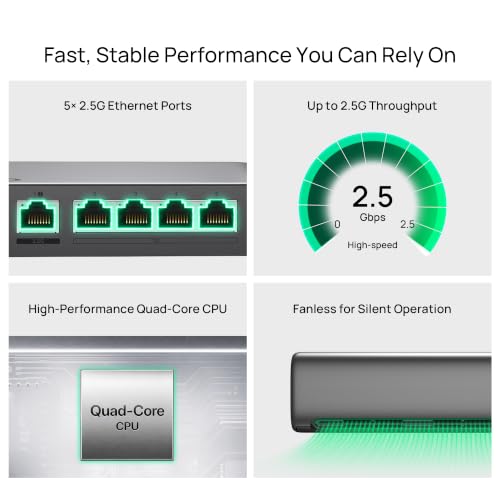
At the heart of the Omada Fusion 2.5G is a quad-core CPU. According to the manufacturer, this processor is designed for lightning-fast processing to handle network traffic efficiently and reduce lag. The specified maximum upstream data transfer rate is 2500 megabits per second, aligning with the 2.5GbE capability of its ports. This combination aims to ensure the router can manage demanding tasks like VPN encryption, deep packet inspection for IPS/IDS, and Quality of Service (QoS) traffic shaping without becoming a bottleneck.
Connectivity and Ports
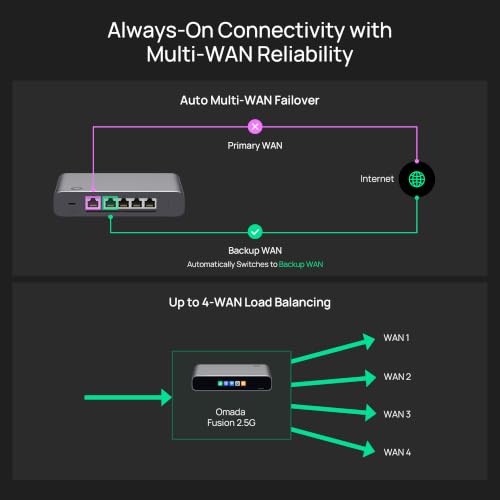
Connectivity is exclusively wired, with five auto-sensing 2.5 Gigabit Ethernet ports. This design provides outstanding speed potential for a local area network and future-proofs the connection for high-bandwidth devices like NAS systems or workstations. A key performance feature is the multi-WAN functionality. The router supports using up to four of these ports as WAN interfaces, enabling load balancing to spread traffic across multiple internet connections and automatic failover to maintain uptime if one connection drops.
Key Integrated Features
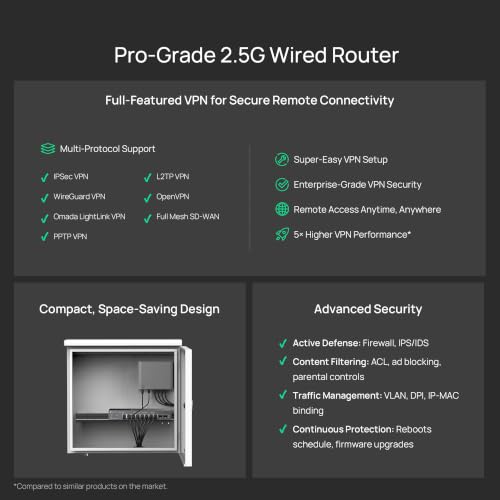
The integration of the Omada controller software directly into the router is a major feature. This built-in controller provides access to all advanced management capabilities from day one without requiring a separate hardware controller or software license. Features like one-tap bulk adoption of other Omada devices (like switches and access points) are fully available. The router also supports full-featured VPN for secure remote access, wired routing, and advanced security protocols.
The touchscreen is more than a novelty; it’s positioned as a troubleshooting tool. It can display network health scores, run on-demand speed tests, show system alerts, and provide real-time traffic monitoring. This allows for immediate on-site insight, reducing the need to carry a laptop for basic diagnostic work.
Software and Security
Security is a highlighted aspect, with the router including an advanced firewall, Intrusion Prevention and Detection System (IPS/IDS), Access Control Lists (ACL), and Quality of Service (QoS) controls. These are business-level features aimed at protecting network data and prioritizing critical traffic. Management is handled through the Omada ecosystem, which offers both local management and license-free cloud access via the Omada Cloud portal for remote oversight and configuration.
Setup, Support and Ownership
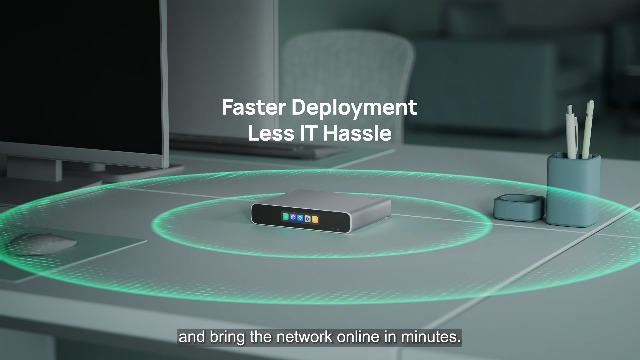
Setup is designed to be streamlined for faster deployment. The router can be initially configured via Bluetooth using the Omada mobile app, which guides the user through the process. A standout feature is its ability to automatically discover and batch adopt other compatible Omada networking devices (like switches and access points) with a single tap, significantly simplifying the rollout of a complete network.
Ownership benefits include the five-year manufacturer warranty, which suggests confidence in the product’s longevity. The license-free cloud management model means there are no ongoing subscription fees to access remote management features, a significant cost advantage. Firmware updates would presumably be delivered through the Omada Cloud platform to maintain security and add features, though the specific update policy is not detailed in the provided data. As a wired-only device, expanding the network for wireless connectivity would require the purchase of separate Omada wireless access points.
What Owners Say
As a newer product model, detailed owner feedback and long-term reliability reports are not yet widely available. The manufacturer’s listing shows a rating, but no specific review excerpts are provided in the data. Prospective buyers should consider that while the feature set is extensive on paper, real-world performance and ease of use for complex features like IPS/IDS configuration may require more user experience data to fully assess.
Pros and Cons
Pros
- Built-in Omada controller eliminates need for separate hardware
- Integrated touchscreen enables quick on-site monitoring and troubleshooting
- Five 2.5GbE ports offer high-speed wired connectivity and multi-WAN flexibility
- License-free cloud management provides full remote access without subscriptions
- Advanced security suite includes IPS/IDS, ACL, and QoS
- Streamlined setup with Bluetooth and bulk device adoption
Cons
- Wired-only design requires separate access points for Wi-Fi
- Advanced features may demand networking knowledge to configure optimally
- Limited long-term user data available as a newer model
- Focus on business features may be overkill for simple home networks
- Physical size and form factor may not suit all home decor styles
- Setup simplicity for advanced features like VPN may still have a learning curve
Who Should Buy It (and Who Should Skip It)
The Omada by TP-Link Fusion 2.5G router is an excellent fit for specific users. Small business owners or IT managers needing a reliable, high-performance wired network backbone with multi-WAN redundancy should strongly consider it. It’s also ideal for tech enthusiasts building a sophisticated home lab or media server environment where 2.5GbE speeds, VLANs, and advanced traffic management are desired. Users already invested in or planning to adopt the Omada ecosystem for switches and access points will benefit most from the integrated controller and streamlined management.
Conversely, this router is not the right choice for someone seeking an all-in-one wireless solution for a typical home. Anyone who needs built-in Wi-Fi should look elsewhere. Users with very basic internet needs—simple web browsing and streaming on a few devices—will find its extensive features unnecessary and potentially complex. Those uncomfortable with networking concepts beyond basic setup might be overwhelmed by the advanced security and configuration options, despite the simplified initial deployment.
Final Verdict
The Omada by TP-Link Fusion 2.5G makes a compelling case for itself in the business and prosumer networking space. By integrating a capable router, a multi-gigabit switch, a network controller, and a diagnostic touchscreen into one device, it reduces hardware clutter and simplifies the management stack. Its performance specifications, centered on a quad-core CPU and five 2.5GbE ports, promise to handle demanding wired traffic, while features like 4-WAN load balancing and failover provide crucial reliability for business continuity.
While its wired-only nature and professional feature set clearly define its target audience, its execution appears thoughtful. The license-free cloud management and touchscreen for on-the-spot insights address real pain points in network administration. For those whose needs align with its capabilities—particularly small businesses, IT professionals, and advanced users building managed networks—the Omada Fusion 2.5G router represents a well-rounded, forward-looking solution worth serious consideration. As with any newer tech product, those interested can find more insights on networking solutions in our guides on the best VPN routers and for larger-scale needs, the best enterprise servers for network security management.
FAQs
Does the Omada Fusion 2.5G Router have Wi-Fi?
No, the Omada Fusion 2.5G is a wired-only router. It does not have any built-in wireless radios. To provide Wi-Fi coverage, you must connect separate wireless access points to its LAN ports. It is designed to work seamlessly with Omada-branded access points, which can be managed through the same built-in controller.
What is the benefit of the built-in touchscreen?
The 2.51-inch touchscreen provides instant, on-device access to key network information without needing a computer or smartphone. You can check the network health score, run an internet speed test, view active alerts, and monitor real-time traffic graphs. This is primarily a troubleshooting aid, allowing for quick diagnostics on-site, which can save time for IT personnel.
Is a subscription required for the cloud management features?
No. A key selling point of the Omada Fusion 2.5G is that its cloud management features are license-free. Remote access and management through the Omada Cloud portal, including all advanced capabilities of the built-in controller, are available at no extra cost from the day you set up the device.
Can I use all five Ethernet ports at the same time?
Yes, all five 2.5 Gigabit Ethernet ports are active and can be used simultaneously. Their function is configurable. You can assign between one and four ports as WAN ports for connecting multiple internet sources, with the remaining ports functioning as LAN ports for your local network devices. This flexibility supports various multi-WAN strategies for load balancing and failover.
About the author

Elvis Dicki writes reviews and buying guides for CyberSecLabs.