Netgear WAX210 Review: Small Business & Lobby WiFi 6 Access Point
The NETGEAR WAX210 is a compact, affordable WiFi 6 access point offering easy setup, support for 128 devices, and WPA3 security, ideal for extending dedicated networks in small business or public spaces.
 By Elvis Dicki
Updated October 21, 2026
By Elvis Dicki
Updated October 21, 2026
The NETGEAR WAX210 is a dual-band AX1800 WiFi 6 wireless access point designed to provide a dedicated, secure wireless network separate from a main router. It targets small businesses, retail storefronts, waiting lobbies, or any public space needing reliable WiFi for customers, employees, or IoT devices without the complexity of enterprise-grade hardware. This review analyzes its specifications, design, and user feedback to determine if its compact form factor and feature set deliver value for extending network coverage.
Bottom line: The WAX210 is a capable, entry-level WiFi 6 access point that excels in simplicity and discreet installation for creating segmented networks, though its reliance on PoE and local-only management are key considerations.

Prime NETGEAR WAX210 WiFi 6 AX1800 Access Point






As an Amazon Associate we earn from qualifying purchases. Product prices and availability are accurate as of the date/time indicated.
Netgear WAX210 at a Glance
| Specification | Detail |
|---|---|
| WiFi Standard & Speed | WiFi 6 (802.11ax), AX1800 (1.8 Gbps aggregate) |
| Frequency Bands | Dual-Band (2.4GHz & 5GHz) |
| Ethernet Port | 1 x 1G Gigabit PoE (802.3af) |
| Max Client Devices | 128 (with MU-MIMO) |
| Security Protocols | WPA, WPA2, WPA3 |
| SSID Support | Up to 4 separate networks |
| Power Options | Power over Ethernet (PoE); power adapter sold separately |
| Management | Local via web interface |
| Mounting | Wall or ceiling |
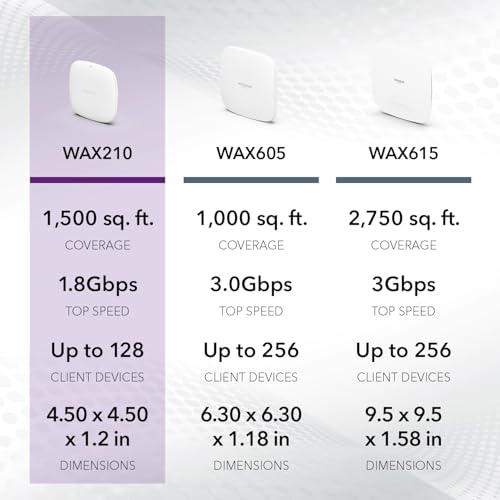
| Coverage Area | Up to 1500 square feet |
Design and Build
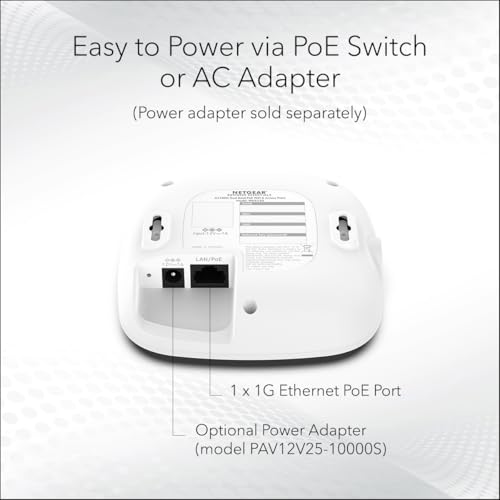
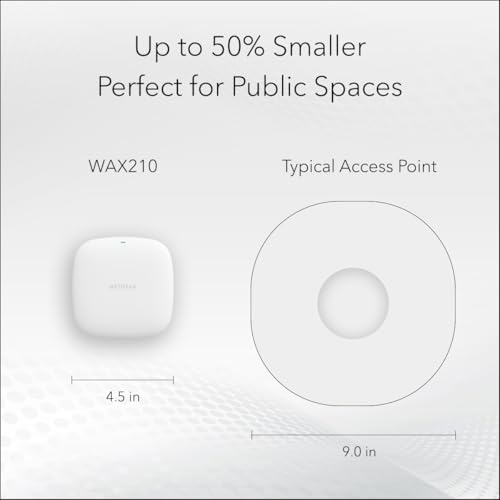
The NETGEAR WAX210 is defined by its compact, white form factor, engineered for discreet installation. Its small size is a highlighted feature, making it suitable for locations where a visible networking device is undesirable, such as retail ceilings or office lobbies. The unit includes a wall or ceiling mount kit, allowing for flexible placement to optimize WiFi coverage in out-of-the-way locations. The build is focused on practicality for its intended small business and public space use case, prioritizing a low-profile presence over flashy design elements. The single Gigabit Ethernet port with Power over Ethernet (PoE) support simplifies cabling, though the manufacturer notes a power adapter is not included and must be purchased separately if a PoE switch or injector is not available.
Performance and Features
Wireless Performance and Capacity
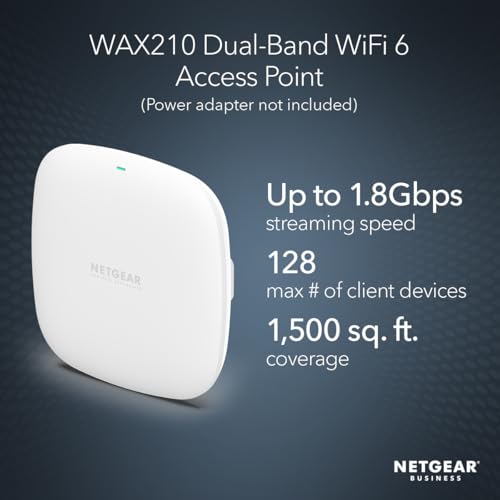
As a WiFi 6 (802.11ax) access point, the WAX210 offers dual-band AX1800 speeds, with a combined theoretical maximum data rate of 1.8 Gbps. This is broken down into 600 Mbps on the 2.4 GHz band and 1200 Mbps on the 5 GHz band. The key performance feature is its support for up to 128 simultaneous client devices, facilitated by MU-MIMO (Multi-User, Multiple-Input, Multiple-Output) technology. This makes it suitable for environments with many connected devices, such as a busy lobby or retail space with customer WiFi, employee devices, and security cameras. The stated coverage area is up to 1500 square feet.
Connectivity and Ports
Connectivity is centered on a single 1 Gigabit Ethernet port. This port supports 802.3af Power over Ethernet, which allows the device to receive both data and power over a single network cable, simplifying installation. The LAN port bandwidth is 1000 Mbps, which is the ceiling for the wired connection feeding the wireless network. There are no additional Ethernet ports for connecting wired devices directly to the access point.
Key Software and Security Features
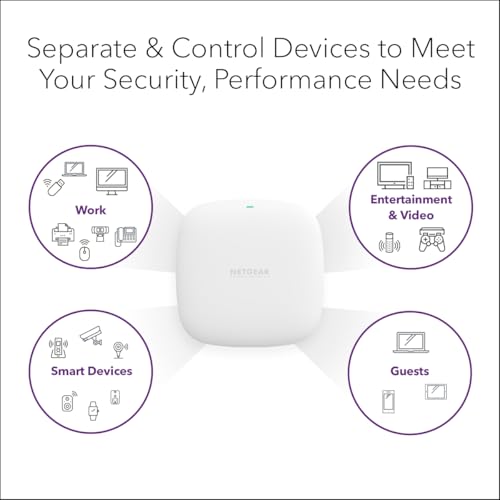
A standout feature is the ability to create up to 4 separate SSIDs (wireless network names). This allows for network segmentation, enabling an administrator to create distinct networks for guests, employees, and IoT devices, each with its own security settings. Security is robust for its class, supporting the latest WPA3 encryption protocol alongside WPA2 and WPA, helping to protect the network from intrusions. Management is performed locally through a web-based interface, featuring an instant setup wizard designed to simplify initial configuration. The device runs NETGEAR OS.
Setup, Support and Ownership
Setup is designed to be straightforward via the included instant setup wizard. Notably, some user feedback indicates the initial configuration must be performed over a wireless connection for the admin password to function correctly. Once configured, management remains local to the network. The device does not include built-in standard remote management capabilities, which are optional or subscription-based on higher-end Netgear models. Ownership considerations include the need for a Power over Ethernet source—either a PoE-capable switch or a PoE injector—as the unit ships without a power adapter. The manufacturer provides a 3-year limited warranty. Firmware updates are available from the Netgear support site to maintain performance and security, a step some owners recommend performing.
What Owners Say
Overall owner sentiment is positive, reflected in the aggregated rating. Many 5-star reviews praise the device for its performance, noting it delivered faster speeds than expected in real-world tests, with one user reporting speeds over 700 Mbps on a gigabit connection. The compact size and ease of setup are frequently highlighted as major benefits. However, there are consistent points of criticism. The most common issue raised is the lack of an included power supply, which has led to frustration and lower ratings from users who were not prepared to supply PoE. Other feedback mentions the importance of performing a full power cycle after firmware updates and the specific requirement for wireless initial setup. The rating distribution shows a majority of positive experiences, with a smaller segment of negative reviews primarily centered on the power supply omission.
Pros and Cons
Pros
- Compact, discreet design for easy wall or ceiling mounting
- Supports up to 128 client devices with WiFi 6 and MU-MIMO
- Simple setup via web-based wizard
- Creates up to 4 separate SSIDs for network segmentation
- Includes modern WPA3 security protocol
- Power over Ethernet support reduces cable clutter
Cons
- Power adapter not included; requires separate purchase or PoE source
- Only one 1G Ethernet port, limiting wired backhaul speed
- Local management only, no built-in remote access
- Initial configuration reportedly requires a wireless connection
- No support for mesh networking
- Coverage area may be limited for very large spaces
Who Should Buy It (and Who Should Skip It)
The Netgear WAX210 is an excellent fit for small business owners, retail operators, or IT managers needing to add a dedicated, secure WiFi network in a specific area like a customer lobby, storefront, or small office. It’s ideal for those who want to segment traffic (guest vs. employee) and have a simple PoE infrastructure or are willing to acquire a PoE injector. Its affordability and WiFi 6 support also make it a good option for tech enthusiasts looking to experiment with a standalone access point in a home lab or to cover a dead zone.
You should skip the WAX210 if you require remote management capabilities, need to cover a very large area (beyond 1500 sq ft) without multiple units, or are looking for a device with multiple Ethernet ports for connecting wired devices. It is also not the best choice if you lack a PoE switch or injector and are unwilling to buy one separately, as it cannot be powered out of the box. For insights on other tech setups, explore our Tech Gear guides.
Final Verdict
The NETGEAR WAX210 successfully fulfills its role as a compact, no-fuss WiFi 6 access point for specific commercial and prosumer scenarios. Its strengths lie in its discreet installation, the ability to create multiple secure networks, and support for modern WiFi standards that handle dozens of devices efficiently. For the price, it delivers solid core functionality that can solve common coverage and network segmentation problems in small spaces.
However, its value proposition is heavily dependent on the buyer’s existing infrastructure and needs. The lack of an included power adapter is a significant caveat that potential buyers must account for. Ultimately, if you understand its limitations—namely local management and the need for PoE—and your use case aligns with extending a network in a small business, retail, or lobby environment, the Netgear WAX210 is a compelling and cost-effective solution. For more expert analysis on networking and other technology categories, check out our full Reviews section.
FAQs
Does the Netgear WAX210 come with a power supply?
No, the Netgear WAX210 does not include a power adapter. It is designed to be powered via Power over Ethernet (PoE) using the included single Ethernet port, which supports the 802.3af standard. To use it, you must have a PoE-capable network switch or purchase a separate PoE injector. The manufacturer lists a specific power adapter model (PAV12V25-10000S) as sold separately.
Can I manage the WAX210 remotely?
No, the Netgear WAX210 only supports local management through its web interface. It does not include built-in standard remote management or cloud capabilities. This means you must be on the same local network to access its configuration settings. Higher-end Netgear access points offer optional or subscription-based remote management features.
How many separate WiFi networks can I create?
You can create up to 4 separate SSIDs (wireless network names) with the Netgear WAX210. This allows you to segment your network for different purposes, such as having one for guests, one for employees, and another for IoT devices, each with potentially different security settings.
Is the Netgear WAX210 good for a home network?
It can be, but it’s primarily geared towards small business or specific home use cases like a dedicated home lab, workshop, or extending coverage where a traditional router isn’t sufficient. For a typical home user looking for a simple mesh system or an all-in-one router, a consumer-grade product might be more user-friendly. For ideas on smart home integrations, see our picks for the best AI smart home devices.
About the author

Elvis Dicki writes reviews and buying guides for CyberSecLabs.