Netgear C7000-100NAS Review: A DOCSIS 3.0 Modem Router Combo for Cable Internet
The Netgear C7000-100NAS is a reliable all-in-one solution for cable internet users, offering AC1900 WiFi 5 speeds, strong security, and app-based management, though it lacks compatibility with fiber or DSL services.
 By Elvis Dicki
Updated October 20, 2026
By Elvis Dicki
Updated October 20, 2026
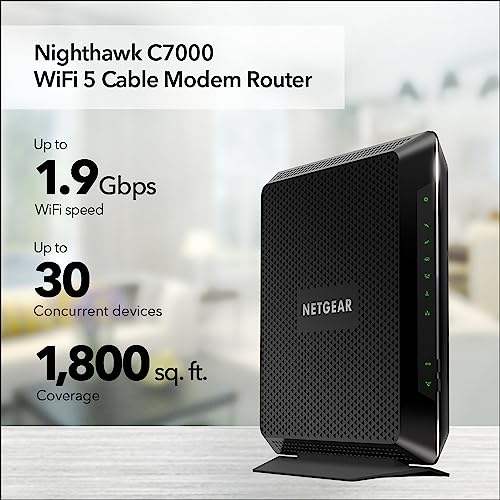
The NETGEAR Nighthawk C7000-100NAS is a modem router combo designed to consolidate home networking equipment into a single device. It combines a DOCSIS 3.0 cable modem with an AC1900 WiFi 5 router, aiming to reduce clutter and simplify setup for users of major cable internet providers. This device is targeted at households with cable internet plans up to 800Mbps from providers like Xfinity and Cox, seeking reliable performance for streaming, gaming, and connecting up to 30 devices. It represents a solid, integrated choice for cable subscribers looking to eliminate monthly rental fees from their ISP.

As a single unit, the C7000-100NAS promises to deliver the essential functions of both a modem and a router without the need for separate boxes and cables. Its key appeal lies in its certified compatibility, straightforward installation, and the convenience of managing your network through a mobile app. For users whose needs align with its specifications—primarily cable internet service within the supported speed tiers—this device can be a cost-effective and efficient solution. However, its limitations with newer WiFi standards and non-cable internet services are important considerations before purchase.
Prime NETGEAR Nighthawk C7000 Modem Router Combo AC1900




As an Amazon Associate we earn from qualifying purchases. Product prices and availability are accurate as of the date/time indicated.
Netgear C7000-100NAS at a Glance
| Specification | Detail |
|---|---|
| Product Type | Modem Router Combo (DOCSIS 3.0) |
| WiFi Standard | WiFi 5 (802.11ac) AC1900 |
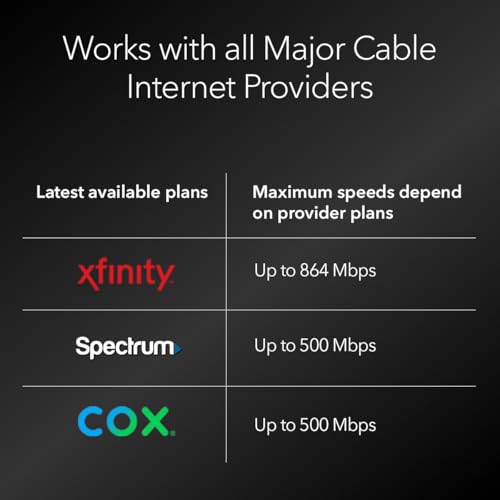
| Maximum Cable Internet Speed | Up to 800Mbps (Xfinity), Up to 500Mbps (Cox) |
| Wireless Speed | Up to 1.9Gbps combined (dual-band) |
| Coverage Area | Up to 1,800 square feet |
| Ethernet Ports | 4 x Gigabit LAN |
| USB Port | 1 x USB 2.0 |
| Compatible Services | Xfinity, Cox, Spectrum (Cable Internet only) |
| Security | WPA/WPA2, Double Firewall, DoS Protection |
| Management | NETGEAR Nighthawk App & Web Interface |
Design and Build
The Netgear C7000-100NAS features a black, angular design consistent with the Nighthawk product line. Its dimensions are listed as 9.66 inches in length, 8.31 inches in height, and 1.7 inches in width, giving it a relatively compact footprint for a combined device. The internal antenna design contributes to a cleaner look without external protrusions. The build is centered on the core function of integrating a modem and router, which physically reduces the number of devices and cables required in a home network setup. The product’s design prioritizes function, with status LEDs on the front for quick diagnostics of power, internet, and WiFi connectivity.
From a construction standpoint, the device is engineered to be a stationary component of a home office or entertainment center. The manufacturer, NETGEAR, states it has over 30 years of home networking innovation behind this product. The unit weight is listed as 9.07 grams, which seems exceptionally light based on the provided data; typical networking equipment of this size would be heavier, but the official specification is recorded as such. The design facilitates the primary setup process: connecting a single coaxial cable from the wall outlet to the device.
Performance and Features
Connectivity and Speed
The C7000-100NAS is built around DOCSIS 3.0 technology with 24×8 channel bonding. This specification supports cable internet plans with download speeds up to 800Mbps from Xfinity and up to 500Mbps from Cox, according to the manufacturer’s certification. The wireless component uses the WiFi 5 (802.11ac) standard, designated as AC1900. This provides combined dual-band speeds up to 1.9Gbps, split between the 2.4GHz and 5GHz frequency bands. Features like Beamforming+ are included to help focus the WiFi signal towards connected devices, aiming to boost range and reduce dead spots within the stated coverage area of up to 1,800 square feet.
The device is designed to handle multiple devices simultaneously, with marketing materials suggesting support for up to 30 devices. The dual-band functionality allows it to intelligently select between bands to minimize interference. For wired connections, it offers four Gigabit Ethernet LAN ports, providing stable, high-speed links for computers, gaming consoles, or network-attached storage. A single USB 2.0 port is also present for connecting peripheral devices like printers or external storage drives, though the data transfer capabilities of this port are not detailed in the provided specifications.
Software and Security
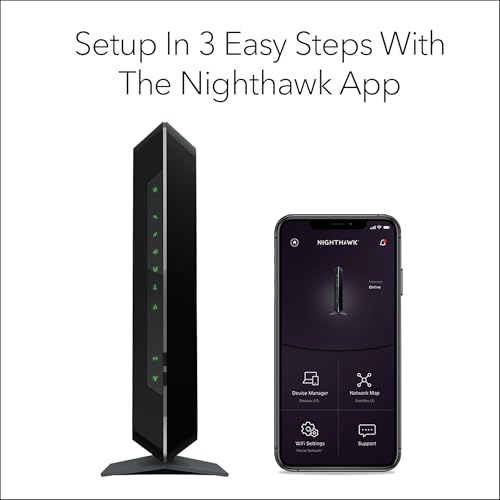
Network management is offered through both a web browser interface and the free NETGEAR Nighthawk mobile app for iOS and Android. The app allows users to set up the device, run speed tests, manage connected devices, pause internet access on specific devices, and control the network remotely. For security, the device includes several built-in protections: WPA/WPA2 wireless encryption, a double firewall, and denial-of-service (DoS) attack prevention. The system also supports automatic firmware updates to address security vulnerabilities without user intervention.
An optional security add-on is available in the form of NETGEAR Armor, which is advertised as providing enhanced protection against hackers, malware, and identity theft. A 30-day free trial is included with the device, after which a separate subscription is required. The core security features, however, operate at no extra cost. The device also supports the creation of a separate guest WiFi network, allowing visitors to access the internet without gaining entry to the primary home network.
Setup, Support and Ownership
Setup is designed to be straightforward. The process involves connecting the coaxial cable to the device, plugging in the power, and then either using the Nighthawk app or a web browser to complete the configuration. A critical subsequent step is activating the modem with the internet service provider (ISP), which is required for the service to work. The manufacturer provides a 1-year warranty for the product. Support is available through NETGEAR, and the automatic update feature is intended to keep the device’s software current with security patches and performance improvements over time.
Ownership of this device primarily means avoiding the monthly modem rental fee typically charged by cable providers, which can lead to long-term savings. It is important to note that the product is specifically for cable internet services in the United States. It is not compatible with fiber optic, DSL, or satellite internet services. It also does not support bundled voice (home phone) services from cable companies. There are no upgrade or accessory options mentioned in the provided data, suggesting the device is a standalone unit.
What Owners Say
Owner feedback, as reflected in the review excerpts and rating distribution, is generally positive. The overall rating is high, with a significant majority of reviews being five-star ratings. Positive reviews frequently highlight a substantial improvement in internet speed and reliability compared to equipment provided by ISPs. Users report successful setups, strong WiFi coverage, and the benefit of consolidating devices. Many appreciate the elimination of rental fees and the performance for activities like streaming and gaming.
Critical reviews exist but are less common. Some negative feedback points to issues with the device’s web interface being slow or cumbersome. Other critical reviews may relate to compatibility problems or specific technical hiccups during setup. The distribution shows that while most users are highly satisfied, a smaller segment has encountered difficulties that impacted their experience. The data indicates that NETGEAR’s customer service has been active in responding to some of these concerns in review forums.
Pros and Cons
Pros
- All-in-one design reduces clutter and simplifies setup
- Strong, certified compatibility with major cable providers like Xfinity and Cox
- Reliable performance for streaming and gaming on multiple devices
- Built-in security features with automatic updates
- Convenient remote management via the Nighthawk mobile app
- Four Gigabit Ethernet ports for stable wired connections
Cons
- Not compatible with fiber, DSL, or satellite internet services
- Uses older WiFi 5 standard instead of newer WiFi 6 or 6E
- Maximum supported internet speed is capped for future higher-tier plans
- Some users report a slow or clunky web interface
- USB port is version 2.0, which is slower than modern standards
- Limited to cable internet providers in the United States
Who Should Buy It (and Who Should Skip It)
The Netgear C7000-100NAS is an excellent choice for specific users. It is ideal for households with Xfinity, Cox, or Spectrum cable internet plans at or below 800Mbps who want to stop renting equipment from their provider. Users with a mix of wireless and wired devices—up to around 30—who engage in streaming, video conferencing, and online gaming will find its performance sufficient. It’s also a good fit for those who value a simple, consolidated setup and want to manage their network easily from a smartphone.
This device is not suitable for everyone. Users with fiber optic, DSL, or satellite internet should skip it, as it is incompatible. Those subscribing to internet plans faster than 800Mbps or who anticipate upgrading to gigabit or multi-gigabit speeds in the near future should look for a DOCSIS 3.1 modem router combo instead. Households requiring the latest wireless technology for future-proofing, such as WiFi 6, or those with very large homes needing coverage beyond 1,800 square feet should consider other options. For more advanced networking needs, exploring dedicated routers that support custom firmware like those in our guide on the best routers for OpenWRT might be beneficial.
Final Verdict
The NETGEAR Nighthawk C7000-100NAS successfully fulfills its role as a capable and convenient modem router combo for cable internet subscribers. Its strengths are clear: it consolidates two devices into one, works reliably with major providers, and delivers solid AC1900 WiFi 5 performance suitable for most common household internet activities. The inclusion of robust security features and an easy-to-use management app adds significant value. For users whose service and speed requirements fit within its boundaries, it represents a smart purchase that can pay for itself by eliminating monthly rental fees.
However, its limitations define its ideal user narrowly. The reliance on the older DOCSIS 3.0 and WiFi 5 standards means it lacks future-proofing for next-generation high-speed plans and wireless devices. Its incompatibility with non-cable internet services is a major exclusion. Within the context of its intended use—as a cost-effective, integrated solution for mainstream cable internet—it performs very well. For those with compatible plans, it is a recommended device. Users with different needs, such as those in large homes, may want to read about the best routers for large homes for alternatives that focus solely on expansive wireless coverage.
FAQs
Is the Netgear C7000-100NAS compatible with my internet service?
The C7000-100NAS is certified for use with cable internet providers, specifically Xfinity for plans up to 800Mbps and Cox for plans up to 500Mbps. It is also listed as working with Spectrum. It is not compatible with fiber optic (like Verizon Fios or AT&T Fiber), DSL, satellite (like DirecTV or DISH), or any bundled voice (home phone) services from cable companies. You must confirm with your specific cable provider and plan before purchasing.
How many devices can connect to this modem router?
The manufacturer states the device is designed to support up to 30 connected devices. This includes a mix of wireless devices on the 2.4GHz and 5GHz bands and wired devices connected to its four Gigabit Ethernet ports. The dual-band technology helps manage traffic across these devices to maintain performance during peak usage times.
Does this device support WiFi 6?
No, the Netgear C7000-100NAS uses the WiFi 5 (802.11ac) standard, specifically AC1900. It does not support the newer WiFi 6 (802.11ax) standard. WiFi 5 is still capable and widespread, but WiFi 6 offers improvements in efficiency, speed in congested environments, and battery life for devices. If future-proofing for WiFi 6 is a priority, you would need to look at other models.
What is the difference between a modem router combo and separate units?
A modem router combo, like the C7000-100NAS, integrates both a cable modem and a wireless router into a single hardware unit. This simplifies setup, reduces cable clutter, and often lowers the upfront cost compared to buying two high-quality separate devices. The main advantage of separate units is flexibility; you can upgrade the router independently for better WiFi performance or features—such as those needed for gigabit internet—without replacing the modem, and vice-versa. Combos offer convenience, while separates offer customization.
About the author

Elvis Dicki writes reviews and buying guides for CyberSecLabs.