Motorola MG7550 Review: A Reliable Modem Router Combo for Cable Internet
The Motorola MG7550 combines a 16x4 DOCSIS 3.0 modem with an AC1900 router, offering strong WiFi performance and significant savings on rental fees for cable internet subscribers.
 By Elvis Dicki
Updated October 20, 2026
By Elvis Dicki
Updated October 20, 2026
The Motorola MG7550 is a 2-in-1 cable modem and WiFi router designed for users of major cable internet service providers. This integrated device, officially approved for use with Comcast Xfinity, Cox, and Charter Spectrum, aims to replace rented equipment and deliver robust dual-band wireless coverage. It is a solid pick for households with cable internet plans up to a recommended 375 Mbps, seeking to eliminate monthly rental fees and improve their home network’s reliability and range.
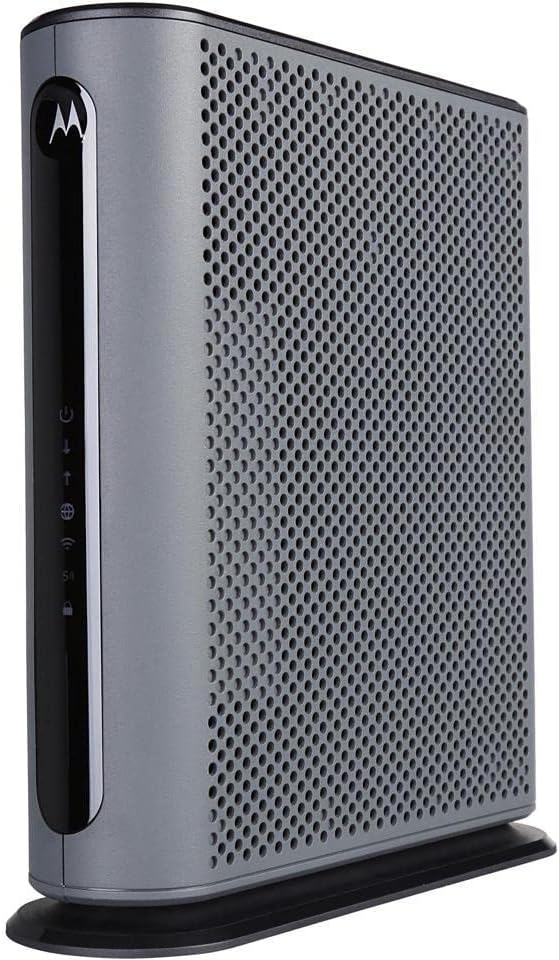
At its core, the MG7550 is a 16×4 DOCSIS 3.0 cable modem integrated with an AC1900 dual-band WiFi router featuring technologies like Power Boost and DFS. Its vertical design consolidates two devices into one, reducing clutter and power adapters. This review analyzes its specifications, design, and user feedback to determine if the Motorola MG7550 is the right networking upgrade for your home.
Motorola MG7550 Cable Modem Router Combo AC1900




As an Amazon Associate we earn from qualifying purchases. Product prices and availability are accurate as of the date/time indicated.
Motorola MG7550 at a Glance
| Specification | Details |
|---|---|
| Modem Technology | 16×4 DOCSIS 3.0 |
| WiFi Router | AC1900 Dual-Band (2.4 GHz & 5 GHz) |
| Maximum Recommended Speed | Up to 375 Mbps |
| Ethernet Ports | Four 10/100/1000 Gigabit LAN |
| Key WiFi Features | Power Boost, AnyBeam Beamforming, DFS Channels |
| Security | Firewall, WPA/WPA2, Broadcom chipset for DoS protection |
| Compatibility | Comcast Xfinity, Cox, Charter Spectrum, Suddenlink, WOW., CableOne |
| Incompatible Services | Fiber optic, DSL, Satellite (e.g., Verizon, AT&T) |
| Warranty | 2-Year Manufacturer Warranty |
| Design | Vertical, Internal Antennas |
Design and Build
The Motorola MG7550 employs a vertical, tower-like design that stands approximately 10.9 inches tall. This form factor is intended to minimize its shelf footprint while promoting better airflow for cooling compared to flat, horizontal designs. The all-black enclosure houses internal antennas, contributing to a clean, unobtrusive look suitable for a home office or living area. By integrating the cable modem and wireless router into a single unit, the setup reduces the typical tangle of wires and multiple power adapters associated with separate devices.
Build quality is supported by mention of rugged lightning and power surge protection circuits integrated into the hardware. The package includes the modem-router unit, a power adapter, an Ethernet cable, and user documentation. The vertical orientation and internal components are central to the product’s design philosophy of saving space and simplifying the user’s network setup.
Performance and Features
Modem Capabilities and Speed
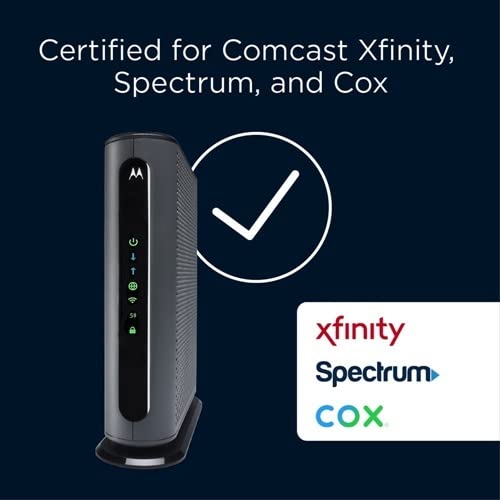
The modem component uses 16×4 channel bonding DOCSIS 3.0 technology. According to the manufacturer, this supports actual cable internet service speeds up to 375 Mbps, making it a match for many mainstream and performance cable plans. It is certified for use with several major cable providers, including Comcast Xfinity, Cox, and Charter Spectrum. It is crucial to note the product is not compatible with fiber optic, DSL, or satellite internet services from providers like Verizon or AT&T, and it lacks telephone jacks for voice service support.
WiFi Router Performance
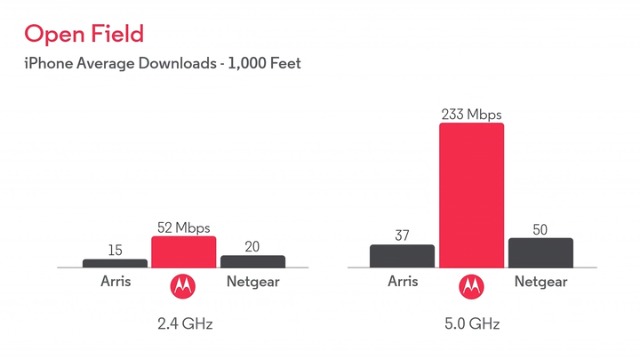
The built-in router is an AC1900 class device, offering combined speeds across its dual 2.4 GHz and 5 GHz bands. Key features aimed at enhancing wireless performance include Power Boost, which uses amplifiers to push the WiFi signal to the legal limit for improved range and speed. AnyBeam beamforming technology at both frequencies focuses the signal towards connected wireless clients. Perhaps most notably, the router supports Dynamic Frequency Selection (DFS) channels, allowing it to operate on less crowded frequencies. This is highlighted as a major advantage in multi-dwelling units or areas with significant WiFi interference from neighbors, leading to smoother performance.
Connectivity and Ports
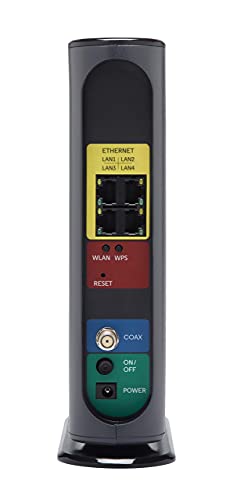
For wired connections, the Motorola MG7550 provides four Gigabit Ethernet LAN ports (10/100/1000 Mbps). These ports allow for high-speed, stable connections to desktop computers, gaming consoles, smart TVs, or network-attached storage devices. The device supports a variety of wireless communication standards, including 802.11ac, n, g, and b, ensuring compatibility with a wide range of modern and legacy WiFi devices such as smartphones, tablets, laptops, and smart home gadgets.
Security and Software
Security features include a built-in firewall and support for WPA and WPA2 wireless security protocols. The manufacturer specifies that a Broadcom cable modem chipset provides security from Denial of Service attacks. The product can be controlled via a companion app, offering a modern interface for network management. The operating system is listed as Linux-based.
Setup, Support and Ownership
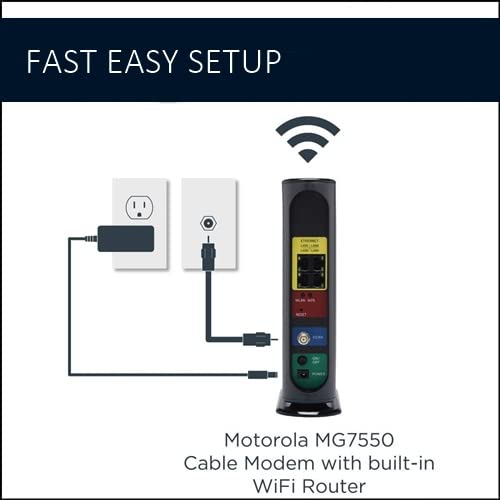
Setup is described in user reviews as straightforward, typically involving connecting the coaxial cable and power, then activating the device through the internet service provider’s website or support line. The integration of modem and router simplifies this process by eliminating a separate router setup step. The device comes with a two-year manufacturer warranty, which includes protection from power surges. Ownership primarily offers the financial benefit of eliminating monthly modem rental fees from the cable provider, a point heavily emphasized in the product data.
Long-term support would involve firmware updates, though the specific update policy or longevity is not detailed in the provided specifications. The device does not have user-replaceable external antennas, as they are internal. Its compatibility is tied to cable internet technology, so it is not a future-proof solution for users planning to switch to fiber or other non-cable services. For more insights on devices suitable for different home setups, you can explore our guide on the best routers for large homes.
What Owners Say
Owner feedback for the Motorola MG7550 is overwhelmingly positive, reflected in its high average rating. A significant majority of reviewers award it five stars. Common praises highlight the easy installation process, with many noting a simple call to their provider was all that was needed for activation. The most frequently cited benefit is the elimination of monthly equipment rental fees, with users expressing satisfaction at the long-term savings.
Performance-wise, owners report noticeably improved WiFi coverage and speed compared to their previous rented equipment, even in environments with many neighboring networks. The reliability of the connection and faster reboot times are also mentioned positively. Critical reviews are in the minority, with some low ratings potentially relating to compatibility issues or individual service problems. The consensus from user reviews is that the device delivers on its core promises of saving money and providing a strong, reliable home network for cable internet subscribers. For users with very high-speed plans, our review of the best routers for gigabit internet may be of interest.
Pros and Cons
Pros
- Eliminates monthly cable modem rental fees
- Strong WiFi performance with Power Boost and beamforming
- Effective in high-interference areas due to DFS support
- Simple, integrated setup reduces clutter and wiring
- Reliable operation with good range reported by users
- Includes two-year warranty and surge protection
Cons
- Not compatible with fiber, DSL, or satellite internet services
- No telephone ports for voice service
- Maximum recommended speed may limit use with higher-tier plans
- WiFi technology is Wi-Fi 4 and 5 (802.11ac), not the latest Wi-Fi 6
- Internal antennas cannot be upgraded or repositioned
- Dependent on cable provider approval and compatibility
Who Should Buy It (and Who Should Skip It)
The Motorola MG7550 is an excellent choice for current subscribers of compatible cable internet providers like Xfinity, Cox, or Spectrum who are paying a monthly equipment rental fee. It is particularly well-suited for homes in apartments or dense neighborhoods where WiFi interference is a problem, thanks to its DFS channel support. Users with internet speed tiers up to around 375 Mbps who want a reliable, all-in-one solution to simplify their setup and improve wireless coverage will find it a compelling purchase.
This device is not suitable for users with fiber optic, DSL, or satellite internet services. Those with cable plans exceeding 375 Mbps should consider a modem-router combo with higher channel bonding, like a 24×8 model. Users who require telephone jacks for landline service bundled with their internet, or those who desire the absolute latest WiFi 6/6E technology for many concurrent high-bandwidth devices, should look elsewhere. If you need a router to support a very large number of devices, our resource on the best routers for multiple devices offers alternatives.
Final Verdict
The Motorola MG7550 successfully fulfills its primary mission: providing cable internet subscribers a cost-effective and performance-oriented alternative to rented equipment. Its combination of a 16×4 DOCSIS 3.0 modem and an AC1900 router with Power Boost, beamforming, and DFS delivers reliable speeds and robust WiFi coverage that users consistently praise. The space-saving vertical design and simplified single-unit setup are practical benefits that enhance the user experience.
While its technology is not the very latest, its effectiveness in real-world conditions, especially in congested wireless environments, is a significant strength. The limitations are clear and important to heed: it is strictly for cable internet, lacks voice support, and has a speed ceiling. For the right user within those parameters, the MG7550 represents a smart investment that pays for itself over time and upgrades the home network. It stands as a reliable, value-driven workhorse in the modem-router combo category. For other networking solutions, you can browse our broader router wifi category.
FAQs
Is the Motorola MG7550 compatible with my internet provider?
The Motorola MG7550 is approved for use with several major cable internet providers, including Comcast Xfinity, Cox, Charter Spectrum, Suddenlink, WOW., and CableOne. It is crucial to confirm compatibility with your specific provider and plan before purchasing. The device is not compatible with fiber optic, DSL, or satellite services from providers like Verizon, AT&T, or CenturyLink.
What is the benefit of DFS (Dynamic Frequency Selection)?
DFS allows the router to access additional 5 GHz wireless channels that are typically less crowded. Many common routers do not use these channels. This capability makes the MG7550 less vulnerable to interference from neighboring WiFi networks, which can significantly improve wireless performance and reliability in apartments, condos, or densely populated residential areas.
Can I use this device with a internet plan faster than 375 Mbps?
The manufacturer recommends the Motorola MG7550 for actual cable internet service speeds up to 375 Mbps. While its maximum theoretical download speed is higher, using it with a plan significantly exceeding 375 Mbps may create a bottleneck, preventing you from achieving the full speeds you are paying for. For higher-speed plans, a modem with more downstream channels (like 24×8) would be more appropriate.
Does the MG7550 support WiFi 6?
No, the Motorola MG7550 does not support WiFi 6 (802.11ax). Its wireless technology is based on the Wi-Fi 4 (802.11n) and Wi-Fi 5 (802.11ac) standards. It is an AC1900 class router. While not the latest generation, AC1900 is still capable of delivering strong performance for most household needs, including streaming and gaming.
About the author

Elvis Dicki writes reviews and buying guides for CyberSecLabs.