Motorola MG7540 Review: AC1600 Dual-Band WiFi & DOCSIS 3.0 Modem
The Motorola MG7540 is a reliable modem-router combo that eliminates rental fees and offers strong performance for cable internet plans up to 300 Mbps, though it lacks compatibility with fiber or DSL services.
 By Elvis Dicki
Updated October 22, 2026
The Motorola MG7540 Cable Modem WiFi Router Combo is an integrated networking device designed for users of major cable internet providers. It combines a 16×4 DOCSIS 3.0 cable modem with an AC1600 dual-band WiFi router, aiming to provide a streamlined solution that reduces equipment clutter and ongoing rental costs. This device is positioned for households with cable internet service plans up to 300 Mbps who seek an all-in-one unit from a trusted brand. The bottom line is that the MG7540 offers a solid, space-saving option for compatible cable subscribers, delivering reliable connectivity with useful features like beamforming and DFS channel support.
This review analyzes the Motorola MG7540 based on its specifications, design, feature set, and aggregated user feedback. We will examine its performance capabilities, compatibility, and overall value proposition for typical home and small office environments. The goal is to provide a clear picture of where this modem-router combo excels and where its limitations might lead users to consider alternative solutions, such as those found in our guides on the best routers for large homes or the best routers for gigabit internet.
Motorola MG7540 Cable Modem Router Combo




As an Amazon Associate we earn from qualifying purchases. Product prices and availability are accurate as of the date/time indicated.
Motorola MG7540 at a Glance
| Specification | Detail |
|---|---|
| Product Type | 16×4 DOCSIS 3.0 Cable Modem + AC1600 WiFi Router |
| Compatible Providers | Comcast Xfinity, Cox, Charter Spectrum, Sparklight, WOW!, RCN, Mediacom |
| Recommended Speed Tier | Up to 300 Mbps |
| WiFi Standard | AC1600 Dual-Band (2.4 GHz & 5 GHz) |
| Wireless Protocols | 802.11a/b/g/n |
| Ethernet Ports | 4 x Gigabit (10/100/1000) |
| Key Features | AnyBeam Beamforming, DFS Channel Support, Built-in Firewall |
| Security | WPA2-PSK, Denial of Service (DoS) protection |
| Design | Vertical Stand, Internal Antennas |
| Warranty | 2-Year Manufacturer |
Design and Build
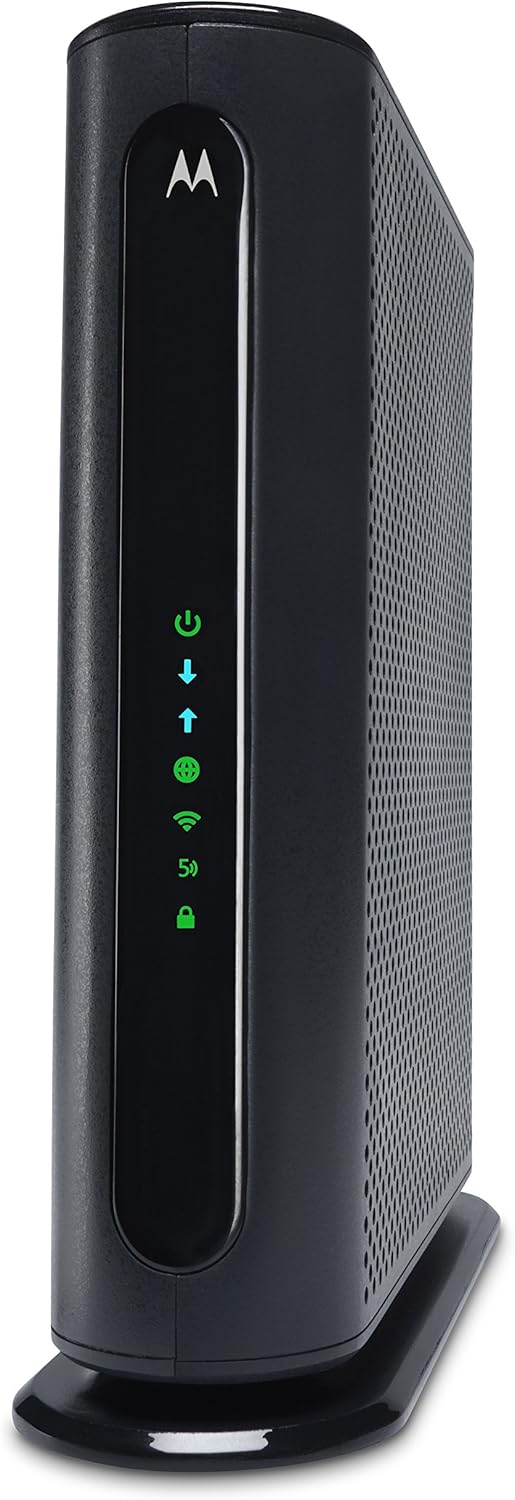
The Motorola MG7540 employs a vertical, tower-like design that is a departure from the traditional flat, horizontal router shape. This orientation is intended to minimize the shelf space required and promote better airflow for cooling, a point frequently noted in user reviews. The unit houses internal antennas, contributing to a clean, unobtrusive look suitable for placement in living areas or offices. The build integrates both the modem and router components, which the manufacturer states reduces wiring and power adapter clutter compared to using two separate devices.
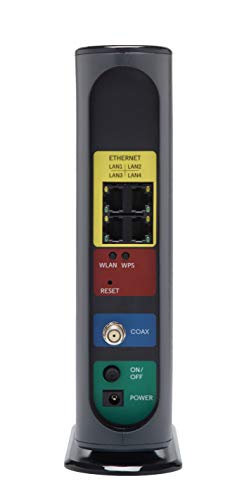
Construction includes rugged lightning and power surge protection circuits, which are part of the investment protection highlighted in the product details. The front panel features LED indicators for power, internet connectivity, and WiFi status. The rear panel houses the coaxial cable connection for internet, the four Gigabit Ethernet LAN ports, a power input, a reset button, and a WPS button for simplified wireless pairing. The overall aesthetic is a simple black finish, designed to blend into various environments.
Performance and Features
Modem Performance and Compatibility
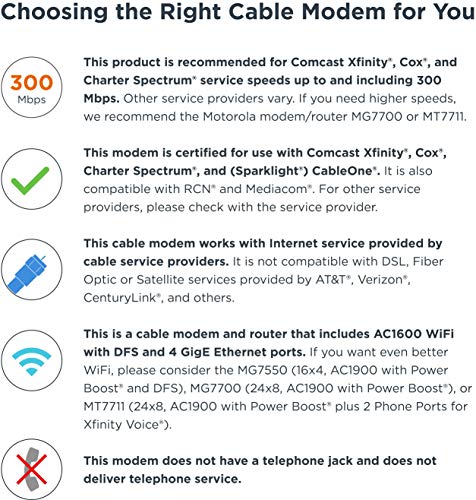
The modem component of the MG7540 is built on a 16×4 DOCSIS 3.0 channel bonding architecture. This configuration supports cable internet service speeds up to a recommended maximum of 300 Mbps, though the manufacturer notes the product is capable for actual service speeds up to 375 Mbps. It is certified for use with major cable providers including Comcast Xfinity, Cox, and Charter Spectrum, among others. A key selling point is the potential to eliminate monthly equipment rental fees from the service provider. It is crucial to note the device’s incompatibility: it will not work with Verizon, AT&T, CenturyLink, or any fiber optic, DSL, or satellite internet services. Furthermore, this model lacks telephone jacks and does not support voice calling services.
Wireless and Wired Connectivity
The built-in router delivers AC1600 dual-band WiFi, operating simultaneous networks on the 2.4 GHz and 5 GHz bands. The 5 GHz band is typically less congested and offers faster speeds for compatible devices, while the 2.4 GHz band provides better range. The router supports the 802.11a/b/g/n wireless protocols. A significant feature is its support for WiFi DFS (Dynamic Frequency Selection) frequencies, which allows it to access less crowded wireless channels and reduces vulnerability to interference from neighboring networks. This can be a major advantage in densely populated areas like apartment complexes.
For wired connections, the Motorola MG7540 provides four 10/100/1000 Gigabit Ethernet ports. These enable stable, high-speed connections for devices where latency and reliability are paramount, such as desktop computers, gaming consoles, or smart TVs. The inclusion of a full suite of Gigabit ports is a strong point for users who prefer wired networking for key devices.
Key Networking Features
Motorola includes its AnyBeam beamforming technology for both the 2.4 GHz and 5 GHz bands. This technology focuses the wireless signal towards connected clients rather than broadcasting uniformly, which can enhance performance and effective range for those devices. On the security front, the device includes a standard firewall and a Broadcom chipset that provides protection from Denial of Service (DoS) attacks. Wireless security is managed via WPA2-PSK encryption. The device also features WPS (Wi-Fi Protected Setup) for easier connection of compatible devices.
Setup, Support and Ownership
Setup for the MG7540 typically involves connecting the coaxial cable, plugging in the power, and then contacting the internet service provider to activate the device on the network. Many user reviews describe the process as straightforward. The integrated nature of the device means there is only one physical unit and one power adapter to manage, simplifying the initial installation compared to a separate modem and router setup.
Motorola provides a two-year manufacturer’s warranty, which offers a degree of long-term security for the purchase. The product details do not specify a detailed roadmap for firmware updates or a dedicated management app. Some user feedback mentions a lack of manual control over updating the modem’s software, with updates potentially happening automatically without user notification. For users seeking more advanced control or features, exploring dedicated router options like those in our roundup of the best routers for OpenWRT might be worthwhile.
What Owners Say
Owner feedback for the Motorola MG7540 is generally positive, reflected in its aggregated rating. A significant majority of reviews are favorable, with many users praising its reliability, ease of setup, and the cost savings from eliminating rental fees. Several long-term users report the device working without issue for many years, citing its stable performance and cool operation. The dual-band WiFi and strong signal coverage are frequently highlighted as benefits.
Some critical reviews mention initial setup quirks or intermittent issues that sometimes resolve after a period of use, potentially after automatic firmware updates. The limitations are also noted by users: the incompatibility with non-cable internet services is a common point of confusion for some, and the lack of telephone support is mentioned by those who needed it. The speed cap is acceptable for users on plans up to 300 Mbps but is a consideration for those with or planning to upgrade to faster tiers, where a device like those in our guide for the best routers for multiple devices under heavier loads might be more appropriate.
Pros and Cons
Pros
- Eliminates ongoing cable modem rental fees.
- Broad compatibility with major cable internet providers.
- Reliable AC1600 dual-band WiFi with beamforming technology.
- Support for DFS channels reduces wireless interference.
- Four Gigabit Ethernet ports for wired connections.
- Space-saving vertical design with integrated modem and router.
- Includes a two-year warranty and surge protection.
Cons
- Not compatible with fiber optic, DSL, or satellite services.
- Lacks telephone jacks for voice calling support.
- Maximum supported speed tier is below newer modem standards.
- Limited advanced user controls for firmware updates.
- WiFi generation is Wi-Fi 4 (802.11n), not the latest standard.
Who Should Buy It (and Who Should Skip It)
The Motorola MG7540 is an excellent choice for subscribers of Comcast Xfinity, Cox, Spectrum, or other compatible cable providers who are on an internet plan of 300 Mbps or lower and want to stop paying monthly rental fees. It’s ideal for users seeking a simple, all-in-one solution that reduces clutter and offers reliable performance for typical home activities like streaming, browsing, and gaming. The DFS and beamforming features make it particularly suitable for environments with many neighboring WiFi networks.
This device should be skipped by anyone with fiber optic, DSL, or satellite internet, as it is fundamentally incompatible. Users who require telephone (VoIP) service through their modem will need a model with phone jacks. Those with internet plans above 300 Mbps, or who plan to upgrade to gigabit speeds in the near future, should consider a DOCSIS 3.1 modem or a more powerful router. Additionally, networking enthusiasts who desire granular control over firmware updates and advanced settings may find the MG7540 too basic.
Final Verdict
The Motorola MG7540 Cable Modem WiFi Router Combo delivers on its core promise: providing a dependable, integrated networking device for cable internet users. Its strengths lie in its proven compatibility, cost-saving potential, and thoughtful features like beamforming and DFS support that enhance real-world WiFi performance. The vertical design is practical, and the inclusion of four Gigabit ports ensures solid wired connectivity options. For the right user—someone firmly in the cable ecosystem with a sub-300 Mbps plan—it represents a sensible and reliable investment.
However, its limitations are clear and important. The incompatibility with non-cable services and lack of voice support narrow its audience. Its speed ceiling means it is not future-proof for those anticipating internet service upgrades. While not the newest standard, its Wi-Fi 4 (AC) performance is sufficient for its target speed tier. In summary, the Motorola MG7540 is a robust workhorse for its intended use case, offering a clutter-free solution and long-term value by cutting rental fees, but buyers must ensure their internet service and needs align precisely with its capabilities.
FAQs
Is the Motorola MG7540 compatible with my internet provider?
The MG7540 is certified for use with many cable internet providers, including Comcast Xfinity, Cox, and Charter Spectrum. It is explicitly not compatible with Verizon, AT&T, CenturyLink, or any fiber optic, DSL, or satellite services. You should always check your provider’s approved equipment list before purchasing.
Can I use this device for making phone calls?
No. The Motorola MG7540 model does not have telephone jacks and cannot be used for making or receiving telephone calls. If you subscribe to a voice service from your cable provider, you would need a modem that supports voice, often referred to as an EMTA.
What is the maximum internet speed this modem supports?
The manufacturer recommends the Motorola MG7540 for cable internet service speeds up to 300 Mbps and states it is capable for actual service speeds up to 375 Mbps. It is a 16×4 DOCSIS 3.0 modem. For plans significantly above 300 Mbps, a DOCSIS 3.1 modem would be more appropriate.
What does DFS channel support mean for my WiFi?
DFS (Dynamic Frequency Selection) allows the router to operate on additional 5 GHz wireless channels that are typically used by radar systems. Most consumer routers avoid these channels. By being able to use them, the MG7540 has access to a larger pool of potential frequencies, making it much less likely to suffer from interference caused by neighboring WiFi networks, which can lead to a more stable and consistent wireless connection.
About the author

Elvis Dicki writes reviews and buying guides for CyberSecLabs.