Minisforum X1-255 Review: Barebone Mini PC with OCuLink and WiFi 7
The MINISFORUM X1-255 is a highly expandable barebone system built around an 8-core AMD Ryzen CPU, designed for power users who want a compact yet powerful and future-proofed PC.
 By Elvis Dicki
Updated October 22, 2026
The MINISFORUM X1-255 Mini PC AMD Ryzen 7 255 Barebone represents a focused entry into the high-performance small form factor market, targeting enthusiasts and professionals who want to build a compact PC tailored to their exact needs. This is a barebone system, meaning it arrives without RAM, storage, or an operating system, presenting a blank canvas for those comfortable with component installation. Powered by an AMD Ryzen 7 255 processor and packed with forward-looking connectivity like WiFi 7 and an OCuLink port for external GPUs, it promises a blend of raw processing power and versatile expansion in a tiny chassis. For users seeking a compact workhorse for productivity, multi-monitor setups, or specialized applications, the X1-255 offers a compelling mix of modern features and user-configurable flexibility.
It’s designed for a specific user: someone who values the ability to choose their own memory, storage, and OS, and who needs the advanced networking and connectivity options typically found in larger desktops. The inclusion of features like a 2.5G LAN port, support for up to four simultaneous displays, and an active cooling system for memory and storage highlights its intent for sustained, demanding workloads. While not a pre-built plug-and-play solution, its extensive upgrade paths make it a future-proof platform for tech-savvy buyers looking to maximize performance per cubic inch. This review will analyze its specifications, design, and potential use cases to determine if this barebone mini PC is the right foundation for a powerful compact build.

Prime MINISFORUM X1-255 Mini PC



As an Amazon Associate we earn from qualifying purchases. Product prices and availability are accurate as of the date/time indicated.
Minisforum X1-255 at a Glance
| Specification | Detail |
|---|---|
| Processor | AMD Ryzen 7 255 (8 Cores / 16 Threads) |
| Graphics | AMD Radeon Integrated Graphics |
| Memory Support | Dual SO-DIMM Slots, up to 96GB (User Installed) |
| Storage Support | Three M.2 2280 PCIe 4.0 SSD slots (one used for OCuLink), up to 12TB total |
| Video Outputs | 1x HDMI, 1x DisplayPort, 2x USB4 (Supports 4 displays total) |
| Networking | WiFi 7, Bluetooth 5.4, 1x 2.5G LAN Port |
| Special Ports | OCuLink (PCIe 4.0 x4 for external GPU) |
| Audio | Built-in Dual Digital Microphones with Noise Reduction, Built-in Speaker |
| Cooling | 3D Airflow Design with Active Memory/SSD Cooler |
| Operating System | None Pre-installed (Supports Windows) |
Design and Build
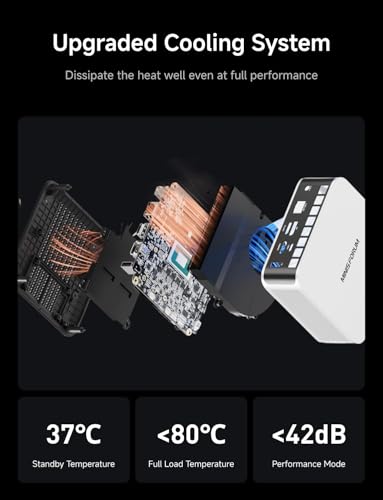
The MINISFORUM X1-255 adopts a compact, silver chassis designed around a small form factor. Its lightweight build, listed at 1.3 pounds, makes it highly portable and easy to mount discreetly behind a monitor or under a desk. The design philosophy is clearly centered on cooling and connectivity. The chassis features large-area cooling vents on the sides and bottom, which are part of a described three-dimensional airflow channel. This system is designed to draw cold air from the bottom and expel hot air through the rear sides to prevent heat accumulation, a critical consideration for a compact PC housing an 8-core processor.
A notable design feature is the active memory and SSD cooler located at the bottom of the unit. According to the manufacturer, this ensures memory and SSD operate at optimal speeds, aiming to maintain smooth system performance under load. The port layout appears comprehensive for its size, with video and high-speed ports concentrated on the rear. The overall aesthetic is utilitarian and professional, fitting for office, home lab, or media center environments where a low-profile presence is valued. As a barebone system, the design inherently prioritizes internal access for component installation, though specific details on the ease of opening the chassis are not listed by the manufacturer.
Performance and Features
Processing Power and Graphics
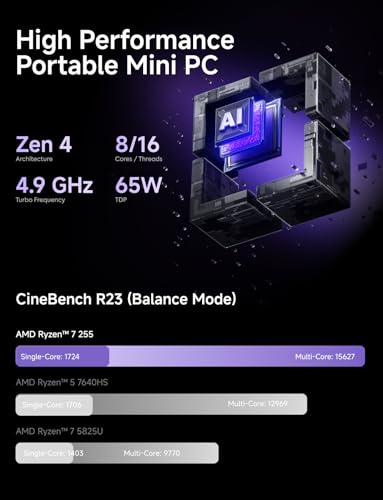
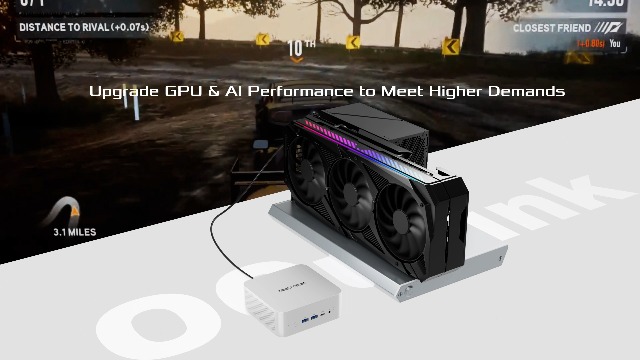
At the heart of the X1-255 is the AMD Ryzen 7 255 processor, an 8-core, 16-thread chip with a base speed of 3.8 GHz. This CPU is positioned by MINISFORUM to handle a wide range of tasks seamlessly, including image editing, web browsing, light gaming, movie watching, daily computing, and programming. The integrated graphics are provided by AMD Radeon Graphics, which will handle basic display output and light graphical workloads. For more demanding graphical applications, the system’s unique OCuLink port becomes a key feature, enabling the connection of an external GPU at PCIe 4.0 x4 speeds, which the manufacturer states is faster than Thunderbolt 4 or USB4 for this purpose.
Connectivity and Ports
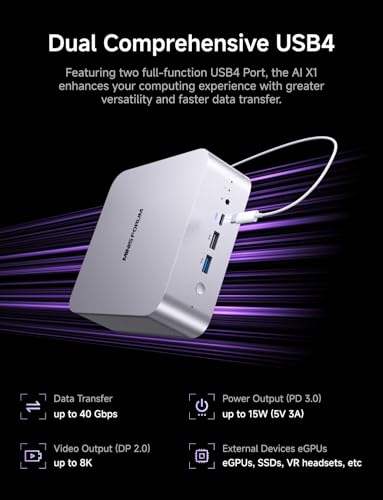
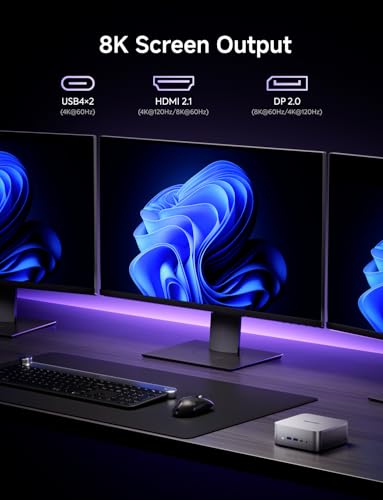
Connectivity is a major selling point for the X1-255. It offers a total of four video outputs: one HDMI port, one DisplayPort, and two USB4 ports, allowing users to connect up to four displays simultaneously for an expansive multi-monitor workspace. For networking, it provides both cutting-edge wireless and high-speed wired options. It is equipped with WiFi 7 and Bluetooth 5.4 for wireless connectivity and a 2.5 Gigabit Ethernet port for wired connections. The manufacturer suggests these enhanced networking capabilities can also expand computer functions for use as a software router, firewall, or for network isolation tasks. The OCuLink port, a standout feature, supports external PCI Express devices like GPUs, though it requires the use of one of the M.2 SSD slots and is noted as non-hot-swappable.
Expandability and Storage
The X1-255 is built for expansion. It comes with two SO-DIMM slots for laptop-style DDR5 memory, supporting up to 96GB of RAM. For storage, it provides three M.2 2280 PCIe 4.0 SSD slots. One key detail is that utilizing the OCuLink port occupies one of these M.2 slots. With the remaining slots, users can expand total storage up to 12TB, according to the manufacturer. This level of expandability in a mini PC is significant, allowing users to configure massive storage arrays for large-scale media libraries, software projects, or data sets.
Audio and Additional Features
The mini PC includes built-in dual digital microphones featuring intelligent noise-reduction technology. This is aimed at providing clear audio capture for video conferences, online classes, and voice creation, even in noisy environments. A built-in speaker is also included for basic audio output. The cooling system, as mentioned, employs a 3D airflow design supplemented by an active cooler specifically for the memory and SSD, which is intended to prevent thermal throttling and maintain consistent performance.
Setup, Support and Ownership
Potential buyers must be fully aware that the MINISFORUM X1-255 is a barebone system. Setup requires the user to procure and install compatible RAM, at least one SSD for storage and the operating system, and then install a supported OS like Windows. This process adds time, cost for components, and demands a certain level of technical competence. The package contents are listed as the mini PC itself, an HDMI cable, a US power adapter, and a manual, providing the essentials to get started after components are installed.
Ownership involves considering the upgrade paths. The system’s design supports significant future upgrades in RAM and storage. The OCuLink port offers a unique path for graphics expansion, though it comes with the trade-off of using an M.2 slot. The manufacturer provides a 2-year warranty, which offers a standard period of coverage for a system of this type. Support for the product would be handled directly by MINISFORUM, though specific details on support channels or software/driver update policies are not listed in the provided data. For those interested in compact, high-performance computing, exploring resources on platforms like our AI & Software section or the general Tech Gear category may provide additional context.
What Owners Say
At the time of this analysis based on the provided data, there are no available buyer review excerpts for the MINISFORUM X1-255. The product shows a rating, but the distribution indicates no reviews have been submitted across any star rating. Therefore, prospective buyers currently lack hands-on user feedback regarding real-world performance, reliability, noise levels, thermal performance under sustained load, or ease of the initial build process. Decisions must be made solely on the manufacturer’s specifications and stated features until user reviews become available.
Pros and Cons
Pros
- Powerful 8-core, 16-thread AMD Ryzen 7 processor
- Highly expandable RAM (up to 96GB) and storage (up to 12TB)
- Future-proof connectivity with WiFi 7 and 2.5G LAN
- Unique OCuLink port for high-speed external GPU support
- Capability to drive four displays simultaneously
- Comprehensive cooling design with active memory/SSD cooling
- Built-in dual noise-canceling microphones
Cons
- Barebone system requires user to install RAM, SSD, and OS
- OCuLink port uses one M.2 SSD slot and is not hot-swappable
- No pre-installed components extends initial setup time and cost
- Lack of available user reviews for real-world verification
- Integrated graphics limit gaming/media creation without external GPU
- Final performance dependent on quality of user-installed components
Who Should Buy It (and Who Should Skip It)
The MINISFORUM X1-255 is ideally suited for tech-savvy users, hobbyists, and professionals who want a compact, clean-slate computing platform. It’s perfect for someone building a home theater PC, a compact workstation for software development or media editing, a digital signage controller, or a network appliance where the WiFi 7 and 2.5G LAN are beneficial. Users who plan to employ an external GPU via OCuLink for heavier gaming or content creation will find this mini PC a unique and capable host. It also fits well in multi-monitor office setups or as a space-saving central home computer. For more insights into specialized computing, readers might explore our analysis of AI-focused mini PCs.
This mini PC should be skipped by users looking for a plug-and-play solution. Anyone uncomfortable with installing RAM, an SSD, and an operating system should consider a pre-configured mini PC or a traditional desktop. Those who need maximum graphics performance out of the box without purchasing an external GPU may find the integrated graphics limiting. Users who require hot-swappable external storage or who need all M.2 slots available for storage and not for an OCuLink connection might also want to look at other options.
Final Verdict
The MINISFORUM X1-255 presents a compelling proposition for a specific niche: the enthusiast or professional who desires a compact, powerful, and highly configurable computer. Its foundation is strong, with an 8-core AMD Ryzen processor, generous expansion capabilities for memory and storage, and a suite of ports that are exceptionally forward-looking, particularly the WiFi 7 and the OCuLink port. The focus on cooling, including an active cooler for memory and storage, suggests a design mindful of sustaining performance. When configured with quality components, this barebone system has the potential to serve as a potent, compact workstation, media center, or network hub.
However, its barebone nature cannot be overstated. It is a project, not a product, requiring additional investment and technical know-how. The benefits of the OCuLink port come with a direct cost to internal storage expansion. In the absence of user reviews, purchasing is an act of faith in the manufacturer’s specifications and build quality. For the right user who enjoys building their system and needs its unique blend of power, small size, and advanced connectivity, the X1-255 is a standout option in the mini PC landscape. For all others, it may represent an unnecessary hurdle. As with any tech investment, researching broader categories like our Reviews page can help inform such decisions.
FAQs
What components do I need to buy separately for the MINISFORUM X1-255?
As a barebone system, you must purchase and install compatible DDR5 SO-DIMM memory modules (laptop RAM), at least one M.2 2280 PCIe 4.0 NVMe SSD for storage, and a valid license for an operating system such as Microsoft Windows. You will also need to install the OS yourself onto the SSD. No RAM, storage, or OS is included in the base package.
What is the OCuLink port used for?
The OCuLink port is a connector standard for external PCI Express connections. On the X1-255, it operates at PCIe 4.0 x4 speed (64 Gbps) and is primarily intended for connecting an external graphics processing unit (eGPU) enclosure. This allows you to add much more powerful discrete graphics to the mini PC for gaming, video editing, or 3D rendering. Note that using this port occupies one of the internal M.2 SSD slots.
Can the MINISFORUM X1-255 run multiple monitors?
Yes, the X1-255 supports multi-monitor setups. It is equipped with one HDMI port, one DisplayPort, and two USB4 ports that also support video output. According to the manufacturer, you can connect up to four displays simultaneously using these ports, which is ideal for productivity, financial trading, or content creation workflows that benefit from extensive screen real estate.
What are the benefits of having WiFi 7 on a mini PC?
WiFi 7 (802.11be) is the latest generation of Wi-Fi technology, offering significantly higher potential speeds, lower latency, and increased capacity compared to previous standards like WiFi 6 or 6E. For a mini PC, this means potentially faster wireless file transfers, smoother streaming of high-resolution video, and a more responsive experience in online applications. It also helps future-proof the device as WiFi 7 routers become more commonplace.
About the author

Elvis Dicki writes reviews and buying guides for CyberSecLabs.