GMKtec K11 Review: Does Oculink Make It the Ultimate Mini PC for eGPU?
The GMKtec K11 is a high-performance mini PC built around the AMD Ryzen 9 8945HS, featuring 32GB DDR5 RAM, a 1TB SSD, and standout connectivity like an Oculink port for external GPUs and dual 2.5GbE LAN.
 By Elvis Dicki
Updated October 20, 2026
By Elvis Dicki
Updated October 20, 2026
The mini PC market is evolving beyond basic office tasks, and the GMKtec K11 is a bold statement in that evolution. This compact desktop packs the formidable AMD Ryzen 9 8945HS processor into a chassis barely larger than a book, targeting users who demand high-end computing power without the bulk of a traditional tower. It is engineered for gamers seeking an easy eGPU upgrade path, content creators needing multi-threaded muscle, and tech enthusiasts who want a versatile, network-capable hub for tasks like soft routing or media serving. In short, the GMKtec K11 aims to be a do-it-all powerhouse in a remarkably small package, challenging the notion of what a mini computer can achieve.

This review analyzes the K11’s specifications, design, and feature set to determine where it excels and where potential compromises lie. We’ll delve into its performance credentials, the practical benefits of its unique Oculink port, and how its extensive connectivity supports professional and entertainment workflows. Whether you’re considering it for a compact gaming setup, a multi-monitor workstation, or a home server, understanding its capabilities is key.
GMKtec K11 Mini PC Ryzen 9 8945HS 32GB DDR5 1TB


As an Amazon Associate we earn from qualifying purchases. Product prices and availability are accurate as of the date/time indicated.
GMKtec K11 at a Glance
| Specification | Detail |
|---|---|
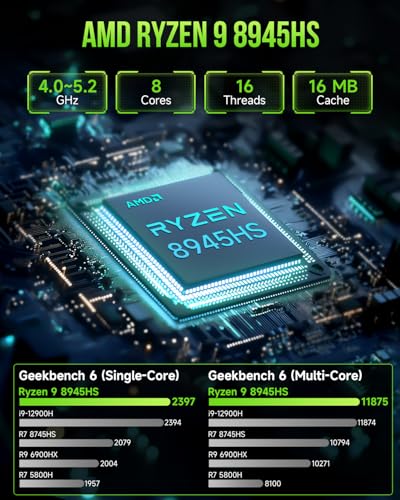
| Processor | AMD Ryzen 9 8945HS (8 cores, 16 threads, up to 5.2GHz) |
| Graphics | Integrated AMD Radeon 780M (12 cores, 2800MHz) |
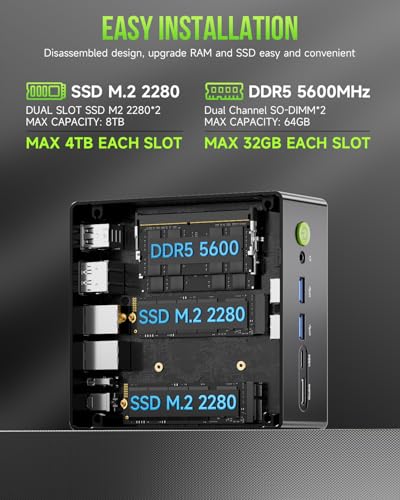
| Memory | 32GB DDR5 5600MT/s (Dual-channel, expandable to 128GB) |
| Storage | 1TB PCIe 4.0 NVMe SSD (Dual M.2 slots, expandable to 8TB) |
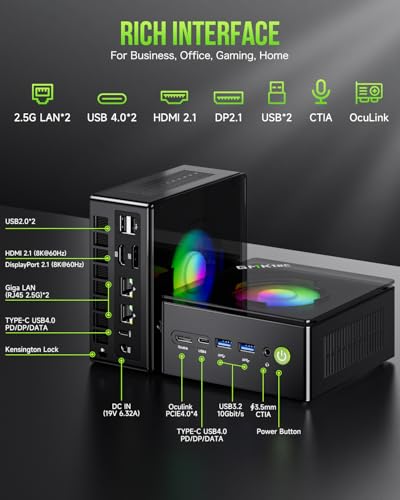
| Video Output | HDMI 2.1, DisplayPort 2.1, 2x USB4 (supports 4x 4K displays) |
| Networking | Dual Intel i226V 2.5GbE LAN, WiFi 6, Bluetooth 5.2 |
| Special Port | Oculink (for high-bandwidth eGPU connection) |
| Cooling | Hyper Ice Chamber 2.0 dual-fan system |
| Power Modes | Quiet (35W), Balance (54W), Performance (65W/70W) |
| Operating System | Windows 11 Pro |
Design and Build
The GMKtec K11 adopts a minimalist, functional aesthetic common to modern mini PCs. Its metal chassis provides a solid foundation for heat dissipation and durability, while the distinctive glossy top cover lid adds a touch of style. This translucent top is designed to be easily removable by rotating it counter-clockwise, which may hint at user-accessible components or simply serve as a design flourish. The compact form factor and light weight make it highly portable and easy to position in various setups, whether on a desk, mounted behind a monitor using the included VESA bracket, or tucked away in an entertainment center.
Build quality from the specifications suggests a focus on practical engineering. The inclusion of upgraded top and bottom large cooling fans is a critical design choice, aiming to manage the thermal output of the high-performance Ryzen 9 chip within such a confined space. The “Hyper Ice Chamber 2.0” design promotes 360-degree airflow to keep internal components cool. For those interested in even more specialized compact computing solutions, our guide on fanless mini PCs explores silent alternatives.
Performance and Features
Processing Power and Graphics
At the heart of the GMKtec K11 is the AMD Ryzen 9 8945HS, an 8-core, 16-thread processor built on a 4nm process with a maximum boost clock of 5.2GHz. This places it firmly in the high-performance segment, capable of handling demanding multitasking, content creation software, coding environments, and virtualization. The integrated AMD Radeon 780M graphics, with 12 cores running at 2800MHz, is among the most powerful iGPUs available, capable of driving light to moderate gaming and smooth 4K media playback. The BIOS allows for VRAM allocation, giving users control over how much system memory is dedicated to graphics.
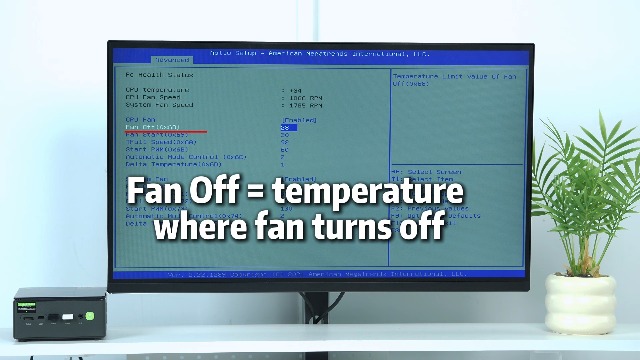
A key feature is the three user-selectable performance modes managed through the UEFI BIOS: Quiet (35W TDP), Balance (54W), and Performance (65W, upgradable to 70W). This flexibility lets users prioritize silence, balanced power, or maximum performance, directly impacting fan noise and thermal output. The manufacturer states fan noise can be as low as 35dB in Quiet mode.
Connectivity and Expansion
Connectivity is where the K11 truly distinguishes itself. The headline feature is the Oculink port, a less common interface that provides a direct PCIe x4 connection for external graphics card (eGPU) docks. This offers higher potential bandwidth and lower latency compared to more common solutions like Thunderbolt 3, making it a compelling option for gamers who want desktop-grade graphics performance from a mini PC. For gamers specifically evaluating mini PCs, our roundup of the best mini PCs for gaming provides further context.
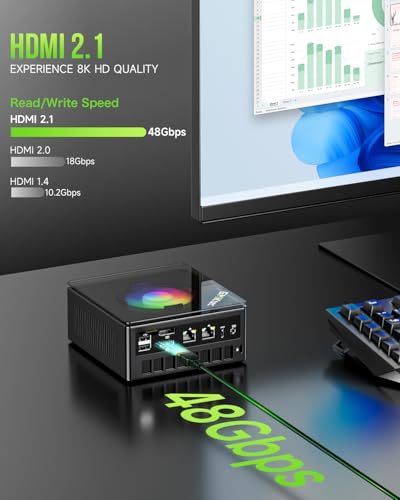
Display output is exceptionally robust, supporting up to four simultaneous displays. This is achieved via one HDMI 2.1 port (supporting 8K@60Hz), one DisplayPort 2.1 port (also 8K@60Hz), and two USB4 ports (each supporting DisplayPort Alt Mode and data speeds up to 40Gbps). This makes the K11 ideal for financial traders, video editors, or anyone needing a vast digital canvas.
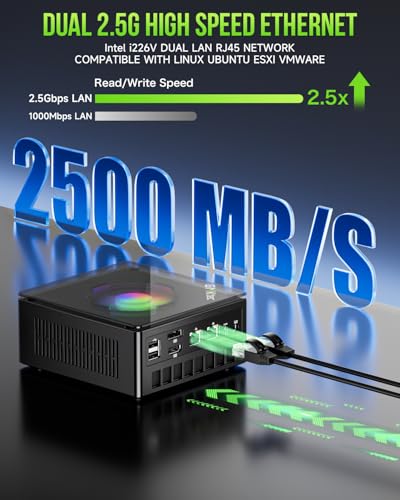
Networking is another strong suit, featuring dual Intel i226V 2.5 Gigabit Ethernet ports. This enables advanced applications like configuring the device as a firewall, a router (using software like pfSense or OPNsense), setting up link aggregation for faster NAS speeds, or running a home server. Wireless connectivity is covered by WiFi 6 and Bluetooth 5.2 for peripherals. Additional ports include two USB 3.2 Gen2 (10Gbps) ports, two USB 2.0 ports, a 3.5mm audio jack, and the DC power input.
Memory, Storage, and Upgradability
The system comes well-equipped out of the box with 32GB of dual-channel DDR5 RAM running at 5600MT/s. It features two SO-DIMM slots, allowing users to expand the memory up to a maximum of 128GB (using 64GB modules), which is substantial for a mini PC. Storage starts with a fast 1TB PCIe 4.0 NVMe SSD. Crucially, there are two M.2 2280 slots that support PCIe 4.0 x4 drives, allowing for total storage expansion up to 8TB, providing ample room for large game libraries, media collections, or project files.
Setup, Support and Ownership
Setup is described as straightforward. The package includes the mini PC, a power adapter, an HDMI cable, a VESA mount with screws, and a user manual. The process involves connecting the power supply and a display, then powering on to complete the Windows 11 Pro setup. The updated UEFI BIOS offers several user-accessible features beyond performance modes, including options for Auto Power On and Wake-on-LAN (WOL), which are useful for server or always-on applications.
GMKtec provides a 1-year limited warranty covering defects in design and workmanship from the date of purchase. The manufacturer mentions a professional after-sales team for support. For users considering other brands in the compact space, exploring options like the Geekom A5 mini PC can offer a useful comparison.
What Owners Say
Based on the available data, the GMKtec K11 has received a high rating from owners. Feedback highlights satisfaction with its overall performance, the utility of its extensive connectivity options, and its compact design. The inclusion of powerful hardware like the Ryzen 9 processor and 32GB of RAM in such a small form factor is frequently appreciated. The Oculink port is noted as a significant differentiator for users interested in eGPU setups. As with any product, some users may have encountered specific issues, but the aggregate rating indicates a positive reception for its intended use cases.
Pros and Cons
Pros
- High-performance 8-core/16-thread AMD Ryzen 9 8945HS processor
- Oculink port provides superior bandwidth for eGPU connectivity
- Extensive display support for up to four 4K/8K monitors
- Dual 2.5GbE LAN ports enable advanced networking applications
- Generous 32GB DDR5 RAM and 1TB PCIe 4.0 SSD pre-installed
- Good upgrade potential for both RAM and storage
- Effective dual-fan cooling system with selectable performance modes
Cons
- Integrated GPU, while capable, may not run demanding AAA games at high settings
- Higher power consumption in performance mode compared to lower-TDP mini PCs
- Onboard storage expansion requires purchasing additional SSDs
- Fan noise may increase under heavy load in higher performance modes
- Oculink eGPU docks and cables are less common than Thunderbolt options
Who Should Buy It (and Who Should Skip It)
The GMKtec K11 is an excellent choice for power users who need maximum performance in a minimal footprint. It is ideal for: gamers planning to use an external GPU via Oculink; content creators and professionals who utilize multi-threaded applications and multiple high-resolution monitors; and tech enthusiasts or homelab users who will leverage the dual 2.5GbE ports for networking projects, firewalls, or home servers. Its combination of CPU power, RAM, and unique connectivity makes it a versatile hub for demanding tasks.
This mini PC may not be the best fit for everyone. Users who only need basic computing for web browsing, document editing, and media consumption will find it over-specified and could opt for a more affordable, lower-power model. Those who require absolute silence for a recording studio or bedroom might prefer a fanless design, despite the performance trade-off. Additionally, buyers who want a simple plug-and-play gaming experience without the added cost and complexity of sourcing an eGPU dock and graphics card might look at dedicated gaming laptops or consoles. For those on a tighter budget, researching the broader mini PC price landscape is advisable.
Final Verdict
The GMKtec K11 successfully pushes the boundaries of the mini PC category. It is not just a small computer; it’s a thoughtfully engineered platform that balances raw processing power from the AMD Ryzen 9 8945HS with exceptional and forward-looking connectivity. The inclusion of the Oculink port is a strategic gamble that pays off for its target audience, offering a compelling upgrade path for graphics performance that surpasses more common standards. When combined with dual 2.5GbE LAN, quad-display support, and easy internal expandability, the K11 presents a compelling argument for being a primary desktop replacement for a wide range of advanced users.
While its integrated graphics have limits for high-end gaming, and its full potential requires additional investment in eGPU or storage hardware, the foundation it provides is exceptionally strong. For anyone seeking a compact, powerful, and uniquely connected computer that can adapt to roles from a gaming rig to a network appliance, the GMKtec K11 is a standout contender that deserves serious consideration.
FAQs
What is the Oculink port used for?
The Oculink port on the GMKtec K11 is a high-speed connection primarily designed for attaching an external graphics processing unit (eGPU) dock. It operates at PCIe x4 speeds, offering higher potential bandwidth and lower latency compared to interfaces like Thunderbolt 3, which can result in better performance and reduced lag for gaming and GPU-accelerated tasks when using an external desktop graphics card.
Can the GMKtec K11 run games without an external GPU?
Yes, the integrated AMD Radeon 780M graphics are among the most powerful available in a mini PC. They are capable of running many modern games at playable frame rates, particularly at 1080p resolution with medium to low settings. However, for running the latest AAA game titles at high settings or higher resolutions like 1440p or 4K, adding an external GPU via the Oculink port would be necessary for a smooth experience.
How many monitors can I connect to the K11?
The GMKtec K11 supports connecting up to four monitors simultaneously. You can use the HDMI 2.1 port, the DisplayPort 2.1 port, and both USB4 ports (in DisplayPort Alt Mode) all at the same time. Each port can support 4K resolution at 60Hz, allowing for a massive and productive multi-display workspace.
Is the RAM and storage upgradable?
Yes, the GMKtec K11 is designed for easy upgrades. It has two SO-DIMM slots for DDR5 memory, allowing you to expand beyond the pre-installed 32GB up to a maximum of 128GB. For storage, it features two M.2 2280 slots that support PCIe 4.0 NVMe SSDs. You can add a second drive alongside the included 1TB SSD, with total potential storage capacity reaching up to 8TB.
About the author

Elvis Dicki writes reviews and buying guides for CyberSecLabs.