Geekom AX8 Max Review: Can a Mini PC Handle AAA Gaming?
The Geekom AX8 Max redefines the mini PC category with desktop-level performance from its AMD Ryzen 7 8745HS processor and Radeon 780M graphics, offering exceptional expandability and pro-level connectivity in a compact aluminum frame.
 By Elvis Dicki
Updated October 20, 2026
By Elvis Dicki
Updated October 20, 2026
The Geekom AX8 Max is a significant leap forward for compact computing, challenging the notion that small form factors must compromise on power. Designed for professionals, creators, and gamers who need serious performance without a bulky tower, this mini PC packs an AMD Ryzen 7 8745HS processor, Radeon 780M integrated graphics, and a highly expandable platform into a chassis barely larger than a book. It arrives ready to tackle demanding workloads, multi-display setups, and even modern gaming, all while offering a level of future-proofing rarely seen in this category. If you’re seeking a powerful, versatile, and upgradeable desktop replacement that saves space without sacrificing capability, the Geekom AX8 Max is a compelling contender.

This review analyzes the specifications, design, and intended use cases of the Geekom AX8 Max to determine who will benefit most from its unique blend of power and portability. We’ll examine its performance potential for tasks like video editing and AAA gaming, its extensive connectivity options including dual 2.5GbE LAN ports, and its practical features like the three user-selectable performance modes. The bottom line is that the AX8 Max successfully bridges the gap between a traditional mini PC and a full-sized desktop, offering a configuration that is both powerful out of the box and designed to grow with your needs.
GEEKOM AX8 Max Mini PC: AMD Ryzen 7 8745HS






As an Amazon Associate we earn from qualifying purchases. Product prices and availability are accurate as of the date/time indicated.
Geekom AX8 Max at a Glance
| Specification | Detail |
|---|---|
| Processor | AMD Ryzen 7 8745HS (8 cores, 16 threads, up to 4.9GHz) |
| Graphics | Integrated AMD Radeon 780M (12 Compute Units, 2600 MHz) |
| Memory | 32GB DDR5 RAM (Expandable to 128GB) |
| Storage | 1TB PCIe Gen4 NVMe SSD (Upgradable to 8TB) |
| Operating System | Windows 11 Pro (Pre-installed) |
| Networking | Wi-Fi 6E, Bluetooth 5.3, Dual 2.5 Gigabit Ethernet Ports |
| Video Output | Dual HDMI, Dual USB4 (40Gbps, 8K@120Hz) – Supports Quad Displays |
| USB Ports | 5x USB 3.2 Type-A, 1x USB 2.0 Type-A, 2x USB4 Type-C |
| Cooling | IceBlast 2.0 Cooling System with Fan |
| Power Consumption | 65 Watts |
Design and Build
The Geekom AX8 Max immediately conveys a sense of premium, purpose-built engineering. Its chassis is crafted from aircraft-grade aluminum alloy, which serves a dual purpose: providing robust structural strength and acting as an efficient heat dissipation surface. The precision CNC machining results in a clean, minimalist aesthetic with a premium texture that feels solid and well-finished. The compact dimensions of approximately 5.4 x 5.1 x 1.7 inches ensure it can be placed almost anywhere—behind a monitor, mounted on a wall or the back of a display using the included VESA bracket, or tucked discreetly on a desk.
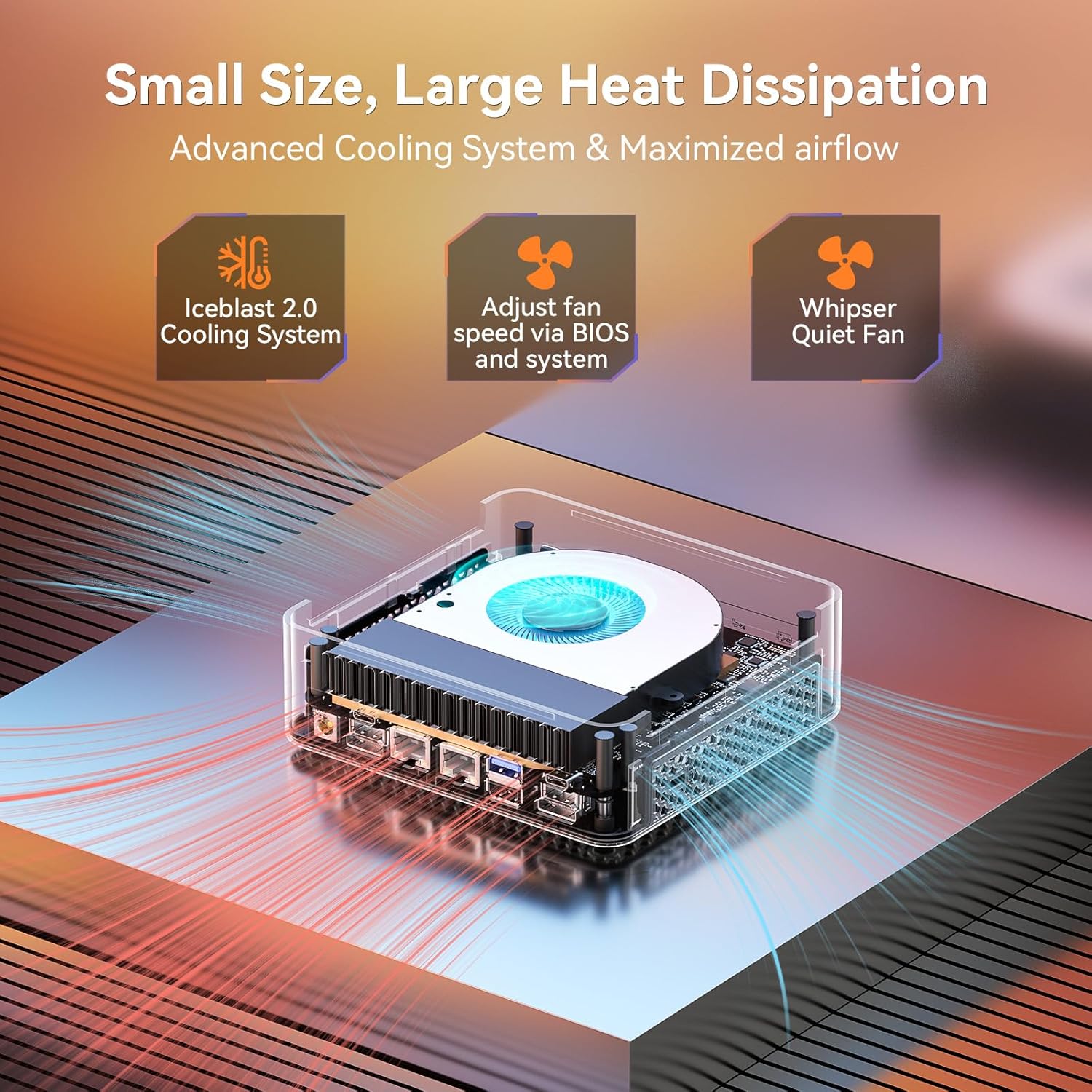
Key design elements focus on functionality and thermal management. The housing features honeycomb-style ventilation patterns that are integral to the IceBlast 2.0 cooling system, maximizing airflow through the internal components. The port layout is comprehensive and logically arranged, providing easy access for all connections. The overall impression is of a device that prioritizes performance and durability over flashy aesthetics, making it suitable for both professional office environments and home setups. For those interested in other compact computing solutions, our guide to fanless mini PCs explores silent alternatives.
Performance and Features
Processing and Graphics Power
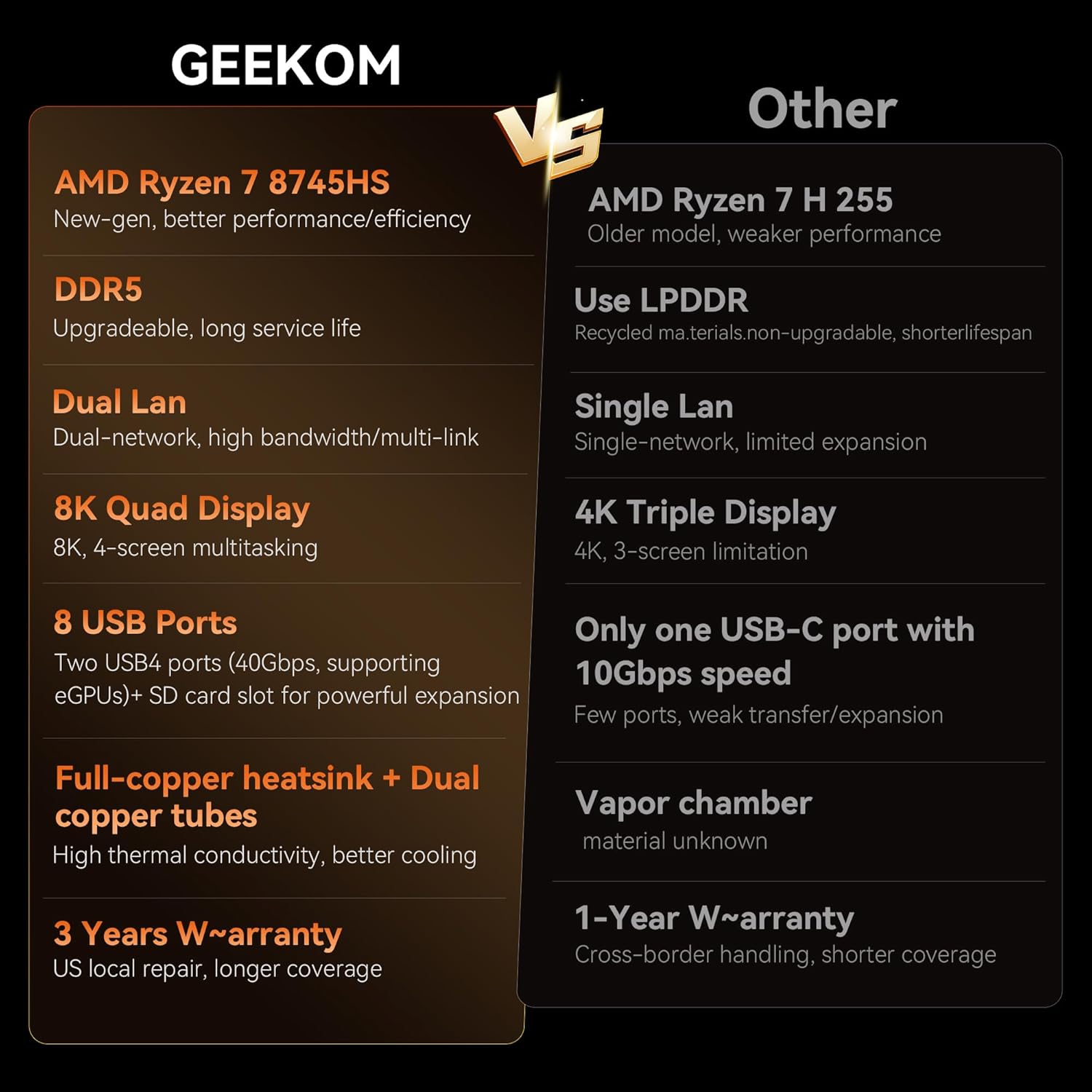
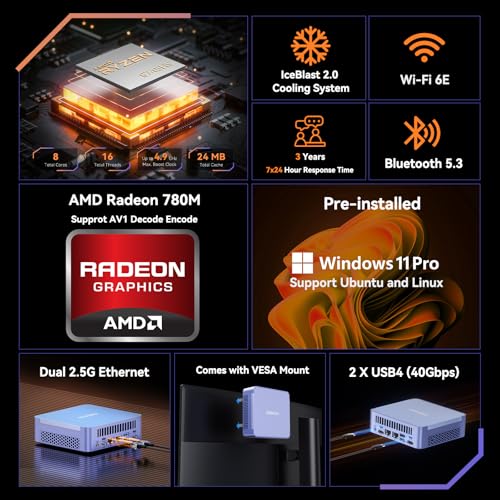
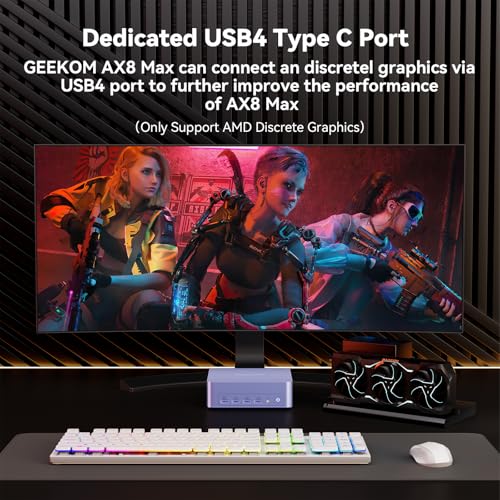
At the heart of the AX8 Max is the 4-nanometer AMD Ryzen 7 8745HS processor, an 8-core, 16-thread chip capable of boosting up to 4.9 GHz. This provides substantial multi-threaded performance for demanding applications like video editing, 3D rendering, and software compilation. The integrated graphics are handled by the AMD Radeon 780M, which is based on the RDNA 3 architecture. According to the manufacturer, this iGPU’s performance rivals that of a discrete GTX 1060, enabling it to smoothly handle 8K video editing, creative design software, and even run AAA games on lower settings. For users requiring more graphical horsepower, one of the USB4 ports supports connecting an external graphics processing unit (eGPU), unlocking desktop-level gaming and rendering performance.
Expandability and Memory
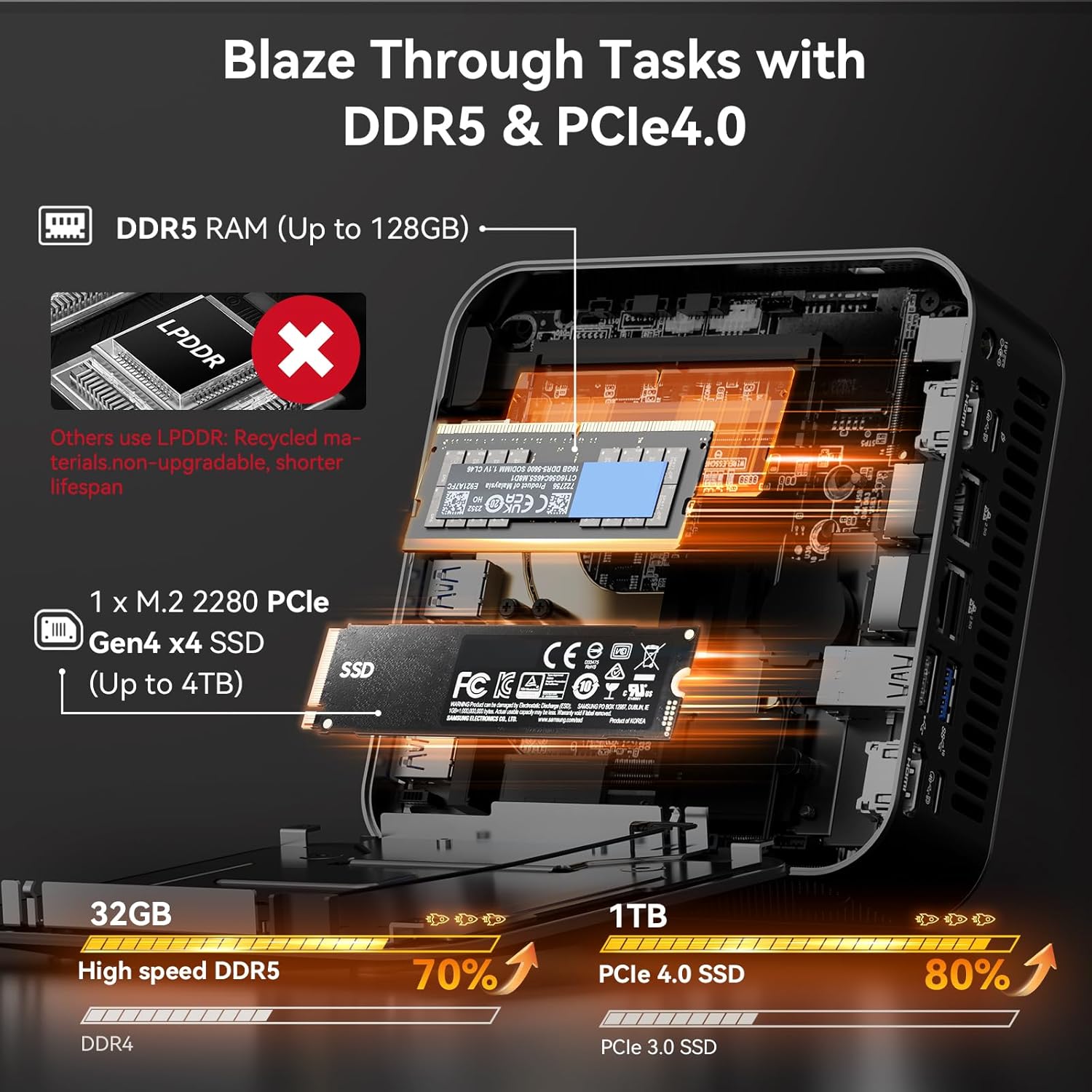
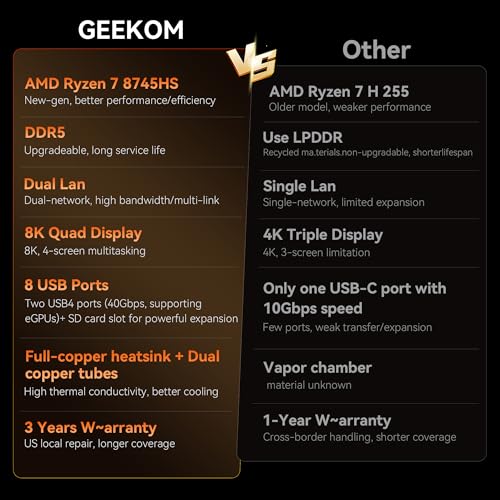
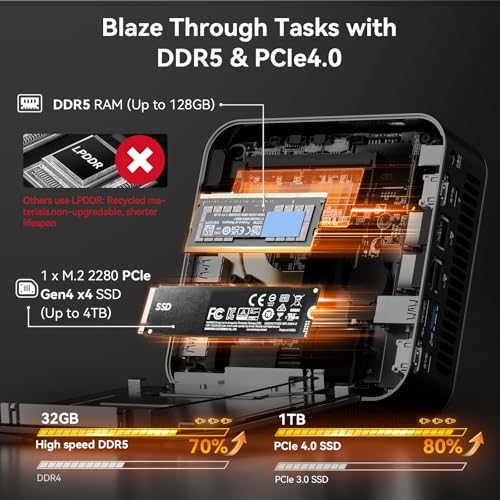
One of the most standout features of the Geekom AX8 Max is its exceptional upgrade path. Unlike many mini PCs and laptops that use soldered memory, this system’s 32GB of DDR5 RAM is housed in standard SO-DIMM slots and can be expanded all the way up to 128GB. Similarly, the 1TB PCIe Gen4 NVMe SSD is user-replaceable and can be upgraded with drives of up to 8TB capacity (using multiple M.2 slots, though the exact configuration is not specified by the manufacturer). This level of expandability is rare in the mini PC space and offers significant future-proofing, allowing the system to adapt to increasingly demanding software and workloads over time.
Connectivity and Ports
The AX8 Max is equipped with a prosumer and professional-grade array of ports. For networking, it includes dual 2.5 Gigabit Ethernet ports, enabling advanced setups like segregated networks for security, creating a lightweight Network Attached Storage (NAS) solution, or using link aggregation to combine bandwidth. For displays, it supports a quad-monitor setup via two HDMI ports and two full-featured USB4 Type-C ports, each capable of 40Gbps data transfer and supporting video output up to 8K resolution at 120Hz. Additional connectivity includes five USB 3.2 Type-A ports, one USB 2.0 Type-A port, a 3.5mm audio jack, and a Kensington lock slot. Wireless connectivity is top-tier with Wi-Fi 6E and Bluetooth 5.3.
Key Features: Cooling and Performance Modes
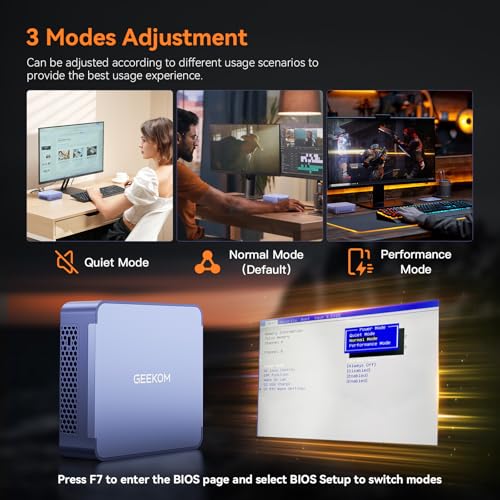
Geekom’s IceBlast 2.0 Cooling System is engineered to manage the thermal output of the high-performance components. It utilizes reinforced heat pipes, expanded cooling fins, a high-efficiency fan, and premium thermal paste. The manufacturer states this system can reduce noise levels by up to 50% under heavy workloads compared to previous designs. Complementing the hardware is a software feature offering three distinct performance modes: Quiet Mode for low-power, silent operation; Normal Mode as a balanced default; and Performance Mode which unlocks the full thermal and power limits of the hardware for maximum speed during gaming, rendering, or other intensive tasks. Users can adjust these modes through the BIOS or a desktop interface.
The system comes with Windows 11 Pro pre-installed, which includes enhanced security and management features beneficial for business users. The specific security features listed include support for a Kensington lock and Wake-on-LAN functionality. For those considering different performance tiers, our review of the Geekom A5 mini PC offers a comparison with another model in their lineup.
Setup, Support and Ownership
The Geekom AX8 Max is designed for a straightforward setup experience, arriving with Windows 11 Pro installed and ready to use out of the box. The package includes all necessary accessories: a power adapter, an HDMI cable, a VESA mount for display attachment, and a user manual. The upgrade process for memory and storage is user-accessible, though specific instructions or tool requirements are not detailed in the provided data. The presence of standard SO-DIMM slots and M.2 slots suggests a familiar process for those with PC building experience.
Regarding support and updates, the manufacturer emphasizes that genuine products with warranty are only available through their official website and Amazon storefront, advising customers to avoid fakes. The product description mentions that GEEKOM provides a warranty, though the specific duration and terms are not listed in the provided data. As with any Windows PC, ongoing software support and driver updates would be managed through Windows Update and potentially a support section on GEEKOM’s official website. The device’s compatibility with external GPUs, monitors, keyboards, mice, and other peripherals is listed, indicating broad support for standard accessories.
What Owners Say
Based on the available data, the Geekom AX8 Max has garnered positive feedback from owners, reflected in its rating. Users appreciate the combination of high performance and compact size, often noting its capability to handle tasks they previously reserved for larger desktops. The quiet operation under normal loads and the effectiveness of the cooling system during heavy use are frequently mentioned positives. The extensive connectivity and the value offered by the out-of-the-box configuration of 32GB RAM and a 1TB SSD are also highlighted as key strengths. As with any technical product, some users may find the advanced networking features or BIOS adjustments to require a learning curve if they are unfamiliar with such settings.
Pros and Cons
Pros
- Exceptional expandability for RAM (up to 128GB) and storage (up to 8TB SSD).
- Powerful AMD Ryzen 7 8745HS processor and Radeon 780M graphics rivaling older discrete GPUs.
- Versatile professional connectivity including dual 2.5GbE LAN and dual USB4 ports.
- Effective IceBlast 2.0 cooling system designed for quiet operation under load.
- Pre-installed Windows 11 Pro for immediate productivity and enhanced features.
- Premium aluminum build quality with a compact, VESA-mountable footprint.
Cons
- AAA gaming performance on the integrated graphics is best achieved on lower settings.
- Advanced networking setups (NAS, link aggregation) may require technical knowledge.
- No built-in optical drive or SD card reader.
- Specific details on warranty length and international power adapter options are not listed.
Who Should Buy It (and Who Should Skip It)
The Geekom AX8 Max is an ideal choice for professionals, creators, and power users who need substantial computing power in a minimal footprint. This includes video editors, graphic designers, software developers, and IT professionals who can leverage the dual NICs for networking labs or network-attached storage. It’s also a great fit for gamers who are comfortable using medium-to-low settings for AAA titles or who plan to use an eGPU for maximum performance. Home users seeking a powerful, upgradeable, and tidy central computer for family use, media streaming, and multitasking will also find it compelling. For those exploring the intersection of compact PCs and artificial intelligence, our look at AI mini PCs provides relevant context.
This mini PC might not be the best fit for users seeking the absolute highest frame rates in modern AAA games at maximum settings without investing in an external GPU. It is also less suitable for those who need a completely silent (fanless) system, as it uses an active cooling fan, though it is designed to be quiet. Beginners who are intimidated by technical setup or potential BIOS adjustments for performance modes might prefer a simpler plug-and-play device.
Final Verdict
The Geekom AX8 Max successfully challenges the traditional limitations of the mini PC form factor. It delivers a remarkable package of high-end processing power, capable integrated graphics, unparalleled expandability, and professional-grade connectivity—all housed in a sleek, sturdy aluminum chassis. The thoughtful inclusion of three performance modes and an advanced cooling system allows users to tailor the machine’s behavior to their task, whether it’s silent office work or a heavy rendering job. For anyone needing to replace a desktop tower without giving up performance or the ability to upgrade, the AX8 Max presents a very convincing argument.
While its integrated graphics have limits for the latest games at high settings, its overall versatility is immense. From a multi-display trading station to a compact home server, a video editing rig, or a living room entertainment hub, the AX8 Max adapts to the role. It stands out in the crowded mini PC market by refusing to compromise on key areas like future-proof expandability and network capability. If your priority is a powerful, clean, and upgradeable computing core that won’t dominate your desk, the Geekom AX8 Max is a top-tier choice that deserves serious consideration. You can explore other options in our broader Mini PCs category.
FAQs
Can the Geekom AX8 Max run games like Fortnite or Cyberpunk 2077?
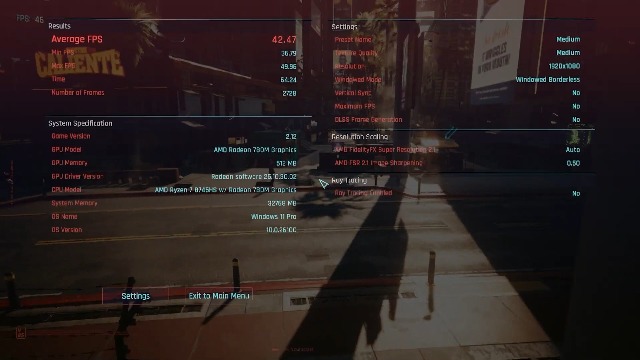
Yes, according to the manufacturer’s specifications, the AMD Radeon 780M integrated graphics can run popular games like Fortnite and League of Legends, and it is stated to be capable of running AAA games. For the best experience with demanding AAA titles like Cyberpunk 2077, users should expect to use lower graphical settings. For significantly higher performance, one of the USB4 ports can be used to connect an external graphics card (eGPU).
What are the main uses for the dual 2.5 Gigabit Ethernet ports?
The dual 2.5GbE LAN ports enable several advanced networking configurations. They can be used to create segregated networks (e.g., separating work and personal traffic), set up a lightweight Network Attached Storage (NAS) system, or employ link aggregation to combine the bandwidth of both ports for a single high-speed connection, which is useful for servers or workstations dealing with large files.
Is the RAM and SSD really user-upgradeable?
Yes. A key feature of the Geekom AX8 Max is that it moves beyond the fixed limits of soldered memory common in many compact devices. The 32GB of DDR5 RAM is installed in standard SO-DIMM slots and can be expanded by the user up to a maximum of 128GB. Similarly, the 1TB NVMe SSD is user-replaceable, and the system supports storage upgrades up to 8TB, providing significant long-term flexibility.
How loud is the fan under normal use?
The IceBlast 2.0 Cooling System is designed for quieter operation. The manufacturer states that noise levels can be reduced by up to 50% under heavy workloads compared to previous cooling designs. Furthermore, the system offers a “Quiet Mode” specifically for low-power, noise-sensitive tasks like office work or media playback, where the fan noise should be minimal and non-disruptive.
About the author

Elvis Dicki writes reviews and buying guides for CyberSecLabs.