Dell 14th Review: Business Desktop with vPro Security
The Dell 14th is a business-focused tower desktop that prioritizes security, manageability, and reliable performance for professional environments, though it lacks built-in Wi-Fi.
 By Elvis Dicki
Updated October 22, 2026
The Dell Pro Tower PC Business Desktop Computer, often referred to as the Dell 14th, represents Dell’s latest evolution in business computing, succeeding the long-standing OptiPlex line. Designed from the ground up for professional environments, this tower combines the latest 14th Gen Intel processing power with the enterprise-grade security and manageability features of the Intel vPro platform. It is built for users who need a dependable, secure, and powerful system for demanding office workloads, remote management, and multi-monitor productivity setups. In short, this is a business-first desktop that excels in stability and corporate IT integration over consumer-friendly frills.

This review analyzes the specifications and design philosophy of the Dell 14th to determine its ideal user. We will examine its performance credentials, connectivity options, and the practical implications of its feature set, such as the absence of built-in wireless networking. By the end, you’ll know if this tower’s focus on security and professional-grade performance aligns with your computing needs, whether for a small office, a developer workstation, or a managed corporate deployment.
Dell Pro Tower Business Desktop


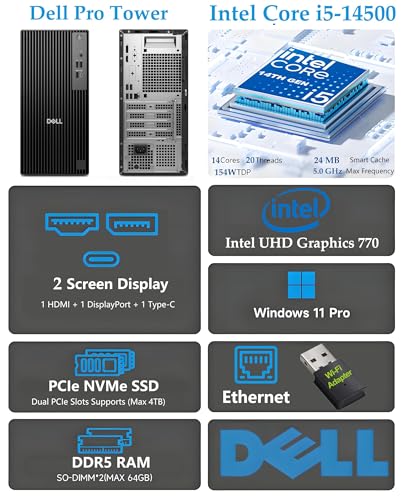
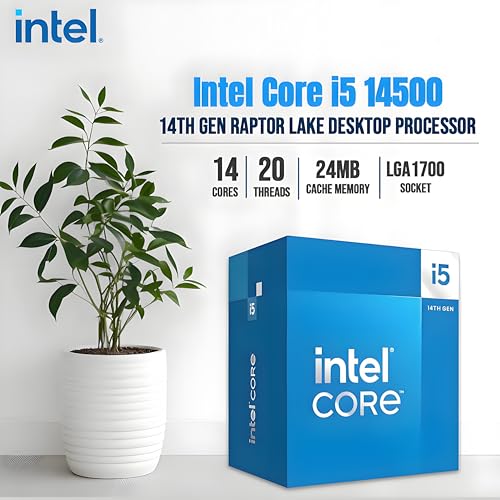

As an Amazon Associate we earn from qualifying purchases. Product prices and availability are accurate as of the date/time indicated.
Dell 14th at a Glance
| Specification | Detail |
|---|---|
| Processor | 14th Gen Intel Core i5-14500 vPro (14 cores, 20 threads) |
| Memory (RAM) | 16GB DDR5 |
| Storage | 512GB PCIe SSD |
| Graphics | Intel UHD Graphics 770 (Integrated) |
| Operating System | Windows 11 Professional |
| Key Feature | Intel vPro Platform for security & manageability |
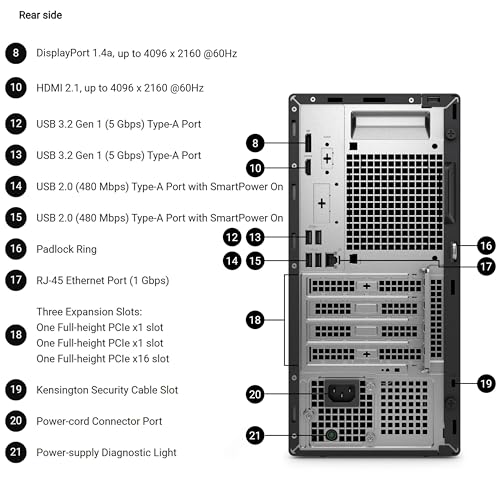
| Video Outputs | HDMI 2.1, DisplayPort 1.4a (both support 4K @60Hz) |
| Networking | Gigabit Ethernet (RJ-45); No built-in Wi-Fi |
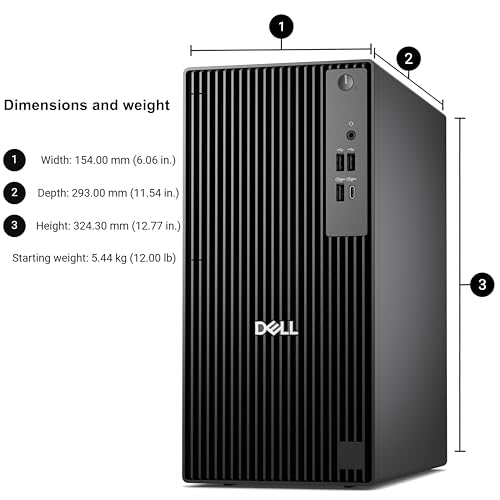
| Dimensions (HxWxD) | 12.77 x 6.06 x 11.54 inches |
| Power Supply | 180W Bronze |
Design and Build
The Dell 14th adopts a professional, understated tower design that prioritizes functionality and durability over flashy aesthetics. Its compact footprint is suitable for placement on or under a desk, making it a versatile fit for various office layouts. According to the manufacturer, the chassis is built to withstand rigorous use, having undergone military-grade testing for reliability. This focus on durability is a key selling point for businesses that require hardware to perform consistently over a long lifespan with minimal downtime.
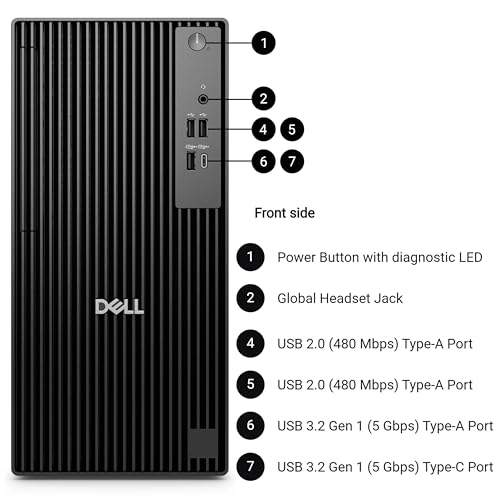
The front panel offers a clean, accessible layout with a USB Type-C port, USB Type-A ports, and a universal audio jack, providing convenient connections for frequently used peripherals like headsets, flash drives, and smartphones. The overall design language suggests a machine built for work, with an emphasis on practical port placement and a robust construction that can handle the demands of a daily professional workload. For those interested in compact computing solutions, you can explore options like those discussed in our guide to fanless mini PCs for silent operation.
Performance and Features
Processing Power and Memory
At the heart of the Dell 14th is the 14th Gen Intel Core i5-14500 vPro processor. This chip features a hybrid architecture with 14 cores (6 Performance-cores and 8 Efficient-cores) and 20 threads, capable of boosting up to 5.0 GHz. This configuration is designed to handle demanding business applications, multitasking with numerous browser tabs and office suites, and light development work with ease. The inclusion of 16GB of DDR5 RAM provides a significant bandwidth advantage over previous DDR4 generations, contributing to snappy application responsiveness and smooth workflow handling. The system supports memory expansion up to 64GB, offering a clear upgrade path for future needs.
Storage and Graphics
Boot times and application loading are accelerated by the 512GB PCIe NVMe SSD. This solid-state drive offers fast read and write speeds, making the overall system feel responsive. For graphics, the system relies on integrated Intel UHD Graphics 770. This is sufficient for driving the included multi-monitor outputs, handling video playback, and managing basic photo editing, but it is not intended for high-end gaming, 3D rendering, or intensive video editing. Its purpose is to deliver clear visuals for productivity across multiple screens.
Connectivity and Ports
Connectivity is a strong point for a business desktop. The rear panel includes an HDMI 2.1 port and a DisplayPort 1.4a output, both capable of driving 4K displays at 60Hz, allowing for a high-resolution dual-monitor setup. For wired networking, a gigabit Ethernet port provides a fast and stable connection, essential for office environments. A notable omission is built-in Wi-Fi and Bluetooth, which means wireless connectivity requires the addition of a USB or PCIe adapter. The system offers a total of eight USB ports split between the front and rear, including a modern USB 3.2 Gen 1 Type-C port, catering to a wide array of peripherals.
The Intel vPro Advantage
The defining feature of this desktop is the Intel vPro platform built into the processor. This is an enterprise-focused technology suite that provides hardware-enhanced security features to help protect against threats at a deeper level than software alone. For IT departments, vPro enables powerful remote management capabilities, allowing technicians to maintain, update, and troubleshoot systems even if the operating system is unresponsive. This makes the Dell 14th an excellent candidate for managed business deployments where security and streamlined IT management are paramount.
Software: Windows 11 Pro
The system comes with Windows 11 Professional pre-installed. This version includes all the business-oriented features of the Pro SKU, such as BitLocker encryption, remote desktop hosting, and Hyper-V for virtualization. It also includes access to Windows Copilot, an AI assistant integrated into the OS that can help with tasks like summarizing documents, adjusting settings, and answering questions, potentially streamlining certain workflows. For other compact systems running specialized software, check out our look at AI mini PCs.
Setup, Support and Ownership
Setting up the Dell 14th should be straightforward for most users. It comes with a keyboard and mouse, so it is essentially a plug-and-play experience once connected to a monitor and network via the Ethernet cable. The most immediate consideration for many will be the lack of built-in Wi-Fi; planning for a wired connection or purchasing a compatible wireless adapter is a necessary first step. The tower design typically allows for easier internal access for upgrades compared to smaller form factors, though specifics on tool-less access or internal layout are not detailed in the provided specifications.
Dell provides a standard warranty with this product. For businesses, extended service plans and professional support options are typically available directly from Dell, which can include onsite service. The use of standardized components and the vPro platform suggests good long-term support from both Dell and Intel for driver and security updates. The machine’s stated military-grade durability testing points to a design intended for a long service life in a professional setting.
What Owners Say
Based on the aggregated rating data, the Dell 14th receives positive feedback from owners. The overall rating reflects general satisfaction with its performance and reliability for business and professional use. While specific review excerpts are not provided, the rating suggests that users appreciate the core value proposition: a capable, secure, and well-connected desktop for office tasks. Potential buyers should note the mentioned lack of Wi-Fi, as this is a common consideration highlighted in such reviews, and ensure their workspace can accommodate a wired connection or they are prepared to add wireless functionality themselves.
Pros and Cons
Pros
- Powerful 14-core Intel vPro processor for multitasking
- Enterprise-grade security and remote management with Intel vPro
- Fast DDR5 memory and PCIe SSD for responsive performance
- Robust port selection including USB-C and dual 4K video outputs
- Windows 11 Pro with business features and Copilot AI
- Military-grade tested chassis for enhanced durability
Cons
- No built-in Wi-Fi or Bluetooth requires an adapter
- Integrated graphics are not suitable for gaming or heavy GPU work
- Lacks an optical drive for CD/DVD media
- 180W power supply may limit high-power expansion cards
- Design is purely functional, lacking aesthetic flair
Who Should Buy It (and Who Should Skip It)
The Dell 14th is an ideal choice for small to medium-sized businesses, home offices with a focus on security, and IT managers seeking reliable, manageable desktops for deployment. Its strengths are perfectly suited for general office productivity, financial applications, coding environments, and as a terminal for cloud-based software. The vPro platform makes it a standout for any scenario where hardware-level security and the ability for IT to remotely manage assets are critical.
This desktop is not the right fit for gamers, video editors, 3D animators, or anyone who requires a powerful dedicated graphics card. Users who must have wireless connectivity out of the box will be disappointed and should factor in the cost and setup of an adapter. Those who need an all-in-one solution or an extremely compact form factor, like the systems in our mini PCs category, should look elsewhere. It is a specialist tool for professional work, not a general-purpose entertainment or creative workstation.
Final Verdict
The Dell Pro Tower PC Business Desktop Computer (14th) successfully carves out its niche as a modern, security-conscious business machine. It delivers excellent daily performance for office tasks through its 14th Gen Intel processor, fast DDR5 RAM, and SSD storage. Its true value, however, lies in the Intel vPro platform, which offers peace of mind through enhanced security features and invaluable remote management capabilities for organizational IT support. The versatile connectivity, including support for dual 4K displays, makes it a highly capable hub for productivity.
However, its business-centric design comes with clear trade-offs. The lack of built-in Wi-Fi is a significant omission for modern workspaces, and the integrated graphics firmly place it outside the realm of multimedia creation or gaming. If your priority is a dependable, secure, and manageable desktop for professional use in a wired environment, the Dell 14th is a compelling and well-specced option. If wireless convenience or graphical power are your top concerns, you will need to look at other configurations or different product categories entirely.
FAQs
Does the Dell 14th have Wi-Fi?
No, this specific model of the Dell Pro Tower does not include a built-in Wi-Fi or Bluetooth card. Connectivity is provided via a gigabit Ethernet port (RJ-45). To use wireless networking or Bluetooth peripherals, you will need to install a compatible PCIe card or use a USB adapter.
Can I upgrade the RAM and storage?
Yes, the specifications indicate the system supports up to 64GB of DDR5 RAM, suggesting available slots for expansion beyond the pre-installed 16GB. The storage can also be upgraded or expanded, as the tower form factor typically provides space for additional 2.5-inch or 3.5-inch drives alongside the primary PCIe SSD.
What is Intel vPro and do I need it?
Intel vPro is a platform of hardware-based technologies built into the processor and chipset. It provides enhanced security features like hardware shields against threats and improved remote manageability for IT departments. For individual home users, its benefits may not be fully utilized. For businesses, especially those with IT support, it is a valuable tool for securing and maintaining fleets of computers efficiently.
Is this computer good for gaming?
No, the Dell 14th is not designed for gaming. It uses integrated Intel UHD Graphics 770, which is suitable for display output, video playback, and basic graphics, but it lacks the power to run modern 3D games at acceptable frame rates and settings. Gamers should look for desktops with dedicated graphics cards from NVIDIA or AMD.
About the author

Elvis Dicki writes reviews and buying guides for CyberSecLabs.