Cudy R700 Review: Desktop Metal Router with Multi-WAN Load Balancing
The Cudy R700 is a feature-packed multi-WAN router offering OpenWRT support, robust failover, and extensive VPN capabilities, ideal for small businesses and advanced home labs seeking reliable connectivity.
 By Elvis Dicki
Updated October 20, 2026
By Elvis Dicki
Updated October 20, 2026
The Cudy R700 is a Gigabit multi-WAN router designed for users who need uninterrupted internet connectivity and advanced network management. This compact device, built around the OpenWRT platform, targets small businesses, remote offices, and tech-savvy home lab enthusiasts who require features like automatic failover, load balancing across multiple internet connections, and a full suite of VPN options. In short, it’s a budget-friendly gateway to professional-grade networking features typically found in more expensive hardware.

This review analyzes the Cudy R700’s specifications, design, and key features based on manufacturer data and owner feedback. We’ll examine its performance claims, setup process, and suitability for different user scenarios, helping you determine if this router’s blend of multi-WAN reliability and OpenWRT flexibility is the right fit for your network.
Prime Cudy R700 Multi-WAN Gigabit Router OpenWRT Load





As an Amazon Associate we earn from qualifying purchases. Product prices and availability are accurate as of the date/time indicated.
Cudy R700 at a Glance
| Specification | Detail |
|---|---|
| Model | Cudy R700 |
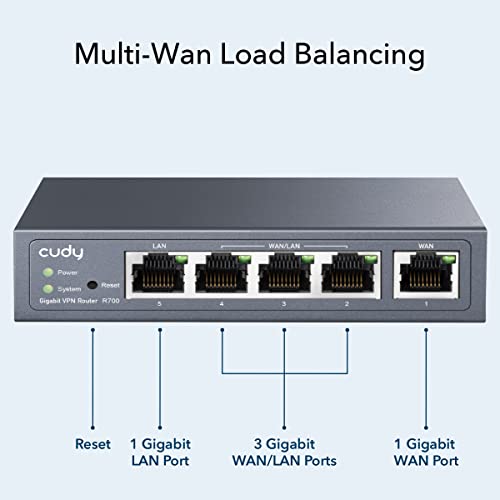
| Ethernet Ports | 5 x Gigabit (RJ45) |
| Key Feature | Multi-WAN Load Balancing & Failover (up to 5 ISPs) |
| Firmware | OpenWRT-Ready |
| VPN Protocols | WireGuard, OpenVPN, IPsec, PPTP, L2TP |
| Security Features | SPI Firewall, DoS Prevention, IP/MAC Binding, Domain Filtering |
| Management | Web GUI & Cudy App (with TR-069 support) |
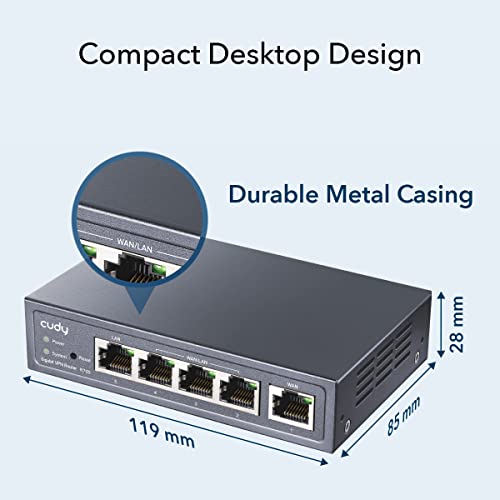
| Dimensions | 4.68″ L x 3.34″ W x 1.1″ H |
| Case Material | Metal |
| Included Components | R700 Unit, Power Adapter, Ethernet Cable, Installation Guide |
Design and Build
The Cudy R700 adopts a compact, desktop-oriented design with a durable metal casing. Its gray finish and modest dimensions make it suitable for placement in various environments, from a home office shelf to a small network cabinet. The manufacturer notes a desktop or wall-mounting design, offering some flexibility for installation. The build quality, centered on the metal chassis, suggests a focus on durability and passive cooling for stable operation. The five Gigabit Ethernet ports are lined up on the rear, providing a straightforward physical interface for wired connections without the complexity or potential interference of built-in wireless radios.
Performance and Features
Core Networking and Ports
The router’s primary function is wired routing and switching, facilitated by its five Gigabit Ethernet ports. These can be configured flexibly, with the capability to designate multiple ports as WAN connections for its flagship multi-WAN functionality. The data transfer rate is listed at 1 gigabit per second per port. A key performance claim from the manufacturer is the device’s ability to handle load balancing and automatic failover across up to five separate internet service provider connections. This is designed to maintain business continuity by instantly rerouting traffic if one connection fails, a critical feature for remote work and home labs.
OpenWRT and Software Control
Being OpenWRT-ready is a major selling point. This opens the door to VLAN segmentation for network isolation, advanced firewall rules, and custom Quality of Service policies to prioritize traffic. The community-developed package ecosystem for OpenWRT allows for significant extensibility beyond the stock firmware. The router also includes the manufacturer’s own web-based graphical interface and the Cudy App for cloud management, providing diagnostic tools like Ping, Traceroute, and system logs for troubleshooting.
VPN and Security Suite
The Cudy R700 is equipped as a complete VPN gateway. It supports acting as both a server and client for WireGuard, OpenVPN, IPsec, PPTP, and L2TP protocols. This allows users to create secure site-to-site tunnels, host remote access VPNs, or route specific network traffic through encrypted connections. On the security front, it includes a stateful packet inspection firewall, denial-of-service attack prevention, IP and MAC address binding, domain filtering, and DMZ hosting capabilities to protect the network perimeter.
Traffic Management
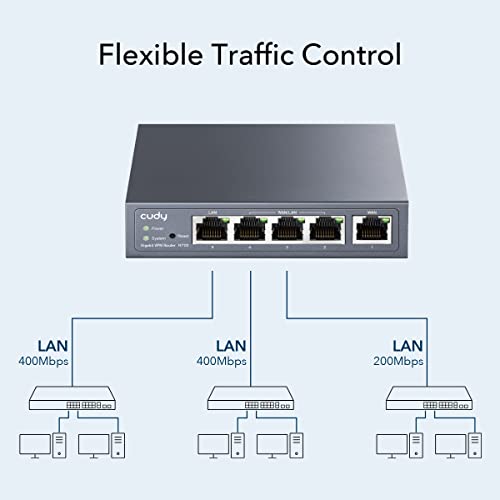
Beyond basic routing, the device offers intelligent load balancing that distributes data streams based on the bandwidth proportion of each active WAN connection. It also provides tools for internet access management, including bandwidth control, session limits, and filtering by IP, MAC address, or URL to standardize user online behavior and optimize network usage.
Setup, Support and Ownership
Setup involves connecting the included power adapter and using the provided Ethernet cable. The installation guide is part of the package. Management can be handled either through the web GUI or the companion Cudy App, which also offers TR-069 support for remote management by an internet service provider. The manufacturer provides a two-year warranty. For users looking to delve into the advanced OpenWRT features, a certain level of networking knowledge is required to configure them fully, as the stock management interfaces may not expose all possibilities. The router comes with the firmware it ships with, and while OpenWRT offers a path for community updates, the manufacturer’s own firmware update process is not detailed in the provided data.
What Owners Say
Owner feedback highlights several strengths. Many praise its ease of setup for basic multi-WAN failover, noting its stability and effectiveness in automatically switching between ISP connections to maintain internet access. The inclusion of WireGuard VPN support is frequently mentioned as a significant advantage for its speed and low overhead. Users appreciate the router’s performance in handling high-speed internet connections and features like IGMP snooping for managing IPTV and mesh Wi-Fi traffic. The web interface is generally described as snappy and user-friendly for common tasks.
Some critiques point out that while VPN setup is straightforward, enabling it can result in a substantial reduction in throughput speed compared to the direct internet connection, even when using efficient protocols like WireGuard. A few users note that the mobile app may lack some of the advanced controls available in the full web GUI. The overall rating distribution shows a high percentage of five-star reviews, with a smaller portion of lower ratings reflecting experiences with speed limitations or the learning curve for advanced features. For more insights on networking hardware, explore our guide on the best VPN routers.
Pros and Cons
Pros
- Reliable multi-WAN failover and load balancing
- Extensive support for VPN protocols including WireGuard
- OpenWRT compatibility for deep customization
- Compact and durable metal housing
- Comprehensive security features like SPI firewall
- Helpful traffic management with QoS and filtering
Cons
- Advanced OpenWRT features require technical knowledge
- VPN throughput can significantly reduce internet speeds
- Limited to five Ethernet ports without expansion
- Mobile app may not offer full feature set
- Configuration for complex scenarios can be challenging
- No built-in Wi-Fi
Who Should Buy It (and Who Should Skip It)
The Cudy R700 is an excellent choice for small businesses, remote offices, or advanced home users who need dependable internet uptime through multiple ISP connections. It’s ideal for those who want to explore professional networking features like VLANs, advanced firewall rules, and site-to-site VPNs on a budget. Users with existing wireless access points or mesh systems who need a robust, wired router core will find it particularly fitting. It also suits enthusiasts interested in the OpenWRT ecosystem for learning or customization.
This router is not the best fit for users seeking an all-in-one solution with built-in Wi-Fi. Those with very high-speed internet connections (e.g., multi-gigabit) who also require full-speed VPN tunneling may encounter limitations. Casual home users who need a simple, set-and-forget router for a single internet connection will likely find its advanced features unnecessary and its setup potentially complex. If your primary interest is in learning about broader cybersecurity tools, consider our resource on cybersecurity books for beginners.
Final Verdict
The Cudy R700 delivers impressive value by packing enterprise-level features like multi-WAN failover, a comprehensive VPN suite, and OpenWRT flexibility into an affordable, compact device. Its performance in maintaining network uptime and providing granular control over traffic and security makes it a powerful tool for specific use cases. The metal build and straightforward port layout contribute to a reliable and professional impression.
Potential buyers should be aware of the trade-offs. Achieving the full potential of the router, especially via OpenWRT, demands networking expertise. The reported VPN speed reduction is a consideration for bandwidth-intensive applications. However, for its target audience—those who need reliable wired routing, redundancy, and advanced features without a high cost—the Cudy R700 is a compelling and capable solution that successfully bridges the gap between consumer and business hardware. For related technology insights, you can read about laptops for cybersecurity students or explore more tech gear reviews.
FAQs
Does the Cudy R700 have Wi-Fi?
No, the Cudy R700 is a wired-only router. It features five Gigabit Ethernet ports for connecting modems, switches, computers, and access points. You would need to connect a separate wireless access point or a Wi-Fi router in access point mode to provide wireless connectivity to your network.
What is the benefit of OpenWRT support?
OpenWRT is a powerful, Linux-based open-source operating system for routers. Support means you can install it on the R700 to gain access to a vast repository of community-developed software packages, more frequent updates, and incredibly granular control over networking functions, firewalls, and VPNs far beyond what the stock firmware may offer.
Can I use this to combine the speed of two internet connections?
Yes, one of the R700’s key features is load balancing. It can distribute network traffic across two or more active WAN (internet) connections. However, this typically works on a per-connection or per-application basis, not by magically combining the bandwidth for a single download stream. It is effective for utilizing the aggregate bandwidth of multiple connections for multiple devices or tasks.
Is it difficult to set up the VPN features?
The difficulty varies by protocol and use case. Setting up a basic OpenVPN or WireGuard client to route your entire network’s traffic through a commercial VPN service can be relatively straightforward, often involving uploading configuration files. Configuring the router as a VPN server for remote access or creating complex site-to-site tunnels requires a better understanding of networking concepts like port forwarding and IP addressing.
About the author

Elvis Dicki writes reviews and buying guides for CyberSecLabs.