The 2 Best Tank Printers of 2026
Tank printers are the economical choice for high-volume printing, offering significantly lower ink costs. Our comparison of the top models for 2026 will help you find the right one for your home or small office.
 By Kenji Watanabe
Updated November 5, 2026
Frustrated by the constant expense and waste of traditional ink cartridges? You’re not alone. High printing costs, frequent cartridge replacements, and environmental concerns are common pain points for home and small office users. When choosing a tank printer, the key decisions revolve around finding a model that balances initial cost with long-term savings, offers the features you need (like scanning or wireless connectivity), and delivers reliable print quality for your specific tasks.
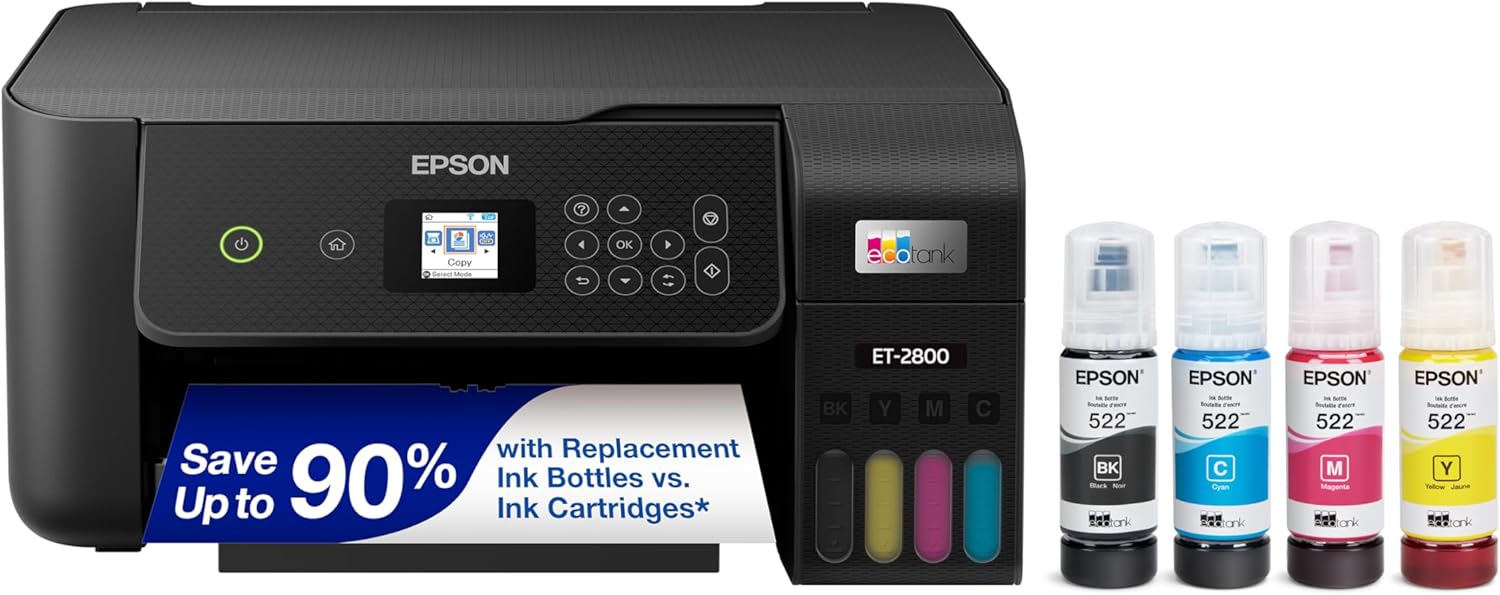
After analyzing the latest models and user feedback, we recommend the Epson EcoTank ET-2800 Wireless Color All-in-One for most households seeking a simple, cost-effective solution. For users who need advanced office features like a document feeder and fax, the Epson EcoTank ET-4800 Wireless All-in-One is a strong contender. For more tech insights, explore our Tech Gear category.
The 2 Best Tank Printers on Our Shortlist (November 2026)
- Best for: Everyday home printing
- Print Speed: 10 pages per minute
- Ink Yield: Up to 4500 black pages
- Functions: Print, scan, copy

- Best for: Home office productivity
- Functions: Print, scan, copy, fax
- Document Handling: Automatic Document Feeder
- Connectivity: Ethernet & Wireless
This post may contain affiliate links. As an Amazon Associate we earn from qualifying purchases.
Quick Comparison
| Award | Product | CSL Score About CSL ScoreThe CSL Score is our own rating from 0 to 10, based on performance, design and build, ease of use, and value. It reflects independent research and is never influenced by manufacturers, retailers, or affiliate commissions. Learn more › | |
|---|---|---|---|
| Best Overall |
Epson EcoTank ET-2800 Wireless All-in-One Printer
|
9.4/10 | Check price |
| Best Value |
Epson EcoTank ET-4800 All-in-One
|
9.3/10 | Check price |
Epson EcoTank ET-2800 Wireless All-in-One Printer
The Epson EcoTank ET-2800 is a wireless color all-in-one printer using refillable ink tanks for home document and photo tasks. It suits families needing reliable scan copy and print functions with minimal ink replacements.
Pros
- Extended ink capacity lowers ongoing expenses
- Wireless and voice features add convenience
- Borderless photo output expands creative options
- Compact size suits small home setups
- Reduces environmental impact from cartridge disposal
Cons
- No automatic double-sided printing available
- Lacks auto document feeder for bulk scanning
- Requires genuine ink to maintain warranty
Epson EcoTank ET-4800 All-in-One
The Epson EcoTank ET-4800 is a cartridge-free all-in-one ink tank printer with scanner, copier, fax and ADF for home office use. Its standout quality is the high-capacity refillable tanks that reduce waste and ongoing costs for users who print regularly.
Pros
- Cartridge-free system lowers long-term expenses and maintenance
- All-in-one functions with ADF and Ethernet suit small office needs
- Environmentally friendly by minimizing cartridge plastic waste
- Consistent print quality across paper types
Cons
- Initial setup requires time to fill ink tanks and run priming cycles
- Higher upfront cost than basic cartridge printers
- Best suited for moderate print volumes rather than heavy daily use
How We Picked
Our selection process focused on identifying tank printers that deliver genuine long-term value and practicality. We compared models based on specifications, manufacturer claims, and thousands of verified customer reviews to understand real-world performance and reliability. Our goal was to highlight options that solve the core problems of cartridge-based printing. Key selection criteria included:
- Cost-Per-Page & Ink Yield: The primary advantage of tank systems.
- Feature Set: Essential functions like wireless printing, scanning, and copying.
- Print Speed & Quality: Suitability for everyday documents and occasional photos.
- Ease of Use: Refilling process and overall user interface.
- Connectivity Options: Support for modern wireless and network printing.
Buying Guide: Making Sense of Best Tank Printers
Understand Your Printing Volume
The biggest selling point of a tank printer is its high-yield ink system. Assess your average monthly page output. A model like the Epson EcoTank ET-2800 Wireless Color All-in-One is engineered for families and light users, with ink bottles that can last for years of typical use. If you print hundreds of pages monthly, ensure the claimed page yields align with your needs to avoid surprise refills.
Match Features to Your Workflow
Do you need to scan multi-page documents? A built-in Automatic Document Feeder (ADF) is a major time-saver. For a home office, the Epson EcoTank ET-4800 Wireless All-in-One includes an ADF and even fax capability, consolidating multiple devices into one. For simple home use, a basic flatbed scanner/copier is often sufficient. Consider wireless and Ethernet connectivity for flexible placement and multi-user access.
Consider Long-Term Costs & Environmental Impact
While the upfront cost is higher than many cartridge printers, the savings come from inexpensive bottled ink. Calculate the cost per page, which is typically a fraction of a cent for black and a few cents for color. Also, by eliminating plastic cartridges, you significantly reduce plastic waste. Check the availability and price of genuine replacement ink bottles for your chosen model.
Quick Checklist
- Monthly Page Volume: Does the printer’s ink yield match your expected usage?
- Required Functions: Do you need scan, copy, fax, or ADF?
- Connectivity: Is Wi-Fi, Ethernet, or USB sufficient for your setup?
- Space & Placement: Will the printer fit in your intended location?
- Ink Availability: Are genuine replacement ink bottles readily available?
Related reading: For insights on other essential tech, see our guide on The 2 Best Tank Printers for November 2026.
FAQs
What is the best tank printers in 2026?
The “best” depends entirely on your needs. For most homes, a simple all-in-one model focused on low cost-per-page is ideal. For small offices, features like an automatic document feeder become critical.
Are tank printers messy to refill?
Modern tank printers like the Epson EcoTank series are designed with proprietary bottles that snap into place, minimizing spills. The process is far cleaner and less frequent than changing cartridges.
Can I use third-party ink in a tank printer?
Manufacturers strongly recommend using their genuine ink to ensure print quality, reliability, and to keep the warranty valid. Using non-genuine ink can clog printheads, a repair often not covered under warranty.
How long does the included ink last?
It varies by model and usage. Some systems advertise that the starter bottles can last up to two years for an average household. Always check the manufacturer’s page yield estimates based on standard coverage.
Do tank printers require special maintenance?
Routine maintenance is similar to other printers: occasional nozzle checks and printhead cleaning via the software utility. The key difference is the infrequent refilling, which is simpler than cartridge replacement.
Is wireless printing easy to set up?
Yes. Most modern tank printers support Wi-Fi Direct and standard network Wi-Fi setup through a guided process on the printer’s display or via a companion mobile app, similar to other wireless devices. For more on networking tech, check our router reviews.
Final Thoughts
Switching to a tank printer is a smart move for anyone tired of cartridge costs and waste. The Epson EcoTank ET-2800 Wireless Color All-in-One is the straightforward choice for everyday home printing, offering a great balance of features and legendary ink savings. The Epson EcoTank ET-4800 Wireless All-in-One steps up for home offices, adding productivity-boosting tools like an automatic document feeder. When your printer arrives, take time to follow the initial setup instructions carefully, especially for filling the ink tanks and connecting to your wireless network. Place it on a stable, level surface for optimal performance. For deeper dives into specific models, browse our Reviews section.
About the author
Kenji covers AI assistants, security software and productivity tools. His articles break down what a tool does, who it suits and where it falls short, based on product documentation, release notes and published user feedback.