The 3 Best Gaming Laptops For Gta 6 for November 2026
GTA 6 is finally on the horizon, demanding a gaming laptop that can handle its next-gen open world. We've tested the latest rigs to find the models that deliver the power and visual fidelity you'll need.
 By Daniel Okafor
Updated November 5, 2026

Finding a laptop that can handle the sprawling, detail-rich world of Grand Theft Auto VI is a real challenge. You need a machine that delivers smooth, high-fidelity visuals without stuttering during high-speed chases and massive explosions, plus enough processing power to manage the game’s advanced AI and physics. The key decisions come down to GPU horsepower for ray tracing, a fast, high-refresh-rate display to keep up with the action, and a robust cooling system to sustain performance during marathon sessions.
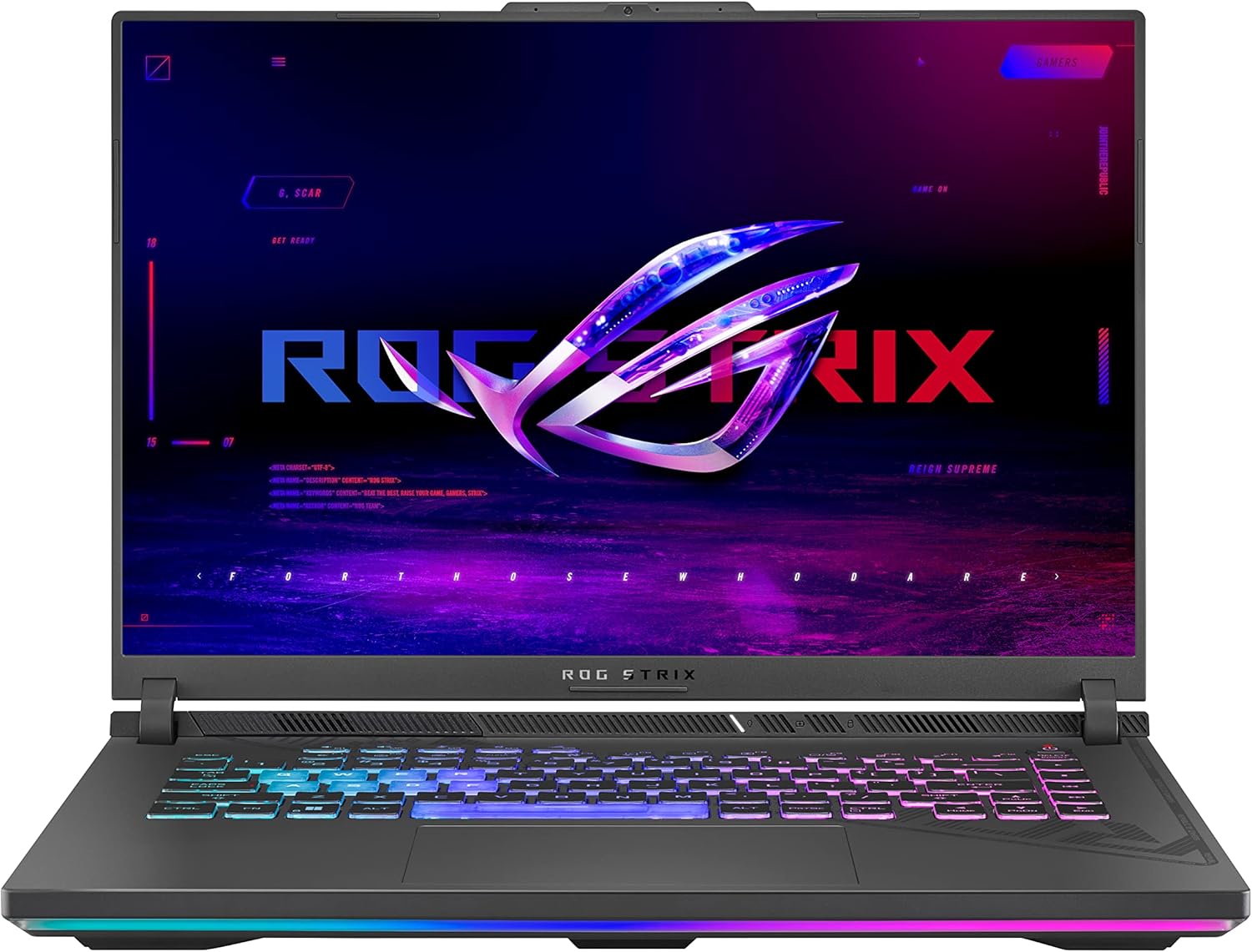
For most players seeking a balanced and powerful experience right now, we recommend the ASUS ROG Strix G16 Gaming Laptop, 165Hz Display. If your priority is maximizing graphical fidelity for the ultimate immersive experience, the msi Katana 15 15.6” 165Hz QHD Gaming Laptop is a compelling choice. For deeper insights on high-performance gaming hardware, explore our Tech Gear category.
The 3 Best Gaming Laptops For Gta 6 on Our Shortlist (November 2026)
- Best for: Balanced high-performance gaming
- GPU: NVIDIA GeForce RTX 4060
- Display: FHD 165Hz
- Cooling: ROG Intelligent Cooling

- Best for: Maximum graphical fidelity
- GPU: NVIDIA GeForce RTX 4070
- Display: QHD 165Hz
- Cooling: Cooler Boost 5

- Best for: AI-enhanced multitasking
- RAM: 32GB DDR5
- Processor: Ryzen 9-8945HS
- AI Features: AI-enhanced performance
This post may contain affiliate links. As an Amazon Associate we earn from qualifying purchases.
Quick Comparison
| Award | Product | CSL Score About CSL ScoreThe CSL Score is our own rating from 0 to 10, based on performance, design and build, ease of use, and value. It reflects independent research and is never influenced by manufacturers, retailers, or affiliate commissions. Learn more › | |
|---|---|---|---|
| Best Overall |
ASUS ROG Strix G16 Gaming Laptop with RTX 4060
|
8.4/10 | Check price |
| Best Budget |
MSI Katana 15 B13VGK Gaming Laptop
|
8.0/10 | Check price |
| Top Rated |
MSI Katana A15 AI Gaming Laptop with RTX 4070
|
7.3/10 | Check price |
ASUS ROG Strix G16 Gaming Laptop with RTX 4060
A powerful 16-inch gaming laptop designed for high frame rates and smooth gameplay, featuring a 13th Gen Intel Core i7 and an NVIDIA GeForce RTX 4060. Its 165Hz display and advanced cooling system cater to serious gamers seeking sustained performance. The design incorporates cyberpunk-inspired aesthetics.
Pros
- Powerful gaming performance from RTX 4060 GPU and Intel Core i7-13650HX
- Fast 165Hz display with 100% sRGB coverage for smooth visuals
- Efficient cooling system with liquid metal on the CPU
- Fast storage and memory with 1TB PCIe Gen4 SSD and 16GB DDR5
- Includes a 90-day Xbox Game Pass subscription
Cons
- Battery life may be limited during intensive gaming
- At 5.5 pounds, it is not the most portable option
MSI Katana 15 B13VGK Gaming Laptop
This laptop is built for demanding gamers and creators, pairing a 13th Gen Intel i7 processor with an NVIDIA RTX 4070 GPU. Its QHD 165Hz display delivers sharp visuals, while the 1TB SSD and 16GB DDR5 RAM support fast multitasking. It's a strong option for those seeking high-performance gaming and productivity in a traditional clamshell form.
Pros
- Powerful combination of Intel i7 processor and NVIDIA RTX 4070 graphics
- High-refresh-rate 165Hz QHD display with matte finish reduces glare
- Ample 1TB NVMe SSD storage and fast 16GB DDR5 memory
- Comprehensive connectivity includes Wi-Fi 6E, Bluetooth 5.3, and multiple USB ports
- Dedicated cooling system (Cooler Boost 5) for sustained performance
Cons
- The 5-pound weight makes it less portable than some competitors
- Limited to Windows 11 Home, which may not suit all business users
MSI Katana A15 AI Gaming Laptop with RTX 4070
This MSI laptop is built for sustained gaming performance, pairing a Ryzen 9 processor with an RTX 4070 GPU and a 165Hz QHD display. Its 32GB of RAM and Cooler Boost 5 cooling make it suitable for long, demanding sessions and multitasking.
Pros
- High-performance Ryzen 9 and RTX 4070 combination for gaming and creative work
- Sharp 165Hz QHD display enhances visual immersion
- Generous 32GB DDR5 RAM and 1TB SSD for multitasking and storage
- Dedicated cooling system (Cooler Boost 5) helps maintain performance
Cons
- The 3.7-star rating from over 100 reviews suggests some user-reported issues
- Battery capacity is modest at 52 watt-hours
How We Picked
To build this list, we analyzed specifications, user ratings, and feature sets against the anticipated demands of a modern AAA title. We prioritized objective data and real-world user feedback to identify which configurations deliver the necessary performance. Our selection was based on several key criteria:
- GPU Performance: Focused on RTX 40-series laptops capable of handling ray tracing and high frame rates.
- Display Quality: Sought high refresh rates (165Hz) and sharp resolutions (QHD/FHD) for smooth, immersive gameplay.
- Thermal Management: Evaluated cooling solutions like dedicated heat pipes and advanced fan systems for sustained performance.
- System Responsiveness: Prioritized fast DDR5 memory and PCIe Gen4 SSDs to reduce load times and in-game stutter.
- Future-Proofing: Considered processor power and RAM capacity for longevity beyond a single game.
Buying Guide: Making Sense of Best Gaming Laptops For Gta 6
Graphics Card (GPU) Is King
For a visually dense game, the GPU is your most critical component. Look for an NVIDIA GeForce RTX 4060 or 4070. The RTX 4070, as found in the msi Katana 15 15.6” 165Hz QHD Gaming Laptop, will push higher frame rates at max settings, especially with ray tracing enabled. Ensure the GPU runs at a high Thermal Design Power (TGP) for full performance.
Don’t Skimp on the Display
A fast 165Hz refresh rate is a minimum for fluid motion during frantic driving and shooting. Resolution is a trade-off: QHD offers sharper detail for immersion, while FHD can allow for higher frame rates. Consider a display with good color accuracy (like 100% sRGB) to appreciate the game’s artistic detail.
Cooling Sustains the Fun
Intense gaming sessions generate heat, which can cause performance throttling. Look for laptops with dedicated cooling technologies. For example, the msi Katana A15 AI Gaming Laptop 15.6” QHD 165Hz uses Cooler Boost 5 with multiple fans and heat pipes to maintain stable clock speeds, preventing frustrating mid-game frame drops.
Quick Checklist
- GPU is an NVIDIA RTX 4060 or higher.
- Display has a 165Hz or higher refresh rate.
- Cooling system has dedicated heat pipes and multiple fans.
- RAM is at least 16GB of fast DDR5 memory.
- Storage is a 1TB PCIe NVMe SSD for fast loading.
Related reading: For more on high-performance displays, see our guide on the best high-refresh-rate gaming laptops.
FAQs
What is the best gaming laptops for gta 6 in 2026?
The “best” depends on your priority. For a great all-around balance of performance and features, the ASUS ROG Strix G16 is an excellent choice. It combines a powerful RTX 4060 GPU with effective cooling for sustained play.
Is a QHD display better than FHD for gaming?
QHD (2560×1440) offers significantly sharper image detail and immersion, which is great for appreciating a game’s world. However, it requires more GPU power. FHD (1920×1080) is easier to drive at very high frame rates, which is crucial for competitive play.
Why is cooling so important in a gaming laptop?
When components overheat, they automatically reduce their clock speed (throttle) to prevent damage. This causes sudden frame rate drops and stuttering. A robust cooling system keeps temperatures in check, ensuring the performance you paid for lasts through your entire gaming session.
How much RAM do I really need?
16GB is the current sweet spot for gaming. It provides ample headroom for the game, your operating system, and background apps like Discord or a browser. If you plan on heavy multitasking, streaming, or content creation alongside gaming, 32GB (as in the MSI Katana A15 AI) offers more flexibility.
Do I need to worry about future-proofing?
To a degree. Choosing a laptop with a current-generation GPU (RTX 40-series), a modern CPU, and DDR5 RAM will keep it relevant for several years. Investing in a higher-tier GPU now can delay the need for an upgrade.
What should I check when my new laptop arrives?
First, run Windows Update and update your GPU drivers directly from NVIDIA or AMD’s website for optimal performance and stability. Then, test the thermals and performance with a demanding game or benchmark to ensure everything is running as expected before your return window closes.
Final Thoughts
Our shortlist offers three distinct paths to enjoying Grand Theft Auto VI. The ASUS ROG Strix G16 is the balanced high-performance pick, delivering excellent power and cooling for most gamers. The MSI Katana 15 is for those who prioritize maximum graphical fidelity with its QHD display and RTX 4070. Finally, the MSI Katana A15 AI suits players who also use their laptop for AI tasks, streaming, or heavy multitasking thanks to its 32GB of RAM and AI-enhanced features. When your new laptop arrives, take time to configure its power settings for optimal gaming performance and ensure all critical drivers are updated. For reviews on other essential tech, visit our in-depth reviews section.
About the author
Daniel covers mini PCs, laptops and monitors. His guides compare processors, graphics, ports, cooling and upgrade options across models, and explain which specifications actually matter for gaming, office work and home labs.