Beelink S13 Review: 13th Gen Intel N150 & 4K Dual Display
The Beelink S13 is a compact, energy-efficient mini PC that delivers solid performance for routine office tasks and home entertainment, backed by ample connectivity and expandable storage.
 By Elvis Dicki
Updated October 21, 2026
In the world of compact computing, the Beelink S13 presents itself as a modern, space-saving solution for everyday digital needs. This mini PC, equipped with a 13th generation Intel processor, is designed for users who require a reliable, quiet, and unobtrusive computer for tasks like document editing, web browsing, and media consumption. It targets home office workers, students, and anyone looking to declutter their workspace without sacrificing essential functionality for light business and entertainment use.

The bottom line is that the Beelink S13 offers a balanced package of adequate processing power, generous memory and storage, and modern connectivity in a remarkably small footprint, making it a strong contender for specific, everyday computing scenarios. Its value lies in its efficiency and versatility rather than raw performance, positioning it as a practical choice for defined workloads.
Prime Beelink Mini S13 N150 Mini PC





As an Amazon Associate we earn from qualifying purchases. Product prices and availability are accurate as of the date/time indicated.
Beelink S13 at a Glance
| Specification | Details |
|---|---|
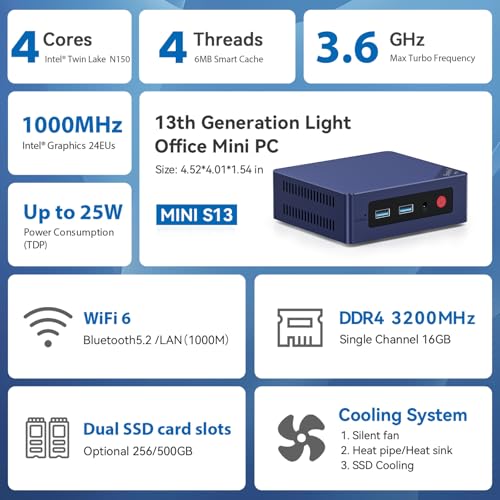
| Processor | 13th Gen Intel Twin Lake-N150 (4 cores/4 threads, up to 3.6GHz) |
| Memory | 16GB DDR4 |
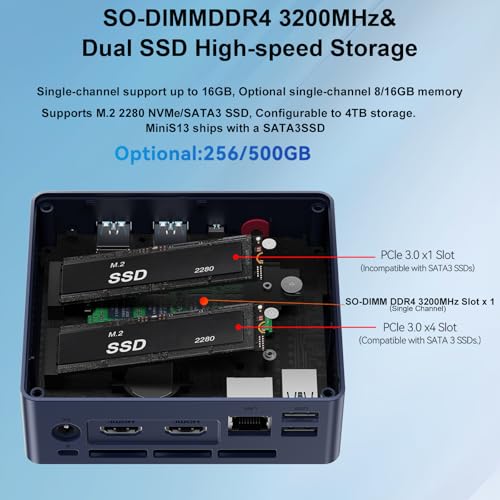
| Storage | 500GB M.2 PCIe 3.0 SSD (supports dual M.2 expansion) |
| Graphics | Intel UHD Graphics (up to 1000MHz) |
| Video Output | Dual HDMI, supporting 4K@60Hz on two displays |
| Connectivity | Wi-Fi 6 (802.11ax), Bluetooth 5.2, Gigabit Ethernet |
| USB Ports | 4 x USB 3.2 Gen 2 |
| Operating System | Windows 11 Home |
| Dimensions | 4.9 x 4.4 x 1.6 inches |
| Power Consumption | Up to 25W |
Design and Build
The Beelink S13 embraces a minimalist aesthetic with a compact form factor designed to maximize desk space or enable discreet mounting. Measuring just 4.9 by 4.4 by 1.6 inches, its small size is a primary feature, allowing it to fit in tight spaces. The unit includes a wall-mount bracket, facilitating installation behind a monitor or under a desk for a completely clean workspace. The build prioritizes practical cooling solutions, incorporating a large silent CPU fan, a copper heat sink, and a dedicated SSD cooling shield, which the manufacturer claims improves heat dissipation performance.
Physically, the chassis houses a well-considered selection of ports on its sides and rear, providing accessibility for peripherals and displays. The overall design is functional, focusing on durability and thermal management for sustained operation rather than flashy aesthetics. This approach aligns with its intended use in office and home environments where reliability and low visual intrusion are valued.
Performance and Features
Processor and Core Performance
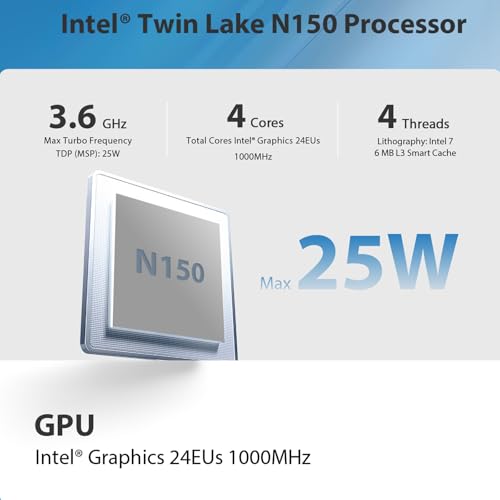
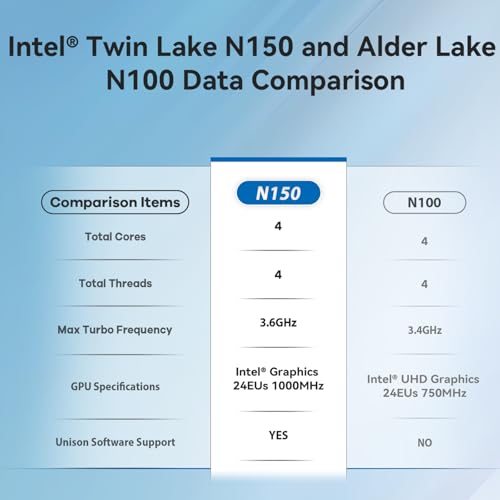
At the heart of the S13 is the 13th generation Intel Twin Lake-N150 processor. This chip operates with four cores and four threads, reaching a maximum turbo frequency of 3.6GHz. According to the manufacturer, it represents an upgrade over the previous Alder Lake N100 and N95, offering an overall performance improvement for routine tasks. With a power consumption capped at 25 watts, it is designed to be energy-efficient and generate minimal heat, contributing to the system’s quiet operation. This level of performance is tailored for office productivity software, web applications, and media playback, not for demanding workloads like intensive video editing or 3D rendering.
Memory, Storage, and Expandability
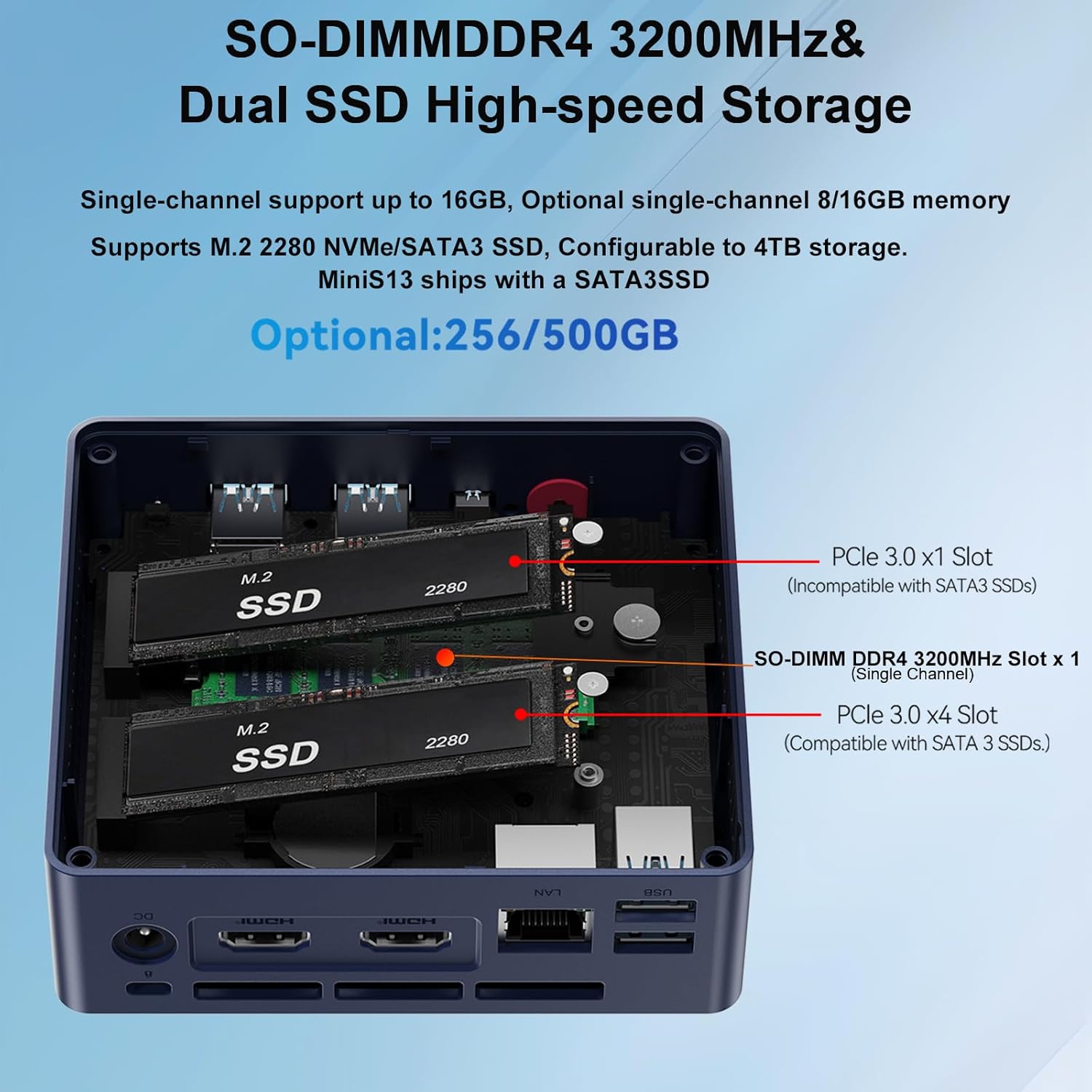
The system comes configured with 16GB of DDR4 RAM, which provides sufficient headroom for multitasking with several browser tabs and standard applications open simultaneously. Storage is handled by a 500GB M.2 PCIe 3.0 solid-state drive, offering faster boot and load times compared to traditional hard drives. A key feature for future-proofing is the support for dual M.2 2280 NVMe or SATA SSDs, allowing users to expand total storage capacity significantly, potentially up to a combined 4TB. This expandability addresses the need for more space as digital libraries grow.
Connectivity and Ports
Connectivity is a strong suit for the Beelink S13. It is equipped with modern wireless standards, including Wi-Fi 6 (802.11ax) and Bluetooth 5.2, which provide stable, high-speed data transfer and improved device pairing range and speed. For wired networks, a single Gigabit Ethernet port is included. The port selection is generous for a device of this size: four USB 3.2 Gen 2 ports offer high-speed data transfer, two HDMI ports support dual 4K monitor setups at 60Hz, and a 3.5mm audio jack handles headphone and microphone input. This array of ports covers most common office and home entertainment peripheral needs without requiring a hub.
Graphics and Display Output
The integrated Intel UHD Graphics, with a frequency up to 1000MHz, handles basic graphical tasks. Its most notable capability is driving two independent displays at 4K resolution and a 60Hz refresh rate via the dual HDMI outputs. This feature is a significant productivity booster, enabling multi-screen workflows for office work, financial tracking, or research. However, the integrated graphics are not designed for gaming or professional graphics work; they are suitable for video playback, photo viewing, and the graphical demands of standard desktop applications.
Software and Enterprise Features
The Beelink S13 ships with Windows 11 Home pre-installed. Beyond the operating system, it supports several features useful in business and managed environments. These include Wake on LAN (WoL), PXE Boot for network deployments, RTC Wake, and Auto Power On. Furthermore, it supports the Intel Unison application, which allows for seamless integration with a user’s mobile phone to manage notifications, transfer files, and make or receive calls directly from the PC. These features enhance its utility in a small office or for tech-savvy home users who appreciate integrated device management.
Setup, Support and Ownership
Setup is straightforward, typical of a pre-assembled mini PC. Users need only connect power, a monitor, keyboard, and mouse to begin the Windows out-of-box experience. The included wall-mount bracket and VESA plate offer flexibility for permanent installation. For those interested in upgrades, the internal design allows for the addition of a second M.2 SSD, though user reviews suggest careful consideration of thermal management if using two high-performance NVMe drives. The manufacturer provides a lifetime technical support promise and 24/7 customer service, which is a notable commitment for long-term ownership peace of mind. As with any Windows device, regular operating system updates are required for security and feature improvements.
What Owners Say
Owner feedback highlights several consistent themes. Many praise the device’s value, compact size, and quiet operation, finding it excellent for light office work, web browsing, and as a dedicated server for applications like Home Assistant. Several users successfully installed Linux distributions, reporting fast boot times and stable performance. The dual 4K display support is frequently mentioned as a key benefit for productivity. Some notes of caution emerge regarding thermal management when installing a second NVMe SSD, with one reviewer noting high idle temperatures with certain drives. The overall rating distribution is positive, with the majority of reviews being favorable, indicating general satisfaction with the product’s performance for its intended use cases. A common sentiment is that it delivers capable performance for basic computing needs without fuss or high power draw.
Pros and Cons
Pros
- Compact, space-saving design with included wall-mount bracket
- Energy-efficient 13th Gen Intel N150 processor for daily tasks
- Generous 16GB RAM and expandable dual M.2 SSD storage
- Excellent connectivity with 4x USB 3.2 Gen 2, Wi-Fi 6, and BT 5.2
- Supports dual 4K monitors for enhanced productivity
- Quiet operation with an upgraded cooling system
- Useful enterprise features like Wake on LAN and Auto Power On
Cons
- Processor is limited to 4 cores/4 threads, unsuitable for heavy multitasking or content creation
- Integrated graphics are only capable of light graphical workloads
- Gigabit Ethernet lacks the multi-gigabit speed found on higher-end models
- Potential for high SSD temperatures in a dual-drive configuration
- Not designed for gaming or demanding professional applications
Who Should Buy It (and Who Should Skip It)
The Beelink S13 is an ideal fit for users with specific, light-to-moderate computing needs. It is perfect for home office workers, students, and general home users who primarily use web applications, office suites, streaming services, and video conferencing. Its small size and dual-screen support make it excellent for creating tidy, productive workstations. It’s also a compelling option for tech enthusiasts looking for a low-power, always-on server for home automation, light file serving, or network tasks. For more insights on compact computing options, explore our guide on fanless mini PCs or our review of the Geekom A6.
Conversely, users should look elsewhere if their work involves video editing, 3D modeling, software development with heavy compilation, or gaming. The processing power and integrated graphics are not sufficient for these tasks. Professionals needing faster multi-gigabit wired networking or more than four CPU threads for virtualization should consider mini PCs with more powerful AMD Ryzen or Intel Core series processors. Those interested in more powerful compact systems for specific uses can read about gaming-focused mini PCs or the emerging category of AI mini PCs.
Final Verdict
The Beelink S13 successfully executes its design philosophy: to deliver a capable, quiet, and extremely compact computer for everyday digital tasks. Its strengths are its modern connectivity suite, including USB 3.2 Gen 2 and Wi-Fi 6, its support for a dual 4K monitor setup, and its potential for storage expansion. The 13th Gen Intel N150 processor provides enough performance for its target audience while maintaining excellent power efficiency. It is a device that knows its limitations and operates confidently within them.
For anyone seeking to replace a bulky desktop or set up a secondary workstation without sacrificing screen real estate, the Beelink S13 is a compelling and practical choice. It offers a clean, modern computing experience tailored for productivity and media consumption, backed by useful business features and a strong support promise. While it won’t handle intensive workloads, for its intended purpose of routine office work, home entertainment, and light business use, it represents a well-rounded and value-conscious solution in the mini PC market.
FAQs
Can the Beelink S13 run two monitors?
Yes, the Beelink S13 supports dual monitor setups through its two HDMI ports. It can drive two independent displays at up to 4K resolution and a 60Hz refresh rate simultaneously. This makes it highly effective for multitasking, allowing users to spread applications across two screens for improved workflow in office or research environments.
Is the storage in the Beelink S13 upgradeable?
Yes, the storage is upgradeable. The mini PC supports the installation of two M.2 2280 NVMe or SATA SSDs. The unit comes with a single 500GB M.2 PCIe 3.0 SSD installed, leaving one slot available for expansion. Users can also replace the existing drive. The manufacturer states it supports a combined storage capacity of up to 4TB across the two slots.
What kind of tasks is the Beelink S13 not good for?
The Beelink S13 is not designed for heavy computational or graphical tasks. Due to its 4-core/4-thread processor and integrated Intel UHD Graphics, it is not suitable for demanding video editing, 3D rendering, modern PC gaming, or scientific simulations. Its performance is tailored for light business applications, web browsing, media streaming, and basic home office use.
Does the Beelink S13 come with an operating system?
Yes, the Beelink S13 ships with Windows 11 Home pre-installed on its SSD. This allows for immediate setup and use out of the box. However, user reviews indicate that it can also run alternative operating systems like Ubuntu or Debian Linux without issues, making it a flexible platform for users who prefer a different software environment.
About the author

Elvis Dicki writes reviews and buying guides for CyberSecLabs.