ASUS RT-BE92U Review: Tri-Band WiFi 7 with 10G Ports
The ASUS RT-BE92U delivers next-generation WiFi 7 speeds and advanced security for smart homes, though its performance can depend heavily on configuration and environment.
 By Elvis Dicki
Updated October 22, 2026
The ASUS RT-BE92U is a tri-band WiFi 7 router designed for users building a high-performance smart home network who need mesh expansion capabilities and multiple secure network options. It promises blazing-fast speeds up to 9.7 Gbps on the new 6 GHz band, future-proof 10G and 2.5G wired connectivity, and subscription-free commercial-grade security. This review analyzes its specifications, key features, and real-world feedback to determine if it’s the right centerpiece for a modern connected home.

Positioned for tech-savvy users and smart home enthusiasts, the RT-BE92U aims to replace older routers and ISP gateways by offering superior control, advanced features like Multi-link Operation and Smart Home Master subnets, and the capacity for lag-free 8K streaming and gaming. Its bottom line is a feature-rich, future-oriented router that delivers on next-gen specs but may require some technical know-how to optimize, especially given mixed user reports on stability.
ASUS RT-BE92U WiFi 7 Tri-Band Router 9.7Gbps 10G



As an Amazon Associate we earn from qualifying purchases. Product prices and availability are accurate as of the date/time indicated.
ASUS RT-BE92U at a Glance
| Specification | Detail |
|---|---|
| Wi-Fi Generation | WiFi 7 (802.11be) |
| Frequency Bands | Tri-Band (2.4 GHz, 5 GHz, 6 GHz) |
| Maximum Speed | Up to 9,700 Mbps |
| Key Wired Ports | 1x 10G WAN/LAN, 4x 2.5G LAN, USB for WAN tethering |
| Security | AiProtection Pro (Trend Micro), VPN, Safe Browsing |
| Coverage Area | Up to 2,750 square feet |
| Antennas | 4 external, 1 internal |
| Mesh Support | AI-boosted Smart AiMesh |
| Special Features | Multi-link Operation (MLO), Smart Home Master (3 SSIDs), Parental Controls |
| Operating System | ASUSWRT |
Design and Build
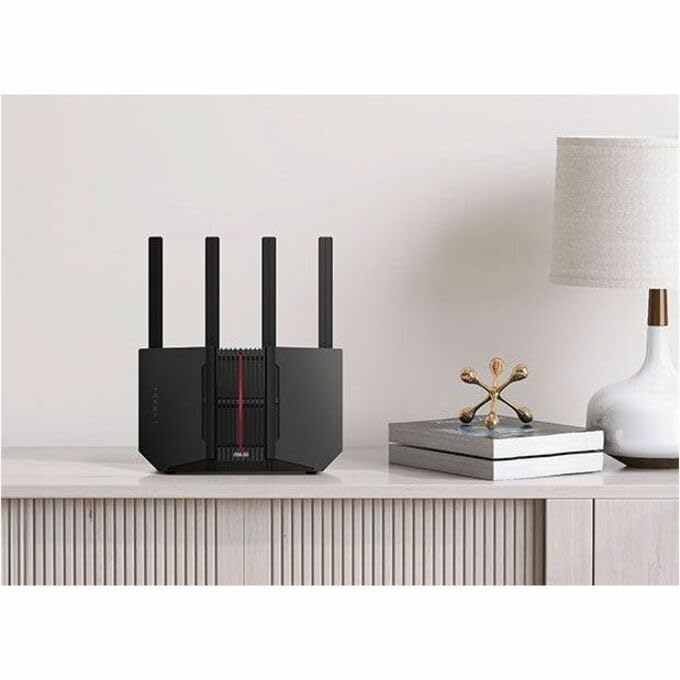
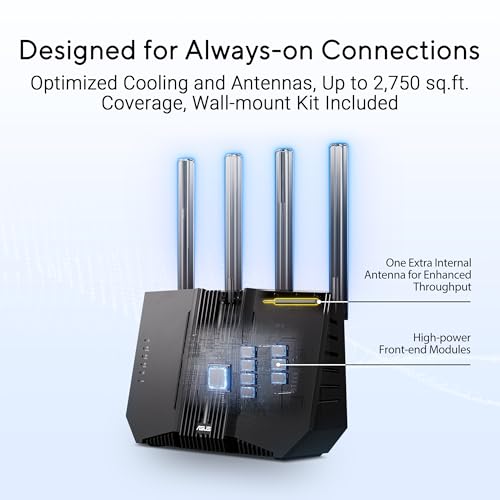
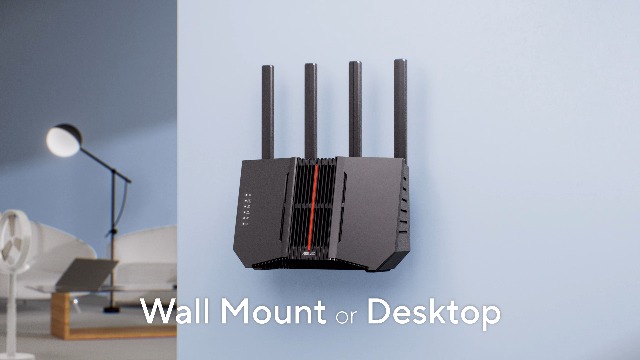
The ASUS RT-BE92U router has a black chassis with dimensions of 11.3 inches long, 4 inches wide, and 9.73 inches high, weighing 1.7 pounds. Its design centers around four prominent external antennas, which are powered by high-power front-end modules intended to eliminate WiFi dead zones with consistent signals in all directions. An additional internal antenna and support for three streams in the 2.4 GHz band aim to boost throughput and coverage further. The package includes the router itself, a power adapter, an RJ-45 cable, a quick start guide, and a wall mount kit, providing the essentials for setup and installation.
Performance and Features
Wireless Performance and WiFi 7
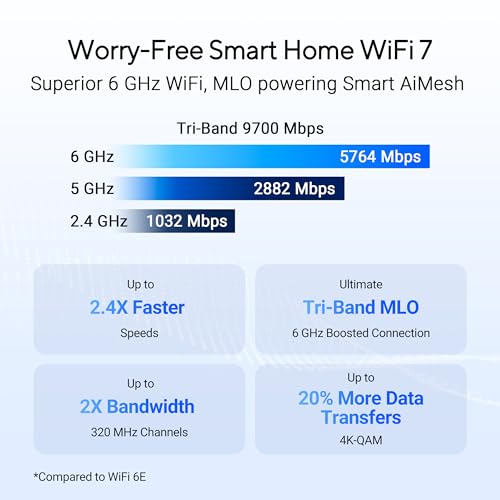
At its core, the RT-BE92U leverages the new WiFi 7 (802.11be) standard. Its key performance claims stem from using 320MHz channels in the 6 GHz band and 4096-QAM modulation, which significantly increase network capacity and throughput for a maximum aggregated speed of 9,700 Mbps. The tri-band setup separates traffic across 2.4 GHz, 5 GHz, and the dedicated 6 GHz band, the latter being ideal for high-bandwidth, low-latency applications like 8K streaming and HDR gaming. A notable advanced feature is Multi-link Operation (MLO), which allows compatible devices to link to multiple bands simultaneously to ensure stable internet connections and efficient data transfers.
Connectivity and Ports
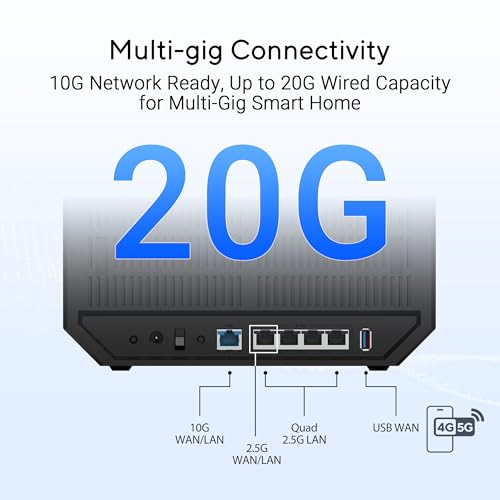
This router stands out for its wired connectivity, ready for a next-generation home network. It features one 10G WAN/LAN port and four 2.5G Ethernet LAN ports, offering up to 20G of wired capacity for high-speed backhaul or connecting NAS devices and gaming rigs. It supports versatile WAN configurations, including dual WAN with AI WAN detection for failover or load balancing, and a USB port ready for 4G LTE and 5G mobile tethering as a backup internet source. This flexibility makes it suitable for home studios, power users, and those with robust entertainment setups.
Software, Security, and Management
The router runs on the ASUSWRT operating system, manageable via a mobile app or web interface. A major selling point is the subscription-free, commercial-grade AiProtection Pro security powered by Trend Micro, which includes a one-tap security scan and Safe Browsing to protect all connected devices. The Smart Home Master feature simplifies network management by allowing users to easily establish up to three separate SSIDs for different purposes, such as isolating IoT devices, creating a VPN-enabled network, or setting up a kids’ network with parental controls. For broader coverage, the AI-boosted Smart AiMesh technology lets users create a seamless mesh network under one network name by adding compatible AiMesh nodes.
Setup, Support and Ownership
Setup is facilitated by the ASUS app, which reviewers describe as easy to use, providing a lot of information and options. The router supports multiple operating modes beyond a standard wireless router, including AiMesh Node, Access Point, Media Bridge, and Repeater Mode, offering flexibility for integration into various network setups. The manufacturer provides a 3-year warranty. Firmware updates are available, with some user feedback indicating that updating to the latest firmware resolved initial stability issues. The router is compatible with Alexa for voice control and supports a wide range of security protocols including WPA/WPA2/WPA3 Enterprise and WPS.
What Owners Say
Owner feedback presents a mixed picture, reflected in the average rating. Many positive reviews praise the router’s fast speeds, easy setup via the app, and rich feature set without subscriptions. Users report stable connections throughout their homes and appreciate the ability to handle multiple simultaneous high-bandwidth activities without interruption. However, a significant portion of negative reviews highlight performance issues, with some users experiencing speeds lower than their previous ISP-provided routers, particularly on the 6 GHz band. A recurring technical point from experienced users is that the Multi-link Operation (MLO) feature can cause connection drops with certain Samsung and Apple devices, recommending it be disabled if problems arise. The consensus among satisfied owners is that with the correct configuration and latest firmware, the router performs as a powerful and capable hub for a smart home.
Pros and Cons
Pros
- Strong 10G and 2.5G wired backhaul options for mesh or high-speed LAN.
- Built-in IoT network segmentation and parental controls reduce need for extra hardware.
- Subscription-free commercial-grade AiProtection Pro security.
- Four external antennas plus internal antenna for improved signal consistency.
- Flexible dual WAN and USB tethering support for backup internet.
- One-tap security scan and app-based management simplify ongoing use.
Cons
- 6 GHz band offers shorter range than lower frequencies in some homes.
- Advanced features like MLO may require configuration knowledge and troubleshooting.
- Mixed user experiences with stability and speed as noted in the average rating.
- Performance may not always exceed that of some ISP-provided equipment.
- Setup documentation may occasionally be out of sync with firmware updates.
- The footprint, while not huge, is larger than some minimalist router designs.
Who Should Buy It (and Who Should Skip It)
The ASUS RT-BE92U is an ideal fit for tech-savvy users and smart home enthusiasts who are building a future-proof network. It’s excellent for those with gigabit or multi-gigabit internet plans who need the wired 10G/2.5G port flexibility for NAS, servers, or high-bandwidth devices. Users who value deep, subscription-free security and want to create separate networks for IoT devices, work, and family will find its Smart Home Master feature invaluable. It’s also a strong candidate for anyone planning to expand coverage via a wired or wireless AiMesh system.
This router may not be the best choice for users seeking a simple, set-it-and-forget-it solution, as some advanced features might need manual configuration for optimal stability. Those in very large homes may find the 2,750 square foot coverage estimate requires a mesh node for complete coverage, especially for the 6 GHz band. If your current ISP router already delivers satisfactory speed and reliability for your needs, the upgrade may not be justifiable. Individuals uncomfortable with potentially adjusting settings like MLO based on device compatibility should consider a less complex model.
Final Verdict
The ASUS RT-BE92U WiFi 7 Router is a forward-looking piece of networking hardware that packs a serious specification sheet. Its combination of tri-band WiFi 7 speeds, a 10G port, multiple 2.5G ports, and robust, subscription-free security makes it a compelling proposition for power users building a sophisticated home network. The ability to create separate SSIDs for different uses and to expand into a mesh system offers great flexibility and control.
However, its real-world performance appears to be highly dependent on the home environment, device compatibility, and user willingness to engage with its settings. While many owners report excellent results, the variance in feedback suggests it may not be a flawless upgrade for everyone straight out of the box. For the right user who can leverage its advanced features and configure it appropriately, the RT-BE92U is a powerful and feature-rich router that can serve as the foundation of a high-performance smart home for years to come. For more options tailored to specific needs, explore our guides on the best routers for gigabit internet or the best routers for large homes.
FAQs
What is the main advantage of the WiFi 7 6 GHz band?
The new 6 GHz band offers wider, cleaner channels (320MHz) with less interference from older devices, which are confined to the 2.4 GHz and 5 GHz bands. This allows for significantly higher throughput and lower latency, making it ideal for bandwidth-intensive tasks like 8K video streaming, high-resolution gaming, and large file transfers. However, its signal range is generally shorter than lower frequencies, so proximity to the router is more important for peak performance.
Do I need special devices to use WiFi 7?
To access the top speeds and features like Multi-link Operation on the 6 GHz band, you need client devices (laptops, phones, etc.) that also support the WiFi 7 standard. The router is fully backward compatible with older Wi-Fi standards (802.11ac/ax/n), so all your existing devices will connect, but they will operate at their respective maximum speeds on the 2.4 GHz or 5 GHz bands.
What should I do if I experience dropped connections?
Based on owner feedback, a common troubleshooting step is to disable the Multi-link Operation (MLO) feature in the router’s settings, especially if you are using Samsung or Apple mobile devices. Ensuring the router is updated to the latest firmware from ASUS is also crucial, as updates often address stability issues. You can also try switching your device to a different SSID (e.g., connect to the dedicated 5 GHz network instead of a combined SSID) to test for band-specific problems.
Can I use this router to replace my ISP’s modem/router?
Yes, the RT-BE92U can function as your primary router. You would connect your internet modem (from cable, fiber, or DSL) to one of its WAN ports, such as the 10G or a 2.5G port. Its dual WAN support even allows you to use a second internet connection for failover or load balancing. For insights on other standalone routing solutions, check out our coverage on best routers for OpenWrt.
About the author

Elvis Dicki writes reviews and buying guides for CyberSecLabs.