ASUS PA278CV Review: For Creative Pros & Office Color Work
The ASUS ProArt PA278CV delivers professional-grade color accuracy and versatile connectivity, making it a strong choice for designers and office users who need precise, reliable visuals.
 By Elvis Dicki
Updated October 21, 2026
By Elvis Dicki
Updated October 21, 2026
The ASUS ProArt Display PA278CV is a 27-inch WQHD monitor engineered for users who demand precise color reproduction and a versatile, professional workflow. Positioned within ASUS’s ProArt line, this monitor is not a high-refresh gaming display but a tool calibrated for accuracy and productivity. It is designed for graphic designers, photographers, video editors, and office professionals who need to see their work exactly as intended, backed by factory calibration and industry-standard color validation. The bottom line: the ASUS PA278CV is a color-accurate, feature-rich professional monitor that excels in creative and office environments where visual fidelity and connectivity are paramount.

This monitor distinguishes itself with its Calman Verified certification and a Delta E value of less than 2, ensuring colors are reproduced with high fidelity right out of the box. Its feature set, including USB-C with 65W Power Delivery, a built-in USB hub, and DisplayPort daisy-chaining, is tailored to streamline modern workspaces, whether for a single creative professional or a multi-monitor office setup. For those prioritizing color precision and flexible connectivity over extreme gaming performance, the PA278CV presents a compelling package.
ASUS ProArt PA278CV 27" WQHD IPS Monitor








As an Amazon Associate we earn from qualifying purchases. Product prices and availability are accurate as of the date/time indicated.
ASUS PA278CV at a Glance
| Specification | Detail |
|---|---|
| Screen Size & Resolution | 27-inch WQHD (2560 x 1440) |
| Panel Technology | IPS, 178° viewing angle |
| Color Accuracy | Delta E <2, Calman Verified |
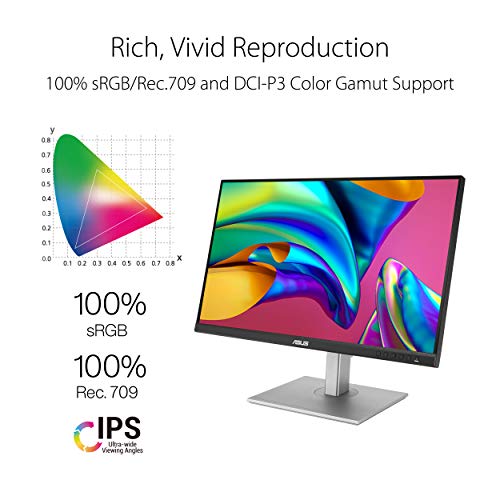
| Color Gamut | 100% sRGB, 100% Rec. 709 |
| Refresh Rate & Sync | 75Hz with Adaptive-Sync (48-75Hz) |
| Key Connectivity | USB-C (65W PD), DisplayPort, HDMI, USB 3.1 Hub |
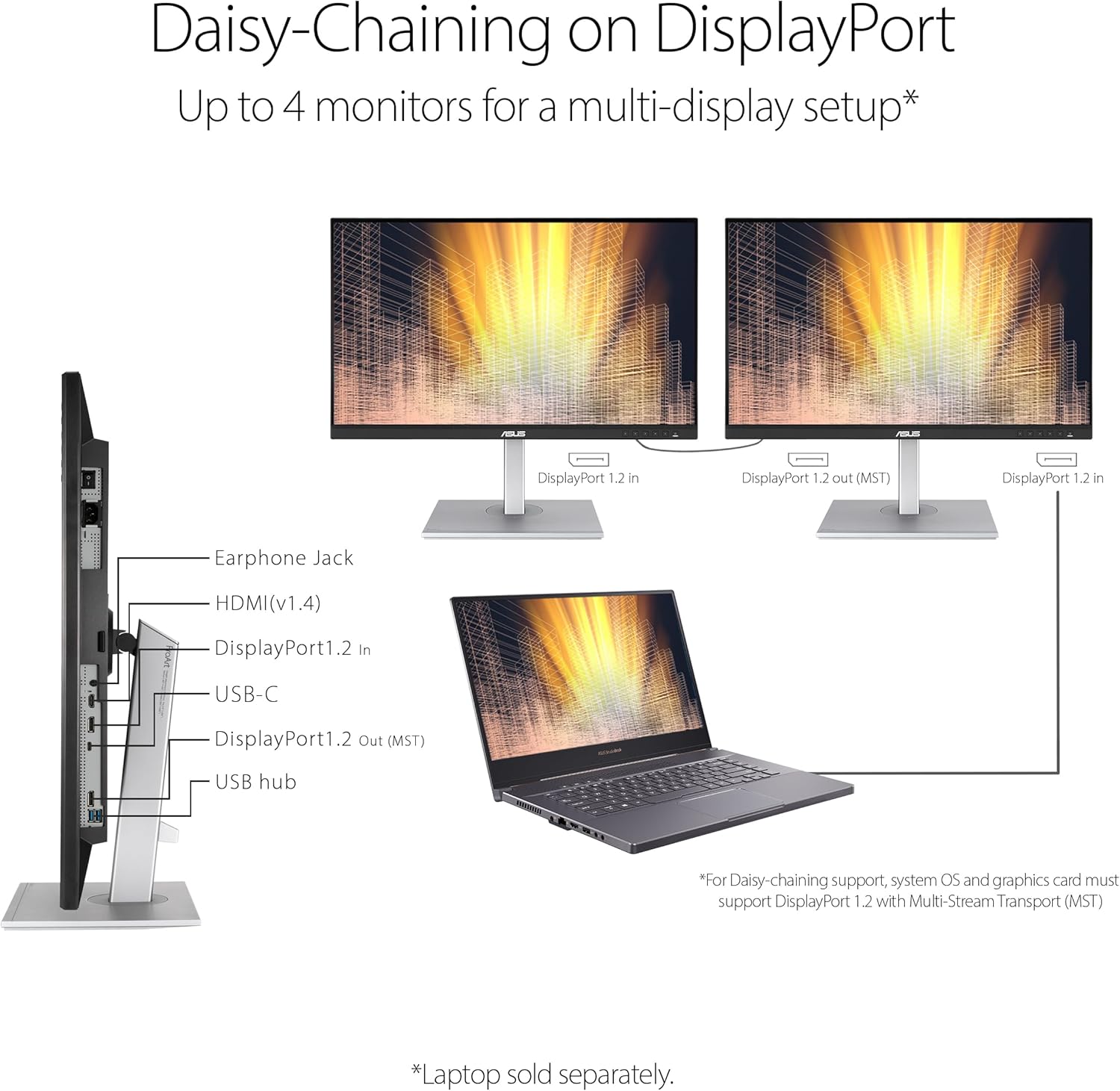
| Special Feature | DisplayPort Daisy-Chaining (up to 4 monitors) |
| Ergonomics | Height, Tilt, Pivot adjustment |
| Warranty | 3-Year Manufacturer Warranty |
Design and Build
The ASUS PA278CV sports a professional, understated aesthetic with a black and silver color scheme that fits seamlessly into office and studio environments. Its build quality is solid, with the monitor weighing 18.52 pounds, indicating a sturdy construction. The stand offers comprehensive ergonomic adjustments, including height, tilt, and pivot (portrait orientation), allowing users to find the most comfortable viewing position for long work sessions. The bezels are reasonably slim, promoting a modern look and reducing visual distraction in multi-monitor configurations. For users preferring alternative mounting solutions, the monitor is compatible with VESA wall mounts, providing further flexibility for desk setup. The overall design prioritizes function and professional integration over flashy aesthetics.
Performance and Features
Display Quality and Color Accuracy
The core strength of the ASUS PA278CV lies in its display performance, specifically engineered for color-critical work. The 27-inch IPS panel delivers a WQHD (2560 x 1440) resolution, providing a sharp pixel density suitable for detailed image editing and multitasking. With a brightness of 350 cd/m² and a wide 178-degree viewing angle, the image remains consistent even when viewed from the side. Crucially, it covers 100% of both the sRGB and Rec. 709 color gamuts, making it suitable for web design, photography, and standard video editing. The factory calibration ensures a Delta E value of less than 2, a benchmark for high color accuracy, and this is further validated by its Calman Verified certification. This means professionals can trust the colors on screen without requiring immediate, complex calibration.
Connectivity and Ports
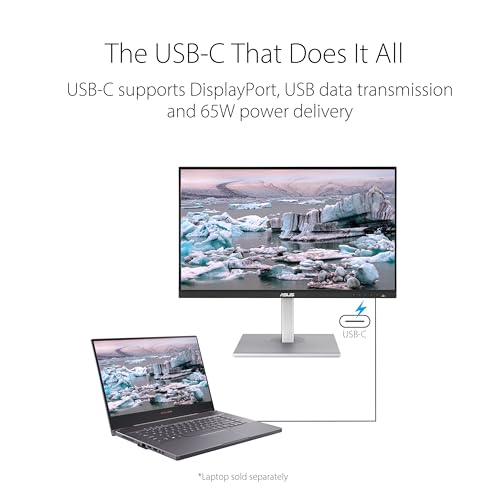
Connectivity is a major highlight of this monitor, designed to simplify cable management and expand workstation capabilities. The inclusion of a USB-C port with DisplayPort alt mode and 65W Power Delivery is a significant feature for modern laptop users; it can transmit video, data, and simultaneously charge compatible devices like laptops through a single cable. The built-in USB 3.1 hub (also referred to as USB 3.2 Gen 1) provides additional ports for peripherals. For multi-monitor setups, the DisplayPort daisy-chaining feature allows users to connect up to four monitors in a chain from a single computer output, reducing cable clutter. Traditional HDMI and DisplayPort inputs are also present for broader compatibility with desktops, gaming consoles, and other sources.
Motion Handling and Additional Features
With a 75Hz refresh rate and support for Adaptive-Sync technology (operating in a 48-75Hz range), the PA278CV offers smoother visuals than standard 60Hz office monitors, which can benefit general desktop use and light content creation involving animation. This feature helps eliminate screen tearing, though its primary use case is not for high-frame-rate competitive gaming. The monitor also includes eye care technologies, such as flicker-free backlighting and a blue light filter, to reduce eye strain during prolonged use. A notable bundled value is the complimentary 3-month subscription to Adobe Creative Cloud, providing immediate access to professional creative software for new buyers, valid until a specified date in 2026.
Setup, Support and Ownership
Setup is straightforward, with the monitor arriving with the necessary cables, including DisplayPort, HDMI, USB-C, and power cords. The ergonomic stand is easy to attach, and the array of ports is clearly labeled. The ability to daisy-chain multiple monitors or connect via a single USB-C cable can significantly simplify a workstation’s physical setup. ASUS backs the PA278CV with a 3-year manufacturer warranty, which provides substantial peace of mind for a professional display. Specific details regarding software updates or driver support are not listed by the manufacturer, but ASUS typically offers basic display utility software for color management on its support website. The monitor’s compatibility extends to Mac computers, PCs, and gaming consoles, as noted in the specifications.
What Owners Say
Overall feedback for the ASUS PA278CV is very positive, reflected in its high average rating. A significant majority of reviewers award it the highest rating, praising its exceptional color accuracy and sharp image quality straight out of the box, which aligns perfectly with its factory-calibrated claims. The versatile connectivity, particularly the convenience of the USB-C port with power delivery, is frequently highlighted as a major benefit for laptop users. The build quality and ergonomic stand also receive favorable comments. A smaller segment of reviewers expressed concerns, which occasionally include desires for a higher refresh rate for gaming or noted the absence of built-in speakers. The rating distribution shows strong satisfaction, with the most common critiques focusing on features outside its core professional design focus.
Pros and Cons
Pros
- Exceptional factory-calibrated color accuracy (Delta E <2, Calman Verified)
- Versatile connectivity with USB-C 65W PD, USB hub, and multiple video inputs
- Useful DisplayPort daisy-chaining for multi-monitor setups
- Wide color gamut (100% sRGB/Rec.709) and consistent IPS viewing angles
- Comprehensive ergonomic adjustments (height, tilt, pivot)
- Includes 3-month Adobe Creative Cloud subscription
Cons
- 75Hz refresh rate is not ideal for fast-paced, competitive gaming
- Lacks built-in speakers for audio output
- LED backlight cannot match the perfect contrast of OLED panels
- Panel’s contrast ratio specification is not clearly listed by the manufacturer
- May be over-specified for users with no need for professional color work
Who Should Buy It (and Who Should Skip It)
The ASUS PA278CV is an ideal purchase for graphic designers, photographers, video editors, and office professionals who require reliable, accurate color reproduction for their work. It is perfectly suited for anyone setting up a home office or studio where a single-cable USB-C connection to a laptop and the potential for a clean, daisy-chained multi-monitor workstation are valuable. Users who prioritize visual fidelity for content creation, document review, or media consumption will appreciate its capabilities.
This monitor is not the best choice for hardcore gamers seeking high refresh rates (144Hz and above) and fast response times, as its 75Hz refresh rate is a compromise for its color focus. Users who need built-in speakers for audio should look elsewhere or plan to use external speakers. Those whose work requires coverage of wider color gamuts like DCI-P3 or Adobe RGB for high-end cinema or print production may need to consider a more specialized, and typically more expensive, monitor. For basic office tasks with no concern for color accuracy, more affordable options exist.
Final Verdict
The ASUS ProArt PA278CV successfully fulfills its mission as a professional-grade color-accurate monitor for creative and office use. Its standout factory calibration, validated by Calman, provides a level of out-of-the-box color fidelity that saves time and ensures confidence for color-sensitive work. The thoughtful integration of modern connectivity options—USB-C with Power Delivery, a useful USB hub, and DisplayPort daisy-chaining—makes it a highly adaptable centerpiece for a modern, efficient workspace. While it makes concessions in areas like refresh rate and audio, these are understandable trade-offs given its core design priorities.
For professionals and businesses where accurate color and streamlined connectivity directly impact productivity and output quality, the ASUS PA278CV represents a strong investment. It delivers a comprehensive package of verified performance, practical features, and ergonomic design. If your needs align with professional content creation, detailed office work, or a clean, multi-monitor setup, this monitor deserves serious consideration, as explored in our guides on the best ultra-wide monitors and best desk chairs for complementary workspace gear.
FAQs
Is the ASUS PA278CV good for gaming?
The ASUS PA278CV is not primarily designed for gaming. Its 75Hz refresh rate and Adaptive-Sync support offer a smoother experience than a standard 60Hz monitor and can handle casual gaming adequately. However, serious gamers seeking high frame rates in fast-paced titles will find its refresh rate limiting compared to dedicated gaming monitors with 144Hz or higher.
Does this monitor come pre-calibrated?
Yes, the ASUS PA278CV is factory-calibrated to achieve a Delta E (color deviation) value of less than 2. This calibration is also verified by Calman, a leading color calibration software company. This means it offers high color accuracy right out of the box, which is a key feature for photographers, designers, and video editors.
Can I connect my laptop with just one cable?
Yes, if your laptop supports USB-C with DisplayPort Alt Mode. Using the included USB-C cable, you can connect to the monitor to transmit video, data through the USB hub, and deliver up to 65W of power to charge your laptop, all through a single cable. This greatly simplifies desk cable management.
How many monitors can I daisy-chain with the PA278CV?
According to the manufacturer’s specifications, the DisplayPort daisy-chaining feature on the ASUS PA278CV allows you to connect up to four compatible monitors in a chain from a single computer DisplayPort output. This is ideal for creating expansive multi-display workstations with reduced cable clutter. For more on multi-monitor setups, see our review of the best ultra-wide curved monitors.
About the author

Elvis Dicki writes reviews and buying guides for CyberSecLabs.