Arris W21 Review: Does Its App-Only Control Limit Your Network?
Our review of the Arris Surfboard mAX W21 finds a powerful tri-band WiFi 6 router with strong performance and smart features, but its exclusive app-based management may not suit every user.
 By Elvis Dicki
Updated October 21, 2026
By Elvis Dicki
Updated October 21, 2026
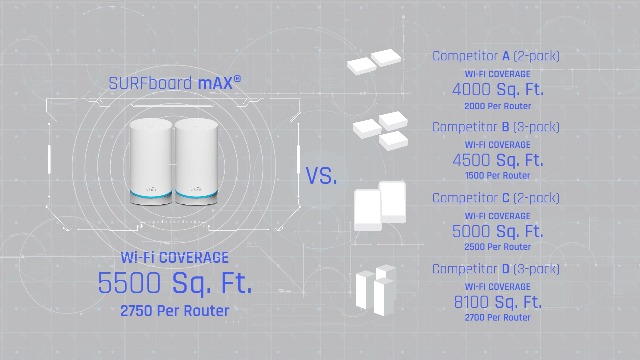
The Arris W21, or the Arris Surfboard mAX W21 Tri-Band Mesh Ready WiFi 6 Router, is a modern networking device designed for households with heavy demands from streaming, gaming, and a growing number of smart home gadgets. It promises AX6600 speeds up to 6.6 Gbps and coverage for approximately 2,750 square feet, backed by ARRIS’s long-standing reputation in broadband technology. This review analyzes its specifications, features, and user feedback to determine if its app-centric approach and mesh-ready design deliver a seamless, high-performance home network.

At its core, the Arris W21 is a tri-band WiFi 6 router that aims to eliminate dead zones and buffering. It is positioned for users ready to upgrade from older WiFi standards, offering features like robust parental controls, IFTTT integration for smart home automation, and the ability to expand into a mesh system. The bottom line: this router packs considerable speed and smart management tools, but its reliance on a mobile app for all configuration is a significant design choice that potential buyers must consider.
ARRIS SURFboard mAX W21 WiFi 6 Tri-Band Mesh




As an Amazon Associate we earn from qualifying purchases. Product prices and availability are accurate as of the date/time indicated.
Arris W21 at a Glance
| Specification | Detail |
|---|---|
| Wi-Fi Standard | Wi-Fi 6 (802.11ax) |
| Frequency Bands | Tri-Band (2.4GHz, 5GHz, 5GHz High) |
| Maximum Speed | Up to 6.6 Gbps (AX6600) | Coverage Area | Up to 2,750 sq ft |
| Ethernet Ports | 4 x Gigabit LAN (1000 Mbps) |
| Antennas | 3 Internal Antennas |
| Security Protocols | WPA-PSK, WPA2-PSK |
| Special Features | Parental Controls, QoS, LED Indicator, Mesh Ready |
| Control Method | SURFboard Central App (Mobile) |
| Smart Home Compatibility | Alexa, IFTTT, IoT Device Pairing |
| Warranty | 2 Year Limited |
Design and Build
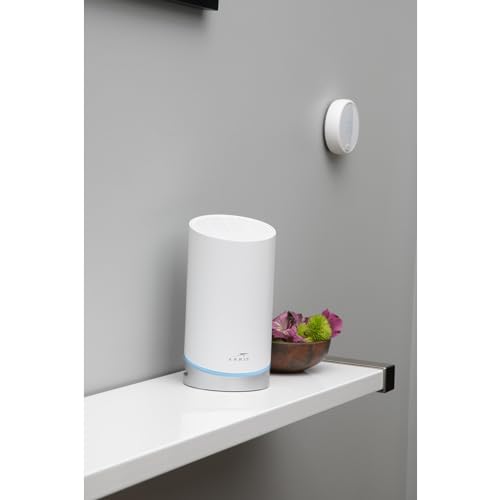
The Arris W21 router features a modern, low-profile design intended to blend into a home environment. It utilizes internal antennas, contributing to its sleek aesthetic without external protrusions. The unit includes LED indicators for status monitoring. As a product from ARRIS, a company with a stated 70-year legacy in connectivity and over 260 million devices sold, the build quality is positioned as reliable. The router is designed to operate on a standard 120-volt electrical system. Specific details on dimensions, weight, or chassis materials are not listed by the manufacturer.
Performance and Features
WiFi 6 Speed and Tri-Band Operation
The Arris W21 is built on the WiFi 6 (802.11ax) standard, with a tri-band configuration consisting of one 2.4 GHz band and two 5 GHz bands (one designated as a “5GHz High” band). This setup is engineered to reduce network congestion by distributing devices across different frequencies. The advertised maximum aggregated speed is 6.6 Gbps (6600 Megabits Per Second), which the manufacturer states is optimized for data-intensive activities like 4K video streaming, online gaming, and virtual reality. The 4×4 MIMO design on the high band is intended to ensure multiple devices can maintain peak performance simultaneously.
Connectivity and Ports
For wired connections, the router is equipped with four Gigabit Ethernet LAN ports, each supporting up to 1000 Mbps. It is compatible with any modem via its WAN port. The specifications confirm it has two ports total, but the manufacturer features and common configuration indicate four LAN ports are present. There is no mention of a USB port, multi-gigabit Ethernet (e.g., 2.5GbE), or a dedicated WAN/LAN port for fiber connections beyond standard gigabit. The wireless connectivity range is listed as covering up to 2,750 square feet.
Key Software and Smart Features
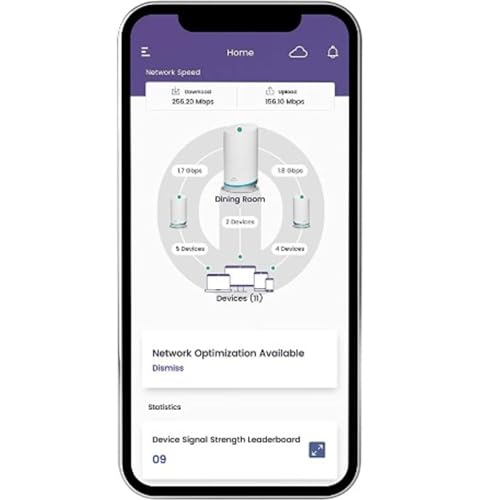
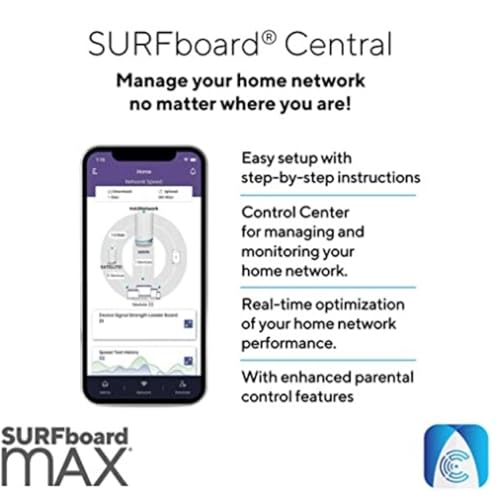
Management and configuration are handled exclusively through the SURFboard Central mobile app. This app provides step-by-step setup, real-time network monitoring, and device management. Key software features include robust parental controls that allow for setting time limits, pausing internet access, and creating reward-based activities for children. The “Who’s Home” feature sends alerts when devices join or leave the network. Quality of Service (QoS) settings let users prioritize traffic for specific applications or devices. For smart home integration, the router supports Alexa and features IFTTT compatibility, allowing automation with brands like Philips Hue, Ring, and Google. A notable privacy feature is the option to keep network management data stored locally on the device instead of in the cloud.
Mesh Expandability
A significant selling point is the router’s mesh-ready design. Users can expand coverage by adding compatible Arris SURFboard mAX units (models W121 or W21) to create a unified WiFi 6 mesh system, supporting up to three routers total. This allows the network to scale for larger homes without replacing the core system, aiming to deliver consistent gigabit speeds throughout the expanded area.
Setup, Support and Ownership
Setup is designed to be straightforward via the SURFboard Central app, which guides users through the process. However, it requires downloading the app and creating an account, as there is no browser-based administrative interface mentioned. The router is compatible with personal computers, smart TVs, and smartphones. For support, ARRIS provides a 2-year limited warranty. The product’s firmware and update process are managed through the app, but specific details on update frequency or long-term software support are not listed by the manufacturer. The mesh expansion capability offers a clear upgrade path for growing network needs without obsolescence.
What Owners Say
Owner feedback presents a mixed picture. The product holds a 3.6 out of 5-star rating. A majority of reviewers award five stars, praising the router’s reliable performance, good coverage even in multi-level homes, and decent speeds for the price. Positive reviews highlight that once set up, the system works well for demanding uses like wireless calling and streaming. However, a significant portion of one-star reviews cite a major pain point: the exclusive reliance on the mobile app for all configuration and management, with no web interface alternative. Some users report this as a frustrating limitation. Other criticisms mentioned in reviews include occasional setup difficulties and receiving units that appeared used or repackaged. The general consensus among satisfied owners is that it provides solid WiFi 6 performance and effective mesh expansion when it functions as intended.
Pros and Cons
Pros
- Strong tri-band WiFi 6 performance for gaming and 4K streaming
- Intuitive mobile app with comprehensive parental controls and network monitoring
- Mesh-ready design allows for easy, scalable coverage expansion
- Smart home integration with Alexa and IFTTT support
- Privacy-focused local data storage option
- Reliable brand heritage in home networking
Cons
- Configuration and management are app-only, with no web interface
- Coverage for larger homes may require purchasing additional mesh units
- Limited to Gigabit Ethernet ports; no multi-gigabit options
- Some user reports of setup hiccups or inconsistent connectivity
- Mixed owner reviews regarding the overall user experience
Who Should Buy It (and Who Should Skip It)
The Arris W21 is a strong candidate for users who prioritize app-based management and want a future-proof, mesh-expandable WiFi 6 system. It’s well-suited for households with multiple gamers and streamers, and for parents who will utilize the advanced parental control features. Those building a smart home with IFTTT-compatible devices will also appreciate the integration. For more on integrating smart tech, see our guide on the best AI smart home devices.
Conversely, users who prefer or require traditional browser-based router administration should skip this model. Those with homes significantly larger than 2,750 square feet should be prepared to invest in additional mesh nodes immediately. Network enthusiasts or professionals needing advanced configuration options, VLAN support, or multi-gigabit wired backhaul may find the feature set limiting. If your primary need is extensive wired connectivity, exploring other options in our reviews category may be beneficial.
Final Verdict
The Arris Surfboard mAX W21 delivers on the core promise of modern WiFi 6: fast, reliable wireless speeds capable of handling today’s connected homes. Its tri-band design, mesh expandability, and feature-rich app—especially the parental controls and smart home integrations—make it a compelling package for the right user. The ability to start with a single router and grow into a mesh system offers flexibility and value over time.
However, the router’s defining characteristic—exclusive app control—is also its most polarizing. This design streamlines setup for many but removes a layer of access and control that some users depend on. Your comfort with this trade-off is the deciding factor. If you manage your network primarily from your phone and want powerful, easy-to-use tools for family and device management, the Arris W21 is a worthy contender. For those who value deeper, browser-based configuration, alternative routers may be a better fit. For insights on other tech purchases, consider our expert picks on cybersecurity essentials.
FAQs
Can I manage the Arris W21 from a web browser on my computer?
No. According to the specifications and owner reviews, the Arris W21 is configured and managed exclusively through the SURFboard Central mobile app. There is no web-based administrative interface provided, which is a significant departure from many traditional routers.
How do I expand the coverage with a mesh system?
The Arris W21 is mesh-ready. You can purchase additional compatible Arris SURFboard mAX units (models W121 or W21) and add them to your network through the SURFboard Central app. The system supports up to three routers total to create a seamless WiFi network that covers a larger area.
What kind of parental controls does it offer?
The SURFboard Central app includes enhanced parental controls. These allow you to set time limits on internet access, pause the internet for specific devices, create guest networks, and establish rules. A unique feature is the ability to set up reward-based activities for children, granting screen time or virtual currency upon completion of chores or tasks.
Does the Arris W21 work with any modem?
Yes. The product specifications state it is modem compatible. It should work with any standard cable, DSL, or fiber modem that has an Ethernet output, connecting via the router’s WAN port. It is a standalone router, not a modem-router combo unit.
About the author

Elvis Dicki writes reviews and buying guides for CyberSecLabs.