GLiNet GL-AR300M16 Review: A Compact Travel Router with VPN Security
The GLiNet GL-AR300M16 is a highly portable OpenWrt router designed to create secure, private Wi-Fi networks on the go, making it a top choice for travelers and privacy-conscious users.
 By Elvis Dicki
Updated October 22, 2026
The GLiNet GL-AR300M16 is a mini travel router that prioritizes security and portability. It is designed for users who frequently connect to public or hotel networks, such as business travelers, journalists, and privacy-focused individuals, seeking to encrypt their internet traffic and create a personal Wi-Fi bubble. This device runs on OpenWrt firmware and comes pre-installed with OpenVPN and WireGuard VPN client and server capabilities, aiming to provide an extra layer of protection. The bottom line: it’s a pocket-sized tool for converting untrusted networks into secure, private connections for multiple devices.

Its core function is to act as an intermediary, taking a single wired or wireless internet connection from a public source and broadcasting a new, encrypted Wi-Fi network. This allows you to connect your laptop, phone, and other devices securely, as if you were on a private home network. With its emphasis on open-source software and hardware extensibility, it also appeals to tech enthusiasts interested in customization. For those needing a simple, portable solution to enhance network security while traveling or in temporary spaces, the GLiNet GL-AR300M16 presents a compelling option.
Prime GL.iNet GL-AR300M16 OpenWrt Mini Travel Router





As an Amazon Associate we earn from qualifying purchases. Product prices and availability are accurate as of the date/time indicated.
GLiNet GL-AR300M16 at a Glance
| Specification | Detail |
|---|---|
| Wi-Fi Standard & Speed | Wi-Fi 4 (2.4 GHz), up to 300 Mbps |
| Ethernet Ports | 2 x 10/100 Mbps |
| USB Port | 1 x USB 2.0 (for storage or 3G/4G modem) |
| CPU & Memory | QCA9531 @650MHz, 128MB RAM, 16MB NOR Flash |
| VPN Support | Pre-installed OpenVPN & WireGuard client/server |
| Firmware | OpenWrt (pre-installed) |
| Power | 5V via Micro-USB (cable included) |
| Dimensions & Weight | 58 x 58 x 25mm, 39g (1.44 oz) |
| Included Accessories | USB Cable, Ethernet Cable, User Manual |
| Warranty | 2 Years |
Design and Build
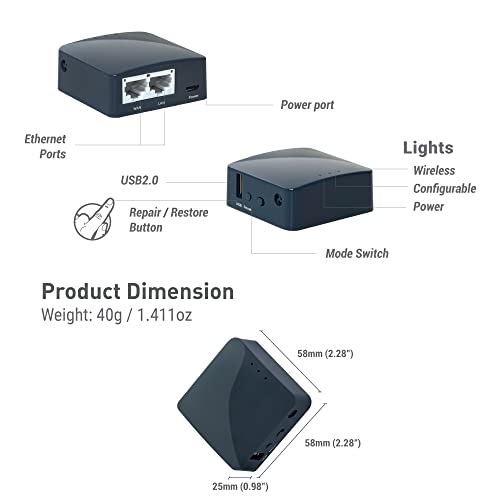
The GL-AR300M16 lives up to its “mini” and “travel” descriptors. Its compact, square form factor measures just over two inches on each side and weighs a mere 39 grams, making it genuinely pocket-friendly. The build is a simple black plastic casing that feels sturdy enough for travel use. The small size is a direct trade-off for internal expandability; there is no internal space for cable management, a point noted in user feedback. The port selection is accessible on the sides, featuring two Ethernet ports and a Micro-USB port for power. It does not include external antennas, relying on internal ones, which contributes to its sleek profile but may impact wireless range in larger spaces.
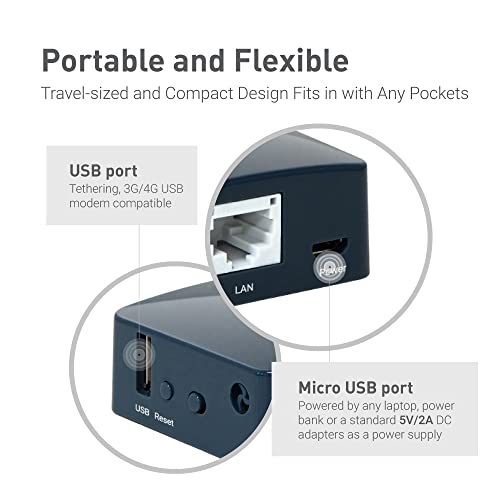
The device’s physical design emphasizes utility for its primary travel use case. It can be powered directly from a laptop’s USB port, a wall adapter (sold separately), or a power bank, offering significant flexibility for mobile setups. The use of a Micro-USB connector for power, rather than the newer USB-C, is a noted drawback in modern contexts. Overall, the design is functional and minimalist, prioritizing portability and the core feature set over premium materials or extensive built-in accessories. For more compact computing solutions, explore our guides on mini PCs and fanless systems.
Performance and Features
Connectivity and Hardware
The router is equipped with a Qualcomm QCA9531 system-on-chip running at 650MHz, paired with 128MB of RAM. This hardware is sufficient for its intended tasks of routing traffic, running VPN clients, and basic network services. The dual 10/100 Mbps Ethernet ports provide flexibility: one can be used as a WAN input from a hotel room’s wired jack, and the other can serve as a LAN output for a device like a gaming console or laptop that benefits from a wired connection. The USB 2.0 port expands functionality, allowing users to connect storage for network file sharing or a USB cellular modem for 3G/4G internet tethering, creating a mobile hotspot.
Wireless Performance
As a single-band Wi-Fi 4 (802.11n) router, it operates solely on the 2.4 GHz frequency with a maximum theoretical speed of 300 Mbps. This is adequate for general web browsing, email, and standard-definition video streaming on several devices connected through its created network. However, the speed is not intended for heavy local file transfers, 4K streaming, or competitive online gaming. The internal antennas and 2.4 GHz band provide decent coverage for small to medium-sized spaces like hotel rooms or small apartments, but performance can be limited by interference and physical obstacles common to the band.
Software and Security Features
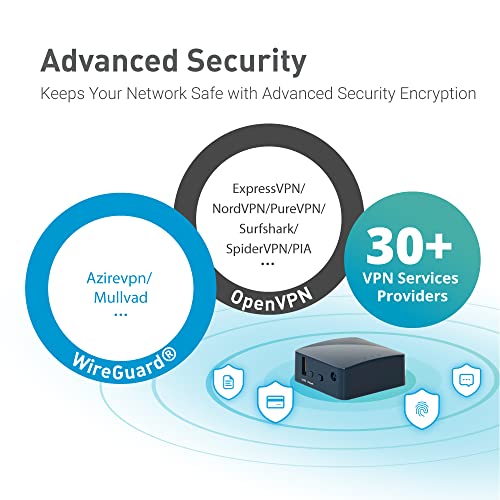
The standout feature is the pre-installed OpenWrt firmware, a powerful, open-source Linux distribution for embedded devices. This gives the router extensive programmability and access to a wide repository of software packages. Most significantly for security, it comes with OpenVPN and WireGuard VPN clients and servers ready to configure. This allows users to connect the entire router to a commercial VPN service, encrypting all traffic from devices connected to it, or to set up their own VPN server for secure remote access to their home network. The manufacturer states compatibility with over 30 VPN service providers. The 16MB of NOR flash storage is sufficient for the base system and some add-ons, but may restrict very extensive custom firmware installations.
Setup, Support and Ownership
Setup is generally reported as straightforward for basic operation. The web interface is based on OpenWrt’s LuCI, which is comprehensive but may have a learning curve for users unfamiliar with advanced networking concepts. Connecting to a hotel’s captive portal (the login page) is a key use case, and the router supports this functionality. For VPN setup, users will need configuration files from their VPN provider. The inclusion of a two-year warranty provides assurance against defects. Support resources include the user manual and, by extension, the vast OpenWrt community and documentation online. The open-source nature means firmware updates are available, though users should follow GLiNet or OpenWrt channels for stability and security patches.
Ownership is enhanced by the device’s low power draw, allowing it to run for extended periods on a power bank. The lack of a bundled wall adapter means users must supply their own 5V/2A adapter or use a USB port. The extensibility through the USB port and the exposed UART and GPIO pins cater to hardware DIY enthusiasts looking to integrate the router into custom projects. For those seeking routers with different performance profiles, such as for handling multiple devices or gigabit internet, other categories may be more suitable.
What Owners Say
Owner feedback is largely positive, with a high proportion of five-star ratings. Users frequently praise its portability, ease of setup for creating a private Wi-Fi network, and effective VPN integration. Many highlight successful use in travel scenarios, such as securing hotel internet for personal devices and IoT gadgets like cameras. Positive reviews often mention the value offered by the OpenWrt system and the low power consumption.
Critical feedback tends to focus on specific limitations. Some users encountered challenges with advanced configurations, particularly when trying to set up WireGuard tunnels between two units. Others noted the speed limitation of the 2.4 GHz band and the older Micro-USB power connector. A few reviews pointed out nuances in how devices communicate when connected through the router, especially in tethering scenarios. The overall sentiment confirms it works well for its advertised primary purpose but may require technical patience for more complex setups.
Pros and Cons
Pros
- Extremely portable and lightweight design
- Pre-installed OpenVPN and WireGuard support
- OpenWrt firmware allows for high customization
- Versatile power options (USB, power bank)
- Dual Ethernet ports for wired connectivity
- Low power consumption
Cons
- 300 Mbps speed limits bandwidth-intensive tasks
- 16MB flash storage restricts very large software additions
- No external antennas, limiting wireless range
- Uses Micro-USB instead of USB-C for power
- Advanced VPN or network configurations can be complex
- Single-band 2.4 GHz Wi-Fi only
Who Should Buy It (and Who Should Skip It)
The GLiNet GL-AR300M16 is an ideal purchase for frequent travelers, remote workers, and digital nomads who need to create a secure, private Wi-Fi network from public internet sources. It’s perfect for business travelers, journalists, or anyone concerned about privacy on hotel or cafe networks. Tech enthusiasts and hobbyists who appreciate the tinkering potential of OpenWrt and hardware GPIO pins will also find great value in it.
This router is not the best choice for users with high-speed home internet plans who need to maximize their bandwidth for activities like 4K streaming, large file downloads, or online gaming. It should be skipped by those who need extensive Wi-Fi coverage for a large home or who require the latest Wi-Fi 6 features. Individuals looking for a simple, set-and-forget router without any desire to configure VPNs or explore advanced settings might find other consumer-grade travel routers more immediately suitable. For home labs or larger spaces, consider routers optimized for large homes.
Final Verdict
The GLiNet GL-AR300M16 successfully fulfills its niche as a secure, portable travel router. Its greatest strength is bundling robust VPN client support and open-source firmware into a device that can fit in a pocket and run off a battery pack. For the target user—someone who needs to guard their data on untrusted networks—the trade-offs in raw speed and modern connectors are acceptable given the core security benefits and portability.
While not a powerhouse for domestic high-speed networking, it excels at its specific mission. The positive owner reviews largely validate its performance in real-world travel scenarios. If your priority is securing your internet connection on the go with a device that offers deep customization for those who want it, the GL-AR300M16 is a compelling and unique product that delivers on its key promises.
FAQs
Can I use this router with my VPN subscription?
Yes. The GL-AR300M16 has pre-installed OpenVPN and WireGuard clients. You can configure it with the connection files provided by your VPN service provider, allowing all devices connected to the router to use the VPN tunnel without installing software on each device. The manufacturer states compatibility with over 30 popular VPN services.
How do I power this router while traveling?
The router includes a Micro-USB cable. You can power it using a standard 5V/2A USB wall adapter (not included), a USB port on a laptop, or a portable power bank. This flexibility is a key feature for mobile use, allowing you to create a network anywhere you have a power source.
Is the Wi-Fi speed sufficient for streaming video?
The 300 Mbps speed on the 2.4 GHz band is sufficient for standard definition (SD) and high definition (HD) streaming on a few devices. However, it may not reliably handle multiple streams of 4K or high-bitrate video, as the bandwidth is shared and the 2.4 GHz band can be congested. It is optimized for browsing, communication, and light media consumption.
What can I do with the OpenWrt firmware?
OpenWrt is a Linux-based operating system that turns the router into a highly customizable platform. Beyond basic routing, you can install packages for network monitoring, ad blocking, dynamic DNS, advanced firewalls, and much more. It also allows for deeper system customization and scripting, appealing to users who want control over their network’s functionality.
About the author

Elvis Dicki writes reviews and buying guides for CyberSecLabs.