eero 1-pack Review: For Smart Homes with Gigabit+ Internet
The eero Pro 6E mesh router delivers Wi-Fi 6E's 6 GHz band for low-latency performance, supports over 100 devices, and is designed for users with fast internet plans seeking reliable whole-home coverage.
 By Elvis Dicki
Updated October 20, 2026
By Elvis Dicki
Updated October 20, 2026
The eero 1-pack is Amazon’s first foray into Wi-Fi 6E mesh networking. This single unit, the eero Pro 6E, is designed to replace a traditional router, offering access to the new 6 GHz band for compatible devices, support for internet plans up to 2.5 Gbps, and coverage for areas up to 2,000 square feet. It’s squarely aimed at users with high-speed internet subscriptions who need a robust, future-proofed network capable of handling intensive gaming, 4K streaming, and a house full of smart devices without compromise. For tech-savvy households with gigabit or faster internet, the eero Pro 6E provides a powerful foundation for a modern, high-performance home network.

As a standalone mesh router, its primary role is to serve as the central gateway for your home network. Its value proposition hinges on the latest Wi-Fi 6E standard, which adds the uncongested 6 GHz frequency to reduce interference and latency, particularly beneficial for real-time applications. The device is also backward compatible with older eero systems, allowing for flexible expansion. This review analyzes its specifications, design, and feature set to determine if it lives up to the promise of delivering “wired speeds, without the wires” for users demanding top-tier wireless performance.
Prime eero Pro 6E Mesh WiFi 6E Router - 2.5 Gbps Speeds






As an Amazon Associate we earn from qualifying purchases. Product prices and availability are accurate as of the date/time indicated.
eero 1-pack at a Glance
| Spec | Value |
|---|---|
| Wi-Fi Standard | Wi-Fi 6E (supports 6 GHz band) |
| Coverage (1-pack) | Up to 2,000 sq. ft. |
| Supported Internet Speeds | Up to 2.5 Gbps (via 2.5 Gb port) |
| Maximum Wireless Speed | Up to 1.6 Gbps |
| Device Support | 100+ connected devices |
| Ethernet Ports | One 2.5 Gb & one 1 Gb (auto-sensing) |
| Key Technology | TrueMesh for traffic routing |
| Smart Home Radio | 802.15.4 (Zigbee, Thread) |
| Processor | 1 GHz dual-core |
| Setup & Management | eero mobile app |
Design and Build
The eero Pro 6E maintains the brand’s signature minimalist, low-profile aesthetic. It’s a compact, white rectangular device measuring 5.6 by 5.4 by 2.0 inches, designed to blend discreetly into home decor on a shelf or side table rather than scream “networking gear.” This approach is typical of consumer-focused mesh systems, prioritizing visual subtlety. The build quality, as described by the manufacturer, is solid, with no external antennas to adjust.
The rear panel houses its connectivity options: one auto-sensing 2.5 gigabit Ethernet port and one auto-sensing 1 gigabit Ethernet port. This port configuration is a key differentiator, as the 2.5 Gb port allows it to fully leverage gigabit-plus internet plans from service providers when connected to a compatible modem. The inclusion of a 1 Gb port provides flexibility for connecting a wired device, like a desktop PC or network-attached storage. The unit is designed to operate within a temperature range of 32 to 104 degrees Fahrenheit, making it suitable for typical indoor home environments.
Performance and Features
Wi-Fi 6E and Speed Capabilities
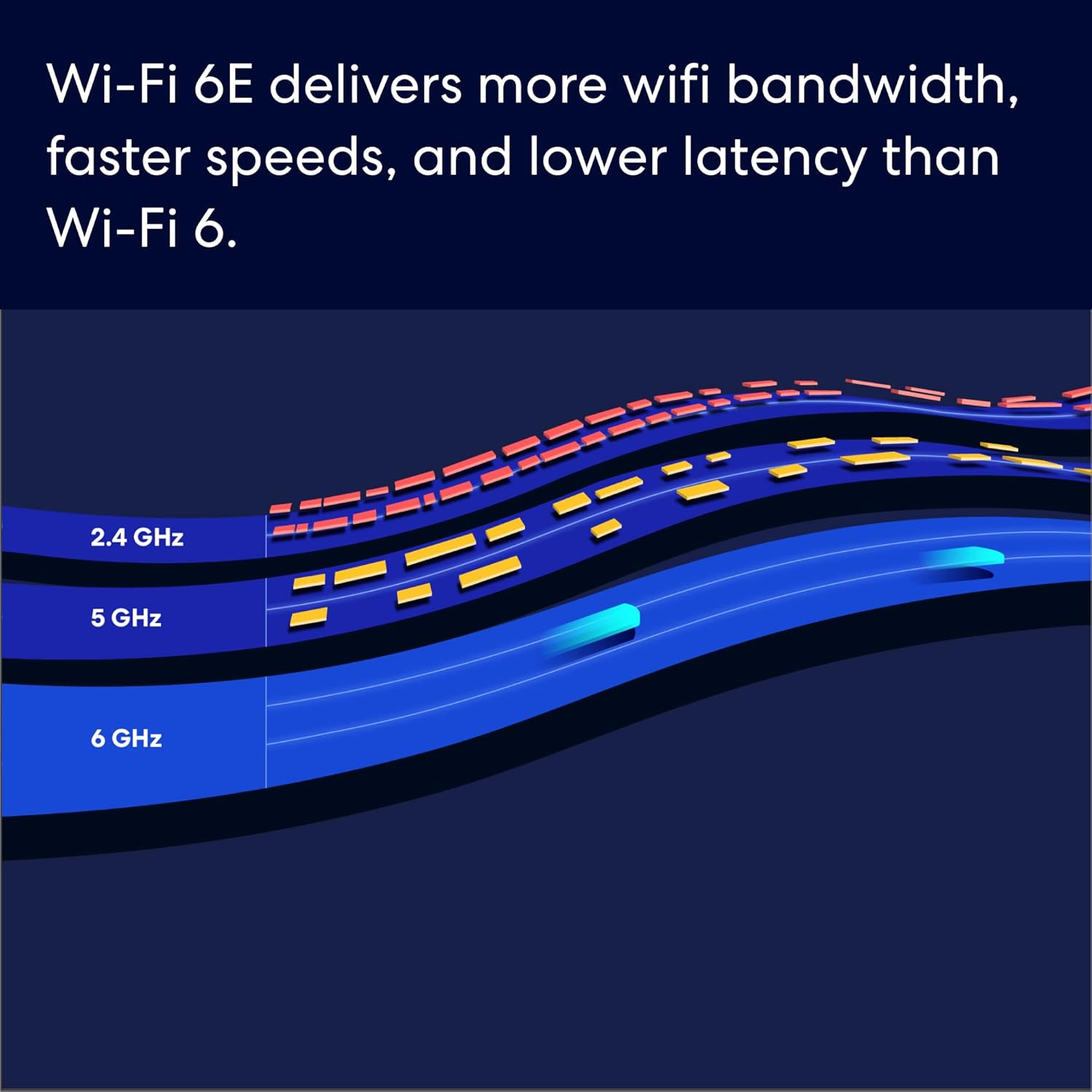
The headline feature is its support for the Wi-Fi 6E standard. This grants compatible devices—like the latest smartphones, laptops, and consoles—direct access to the new 6 GHz band. This band is less crowded than the traditional 2.4 GHz and 5 GHz bands, resulting in lower latency, which is critical for competitive gaming, video conferencing, and VR applications. The router supports combined network speeds up to 2.3 Gbps, with wireless speeds reaching up to 1.6 Gbps. It is engineered to enable gigabit-plus internet plans, particularly when utilizing the 2.5 Gb Ethernet port for the connection to your modem.
Coverage and Device Handling
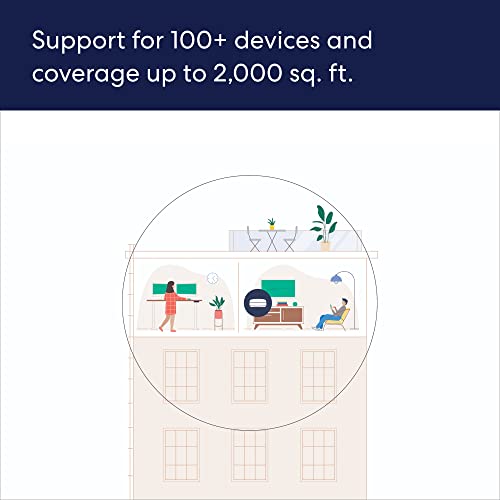
A single eero Pro 6E is rated to provide network coverage up to 2,000 square feet, which the manufacturer equates to a 25-foot radius. This estimate is based on normal use conditions, and actual performance can vary due to building materials and obstructions. More impressively, it is designed to support over 100 connected devices simultaneously. This high device count capacity makes it an ideal candidate for smart homes densely populated with phones, tablets, computers, smart speakers, security cameras, and other IoT gadgets. Its patented TrueMesh technology is cited as the engine behind this capability, intelligently routing traffic between devices to minimize drop-offs and dead spots.
Connectivity and Smart Home Integration
Beyond standard Wi-Fi, the eero Pro 6E includes an 802.15.4 radio. This allows it to function as a smart home hub, directly connecting to and managing devices that use the Zigbee or Thread wireless protocols without requiring a separate hub. This built-in functionality can simplify a smart home setup by reducing the number of dedicated hubs needed. The device also features Bluetooth Low Energy 5.0 and is compatible with Amazon Alexa for voice control and Frustration Free Setup.
Software and Security
Network management is handled entirely through the eero app, which guides users through setup and allows for remote management. The system receives automatic software updates to maintain security and performance. Standard network security features include WPA2, VPN passthrough, IPv6, and port forwarding. Advanced security features like WPA3 are noted as an “eero Labs” feature. It’s important to note that more comprehensive online security and advanced network management tools are available via a separate eero Plus subscription, which typically includes content filtering, threat scanning, and activity reports.
Setup, Support and Ownership
The setup process is designed to be user-friendly, guided step-by-step through the eero mobile app. The manufacturer claims it can be completed in minutes, requiring only a supported iOS or Android device and an existing internet service connection. A significant advantage of the eero ecosystem is its modularity. This single unit can be used as a standalone gateway to replace an old router. If more coverage is needed later, it can seamlessly integrate with additional eero devices—whether older generation models or new Pro 6E units—to create or extend a mesh network. This provides a clear, scalable path for expanding coverage.
Ownership includes a one-year limited warranty and access to free customer support via phone or email seven days a week. The promise of “gets better over time” refers to the automatic software updates that deliver new features and security patches. However, potential buyers should be aware that achieving the full 2,000 sq. ft. coverage with a single unit may not be realistic in all homes, especially those with challenging layouts or construction materials, potentially necessitating the purchase of additional nodes. For insights on scaling a network for larger spaces, see our guide on the best routers for large homes.
What Owners Say
Based on the aggregated rating, user feedback for the eero Pro 6E is generally positive. The overall rating reflects satisfaction with its performance, particularly in delivering strong and stable Wi-Fi signals. Owners with gigabit or faster internet plans often highlight the router’s ability to provide high wireless speeds throughout their home, making good use of their expensive internet subscription. The ease of setup via the app is frequently praised, making it accessible even for those who are not networking experts.
Common points of praise in user discussions often center on the reduction of dead zones and the system’s ability to handle many connected devices without noticeable slowdowns, which aligns with its marketed 100+ device capacity. Some feedback touches on the value of the 6 GHz band for cutting-edge devices. As with any product, experiences can vary based on individual home environments and the specific devices connected.
Pros and Cons
Pros
- Supports Wi-Fi 6E and the low-latency 6 GHz band
- 2.5 Gb Ethernet port for gigabit-plus internet plans
- Handles 100+ devices across 2,000 sq. ft.
- Backward compatible with existing eero systems
- Simple, app-based setup and management
- Built-in Zigbee/Thread smart home hub
- TrueMesh technology optimizes network traffic
Cons
- Full coverage may require additional units for larger or complex homes
- Advanced security features require a separate subscription
- Optimal 6 GHz speeds require Wi-Fi 6E compatible devices
- Performance may be reduced if mixed with older eero generations
- Only two Ethernet ports on the unit
Who Should Buy It (and Who Should Skip It)
The eero 1-pack is an excellent choice for homeowners or renters with a gigabit or faster internet plan who are building a high-performance network. It’s particularly well-suited for tech-heavy households with many wireless devices, including gamers, 4K streamers, and smart home enthusiasts who will benefit from the integrated Zigbee/Thread hub. Users with existing eero systems looking to upgrade their main gateway to Wi-Fi 6E will find it integrates seamlessly. It’s also a strong candidate for those who prioritize a simple, app-controlled setup over the complex interfaces of traditional routers.
This router may not be the best fit for those with internet plans significantly below 1 Gbps, as its high-speed capabilities would be underutilized. Users with homes much larger than 2,000 square feet or with many thick walls should be prepared to purchase additional units for full mesh coverage, increasing the total cost. Individuals who need advanced, built-in network security features like robust parental controls or intrusion detection without a monthly fee might want to explore other options. If your primary need is supporting a very high number of concurrent devices on a fast connection, our roundup of the best routers for multiple devices offers further alternatives.
Final Verdict
The eero Pro 6E successfully brings Wi-Fi 6E to Amazon’s mesh ecosystem, offering a future-proof solution for demanding home networks. Its strengths are clear: access to the uncongested 6 GHz band for compatible devices, strong support for ultra-fast internet plans via its 2.5 Gb port, and impressive capacity for handling a dense array of smart home gadgets and streaming endpoints. The intuitive app and TrueMesh routing deliver a user-friendly and reliable experience that lives up to the promise of whole-home coverage without dead zones, for the right-sized space.
However, its value is maximized under specific conditions. To reap the full benefits, you ideally need both a gigabit-plus internet subscription and Wi-Fi 6E client devices. For larger homes, the investment doesn’t stop at a single unit. When evaluated on its core specifications and intended use case—as a high-performance gateway for a modern, connected home—the eero Pro 6E stands out as a compelling option. It effectively bridges the gap between cutting-edge wireless technology and approachable consumer design. For those specifically seeking routers that can maximize gigabit internet performance, our analysis of the best routers for gigabit internet provides additional context.
FAQs
Can I use the eero Pro 6E as a standalone router?
Yes, absolutely. The eero Pro 6E 1-pack is designed to function as a complete router, replacing your existing ISP-provided or traditional router. You connect it directly to your modem, and it handles all routing, Wi-Fi broadcasting, and network management duties for your home.
What is the main advantage of Wi-Fi 6E?
The primary advantage is access to the new 6 GHz frequency band. This band offers more channels and is currently less crowded than the 2.4 GHz and 5 GHz bands, resulting in significantly lower latency, less interference, and faster potential speeds for devices that support the Wi-Fi 6E standard, such as newer smartphones, laptops, and gaming consoles.
Do I need to pay a subscription for the eero to work?
No, a subscription is not required for basic router functionality, Wi-Fi coverage, and automatic security updates. The eero Plus subscription is optional and unlocks additional features like advanced security scanning, content filters, activity reports, and network performance insights. The router works fully without it.
How do I expand coverage if 2,000 sq. ft. is not enough?
The eero system is modular and designed for easy expansion. You can purchase additional eero devices—either more Pro 6E units or compatible older eero models—and add them to your network through the eero app. They will form a seamless mesh network, extending your Wi-Fi coverage throughout your home. The setup process for adding nodes is straightforward.
About the author

Elvis Dicki writes reviews and buying guides for CyberSecLabs.