Ugreen DXP4800 Pro Review: Intel i3-1315U NAS with 10GbE
The Ugreen DXP4800 Pro is a high-performance 4-bay NAS designed for power users and businesses, offering robust virtualization support, extensive storage expansion, and enterprise-grade security features.
 By Elvis Dicki
Updated October 20, 2026
By Elvis Dicki
Updated October 20, 2026
The Ugreen DXP4800 Pro is a desktop network-attached storage (NAS) enclosure engineered for demanding workflows that go beyond simple file sharing. This diskless 4-bay unit is built around pro-grade hardware, including an Intel Core i3-1315U processor and 8GB of DDR5 RAM, positioning it as a versatile private workstation capable of running virtual machines, Docker containers, and serving as a central IT hub. It is an ideal solution for video editors, developers, and growing teams who require high-performance, flexible storage with advanced computing capabilities, offering a compelling blend of raw power, extensive connectivity, and comprehensive software features in a single package.

Targeting offices, businesses, and power users, the DXP4800 Pro distinguishes itself with its support for virtualization and containerization, high-speed networking with 10GbE, and a massive potential storage capacity of up to 144TB. Its bottom line is that it provides a scalable, all-in-one platform for data storage, media management, and application hosting, with a strong emphasis on data security and local privacy.
Prime UGREEN NAS DXP4800 Pro 4-Bay Intel Core i3 NAS











As an Amazon Associate we earn from qualifying purchases. Product prices and availability are accurate as of the date/time indicated.
Ugreen DXP4800 Pro at a Glance
| Specification | Details |
|---|---|
| CPU | Intel Core i3-1315U (6 Cores, 8 Threads, up to 4.5GHz) |
| RAM | 8GB DDR5 (Expandable to 96GB) |
| Internal Storage | 128GB SSD (Built-in) |
| Drive Bays | 4 x 3.5″ SATA Bays + 2 x M.2 NVMe PCIe 4.0 Slots |
| Maximum Raw Capacity | 144 TB |
| Networking | 1 x 10GbE Port, 1 x 2.5GbE Port |
| Additional Ports | 4K HDMI, USB 3.0, USB Type-C |
| Key Features | Docker & VM Support, AI Photo Recognition, RAID 0/1/5/10, Data Vault Encryption |
| Operating System | UGOS Pro |
| Warranty | 2 Years |
Design and Build
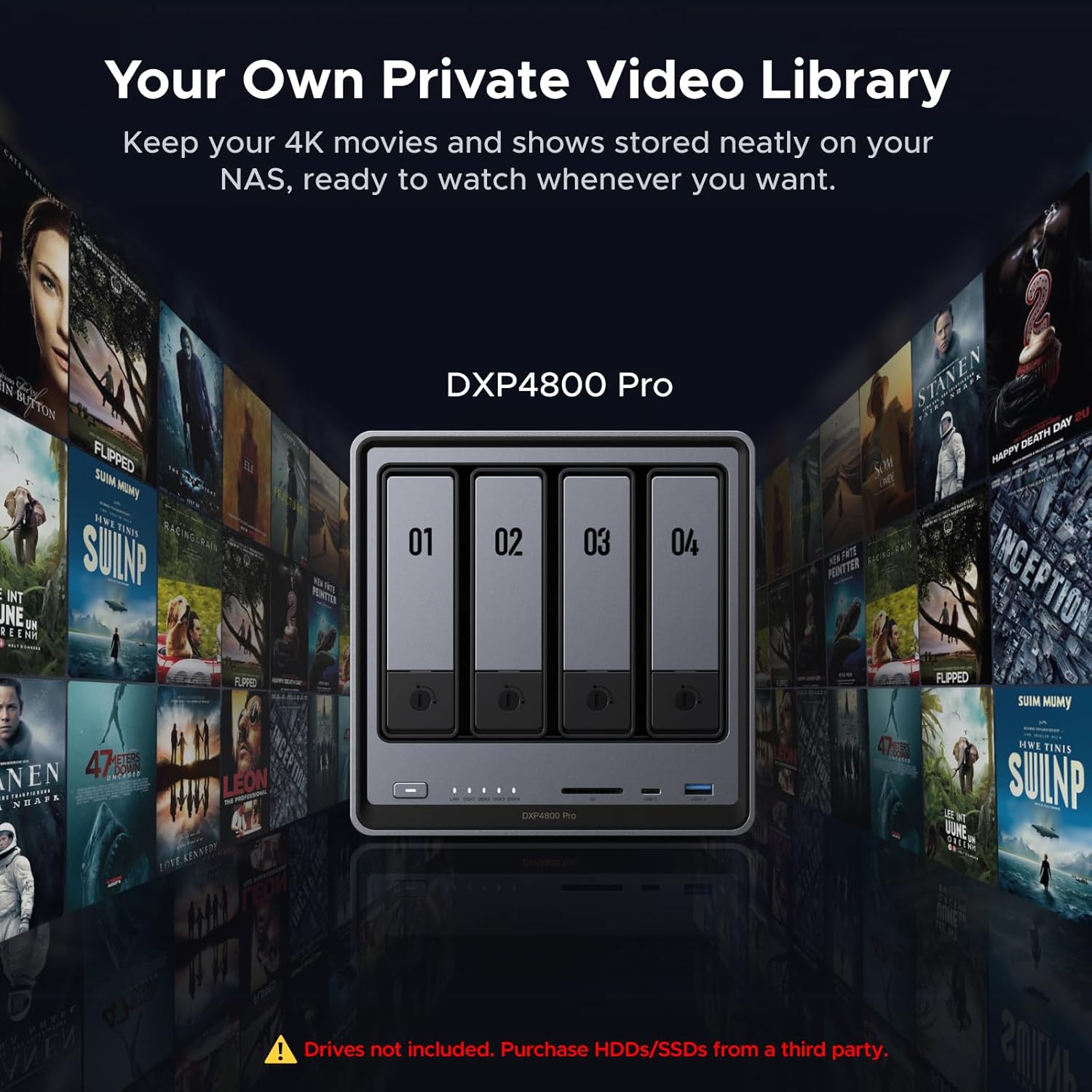
The Ugreen DXP4800 Pro presents a professional, desktop-oriented design with a grey aluminum enclosure. The construction prioritizes functionality for a device intended for continuous operation, featuring a multi-zone cooling system designed to keep components cool and quiet. Tool-free drive trays for the four 3.5-inch hard drive bays facilitate easy installation and maintenance of storage drives. The overall form factor is that of a compact desktop tower, making it suitable for placement in an office or studio environment. The build quality, as suggested by the materials and design, aims for durability suitable for business use.
Performance and Features
Core Hardware and Processing Power
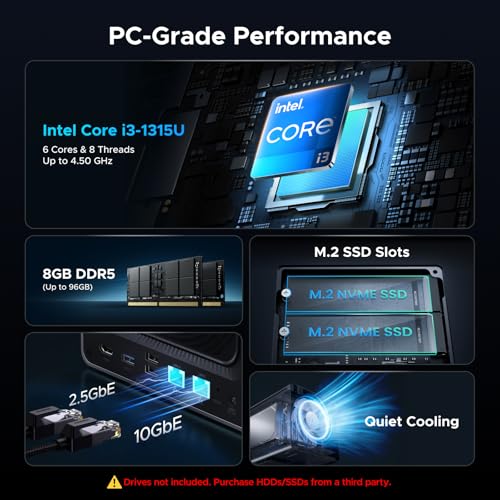
At the heart of the DXP4800 Pro is the Intel Core i3-1315U processor, a 6-core, 8-thread CPU with a maximum turbo frequency of 4.5GHz. This, combined with 8GB of DDR5 RAM (expandable to a substantial 96GB), provides the multi-core performance necessary for smooth multitasking, especially for running virtual machines and multiple Docker containers simultaneously. The inclusion of 13th Gen Intel UHD Graphics assists with media transcoding and graphical tasks within the UGOS Pro operating system. This hardware foundation is a significant step above the ARM or lower-power Intel Celeron processors found in many consumer NAS units, directly targeting power users with computational needs.
Storage and Connectivity
The storage configuration is highly flexible. The four main bays support 3.5-inch SATA hard drives, while the two M.2 NVMe PCIe 4.0 slots can be used either as a high-speed cache to accelerate hard drive performance or as a separate, fast storage pool. This allows users to eliminate bottlenecks for frequently accessed data. The dual high-speed network ports are a standout feature: a 10GbE port and a 2.5GbE port enable blazing-fast network transfers, with a claimed maximum read speed of up to 1.25GB/s. Additional connectivity includes a 4K HDMI output for direct media playback, USB 3.0, and USB Type-C ports, providing extensive options for peripherals and external backups.
Software and Virtualization
The UGOS Pro operating system is central to the device’s versatility. It integrates standard NAS functions like a media center, photo management, cloud sync, and download management into a one-stop interface. Its most powerful aspect is the comprehensive, out-of-the-box support for Docker and Virtual Machines. This unlocks the ability to host personal websites, development environments, smart home hubs like Home Assistant, and media servers like Plex (via Docker). The local AI-powered Photo Album automatically recognizes faces, scenes, and content, with all processing done on-device to maintain user privacy.
Security and Data Protection
Data security is addressed with multiple layers. Users can configure RAID 0, 1, 5, or 10 arrays across the hard drives for redundancy and performance. The system supports granular user permission controls for up to 2048 accounts. A dedicated “Data Vault” feature provides an extra layer of security by hiding and encrypting sensitive files. The manufacturer states the device is certified for privacy and data protection by TV SD (against the ETSI EN 303 645 standard) and TRUSTe, indicating a focus on enterprise-grade security practices. For broader insights on securing network infrastructure, explore our guide on the best VPN routers.
Setup, Support and Ownership
As a diskless model, the initial setup requires the user to purchase and install compatible 3.5-inch SATA hard drives and, optionally, M.2 NVMe SSDs. The tool-free drive trays should simplify this physical installation. The intuitive UGOS Pro interface is designed to guide users through the initial software configuration, including network setup, storage pool creation, and RAID selection. The device is backed by a two-year manufacturer’s warranty. While specifics on long-term software update support are not listed by the manufacturer, the inclusion of a modern x86 platform suggests a viable lifespan for the core operating system and applications. The expandable RAM, up to 96GB, offers a clear path for future-proofing the device as workload demands increase.
What Owners Say
At the time of this analysis, detailed owner review excerpts are not available. The product holds a rating, indicating initial user satisfaction, but the lack of extensive written feedback makes it difficult to assess long-term reliability, real-world performance under load, or nuances of the UGOS Pro user experience from an owner’s perspective. Prospective buyers may want to consider this as an early-adopter product within its performance segment.
Pros and Cons
Pros
- Strong multi-core Intel i3 performance for virtualization and Docker
- High-speed 10GbE and 2.5GbE networking for fast data transfers
- Extensive storage expansion with four bays and dual M.2 NVMe slots
- Comprehensive Docker and virtual machine support built into the OS
- Robust security features including flexible RAID and on-device encryption
- RAM is expandable to 96GB for future demands
Cons
- Diskless model requires separate purchase of hard drives
- Higher initial investment compared to basic consumer NAS devices
- Limited volume of user reviews to confirm long-term reliability
- Size and capabilities may be overkill for simple backup or media streaming needs
Who Should Buy It (and Who Should Skip It)
The Ugreen DXP4800 Pro is an excellent fit for power users, small to medium businesses, and IT enthusiasts who need a high-performance private server. It is ideal for video editors requiring fast shared storage, developers wanting to host test environments and containers, and users seeking to consolidate smart home automation, media serving, and data backups onto a single, powerful device. It also suits those planning to study or work in fields requiring virtualization, much like the users who would benefit from the best laptops for cybersecurity students.
This NAS should be skipped by users with basic needs like backing up a few family computers or streaming media to a couple of devices. The cost and complexity are not justified for simple file storage. Those unwilling to invest in separate hard drives or who prefer a completely plug-and-play experience should look at pre-populated NAS solutions. Individuals or very small offices with minimal data and no need for VMs or Docker would find more value in a less expensive, lower-powered model.
Final Verdict
The Ugreen DXP4800 Pro makes a compelling argument in the prosumer and small business NAS market by packing high-end desktop-grade hardware into a network storage form factor. Its combination of an Intel Core i3-1315U processor, 10GbE networking, and extensive support for virtualization addresses specific pain points for users who have outgrown the capabilities of typical consumer NAS devices. The software feature set, particularly the on-device AI photo management and Docker/VM integration, adds significant value for creating a versatile, all-in-one home or office server.
While the requirement to buy drives separately and the premium price are considerations, the DXP4800 Pro delivers a level of performance and flexibility that justifies the cost for its target audience. It represents a scalable platform that can grow with a user’s needs, from massive media libraries to complex containerized applications. For those seeking a powerful, private alternative to cloud services for business workflows or advanced home labs, the Ugreen DXP4800 Pro is a formidable contender. For related enterprise hardware considerations, see our analysis of the best enterprise computer servers.
FAQs
Does the Ugreen DXP4800 Pro come with hard drives installed?
No, this is a diskless model. It includes the NAS enclosure with the CPU, RAM, built-in 128GB SSD, and all ports, but the four 3.5-inch SATA hard drive bays are empty. You must purchase compatible hard drives separately to use the device for primary storage. M.2 NVMe SSDs for cache or storage pools are also not included.
Can I use the Ugreen NAS to run a Plex Media Server?
Yes. The manufacturer specifies that Plex can be run via Docker on all DXP series models. The Intel Core i3-1315U processor with UHD Graphics provides hardware-accelerated transcoding, making it suitable for streaming media, including 4K content, to multiple clients. The 4K HDMI port also allows for direct playback on a connected display.
What is the benefit of the 10GbE network port?
The 10 Gigabit Ethernet (10GbE) port provides a theoretical maximum network transfer speed ten times faster than standard 1GbE. This is crucial for workflows involving large files, such as video editing directly from the NAS, rapid backups of massive datasets, or serving files to multiple users simultaneously without bottlenecks. To utilize this speed, your network switch and the connecting client computers must also support 10GbE.
How does the AI Photo Album work, and is my data private?
The AI-powered Photo Album feature automatically analyzes photos uploaded to the NAS to recognize faces, scenes, and objects, enabling smart search and organization. A key point is that all AI processing for this feature happens locally on the DXP4800 Pro device itself. Your photos are not sent to the cloud or a third-party server for analysis, which helps maintain your privacy and data security.
About the author

Elvis Dicki writes reviews and buying guides for CyberSecLabs.