TP-Link Archer BE600 Review: A Future-Proof Router with 10G Port
The TP-Link Archer BE600 is a tri-band WiFi 7 router designed for large homes seeking multi-gigabit wired and wireless performance, backed by robust security features.
 By Elvis Dicki
Updated October 20, 2026
By Elvis Dicki
Updated October 20, 2026
The TP-Link Archer BE600, also marketed as the Tri-Band BE9700 WiFi 7 Router, represents a significant step into the next generation of home networking. This router is built for tech-savvy households and power users who demand high-speed connectivity for activities like 8K streaming, immersive AR/VR gaming, and managing extensive smart home ecosystems. With its promise of BE9700-class speeds, extensive coverage, and a notable commitment to security, the Archer BE600 aims to be a cornerstone for modern, connected homes. The bottom line is that this router offers a compelling mix of future-proof WiFi 7 technology and versatile multi-gigabit ports, making it a strong candidate for users looking to upgrade their network infrastructure.
Targeting users with large homes up to 2,600 square feet and those who juggle numerous connected devices, the TP-Link Archer BE600 leverages tri-band architecture to distribute network load efficiently. Its standout feature is the inclusion of a 10 Gbps port alongside multiple 2.5 Gbps ports, catering to users with or planning for multi-gigabit internet service. Backed by TP-Link’s HomeShield security suite and a user-friendly management app, it seeks to balance cutting-edge performance with practical, secure daily use.

Prime TP-Link Archer BE600 BE9700 WiFi 7 Tri-Band





As an Amazon Associate we earn from qualifying purchases. Product prices and availability are accurate as of the date/time indicated.
TP-Link Archer BE600 at a Glance
| Specification | Detail |
|---|---|
| Wi-Fi Generation | Wi-Fi 7 (802.11be) |
| Total Theoretical Speed | 9.7 Gbps (BE9700) |
| Frequency Bands | Tri-Band (6 GHz, 5 GHz, 2.4 GHz) |
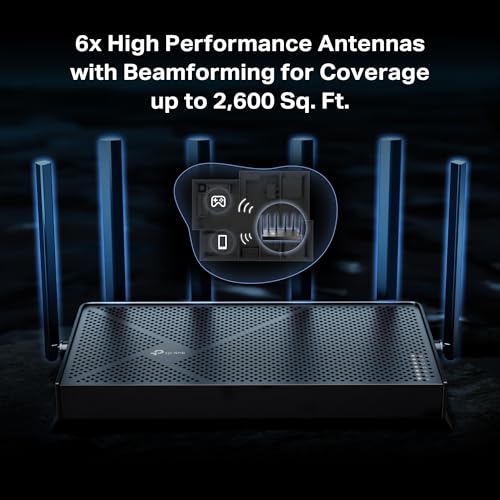
| Coverage Area | Up to 2,600 sq. ft. |
| Device Capacity | Up to 120 devices |
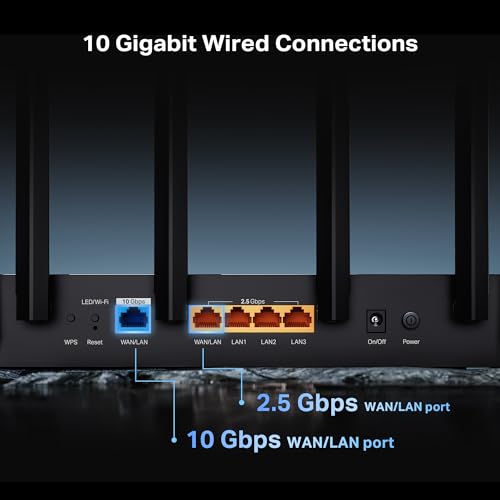
| Key Ports | 1x 10 Gbps WAN/LAN, 1x 2.5 Gbps WAN/LAN, 3x 2.5 Gbps LAN |
| Security | WPA3, TP-Link HomeShield, CISA Secure-by-Design pledge |
| Management | Tether App (Android/iOS) & Web Interface |
| Special Features | Multi-Link Operation (MLO), 4K-QAM, Beamforming, VPN Server/Client |
Design and Build
The TP-Link Archer BE600 sports a black chassis with dimensions of 11.29 by 6.02 by 1.87 inches and a weight of 1.7 pounds, giving it a substantial but not overly bulky presence. The design incorporates six internal antennas, which are optimally positioned according to the manufacturer to aid in signal distribution and coverage. This internal antenna design contributes to a cleaner aesthetic compared to routers with external, adjustable antennas. The build appears focused on functional散热 and stable operation, a necessity for a device meant to handle high-speed data transfer and multiple simultaneous connections continuously.
The rear panel is where the router’s connectivity prowess is on full display, housing its array of high-speed ports. The unit includes a USB 3.0 port for network storage or printer sharing. The inclusion of LED controls, mentioned in the specifications, suggests users can manage indicator lights, which is a minor but appreciated feature for those who prefer a less distracting setup in a living space or home office. Overall, the design prioritizes the technical capabilities and cooling necessary for its performance tier over flashy gaming aesthetics.
Performance and Features
Wi-Fi 7 and Tri-Band Speeds
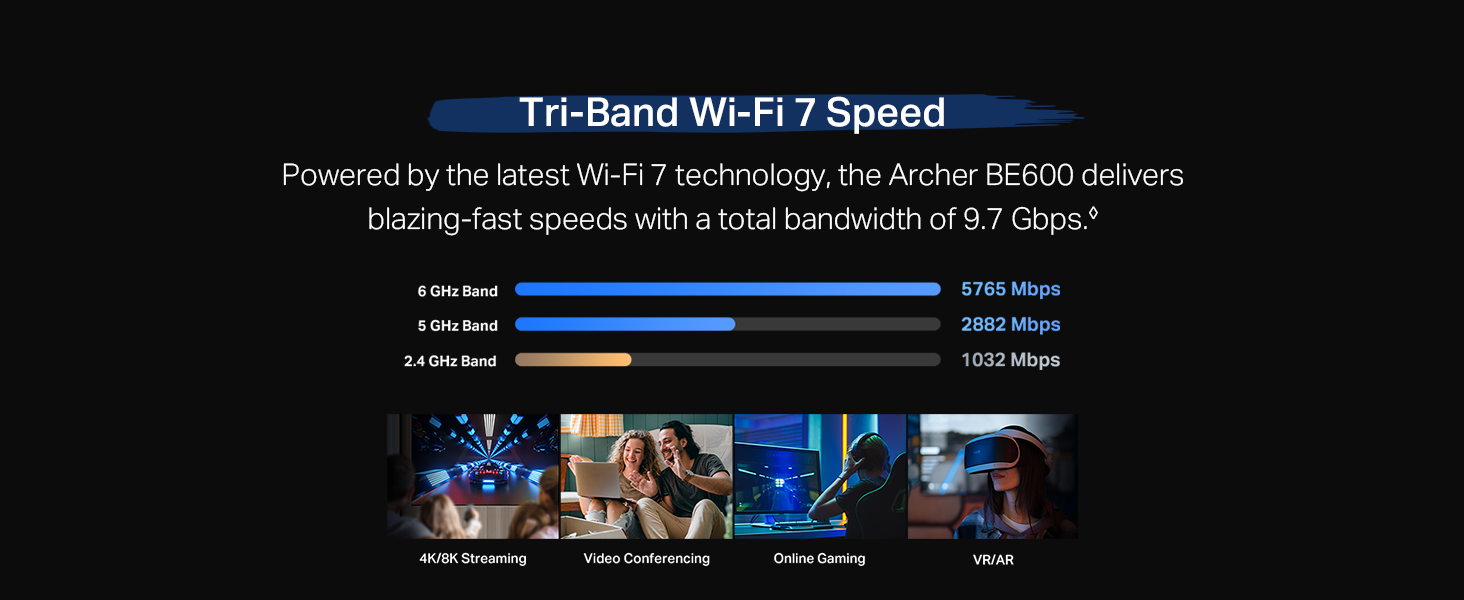
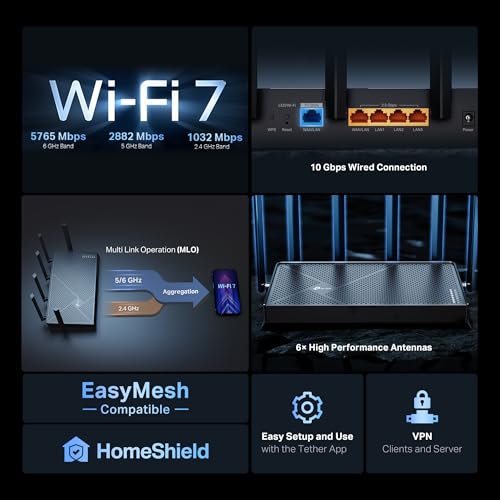
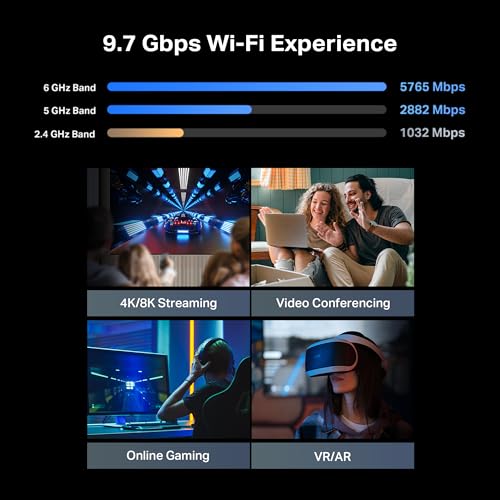
As a WiFi 7 (802.11be) router, the Archer BE600 introduces several foundational technologies for the new standard. It supports 320 MHz channel width in the 6 GHz band, 4K-QAM modulation, and Multi-Link Operation (MLO). MLO is a key advancement, allowing compatible devices to bond multiple frequency bands (e.g., 5 GHz and 6 GHz) into a single connection for increased throughput, reduced latency, and more stable connections when moving around the home. The router’s tri-band configuration divides the wireless load across three distinct radios: a 6 GHz band with a theoretical speed up to 5,765 Mbps, a 5 GHz band up to 2,882 Mbps, and a 2.4 GHz band up to 1,032 Mbps, summing to the advertised 9.7 Gbps total.
It’s important to note that to fully leverage these WiFi 7 benefits, such as MLO and the high speeds on the 6 GHz band, client devices must also be WiFi 7 compatible. The manufacturer cites examples like the iPhone 16 Pro, Samsung Galaxy S24 Ultra, and PS5 Pro. For households with a mix of older devices, the router maintains backward compatibility with previous Wi-Fi standards (802.11a/b/g/n/ac/ax). Features like Beamforming and MU-MIMO help direct signals to devices and manage multiple connections efficiently, supporting the claim of handling up to 120 devices.
Connectivity and Ports
The port selection is one of the TP-Link Archer BE600‘s most compelling aspects for future-proofing. The single 10 Gbps WAN/LAN port is a standout, allowing connection to a multi-gigabit modem for internet plans exceeding 2.5 Gbps, or it can be used as an ultra-fast LAN port for a high-performance NAS or desktop. This is complemented by a 2.5 Gbps WAN/LAN port and three additional 2.5 Gbps LAN ports, providing exceptional flexibility for wired backbone connections. This setup is ideal for creating a multi-gigabit wired network that can feed access points or connect to devices that benefit from low-latency, high-throughput connections.
Software and Security
TP-Link equips the Archer BE600 with its HomeShield security system. This suite offers real-time network scanning for threats, robust parental controls with content filtering and time management, and specific IoT protection features. A notable capability is the option to create a separate, private SSID for IoT devices, which can be isolated from the main network and protected with WPA3 encryption to limit potential security risks. The router also supports VPN functionality, acting as both a client and server, which allows devices on the home network to access a remote VPN without installing software on each one.
TP-Link states it is a signatory of the U.S. Cybersecurity and Infrastructure Security Agency’s (CISA) Secure-by-Design pledge, indicating a commitment to building security into the product’s development lifecycle. Management is handled through the intuitive Tether mobile app for Android and iOS or a traditional web interface, providing options for users of all technical levels. The router is compatible with Alexa and Google Assistant for voice control and receives automatic firmware updates via cloud services.
Setup, Support and Ownership
Setup is described as a process that can be completed in minutes using the Tether app, which guides users through installation and basic configuration. The router supports Access Point (AP) mode for integrating into existing networks and includes features like Quality of Service (QoS) to prioritize traffic for specific devices or applications. For users with advanced needs, the web interface offers deeper customization, including access control, IPTV support, guest networks, port forwarding, and SPI firewall settings.
TP-Link provides a two-year manufacturer’s warranty for the Archer BE600. Support is available through a dedicated team, with contact information provided. The product’s specifications list 1 GB of installed RAM, which contributes to its ability to manage numerous connections and network tasks. As with any router, real-world performance regarding the stated 2,600 sq. ft. coverage can be influenced by factors like building materials, interference, and device placement.
What Owners Say
Owner feedback presents a generally positive picture with some noted considerations. Many positive reviews highlight the router’s strong processing power, ease of setup via the Tether app, and significant improvement over ISP-provided gateways. Users appreciate features like device isolation for IoT gear, guest networks, and the extensive customization available through the web interface. Several owners with multi-gigabit internet connections and complex home networks, including servers and numerous smart devices, report successful migrations and stable performance.
However, the rating distribution shows a mix of experiences. While a majority of ratings are positive, there are reports of intermittent connectivity issues where devices lose connection, requiring reboots of the router. Some users have encountered challenges getting all devices to connect initially. A minority of reviews express concerns about managing the router through a third-party app with subscription options, feeling it impacts privacy. These experiences suggest that while the router is powerful, its stability in certain environments may vary, and the reliance on TP-Link’s ecosystem for full management is a factor for some buyers.
Pros and Cons
Pros
- Future-proof WiFi 7 technology with MLO, 4K-QAM, and 320 MHz channels
- Exceptional port selection featuring a 10 Gbps and multiple 2.5 Gbps ports
- Comprehensive HomeShield security suite with parental and IoT controls
- High device capacity and tri-band design for managing numerous connections
- Easy setup and management through the Tether app and web interface
- Supports VPN server and client functions for enhanced network security
Cons
- Full WiFi 7 benefits require compatible client devices
- Real-world coverage and stability may vary with home layout and interference
- Some users report occasional connectivity issues requiring reboots
- Advanced management features are tied to TP-Link’s ecosystem
- IoT network isolation and some security features require app configuration
Who Should Buy It (and Who Should Skip It)
The TP-Link Archer BE600 is an excellent fit for users with large homes who are actively building a high-performance, multi-gigabit network. It’s ideal for those with or planning to get internet service above 1 Gbps, thanks to its 10 Gbps WAN port. Tech enthusiasts with growing smart home deployments, users who engage in 4K/8K streaming, AR/VR gaming, or host home servers will find its tri-band capacity and wired connectivity advantageous. The strong security focus and parental controls also make it suitable for families seeking a safer online environment. For more insights on building a secure and efficient home tech setup, explore our guides on the best AI smart home devices and essential cybersecurity resources.
This router may be overkill for users in small apartments with basic internet plans (under 1 Gbps) and only a handful of devices. Those who have no immediate need for WiFi 7 or multi-gigabit wired speeds might find better value in a current-generation WiFi 6 or WiFi 6E model. Individuals who prefer a router with a completely standalone web interface without any app dependency might want to consider alternatives. If your primary need is extensive, guaranteed coverage in a challenging environment, investigating dedicated mesh systems might be a better path, similar to how one might research specialized equipment like the best ultra-wide monitors for a specific workspace need.
Final Verdict
The TP-Link Archer BE600 makes a strong case as a forward-looking investment for serious home networkers. Its combination of nascent WiFi 7 capabilities and a generous array of high-speed Ethernet ports addresses both wireless and wired future-proofing concerns. The integrated HomeShield security and intuitive management tools add significant practical value for day-to-day network oversight and protection. While its peak wireless performance is contingent on owning compatible client devices, its robust backbone ensures it can serve as a powerful network hub for years to come.
Potential buyers should weigh the generally positive performance feedback against the reported instances of stability issues from some owners. For those with demanding connectivity needs, multi-gigabit internet, and a home filled with devices, the Archer BE600’s specifications and feature set are highly compelling. It successfully bridges the gap between cutting-edge technology and usable, secure home networking, positioning itself as a capable centerpiece for a modern smart home. Discover more detailed product analyses and buying guides in our reviews section.
FAQs
Do I need WiFi 7 devices to use this router?
No, the TP-Link Archer BE600 is fully backward compatible with older Wi-Fi standards (Wi-Fi 6/5/4). You can use it with all your existing devices. However, to experience the specific new features and maximum speeds of WiFi 7—such as Multi-Link Operation (MLO) and the full 6 GHz band performance—you will need client devices (laptops, phones, etc.) that also support the WiFi 7 standard.
What is the benefit of the 10 Gbps port?
The 10 Gbps WAN/LAN port allows you to connect to an internet modem that provides service speeds greater than 2.5 Gbps, fully utilizing ultra-fast fiber or cable internet plans. Alternatively, you can configure it as a LAN port to connect to a high-performance network-attached storage (NAS) device or a powerful desktop computer, enabling incredibly fast file transfers within your local network.
What does TP-Link HomeShield include?
HomeShield is TP-Link’s integrated security and management suite. It includes real-time network scanning for security threats, robust parental controls for managing screen time and blocking inappropriate content, and specific features for protecting Internet of Things (IoT) devices. This includes the ability to create a separate, encrypted network for smart home devices to isolate them from your main devices.
Is the VPN feature easy to set up?
The router supports both VPN client and server functions. As a client, it can connect to a commercial VPN service, protecting all traffic from your home network without installing software on each device. As a server, it allows you to securely access your home network while away. Setup is managed through the router’s web interface or app, and while it requires some configuration (like entering server details), it is designed to be accessible to users familiar with basic VPN concepts.
About the author

Elvis Dicki writes reviews and buying guides for CyberSecLabs.