TP-Link Archer BE230 Review: Wi-Fi 7 Router with Dual 2.5G Ports
The TP-Link Archer BE230 is a dual-band Wi-Fi 7 router that brings next-generation features like Multi-Link Operation and dual 2.5Gbps ports to a mid-range price point, making it a strong candidate for future-proofing a home network.
 By Elvis Dicki
Updated October 20, 2026
By Elvis Dicki
Updated October 20, 2026
The TP-Link Archer BE230 is a dual-band Wi-Fi 7 router designed to bring the latest wireless standard to users looking to upgrade their home network without the premium cost of tri-band models. It targets households with a growing number of smart devices, gamers seeking low latency, and users with multi-gigabit internet plans. This router aims to deliver future-proof connectivity through Wi-Fi 7 innovations while maintaining broad compatibility and ease of use.

Positioned as an entry point into Wi-Fi 7, the Archer BE230 offers a compelling blend of new technology and practical features, including dual 2.5G Ethernet ports and a quad-core processor. It is well-suited for tech-savvy users and families needing robust performance for streaming, gaming, and managing numerous IoT devices across a medium-sized home.
TP-Link Archer BE230 Wi-Fi 7 Router





As an Amazon Associate we earn from qualifying purchases. Product prices and availability are accurate as of the date/time indicated.
TP-Link Archer BE230 at a Glance
| Specification | Detail |
|---|---|
| Wi-Fi Standard | Wi-Fi 7 (802.11be) |
| Speed Rating | BE3600 (2882 Mbps 5 GHz + 688 Mbps 2.4 GHz) |
| Frequency Bands | Dual-Band (2.4 GHz & 5 GHz) |
| Processor | 2.0 GHz Quad-Core |
| Ethernet Ports | 2x 2.5 Gbps (WAN/LAN, LAN), 3x 1 Gbps LAN |
| USB Port | USB 3.0 |
| Antennas | 4 Internal High-Gain |
| Coverage Area | Up to 2,000 sq. ft. |
| Supported Devices | Up to 60 |
| Security Suite | TP-Link HomeShield |
| Mesh Compatibility | TP-Link EasyMesh |
Design and Build
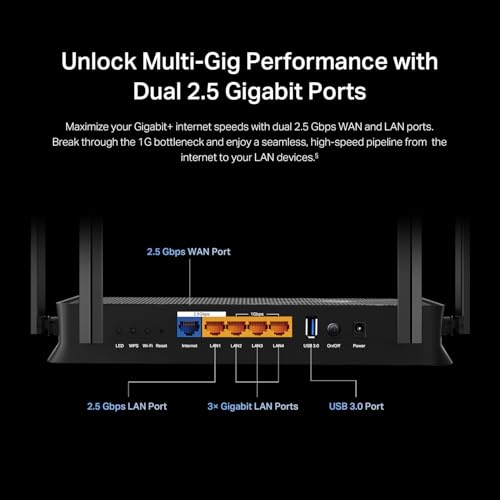
The TP-Link Archer BE230 features a black enclosure with a low-profile design intended to blend into a home or office environment. It utilizes four internal, fixed antennas, which contribute to its clean aesthetic. The router’s build is focused on housing its core components, including the quad-core processor and the array of high-speed ports. The front panel includes status LEDs, while the rear houses all connectivity options: the dual 2.5G ports, three 1G LAN ports, a USB 3.0 port, a power input, a reset button, and a WPS button. The unit is designed for horizontal placement on a shelf or desk.
Performance and Features
Wi-Fi 7 and Core Performance
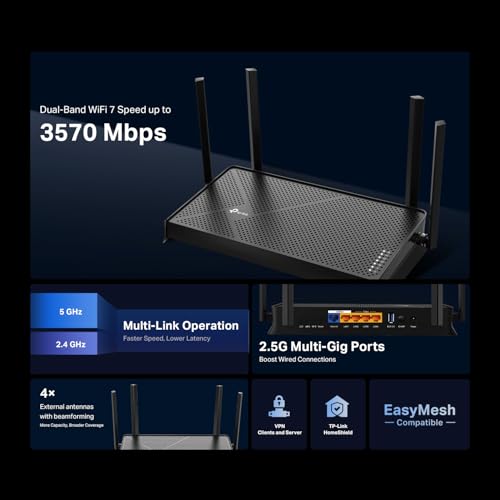
As a Wi-Fi 7 router, the Archer BE230 introduces key advancements over previous generations, though in a dual-band configuration. It supports Multi-Link Operation (MLO), which allows compatible client devices to simultaneously transmit data across both the 2.4 GHz and 5 GHz bands. This technology aims to reduce latency and increase reliability. It also implements 4K-QAM, which increases data capacity by up to 120% compared to 1024-QAM used in Wi-Fi 6, and Multi-RU for enhanced throughput efficiency. The router is powered by a 2.0 GHz quad-core processor paired with 512 MB of RAM, which is tasked with managing network traffic for up to 60 devices and handling the computational demands of Wi-Fi 7 features.
The dual-band design delivers a combined maximum theoretical speed of 3.6 Gbps, split as 2882 Mbps on the 5 GHz band and 688 Mbps on the 2.4 GHz band. It’s important to note that, as a dual-band router, it does not support the 6 GHz band, which is a feature of higher-tier tri-band Wi-Fi 7 models. The router uses beamforming technology and its four internal antennas to focus signals toward connected devices, aiming to improve range and stability within its stated coverage of up to 2,000 square feet.
Connectivity and Ports
One of the standout hardware features of the Archer BE230 is its port selection. It includes two multi-gigabit 2.5 Gbps Ethernet ports. One can be configured as either a WAN or LAN port, allowing it to connect to a modem with a 2.5G connection, while the second is a dedicated 2.5 Gbps LAN port for connecting a high-performance device like a NAS, gaming PC, or another switch. This setup is designed to break the 1 Gbps bottleneck common on many routers. Additionally, it provides three standard 1 Gbps LAN ports for other wired devices and a USB 3.0 port for sharing storage or a printer over the network.
Software and Security Features
The router is managed through the TP-Link Tether mobile app, which facilitates initial setup, network monitoring, and basic configuration. For more advanced settings, a web management interface is available. Security is handled by TP-Link HomeShield, which offers a suite of features including network security scanning, robust parental controls with scheduling and content filtering, and real-time IoT device protection. The router also supports VPN functionality for secure remote access. Furthermore, it is compatible with Amazon Alexa and Google Assistant for voice control of certain network functions.
A significant feature for expandability is its support for TP-Link’s EasyMesh technology. This allows the Archer BE230 to be paired with other compatible TP-Link EasyMesh routers or range extenders to create a seamless whole-home mesh network, eliminating dead zones and managing roaming between nodes. The router is also backward compatible with all previous Wi-Fi generations, ensuring it works with older devices.
Setup, Support and Ownership
Setup is designed to be straightforward using the Tether app, which guides users through the process. The router requires a separate modem to connect to the internet. TP-Link provides free expert support via email and phone for assistance with setup or troubleshooting. Firmware updates are managed through the Tether app to keep the router’s performance and security up to date. The manufacturer includes a 2-year warranty. For users whose homes exceed the router’s coverage area, the EasyMesh compatibility provides a clear upgrade path by adding nodes rather than replacing the entire system.
What Owners Say
Owner feedback for the TP-Link Archer BE230 is generally positive, with users noting its reliable performance and the noticeable benefits of the Wi-Fi 7 features, particularly reduced latency in gaming and smoother streaming. The inclusion of the 2.5G ports is frequently highlighted as a valuable feature for those with fast internet plans or local network needs. The setup process via the Tether app is commonly described as easy and intuitive. The overall sentiment from user reviews aligns with a product that delivers on its promises for modern home networking in a medium-sized space.
Pros and Cons
Pros
- Introduces Wi-Fi 7 features like MLO and 4K-QAM for lower latency and higher capacity.
- Dual 2.5G Ethernet ports eliminate wired bottlenecks for internet and local devices.
- Powerful quad-core processor handles multiple devices and high traffic well.
- EasyMesh support allows for simple whole-home network expansion.
- Comprehensive HomeShield security suite with parental controls and IoT protection.
- Simple setup and management through the Tether mobile app.
Cons
- Dual-band design lacks the 6 GHz band, limiting the full potential of Wi-Fi 7.
- Coverage is limited to 2,000 sq ft, which may require mesh nodes for larger homes.
- Requires a separate modem, which is not included.
- Internal antennas cannot be adjusted or upgraded.
Who Should Buy It (and Who Should Skip It)
The TP-Link Archer BE230 is an excellent choice for users with internet plans above 1 Gbps who want to leverage that speed with its 2.5G WAN port. It’s also ideal for households with many connected devices, gamers prioritizing low latency, and those who want to future-proof their network with Wi-Fi 7 while on a budget. Users living in homes up to 2,000 square feet will find its coverage sufficient, and its EasyMesh capability offers a clear path for later expansion.
This router may not be the best fit for users in very large homes who need immediate, extensive coverage without purchasing additional hardware, as its range is limited. Those who require the absolute maximum wireless speed and the clean airwaves of the 6 GHz band for the latest Wi-Fi 7 devices should consider a tri-band Wi-Fi 7 model instead. Users with simple internet needs and older devices that don’t benefit from Wi-Fi 7 features might find a capable Wi-Fi 6 router to be a more cost-effective solution. For more insights on securing your network, explore our guide on the best VPN routers.
Final Verdict
The TP-Link Archer BE230 successfully brings next-generation Wi-Fi 7 technology to an accessible price point. Its strengths lie in the practical application of new standards like Multi-Link Operation for improved responsiveness and the inclusion of future-ready hardware such as the dual 2.5G Ethernet ports. The robust quad-core processor ensures it can manage the demands of a modern smart home, while the HomeShield suite adds valuable network security. For users looking to upgrade their network infrastructure to handle faster internet plans and more devices with lower latency, the Archer BE230 presents a compelling and future-proof option.
While the lack of a 6 GHz band means it doesn’t offer the complete tri-band Wi-Fi 7 experience, this is a conscious trade-off that makes the technology more affordable. The router’s performance, feature set, and positive user reception make it a strong contender in the mid-range market. It effectively bridges the gap between previous-generation routers and the high-end of Wi-Fi 7, offering a significant performance leap for those ready to step into the next wireless era. For related technology insights, check out our Tech Gear section or our AI & Software content.
FAQs
Does the TP-Link Archer BE230 have a 6 GHz band?
No, the Archer BE230 is a dual-band Wi-Fi 7 router, operating on the 2.4 GHz and 5 GHz bands only. It does not support the 6 GHz band. Dual-band Wi-Fi 7 routers like this one bring new technologies such as Multi-Link Operation (MLO) and 4K-QAM to these existing bands, offering improvements in latency and efficiency, but they lack the additional bandwidth and less congested channels provided by the 6 GHz spectrum found in tri-band Wi-Fi 7 models.
What is Multi-Link Operation (MLO) and do I need special devices for it?
Multi-Link Operation (MLO) is a key feature of Wi-Fi 7 that allows a compatible device to simultaneously send and receive data across multiple frequency bands (like 2.4 GHz and 5 GHz) at the same time. This can reduce latency, increase throughput, and improve reliability. To benefit from MLO, you need both a router that supports it, like the Archer BE230, and client devices (phones, laptops, etc.) that also have Wi-Fi 7 with MLO capability. The router remains fully compatible with all older Wi-Fi devices, but they will not utilize the MLO feature.
Can I use the two 2.5G ports at the same time?
Yes. One of the 2.5G ports is a flexible WAN/LAN port. This can be used as your internet input from a compatible 2.5G modem. The second 2.5G port is a dedicated LAN port. You can use both simultaneously—one for your high-speed internet connection and the other to connect a device like a NAS, gaming PC, or a 2.5G switch to create a very fast local network that exceeds 1 Gbps speeds.
How does the Archer BE230 compare to a Wi-Fi 6 router?
The Archer BE230 offers several advantages over typical Wi-Fi 6 routers, primarily through Wi-Fi 7 technologies. These include Multi-Link Operation for lower latency, 4K-QAM for a 120% increase in data capacity, and more efficient channel use with Multi-RU. It also features dual 2.5G Ethernet ports, which are less common on Wi-Fi 6 routers. If you have a multi-gigabit internet plan, many Wi-Fi 7 devices, or prioritize ultra-low latency for gaming/VR, the BE230 provides a more future-proof foundation. For standard use with older devices, a good Wi-Fi 6 router may still be sufficient. Learn more about foundational tech for professionals in our review of the best laptops for cybersecurity students.
About the author

Elvis Dicki writes reviews and buying guides for CyberSecLabs.