Best Smart Locks For Front Doors for November 2026
Your front door deserves an upgrade in security and convenience. We review the leading smart locks of 2026, comparing features, reliability, and integration to help you choose.
 By Marcus Hale
Updated November 5, 2026
Fumbling for keys with arms full of groceries, worrying about lost or copied keys, and managing access for family, guests, or service providers are common headaches for homeowners. When upgrading your security, the key decisions revolve around finding a reliable unlocking method, ensuring seamless connectivity for remote control, and verifying durability and weatherproofing for your specific door.
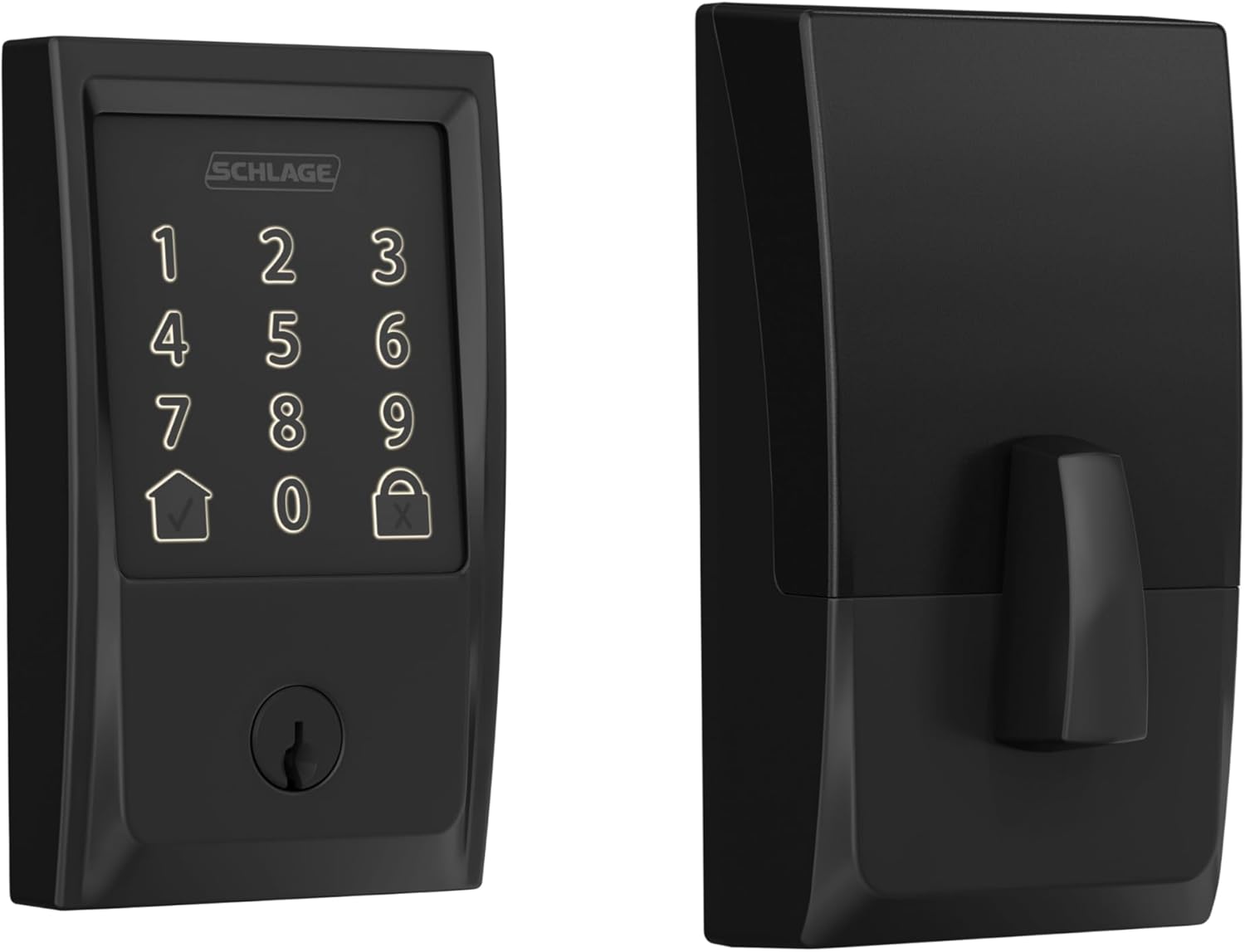
After evaluating the current market, our top recommendation for most users seeking robust, integrated smart home security is the Schlage Encode Smart WiFi Deadbolt Lock. For those prioritizing advanced biometric access with built-in Wi-Fi and no hub requirement, the TEEHO TE012W WiFi Fingerprint Smart Door Lock is an excellent alternative. For more smart home insights, explore our AI & Software content.
The 3 Best Smart Locks For Front Doors on Our Shortlist (November 2026)
- Best for: Integrated smart home security
- Connectivity: Built-in Wi-Fi
- Unlock Methods: Touchscreen, App, Voice
- Security: BHMA Highest Grade

- Best for: Multi-user households & rentals
- Unlock Methods: 8-in-1 Keyless Entry
- Durability: ANSI Grade 1, IP65
- Integration: Alexa, Google, SmartThings

- Best for: Simple, reliable keypad entry
- Unlock Methods: Passcode & One-Time Code
- Battery Life: Up to 365 days
- Installation: DIY, screwdriver only
This post may contain affiliate links. As an Amazon Associate we earn from qualifying purchases.
Quick Comparison
TEEHO TE001 Keypad Deadbolt Lock
This keyless entry deadbolt prioritizes convenience with up to 20 user codes and a one-time guest code. It features automatic locking and an IP54 weather-resistant metal build, making it a practical choice for a main entry. Setup is straightforward, though compatibility is limited to standard 2-1/8" door holes.
Pros
- Supports up to 20 individual user codes plus a temporary guest code
- Offers automatic locking options and a one-touch manual lock feature
- Sturdy, weather-resistant (IP54) metal construction
- Easy installation requiring only a screwdriver
- Includes a low battery indicator and two backup keys for reliability
Cons
- Requires specific 2-1/8" door hole preparation, incompatible with 38mm holes
- Batteries (4 AA) are not included with purchase

Veise KS02A AI Fingerprint Smart Deadbolt
This keyless deadbolt combines a fast AI-powered fingerprint scanner with a flexible 4-in-1 entry system, making it a versatile option for households and rental properties. Its durable, weather-resistant build and straightforward DIY installation add to its appeal.
Pros
- Fast AI fingerprint recognition learns and improves with use, offers high accuracy.
- Flexible 4-in-1 access (fingerprint, codes, keys, one-time passwords) for various users.
- Durable ANSI Grade 3 build with IP54 waterproof rating and wide temperature tolerance.
- Easy DIY installation with no drilling required, suitable for standard doors.
- Features like Vacation Mode and Anti-Peeping Code enhance security and privacy.
Cons
- Requires AA batteries (not included) for power, adding to initial setup.
- No mention of integration with smart home ecosystems or remote access.

TEEHO TE012W WiFi Fingerprint Smart Lock
A feature-packed, app-controlled smart deadbolt with built-in WiFi for remote access. Its multiple unlock methods, including fingerprint and voice control, make it a versatile choice for securing homes, rentals, or offices without needing a separate hub.
Pros
- Built-in WiFi eliminates the need for a separate hub for remote control
- Offers five flexible unlock methods: app, fingerprint, passcode, key, and voice
- Features robust security with AES-128 encryption, break-in alerts, and anti-peeping passwords
- Long-lasting battery from eight AA cells and includes low-battery alerts
- Easy to install and fits a wide range of standard door preparations
Cons
- Requires a 2.4GHz WiFi network, not compatible with 5GHz
- The keypad is not illuminated by default, only in low-light operation modes

Tapo DL100 Smart Wi-Fi Deadbolt Lock
This keyless deadbolt lock offers flexible access via keypad, app, or voice, and is designed for easy, drilling-free installation on standard doors. It's a solid choice for homeowners seeking convenient remote management and a high degree of access control.
Pros
- Multiple flexible access methods including keypad, Wi-Fi app control, and voice commands.
- Easy installation on standard door holes without drilling.
- BHMA Grade 3 and IP54 ratings for durability and weather resistance.
- Includes auto-lock, activity logs, and access group management for security and convenience.
Cons
- Relies on AA batteries, requiring periodic replacement or recharging.

Veise VE017 Fingerprint Smart Door Lock with App
This biometric smart lock offers versatile 8-in-1 access, including fast fingerprint unlocking and remote user management via an app. It's a strong choice for families or landlords seeking keyless convenience and detailed activity logs, with robust features like anti-peeping codes and local data encryption.
Pros
- Offers eight unlock methods, including fingerprint, code, app, and voice control (with separate gateway).
- Provides comprehensive remote user management and detailed entry logs via the KK Home app.
- Features self-learning AI for improved fingerprint recognition over time and anti-peeping password protection.
- Employs AES128 on-device encryption for user data and has a long battery life (approx. 12 months).
- Features a durable, weather-resistant design (IP55) and relatively simple DIY installation.
Cons
- Remote access and voice control require a separately sold G1 Wi-Fi gateway.
- The auto-lock function has a maximum delay of only 180 seconds, which may be short for some users.

Philips DDL242X Smart Wi-Fi Deadbolt Lock
This keyless smart deadbolt offers a flexible blend of convenience and remote control, featuring multiple unlocking methods and built-in Wi-Fi for access from anywhere. It's a solid choice for tech-savvy households looking to eliminate keys and grant secure, temporary access.
Pros
- Offers five ways to unlock: app, fingerprint, passcode, voice, and physical key.
- Built-in Wi-Fi allows for remote control from a smartphone without an extra hub.
- Supports up to 100 custom passcodes and multiple fingerprints for family and guest access.
- Features an auto-lock timer and an Away Mode for enhanced security when traveling.
- Includes a backlit touchscreen and promises straightforward installation with a screwdriver.
Cons
- Requires a stable 2.4GHz Wi-Fi network and proximity to the router for optimal remote function.
- Batteries are not included, and the manual specifies using only AA alkaline types.
- Lacks a door sensor, so the auto-lock feature operates on a timer rather than sensing door closure.
Schlage Encode Smart WiFi Deadbolt with Century
This smart lock provides robust, hub-free WiFi access for remote control and keyless entry. Its built-in alarm and high security ratings make it a reliable choice for those prioritizing safety and convenience.
Pros
- Built-in WiFi eliminates the need for a separate hub
- High security and durability ratings from industry experts
- Easy to install with no hardwiring required
- Compatible with Alexa and Google Assistant for voice control
- Includes auto-lock and customizable access codes
Cons
- Battery life is limited to around six months with typical use

eufy Security Smart Lock C220 with Built-in Wi-Fi
This fingerprint-enabled smart deadbolt offers six ways to unlock, including a self-learning AI system that improves recognition. Its built-in Wi-Fi allows remote control without a hub, and it integrates with other eufy devices. The lock is straightforward to install and backed by a strong durability certification.
Pros
- Offers six convenient unlocking methods: fingerprint, app, keypad, physical key, Apple Watch, and voice assistants.
- Built-in Wi-Fi enables remote access without requiring a separate bridge or hub.
- Self-learning AI improves fingerprint recognition accuracy over time.
- Easy installation compatible with most standard deadbolts, no drilling required.
- Durable with BHMA Grade 3 certification and IP53 waterproof rating.
Cons
- Battery life, while up to 8 months, can vary significantly with usage frequency.
- Requires 8 AA batteries, which may be considered a high count for some users.
ULTRALOQ U-Bolt Pro WiFi Smart Lock with Door
This smart deadbolt integrates a door sensor and built-in WiFi for remote management, eliminating the need for a separate hub. Its eight access methods, including fingerprint and voice control, cater to households and rental properties seeking keyless convenience.
Pros
- Built-in WiFi allows remote control without a separate hub.
- Eight-in-one access includes fingerprint, codes, app, and voice control.
- Door sensor enables auto-lock and alerts for enhanced security.
- Rated ANSI Grade 1 for high durability and strength.
- Easy installation on most standard doors.
Cons
- Requires 2.4GHz WiFi, which may not be compatible with some networks.
- Not recommended for installation on metal doors.

Yale Assure Lock 2 Wi-Fi Smart Deadbolt
This Wi-Fi smart lock integrates directly with your home network, eliminating the need for a separate hub. It offers full remote control, hands-free Auto-Unlock, and the ability to create unlimited access codes with schedules, making it a strong choice for households or short-term rentals.
Pros
- Built-in Wi-Fi eliminates the need for a separate hub
- Auto-Unlock and DoorSense features automate locking and provide door status alerts
- Unlimited, schedulable access codes for flexible guest and service access
- Grade 2 certified for commercial-grade durability
Cons
- App-based remote control is limited to US and Canada only
- Relies on battery power, requiring eventual replacements
How We Picked
Our selection of 10 models for November 2026 is based on a detailed analysis of specifications, verified customer ratings, and aggregated user feedback. We prioritized objective criteria to ensure a transparent and useful comparison for readers.
- Unlocking Methods & Security: We evaluated the variety and reliability of access options (fingerprint, keypad, app, voice, physical key) and security certifications like BHMA/ANSI grades.
- Connectivity & Integration: Models were assessed for built-in Wi-Fi capability, hub requirements, and compatibility with major smart home platforms (Alexa, Google Assistant, Apple Home).
- Durability & Weatherproofing: We looked for IP ratings for dust and water resistance and operational temperature ranges to ensure long-term performance.
- Power Management: Battery life estimates, low-battery alerts, and emergency power options (like USB-C ports) were key considerations.
- Ease of Installation: We favored models with straightforward DIY installation, clear compatibility with standard door preparations, and good customer support.
Buying Guide: Making Sense of Best Smart Locks For Front Doors
Choosing Your Primary Access Method
The core convenience of a smart lock lies in how you unlock it. Fingerprint sensors offer speed and keyless convenience, perfect for families. Keypad models are reliable and eliminate key worries entirely. For full remote control, ensure the lock has built-in Wi-Fi or a simple hub connection. Consider which method fits your daily routine best.
For example, the Philips Wi-Fi Smart Deadbolt Lock provides flexibility with fingerprint, app, passcode, and voice unlocking, catering to different household members’ preferences.
Ensuring Smart Home Compatibility
If you use Alexa, Google Assistant, or Apple HomeKit, verify the lock’s compatibility. Built-in Wi-Fi models connect directly to your network, while others may require a proprietary bridge. This integration allows for voice commands, routines, and remote status checks from your smartphone.
Checking Door Compatibility and Weather Rating
Before buying, measure your door’s thickness, backset (the distance from the edge of the door to the center of the bore hole), and bore hole size. Most smart locks fit standard preparations, but verifying saves installation hassle. For exterior doors, look for a weatherproof IP rating (like IP54 or IP65) to ensure the lock withstands rain, dust, and temperature extremes.
The eufy Security Smart Lock C220, for instance, is BHMA Grade 3 certified and IP53 rated, indicating good durability and some water resistance for typical front door use.
Quick Checklist
- Measure your door’s thickness, backset, and bore hole diameter.
- Decide on your preferred primary unlocking method (fingerprint, keypad, app).
- Confirm compatibility with your existing smart home ecosystem.
- Check the IP rating for weather resistance suitable for your climate.
- Verify the warranty length and the availability of customer support.
Related reading: For more on integrating technology into your home security, see our guide on The 10 Best Smart Locks For Front Doors of 2026.
FAQs
What is the best smart locks for front doors in 2026?
The “best” depends on your needs. For most users wanting reliable, brand-name security with excellent smart home integration, our top overall pick is a strong choice. Always match the lock’s features to your specific door and usage.
Are smart locks easy to install myself?
Most modern smart locks are designed for DIY installation with just a screwdriver, provided your door has standard preparations. Always follow the manufacturer’s instructions carefully and double-check measurements before starting.
What happens if the batteries die?
Quality smart locks provide low-battery warnings via the app or a light on the lock itself. Nearly all include a physical backup key for emergency entry, and many, like the Tapo Smart Wi-Fi Deadbolt Door Lock, also feature a USB-C port for emergency external power.
Can I give temporary access to guests?
Yes, this is a key advantage. Through the companion app, you can create one-time or scheduled passcodes for cleaners, dog walkers, or guests. These codes can be set to expire automatically, enhancing security. Learn more about access management in our Tech Gear category.
How secure are smart locks compared to traditional deadbolts?
High-quality smart locks meet or exceed the same BHMA/ANSI security grades as traditional deadbolts. They add digital security layers like encryption, incorrect attempt lockouts, and activity logs, often making them more secure.
Do I need a strong Wi-Fi signal at my door?
For reliable remote locking/unlocking and instant alerts, a stable 2.4 GHz Wi-Fi signal at your door is necessary. If the signal is weak, consider a Wi-Fi extender or choose a model that uses a Bluetooth-to-hub connection instead.
Final Thoughts
Our shortlist highlights three standout options for different needs. The Schlage Encode Smart WiFi Deadbolt Lock is best for integrated smart home security, offering robust build quality and seamless app control. The ULTRALOQ U-Bolt Pro WiFi Smart Lock with Door Sensor is best for multi-user households and rentals, thanks to its 8-in-1 entry and high durability rating. The TEEHO TE001 Keyless Entry Deadbolt with Keypad is best for simple, reliable keypad entry, providing long battery life and straightforward operation at an accessible price point. Before installation, have fresh AA batteries ready and review the setup video for your chosen model to ensure a smooth process. For more in-depth product analysis, check out our other Reviews.
About the author
Marcus covers home networking for CyberSecLabs: Wi-Fi routers, mesh systems and the gear that keeps a home network fast and secure. Each buying guide is built from manufacturer specifications, owner feedback and current availability, and is updated as new models arrive.