The 3 Best Atx Cases Under 200 of 2026
An ATX case under $200 can offer excellent airflow, cable management, and build quality without the premium price tag. Our 2026 roundup highlights the models that deliver the best value and features for your next PC build.
 By Marcus Hale
Updated November 5, 2026
Finding the right PC case can be a frustrating balancing act. You want great airflow to keep your components cool, enough space for your graphics card and cooling system, and a design that doesn’t look out of place in your setup. The key decisions come down to cooling performance, component compatibility, and overall build quality.
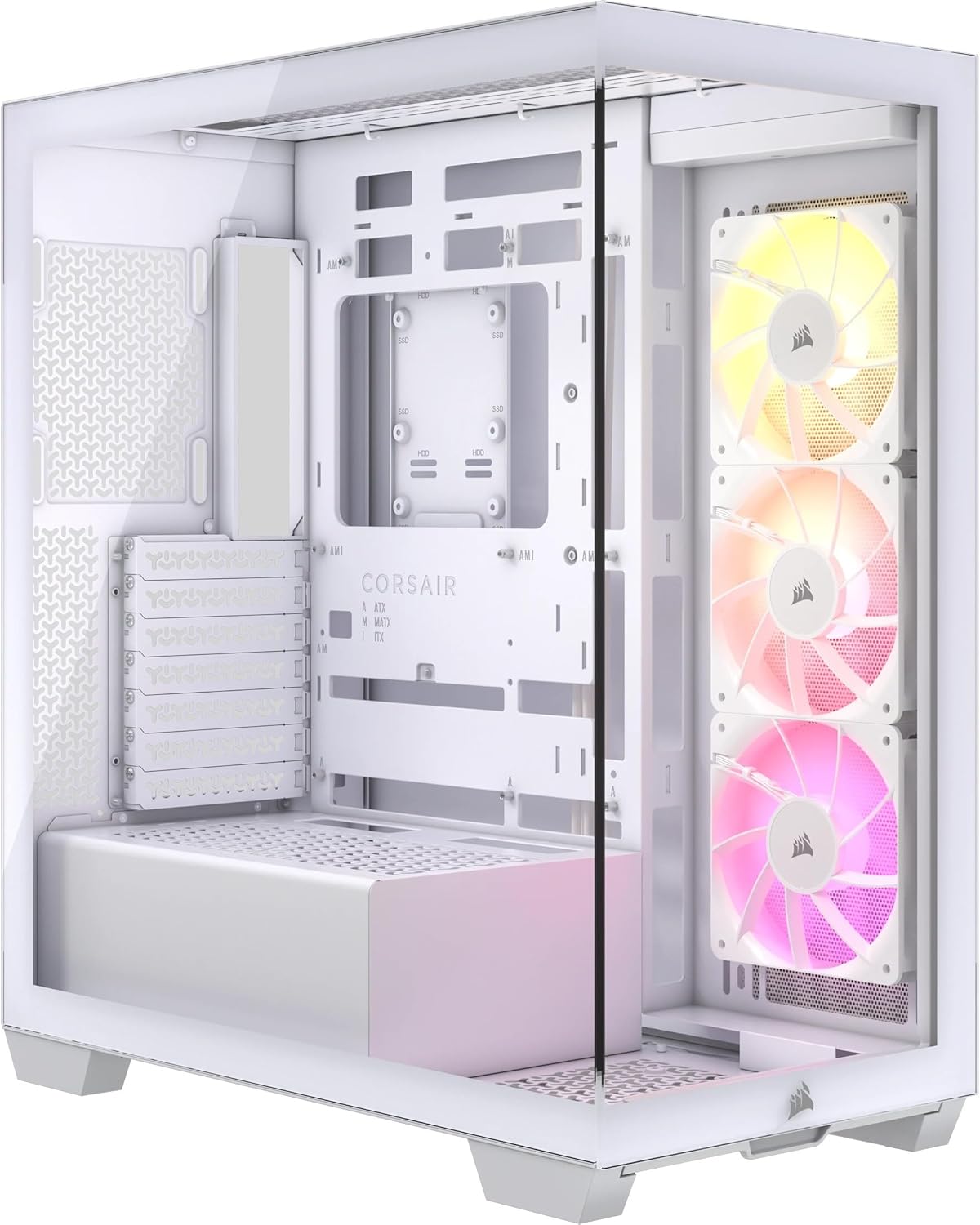
After evaluating the current market, we have a clear recommendation. For most builders looking for excellent value and a stunning, modern aesthetic, the CORSAIR 3500X ARGB Mid-Tower ATX PC Case is our top choice. If you’re looking to blend premium design with natural materials for a unique look, the Fractal Design North Charcoal Black Tempered Glass is an exceptional option. For more on building a great setup, check out our Tech Gear category.
The 3 Best Atx Cases Under 200 on Our Shortlist (November 2026)
- Best for: Modern Aesthetic & Easy Building
- Cooling: 10 Fan Mounts
- Glass: Wraparound Tempered
- Motherboards: EATX to Mini-ITX

- Best for: Maximum Component Space
- GPU Length: Up to 413 mm
- Radiator Support: 420 mm Front
- Included Fans: Three 140mm PWM

- Best for: Stylish Natural Design
- Front Panel: Genuine Walnut Wood
- GPU Length: Up to 355 mm
- Included Fans: Two 140mm PWM
This post may contain affiliate links. As an Amazon Associate we earn from qualifying purchases.
Quick Comparison
| Award | Product | CSL Score About CSL ScoreThe CSL Score is our own rating from 0 to 10, based on performance, design and build, ease of use, and value. It reflects independent research and is never influenced by manufacturers, retailers, or affiliate commissions. Learn more › | |
|---|---|---|---|
| Best Overall |
Corsair 3500X ARGB ATX Mid Tower Case
|
9.1/10 | Check price |
| Top Rated |
Fractal Design North Charcoal Black TG Dark ATX
|
8.9/10 | Check price |
| Most Popular |
Fractal Design North XL E-ATX Full Tower
|
8.9/10 | Check price |
Corsair 3500X ARGB ATX Mid Tower Case
Corsair's 3500X ARGB pairs a panoramic tempered glass layout with three preinstalled RS120 fans, making it a strong fit for builders who want visible RGB without extra fan work. Its validated support for ASUS BTF and MSI Project Zero boards helps keep cables out of view, while the spacious interior fits most large graphics cards and CPU coolers.
Pros
- Three preinstalled RS120 ARGB fans provide cooling and lighting out of the box.
- Panoramic tempered glass with removable front and side panels improves visibility and access.
- Support for Mini ITX to EATX motherboards and up to ten 120mm fans gives flexible build room.
- Reverse connection compatibility with ASUS BTF and MSI Project Zero boards supports a cleaner view.
- Supports liquid cooling radiators up to 360mm.
Cons
- The cleaner reverse connection view depends on a supported ASUS BTF or MSI Project Zero motherboard.
- ARGB fan control requires a +5V motherboard ARGB header.
- The listed 9.1 kg weight adds heft for a mid tower case.
Fractal Design North Charcoal Black TG Dark ATX
Fractal Design North blends an open mesh front with real walnut bars and a tempered glass side, giving a mid tower that suits builders who want airflow and a living room friendly look. It supports ATX, mATX, and ITX boards, includes two 140 mm Aspect PWM fans, and offers room for GPUs up to 355 mm. The removable panels and integrated access tab make building easier, while seven bridgeless slots and drive mounts add customization.
Pros
- Open front with fine mesh ventilation supports airflow and natural cooling.
- Real walnut front bars and tempered glass side panel create a distinctive build.
- Two 140 mm Aspect PWM fans are included for a ready start.
- Supports ATX, mATX, and ITX motherboards, plus GPUs up to 355 mm.
- Seven bridgeless expansion slots and integrated drive mounts add layout flexibility.
Cons
- GPU clearance drops to 300 mm when a 360 mm front radiator is installed.
- Only two fans are included, so dense heat loads may require additional cooling.
Fractal Design North XL E-ATX Full Tower
Fractal Design's North XL pairs a full tower layout with walnut or oak front panels and mesh ventilation, making it a strong fit for builders who want a visible PC without hiding it in a closet. It supports E-ATX boards, long GPUs, and large front or top radiators, and ships with three 140 mm Aspect PWM fans.
Pros
- Supports E-ATX, ATX, mATX, and mini-ITX motherboards
- Accepts GPUs up to 413 mm, or 380 mm with a 420 mm front radiator
- Compatible with front radiators up to 420 mm and top radiators up to 360 mm
- Includes three 140 mm Aspect PWM fans
- Mesh front ventilation with wood panel design helps balance airflow and looks
Cons
- Full tower dimensions may be too large for compact desk setups
- Bottom-mounted power supply may not suit builders who want top PSU placement
How We Picked
Our selection process for these cases was based on a careful analysis of specifications, verified owner feedback, and professional reviews from trusted sources. We focused on objective criteria that matter most to builders to ensure our shortlist represents the best combination of performance and value available in November 2026.
- Thermal Performance: We prioritized cases with proven airflow designs, multiple fan mounting points, and support for substantial cooling radiators.
- Component Compatibility: A key factor was support for modern, large GPUs, various motherboard sizes (from Mini-ITX to E-ATX), and ample drive bays.
- Build Quality & Materials: We looked for sturdy construction, the use of tempered glass, and thoughtful design elements that aid the building process.
- Feature Set: Included fans, cable management options, front-panel connectivity (like USB-C), and ease of access were all considered.
- User Experience: We weighed overall ratings and recurring praise or criticism in user reviews to gauge real-world satisfaction.
Buying Guide: Making Sense of Best Atx Cases Under 200
Airflow and Cooling Capacity
Your PC’s performance and longevity hinge on effective cooling. Look for a case with a mesh-front or open design for optimal air intake, multiple mounting points for fans (both included and optional), and support for liquid cooling radiators if you plan to use one. More fans and better airflow directly translate to lower component temperatures.
Size and Compatibility
Always double-check that your chosen case fits all your components. The most critical measurements are maximum GPU length and CPU cooler height. Also, verify the case supports your motherboard size (ATX, Micro-ATX, etc.). For builders with expansive setups, a larger case like the Fractal Design North XL Charcoal Black offers incredible flexibility for massive graphics cards and multiple radiators.
Cable Management and Ease of Build
A clean build isn’t just about looks; it improves airflow. Look for cases with dedicated cable routing channels, velcro straps or tie-down points, and a power supply shroud to hide cables. Features like tool-less drive bays and removable dust filters also make the building and maintenance process much smoother.
Quick Checklist
- Does it have sufficient front-panel airflow (mesh or vents)?
- Will your graphics card and CPU cooler fit inside?
- Does it support your motherboard size (ATX, mATX, etc.)?
- Are there enough drive bays (2.5″ and 3.5″) for your storage?
- Does it offer good cable management features (grommets, channels, shroud)?
Related reading: For insights into other essential tech components, see our guide on the 3 Best Atx Cases Under 200 for November 2026.
FAQs
What is the best atx cases under 200 in 2026?
Our top overall pick for 2026 is the CORSAIR 3500X ARGB Mid-Tower ATX PC Case. It offers an exceptional blend of cooling potential with up to 10 fan mounts, a stunning wraparound glass design, and features that make building easier, like reverse motherboard compatibility.
How important is good airflow in a PC case?
Extremely important. Proper airflow prevents heat buildup, which can throttle your CPU and GPU performance, reduce component lifespan, and cause system instability. Cases with mesh fronts and multiple fan mounts, like the ones on our list, are designed specifically for this.
Do I need a full-tower case for an ATX motherboard?
No, a mid-tower case is typically sufficient for a standard ATX build. Full-tower cases are for extreme setups with multiple graphics cards, custom water-cooling loops, or E-ATX motherboards. All the cases we’ve selected are mid-towers (or similar) and support ATX boards.
What should I look for in terms of build quality?
Look for sturdy steel construction, thick tempered glass (not acrylic) side panels, and solid, well-finished panels. Tool-less features for drive bays and PCIe slots are a plus. The Fractal Design North Charcoal Black Tempered Glass is renowned for its premium build quality and unique material choices.
Are pre-installed fans necessary?
Not strictly necessary, but highly recommended. They provide immediate out-of-the-box airflow and can save you money. All our picks include at least two high-quality fans, giving you a great starting point for your cooling setup. For more on optimizing performance, explore our AI & Software section.
What’s the first thing I should do when my new case arrives?
Inspect it thoroughly for any shipping damage. Then, familiarize yourself with the layout: locate the motherboard standoffs, cable routing holes, and drive bays. Remove all panels and lay out the included screws and accessories to ensure everything is present before you start your build.
Final Thoughts
Choosing between these three excellent cases ultimately depends on your priorities. The CORSAIR 3500X ARGB is ideal if you want a modern, flashy build with top-tier cooling and easy assembly features. The Fractal Design North XL Charcoal Black is the go-to for builders who need maximum internal space for the largest components and advanced cooling setups. The standard Fractal Design North Charcoal Black Tempered Glass perfectly suits those who value a sophisticated, natural aesthetic without sacrificing performance. Whichever you choose, ensure you have all necessary tools on hand before starting your build, and take your time with cable management for the cleanest and most thermally efficient result. For further reading on tech builds, visit our Reviews page.
About the author
Marcus covers home networking for CyberSecLabs: Wi-Fi routers, mesh systems and the gear that keeps a home network fast and secure. Each buying guide is built from manufacturer specifications, owner feedback and current availability, and is updated as new models arrive.