TP-Link AC1900 Review: Does EasyMesh Deliver Whole-Home Coverage?
The TP-Link AC1900 WiFi Range Extender RE550 is a versatile and capable device that excels at eliminating dead zones, offering dual-band speeds and a Gigabit Ethernet port for reliable extended coverage in large homes.
 By Elvis Dicki
Updated October 21, 2026
Dead zones and weak WiFi signals are common frustrations in modern homes, especially as we rely more on seamless connectivity for work, streaming, and smart devices. The TP-Link AC1900 WiFi Range Extender RE550 is designed as a targeted solution to this problem, aiming to expand your existing router’s coverage without requiring a full network overhaul. This device is primarily for homeowners or renters with a reliable primary router who need to push a stable signal into areas like garages, basements, or distant bedrooms where the connection currently falters. Based on its specifications and user feedback, the RE550 is a strong contender for those seeking to banish dead zones through a straightforward, feature-rich extender that balances performance with ease of use.

It offers a dual-band AC1900 connection, a Gigabit Ethernet port for wired devices, and compatibility with EasyMesh for potential whole-home coverage. The bottom line: The TP-Link AC1900 RE550 effectively extends WiFi coverage for up to 32 devices across a significant area, though it manages expectations by clarifying it improves coverage, not raw internet speeds. For a deeper dive into networking solutions, explore our guide on the best routers for large homes.
Prime TP-Link RE550 AC1900 WiFi Extender


As an Amazon Associate we earn from qualifying purchases. Product prices and availability are accurate as of the date/time indicated.
TP-Link AC1900 at a Glance
| Specification | Detail |
|---|---|
| Model | AC1900 WiFi Range Extender RE550 |
| Total Bandwidth | 1900 Mbps (1300 Mbps on 5 GHz, 600 Mbps on 2.4 GHz) |
| Coverage Area | Up to 2200 sq. ft. |
| Device Support | Up to 32 devices |
| Key Port | 1 x Gigabit Ethernet |
| Key Features | EasyMesh Compatibility, Access Point Mode, Smart Adaptive Roaming, Three External Antennas |
| Setup Method | Tether App & Intelligent Signal Indicator |
| Wireless Standards | 802.11a/b/g/n/ac |
| Security Commitment | TP-Link is a CISA Secure-by-Design pledge signatory |
| Warranty | 2-year manufacturer warranty |
Design and Build
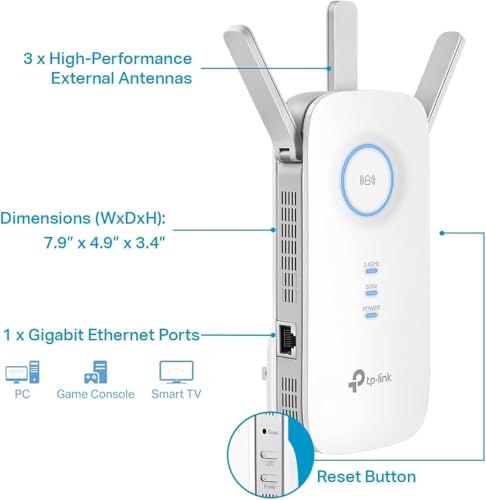
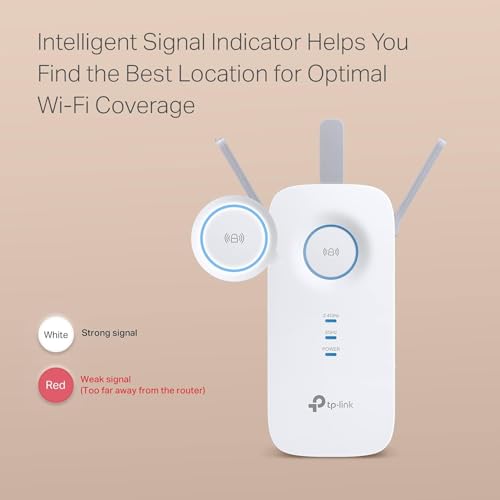
The TP-Link RE550 presents a compact, vertical design that is intended to plug directly into a wall outlet, minimizing desk or shelf clutter. Its white casing houses three adjustable external antennas, which are a key component for directing and optimizing wireless signal coverage. The physical footprint is relatively small, allowing it to fit in most spaces without obstructing other outlets. A single Gigabit Ethernet port is located on the side, providing a wired connection option. The front panel features an intelligent signal indicator LED, which is a practical tool for finding the optimal placement during setup by showing the strength of the connection to your main router.
Performance and Features
Wireless Performance and Coverage
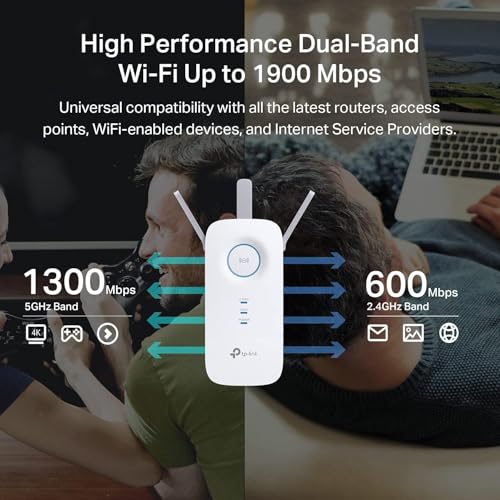
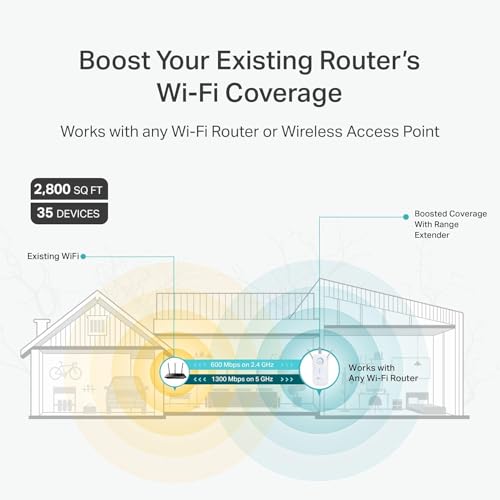
The core promise of the TP-Link AC1900 is to expand WiFi coverage, not to increase your base internet speed. It operates on dual bands, with a combined theoretical bandwidth of 1900 Mbps (1300 Mbps on 5 GHz and 600 Mbps on 2.4 GHz). This dual-band design helps manage network traffic, allowing you to connect bandwidth-intensive devices like streaming boxes or gaming consoles to the faster 5 GHz band while relegating smart home gadgets to the 2.4 GHz band. The manufacturer states it can cover up to 2200 square feet and support connections for up to 32 devices, making it suitable for medium to large homes. It’s important to note the manufacturer’s clear guidance: users should expect actual speeds to be about 50% or less of their original router’s speed due to the nature of wireless repeating.
Connectivity and Ports
The inclusion of a Gigabit Ethernet port is a significant feature that adds versatility. This port allows you to connect a device like a smart TV, gaming console, or desktop PC directly to the extender via a wired cable, providing a more stable and potentially faster connection than wireless. This port also enables the Access Point (AP) mode, where the RE550 can be connected via Ethernet to your main router to create a new, powerful WiFi hotspot, effectively functioning as a standalone access point. This is useful for converting a wired network connection in a room into a local wireless signal.
Key Features and Software
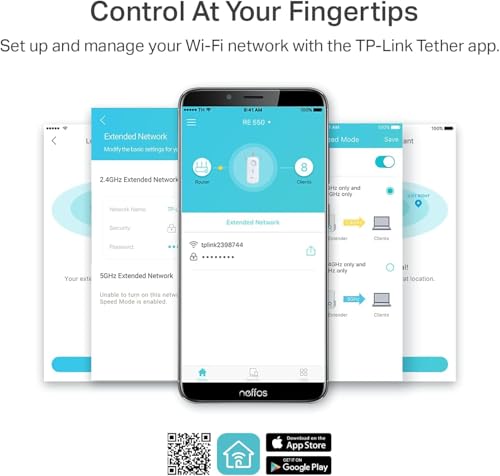
Beyond basic extension, the RE550 packs several intelligent features. Smart Adaptive Roaming is designed to help devices automatically connect to the strongest available signal (from either the main router or the extender) as you move through your home, aiming for a seamless experience. Its headline feature is EasyMesh compatibility, which means it can integrate with a network using an EasyMesh-compatible router to create a unified system under a single WiFi name. However, it is specifically noted as not being compatible with mesh WiFi systems like TP-Link’s own Deco lineup. Management is handled through the TP-Link Tether app, which facilitates setup, network monitoring, access control, and firmware updates. TP-Link also emphasizes a cybersecurity commitment, being a signatory of the U.S. CISA Secure-by-Design pledge, indicating security is considered in the device’s design and maintenance.
Setup, Support and Ownership
Setup is designed to be user-friendly, primarily through the Tether mobile app. The intelligent signal indicator on the device itself is a practical aid, lighting up to show the signal strength from your main router and helping you find the optimal placement—a crucial step for any extender’s performance. The app provides ongoing management, including the ability to update firmware, which is important for security and performance. TP-Link offers a two-year manufacturer warranty on the device. For users looking to build a more robust network from the ground up, our review of the best routers for gigabit internet provides options for high-speed primary hubs.
What Owners Say
Owner feedback for the TP-Link AC1900 is largely positive, reflected in its high overall rating. A significant majority of reviews are five-star, with users frequently praising its effectiveness in eliminating dead zones in garages, backyards, and far rooms, leading to stable streaming and browsing. Many highlight the straightforward setup process using the app and the helpful signal indicator. Positive experiences with EasyMesh (or OneMesh, as referenced in some reviews) integration are noted, where it creates a seamless network with compatible TP-Link routers. Some four-star and lower reviews mention that, as expected, it does not increase raw internet speed, and a few users found the setup process slightly less intuitive. The general consensus is that it delivers on its core promise of reliable extended coverage.
Pros and Cons
Pros
- Effectively eliminates WiFi dead zones over a large area.
- Easy setup and management via the Tether app.
- Versatile Gigabit Ethernet port for wired connections or Access Point mode.
- EasyMesh compatibility allows for scalable whole-home WiFi with compatible routers.
- Smart Adaptive Roaming for smoother transitions between signals.
- Strong overall rating and positive user feedback on performance.
Cons
- Does not increase internet speeds; repeats the existing signal with expected loss.
- Not compatible with all mesh systems (e.g., Deco).
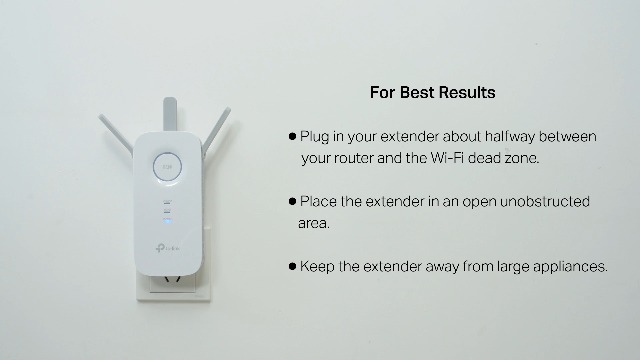
- Performance heavily dependent on optimal placement relative to the main router.
- Some users may desire a more powerful solution for extreme speed demands.
Who Should Buy It (and Who Should Skip It)
The TP-Link AC1900 RE550 is an ideal purchase for anyone with a stable primary router who struggles with specific weak-signal areas in their home. It’s perfect for extending coverage to a home office in a detached garage, a streaming TV in a basement, or ensuring reliable video calls in a backyard. Users with a compatible EasyMesh router will get extra value by creating a more unified network. It’s also a good fit for those who appreciate the option of a wired Gigabit connection for a key device.
This extender is likely not the best choice if your primary internet service or router is itself slow or unreliable, as it can only amplify the signal it receives. Those seeking the absolute highest possible wireless speeds throughout their entire home might be better served by investigating a full mesh system. Similarly, if you already own a non-compatible mesh system like Deco, this extender will not integrate seamlessly. For users with simpler needs or smaller spaces, a more basic extender might suffice, while those with complex multi-device setups might explore our resource on the best routers for multiple devices.
Final Verdict
The TP-Link AC1900 WiFi Range Extender RE550 successfully fulfills its primary mission of expanding wireless network coverage to eliminate frustrating dead zones. Its combination of dual-band AC1900 speeds, a useful Gigabit Ethernet port, and intelligent features like EasyMesh compatibility and smart roaming make it a versatile and capable tool for improving home network reach. The straightforward app-based setup and strong positive reception from owners further solidify its position as a reliable choice in the extender market.
Potential buyers must have realistic expectations: this is a range extender, not a magic speed booster. It will provide a stable, reliable connection in previously weak areas, but at a reduced speed compared to being directly connected to the main router. For the vast majority of users looking to fix coverage gaps for streaming, browsing, and smart home devices, this trade-off is more than acceptable. If your goal is seamless, strong WiFi in every corner of a large home without replacing your existing router, the TP-Link AC1900 RE550 is a compelling and well-executed solution. Discover more about compact networking and computing solutions in our coverage of mini PCs.
FAQs
Does the TP-Link AC1900 increase my internet speed?
No. The manufacturer is clear that wireless extenders are designed to improve WiFi coverage, not increase speeds. The RE550 will repeat the signal from your existing router. You can expect the actual speeds from the extender to be approximately 50% or less of the speed you get when connected directly to your main router, though the improved signal reliability can make the overall experience feel faster and more stable in previously weak areas.
What is the difference between EasyMesh compatibility and a mesh WiFi system?
EasyMesh is a standard that allows compatible routers and extenders from different brands (if they support the standard) to work together under a single network name. The TP-Link AC1900 RE550 is EasyMesh-compatible, meaning it can create this seamless network with an EasyMesh router. However, it is not compatible with proprietary mesh systems like TP-Link’s own Deco lineup. A full mesh system is typically a set of identical nodes designed from the ground up to work together, while EasyMesh aims to allow interoperability between different devices.
Can I use the Ethernet port on the extender?
Yes, the Gigabit Ethernet port serves two main purposes. First, you can connect a wired device (like a gaming console, PC, or smart TV) directly to the extender to get a reliable wired connection in the extended area. Second, you can use this port in Access Point (AP) mode: connect the extender via an Ethernet cable back to your main router, and it will create a new, powerful WiFi hotspot using that wired backhaul, which can be a more performance-stable setup than wireless repeating.
How do I find the best place to plug in the extender?
The TP-Link RE550 has an intelligent signal indicator light on the front. During setup, you plug the extender into an outlet roughly halfway between your router and the area you want to cover. The light will show red (weak), amber (fair), or green (good/strong) to indicate the quality of the signal it is receiving from your main router. You move the extender to different outlets until you get a solid green or amber light, ensuring it has a strong enough connection to effectively repeat the signal forward.
About the author

Elvis Dicki writes reviews and buying guides for CyberSecLabs.