TP-Link Archer GE400 Review: Dual-Band WiFi 7 with Dual 2.5G Ports
The TP-Link Archer GE400 delivers dedicated gaming features and multi-gig wired connectivity in a dual-band WiFi 7 router, though it lacks the 6 GHz band of tri-band competitors.
 By Elvis Dicki
Updated October 21, 2026
The TP-Link Archer GE400 is a dual-band WiFi 7 gaming router designed to prioritize low-latency gameplay and high-speed wired connections. It targets competitive gamers and multi-device households that need stable performance for gaming, 4K/8K streaming, and AR/VR experiences. While it brings next-generation WiFi 7 features like 4K-QAM and Multi-Link Operation to the table, it does so within a dual-band framework that omits the 6 GHz band found in premium tri-band models. For users seeking game-accelerated traffic, multiple high-speed ports, and an intuitive management dashboard, the Archer GE400 presents a focused solution.
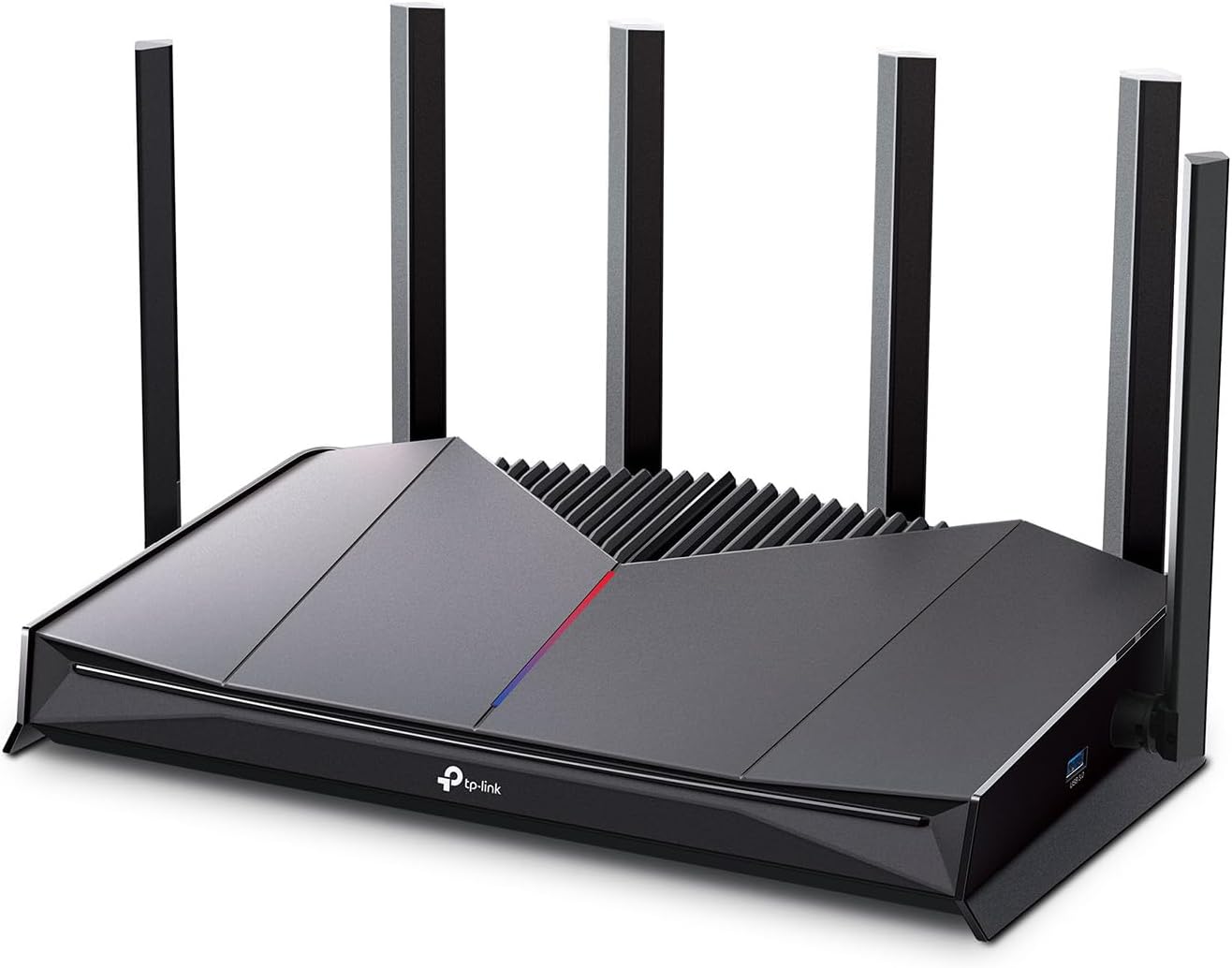
This router’s core proposition is reducing lag and ping for online gaming through a combination of hardware and software features, including a dedicated gaming port, game server acceleration via WTFast, and a quad-core 2.0 GHz CPU. It supports up to 90 connected devices and offers coverage up to 2,600 square feet, extendable via TP-Link’s EasyMesh system. Bottom line: the Archer GE400 is a strong choice for gamers who value wired multi-gig connections and traffic prioritization, but those requiring the absolute maximum wireless bandwidth may want to consider a tri-band WiFi 7 alternative.
Prime TP-Link Archer GE400 WiFi 7 Dual-Band



As an Amazon Associate we earn from qualifying purchases. Product prices and availability are accurate as of the date/time indicated.
TP-Link Archer GE400 at a Glance
| Specification | Detail |
|---|---|
| WiFi Generation | WiFi 7 (802.11be) |
| Total Bandwidth | BE6500 (6.5 Gbps) |
| Frequency Bands | Dual-Band (2.4 GHz & 5 GHz) |
| Coverage Area | Up to 2,600 sq. ft. |
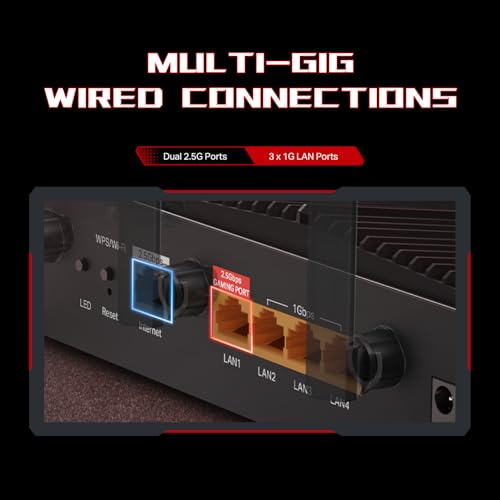
| Ethernet Ports | 1x 2.5 Gbps WAN/LAN, 1x 2.5 Gbps LAN, 3x 1 Gbps LAN |
| Key Gaming Features | Dedicated Gaming Port, Game Panel, WTFast GPN, QoS |
| Security | TP-Link HomeShield (Network Security, Parental Controls), WPA3 |
| Management | Tether App, Web Interface, Dedicated Game Dashboard |
| Mesh Support | EasyMesh (compatible with select TP-Link routers/extenders) |
| Processor | Quad-core 2.0 GHz CPU |
Design and Build
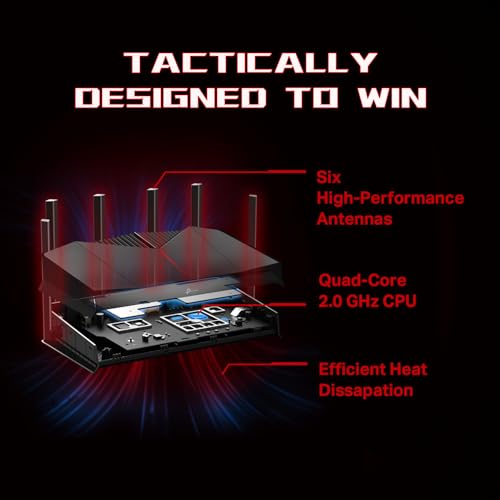
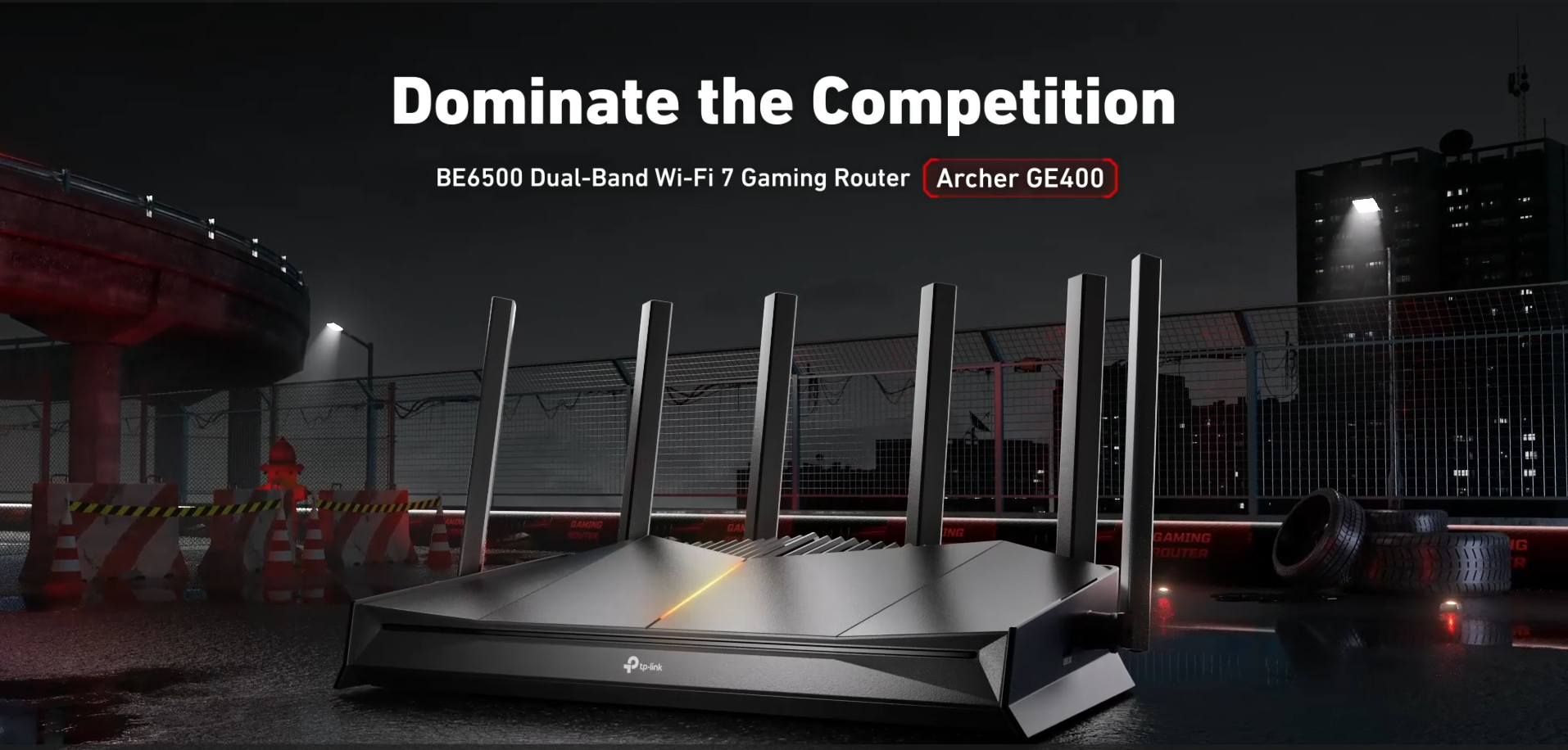
The Archer GE400 sports a gaming-centric aesthetic with angular lines, six external antennas, and customizable RGB lighting. Its dimensions are 10.57 inches long by 6.02 inches wide by 2.31 inches high, giving it a substantial footprint typical of performance routers. The design incorporates efficient heat dissipation to maintain performance during extended gaming sessions, a critical consideration for hardware running a quad-core processor. The front panel features a dedicated LED for the gaming port, providing at-a-glance status. While the aggressive styling and RGB elements will appeal to enthusiasts, the build prioritizes function with its antenna array and cooling design.
Performance and Features
Wireless Performance and WiFi 7
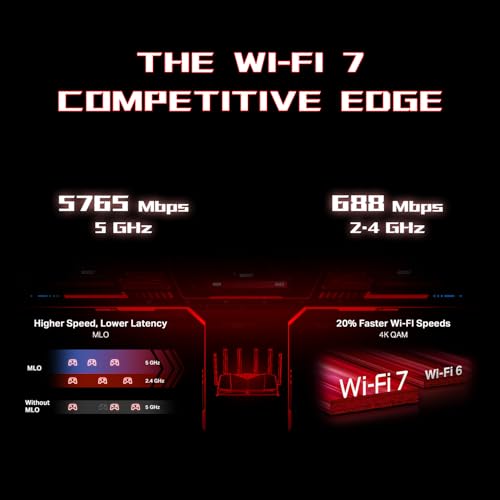
The Archer GE400 is a dual-band BE6500 router, offering a combined maximum theoretical speed of 6.5 Gbps. This breaks down to up to 5765 Mbps on the 5 GHz band and 688 Mbps on the 2.4 GHz band. It leverages key WiFi 7 technologies, including 4K-QAM for higher data density and Multi-Link Operation (MLO), which allows devices to use both frequency bands simultaneously for more stable connections and reduced latency. It’s important to note that, as a dual-band router, it does not support a dedicated 6 GHz band, which is a feature of higher-end tri-band WiFi 7 routers. The router uses six antennas with Beamforming technology to focus signals toward connected devices, aiming to maximize coverage and strength.
Connectivity and Ports
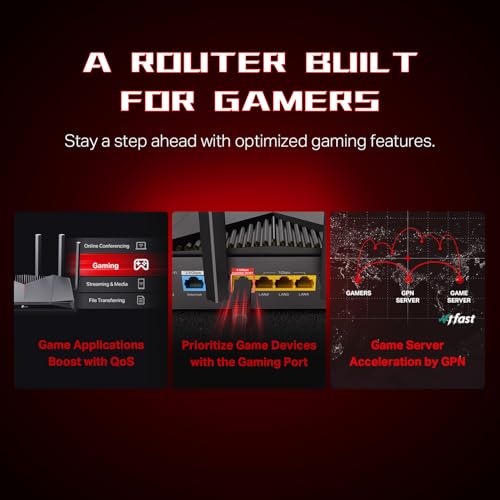
Wired connectivity is a standout feature. The router includes five Ethernet ports: one 2.5 Gbps port that can function as either WAN or LAN, one dedicated 2.5 Gbps LAN port, and three standard 1 Gbps LAN ports. The dedicated 2.5 Gbps LAN port is labeled as the “Gaming Port” and is designed for prioritizing traffic from a connected PC or console. This multi-gig capability allows users to fully leverage high-speed internet plans or create fast wired backbones for NAS devices and gaming rigs. The router requires a separate modem.
Gaming and Software Features
Gaming optimization is central to the GE400’s design. The dedicated Game Panel, accessible via the Tether app or web interface, provides a dashboard showing network performance, connected gaming devices, and router status. It allows users to prioritize game traffic using Quality of Service (QoS) and enables Game Server Acceleration through WTFast’s Gamer Private Network (GPN), which aims to reduce jitter and lower ping by optimizing routes to game servers. Features like MU-MIMO and OFDMA help manage traffic efficiently across multiple devices. The router is also backward compatible with all previous WiFi standards.
Security and Management
Security is handled by TP-Link HomeShield, which offers free basic features including network security scanning, Quality of Service, and parental controls. The router supports the latest WPA3 security protocol. TP-Link notes its commitment to cybersecurity as a signatory of the U.S. CISA’s Secure-by-Design pledge. Management is primarily done through the intuitive Tether app for iOS and Android or a web browser, making setup and daily adjustments straightforward. The router also supports functions like Access Point mode, guest networks, and VPN server/client capabilities.
Setup, Support and Ownership
TP-Link promotes an easy setup process for the Archer GE400, achievable in minutes using the Tether app. The app guides users through connection and basic configuration. For ongoing ownership, the router supports cloud management and is compatible with Amazon Alexa and Google Assistant for voice controls. TP-Link provides a 2-year manufacturer’s warranty. The EasyMesh feature allows for extending coverage by adding compatible TP-Link routers, range extenders, or powerline adapters to create a more seamless whole-home network, though it is noted as not compatible with TP-Link’s Deco mesh systems. Firmware updates are delivered to maintain performance and security.
What Owners Say
At the time of this analysis, detailed buyer review excerpts are not available. The product holds a rating, but no specific user feedback on performance, setup, or reliability is listed by the manufacturer for summarization. Prospective buyers should consider that as an early WiFi 7 product, real-world experiences regarding the stability of new features like Multi-Link Operation may evolve with firmware updates. For more insights on tech gear, explore our Tech Gear section.
Pros and Cons
Pros
- Dual 2.5 Gbps multi-gig Ethernet ports for high-speed wired connections
- Dedicated gaming features: Gaming Port, WTFast GPN, and Game Panel dashboard
- WiFi 7 technologies (4K-QAM, MLO) for reduced latency and future-proofing
- Robust QoS and traffic prioritization capabilities
- EasyMesh support for extending coverage with compatible devices
- Comprehensive security suite with TP-Link HomeShield and WPA3
Cons
- Dual-band design lacks a 6 GHz band for maximum WiFi 7 performance
- Base coverage may require EasyMesh nodes for very large homes
- Gaming aesthetic and RGB may not appeal to all users
- Not compatible with all mesh systems (e.g., Deco)
- Performance is dependent on client device support for WiFi 7 features
Who Should Buy It (and Who Should Skip It)
The TP-Link Archer GE400 is an ideal fit for competitive online gamers who rely on wired connections for their primary gaming PC or console and want software tools to minimize lag. It’s also suitable for tech-savvy households with multi-gig internet subscriptions that need to support many simultaneous devices for streaming, gaming, and smart home use. Users who appreciate granular control over their network through a dedicated app and dashboard will find it compelling.
This router is less ideal for users living in very large, multi-story homes who need immediate, extensive wireless coverage without adding mesh nodes. Those who want to fully exploit the 6 GHz band for uncongested, ultra-high-speed wireless connections should look at tri-band WiFi 7 routers instead. Casual users with basic internet needs and no multi-gig equipment may find the feature set and cost more than necessary. For other expert picks on optimizing your setup, check out our guides on the best ultra-wide monitors and best desk chairs for gaming.
Final Verdict
The TP-Link Archer GE400 successfully carves out a niche as a gaming-focused, dual-band WiFi 7 router. Its greatest strengths lie in its wired connectivity, with dual 2.5 Gbps ports offering serious bandwidth for gaming PCs, NAS devices, and next-gen consoles, and its software suite designed to hunt down and eliminate lag. The inclusion of WiFi 7 fundamentals like 4K-QAM and Multi-Link Operation provides a measure of future-proofing for new devices, even without the 6 GHz band.
Ultimately, the decision comes down to your specific needs and network environment. If your priority is rock-solid, low-latency wired gaming performance and you can leverage multi-gig ports, the Archer GE400 is a compelling and feature-rich choice. If your usage is predominantly wireless and you desire the absolute peak speeds and capacity that WiFi 7 can offer, investing in a tri-band model with a 6 GHz radio would be a more forward-looking path. For more in-depth reviews of similar products, visit our main Reviews hub.
FAQs
Does the Archer GE400 support wired gaming?
Yes, wired gaming is a key strength. It has a dedicated 2.5 Gbps Gaming LAN port for prioritizing traffic from a connected device, plus an additional 2.5 Gbps WAN/LAN port and three 1 Gbps LAN ports. This allows for ultra-fast, low-latency wired connections to gaming PCs, consoles, and other high-performance devices, which is often preferable to wireless for competitive play.
Can this router improve ping and reduce lag for online gaming?
TP-Link designs the Archer GE400 specifically for this purpose. It uses a combination of WiFi 7 technologies like 4K-QAM for efficiency, a dedicated gaming port for wired traffic, Quality of Service (QoS) to prioritize gaming data, and Game Server Acceleration via WTFast’s GPN to optimize routes to game servers. These features work together to target lower ping times, reduced jitter, and less packet loss.
What is the difference between dual-band and tri-band WiFi 7?
The primary difference is the number of frequency bands. A dual-band router like the Archer GE400 uses the 2.4 GHz and 5 GHz bands. A tri-band WiFi 7 router adds a dedicated 6 GHz band. The 6 GHz band offers more channels, less interference from older devices, and potentially higher speeds, but requires compatible client devices. The Archer GE400 provides WiFi 7 benefits like MLO and 4K-QAM but does so without a 6 GHz radio.
How do I extend the coverage of the Archer GE400?
You can extend coverage using TP-Link’s EasyMesh technology. This allows you to add compatible TP-Link routers, range extenders, or wireless powerline adapters to create a more seamless whole-home network, helping to eliminate dead zones. It is important to note that the Archer GE400 is not compatible with TP-Link’s Deco mesh systems, so you must select EasyMesh-certified devices for expansion.
About the author

Elvis Dicki writes reviews and buying guides for CyberSecLabs.