MSI RADIXAXE6600 Review: AI-Optimized WiFi 6E for Gaming & Multi-Device Homes
The MSI Radix AXE6600 is a tri-band gaming router that leverages WiFi 6E and an AI QoS engine to deliver high-capacity, low-latency networking for demanding households and gamers.
 By Elvis Dicki
Updated October 22, 2026
The MSI RADIXAXE6600 is a tri-band gaming router designed to leverage the latest WiFi 6E standard, offering a dedicated 6GHz band alongside the traditional 2.4GHz and 5GHz frequencies. It targets users with high-performance networking needs, particularly gamers and households with many connected devices, who require robust capacity and minimal lag. This router stands out with its AI-driven Quality of Service (QoS) system, which promises to automatically prioritize traffic for gaming, streaming, and work-from-home scenarios, aiming to simplify network management while delivering a premium experience.

At its core, the RADIXAXE6600 is built around a powerful 1.8GHz quad-core processor and supports up to 8 simultaneous data streams across its three bands, with a maximum theoretical throughput of 6.6Gbps. It combines this hardware with gamer-centric features like customizable RGB lighting and integration with MSI’s ecosystem software. For users seeking a router that can handle intensive online gaming, 4K streaming, and multiple concurrent connections without manual tweaking, the MSI Radix AXE6600 presents a compelling, feature-rich option that aims to intelligently manage network traffic right out of the box.
MSI Radix AXE6600 WiFi 6E Tri-Band Gaming Router




As an Amazon Associate we earn from qualifying purchases. Product prices and availability are accurate as of the date/time indicated.
MSI RADIXAXE6600 at a Glance
| Specification | Detail |
|---|---|
| WiFi Standard | WiFi 6E (802.11ax) |
| Frequency Bands | Tri-Band (2.4GHz, 5GHz, 6GHz) |
| Maximum Theoretical Speed | Up to 6.6 Gbps |
| Processor | 1.8 GHz Quad-Core |
| Memory | 512MB DDR4 RAM, 256MB Flash |
| Ethernet Ports | 1x 2.5 Gbps WAN/LAN, 4x 1 Gbps LAN |
| USB Port | 1x USB 3.0 |
| Antennas | 6 Fixed High-Performance Antennas |
| Key Feature | AI QoS with Gaming, Streaming, WFH, & AI Auto Modes |
| Security Protocols | WPA-PSK, WPA2-PSK, WPA3-PSK |
Design and Build
The MSI Radix AXE6600 sports a distinct gaming aesthetic, characterized by angular lines and a prominent dragon shield motif. Its design incorporates six fixed, high-performance antennas that contribute to its wide coverage claims. A central feature of its visual design is the customizable RGB lighting, branded as “Mystic Light,” which illuminates both the antenna housings and the dragon shield. This lighting can be synchronized with other MSI Mystic Light compatible products, allowing users to create a cohesive gaming setup. The router’s physical dimensions are 16.3 inches in length, 12.5 inches in width, and 5.4 inches in height, with a weight of 1.13 kilograms, indicating a substantial physical presence meant for a desktop placement.
Performance and Features
Wireless Performance and WiFi 6E
The MSI RADIXAXE6600 is built on the WiFi 6E standard, which introduces access to the uncongested 6GHz spectrum. This band provides seven high-speed 160MHz channels, significantly increasing network capacity and reducing interference from older devices. The router operates on a tri-band setup: a 2.4GHz band with speeds up to 574 Mbps, a 5GHz band with speeds up to 1201 Mbps, and a 4×4 6GHz band with speeds up to 4804 Mbps. Combined, these deliver the advertised maximum aggregate speed of 6.6Gbps. Technologies like MU-MIMO and OFDMA are supported to efficiently handle data for multiple devices simultaneously, while beamforming focuses signal strength towards connected clients for improved range and stability.
Connectivity and Ports
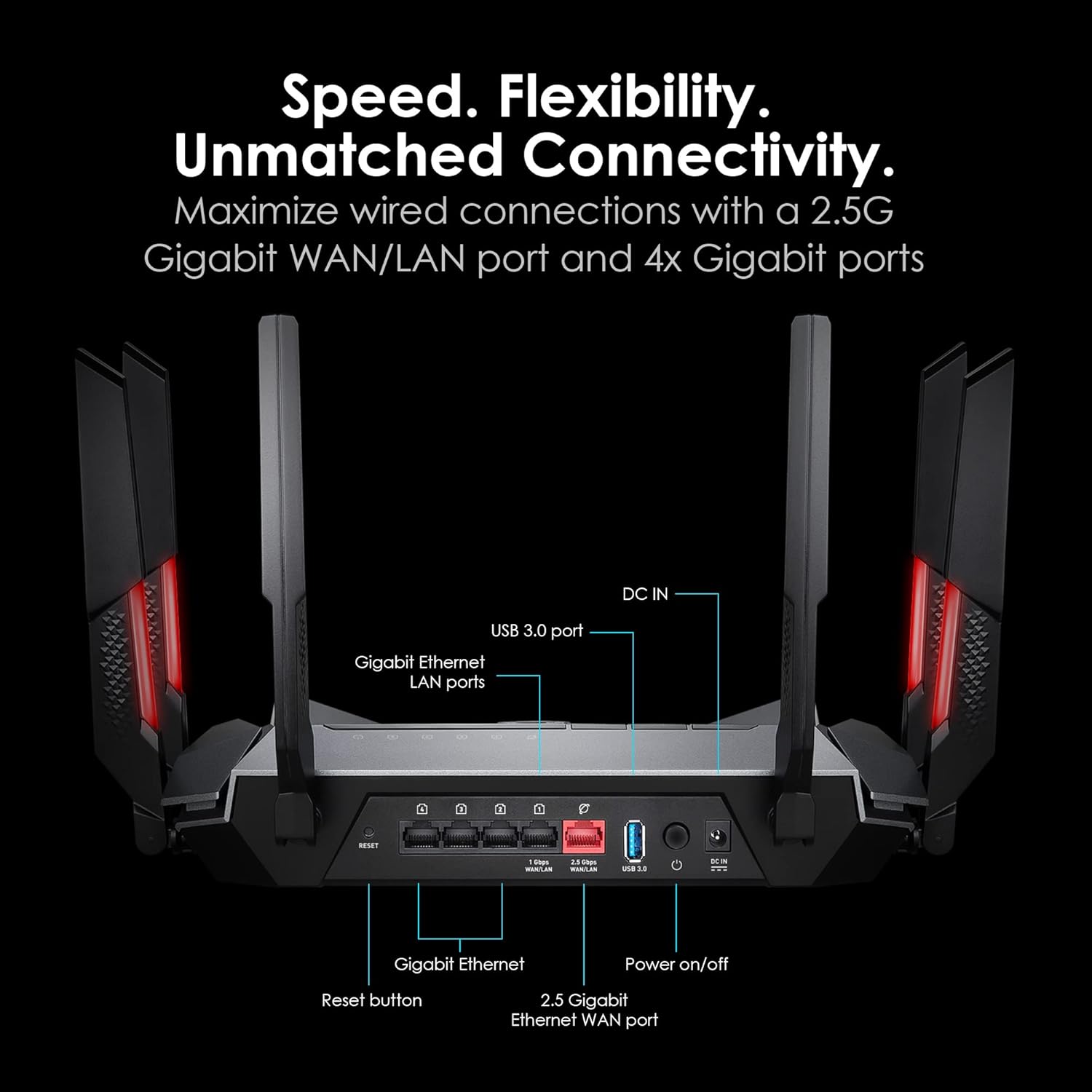
For wired connections, the router offers versatile port options. It includes one 2.5 Gigabit port that can be configured as either a WAN (Internet) or LAN port, providing a future-proof connection for high-speed internet plans or a multi-gigabit link to a compatible NAS or desktop. This is complemented by four standard 1 Gigabit LAN ports for connecting additional devices like consoles, PCs, or smart home hubs. A USB 3.0 port is also present, allowing for network storage sharing or printer sharing. This combination of ports supports a variety of home network setups, from pure gaming rigs to mixed-use environments with wired IoT devices.
AI Quality of Service (QoS) and Gaming Features
The standout software feature is the AI QoS engine. This system is designed to automatically detect and prioritize network traffic based on user-selectable modes: Gaming, Streaming, WFH (Work From Home), and an AI Auto mode that optimizes for all family members. In Gaming mode, it claims to accelerate game traffic and reduce ping rates across PC, console, and mobile platforms. The Streaming mode aims to reduce interruptions for live media, while WFH mode prioritizes video conferencing and productivity applications. The router also offers a “Game Accelerator” function and an “MSI First” feature within the MSI Center software, which can prioritize traffic from other MSI-branded devices on the network.
Software and Control
Users can manage the MSI RADIXAXE6600 through multiple interfaces: a comprehensive web-based graphical user interface (GUI), a dedicated MSI Router mobile app, or the broader MSI Center software suite. These platforms allow for network monitoring, device prioritization, guest network setup, WiFi scheduling, and control of the RGB lighting effects. The router also supports Access Point mode, enabling it to be integrated into an existing wired network to extend WiFi coverage. Security is handled by WPA3-PSK encryption, the latest standard for securing wireless networks.
Setup, Support and Ownership
Setup is described in user reviews as relatively straightforward, though perhaps not for a complete novice without some technical inclination. The process involves connecting the hardware and then using either the web GUI or mobile app for configuration. The manufacturer provides a quick setup guide in the box. The router’s firmware can be updated, which is crucial for security and performance enhancements. MSI backs the RADIXAXE6600 with a three-year warranty, offering a standard period of support for a networking device of this class. Specific details about long-term software update support or the availability of advanced security subscription services are not listed by the manufacturer.
What Owners Say
Owner feedback highlights several key experiences. Many praise the router’s strong and stable signal, with some noting it solved coverage issues in challenging home layouts with thick walls. The AI QoS and ease of setup via the app or web interface are frequently mentioned positives, with users appreciating the automatic optimization for different activities. The RGB lighting is a hit with gamers looking to match their setup aesthetics. On the critical side, some users report issues with the router requiring resets or not delivering expected speeds on the 6GHz band, which may relate to device compatibility or local interference. The software interface, while powerful, is noted by some as being complex or overly complicated for basic tasks. The overall rating distribution shows a strong majority of positive experiences, with a significant portion of reviews awarding the highest score.
Pros and Cons
Pros
- WiFi 6E tri-band provides high capacity and reduced interference on the 6GHz band.
- AI QoS automatically prioritizes traffic for gaming, streaming, and work.
- Powerful 1.8GHz quad-core processor handles multiple devices smoothly.
- Includes a flexible 2.5G WAN/LAN port for high-speed wired connections.
- Customizable RGB lighting syncs with MSI ecosystem gear.
- Comprehensive control via web GUI, mobile app, and MSI Center software.
Cons
- Full benefits of the 6GHz band require compatible WiFi 6E client devices.
- Only one 2.5G port limits multi-gigabit wired network expansion.
- Software interface can be complex for networking beginners.
- RGB features may not appeal to users seeking a minimalist look.
- Some users report occasional stability issues requiring resets.
- Physical size is substantial and requires significant desk space.
Who Should Buy It (and Who Should Skip It)
The MSI RADIXAXE6600 is an ideal choice for gamers and multi-user households where low latency and high bandwidth are priorities. Its AI QoS makes it particularly suitable for environments where gaming, 4K streaming, and video calls happen simultaneously, as it seeks to manage contention automatically. Users invested in the MSI ecosystem who want RGB sync and device prioritization will find added value. It’s also a good fit for tech enthusiasts with upcoming WiFi 6E devices looking to future-proof their network core. For more insights on optimizing your tech setup, explore our guides on the best monitors and best gaming chairs.
This router may not be the best fit for users with a very simple network consisting of only a few basic devices, as its advanced features and gaming aesthetics might be overkill. Those who need multiple 2.5G or 10G Ethernet ports for a sophisticated wired home lab or NAS setup should look for models with more multi-gig ports. Individuals who prefer a purely utilitarian design without RGB lighting might also want to consider other options. If your primary interest is in enhancing other aspects of your smart home, our review of the best AI smart home devices could be useful.
Final Verdict
The MSI Radix AXE6600 WiFi 6E Tri-Band Gaming Router delivers on its promise of high-performance, intelligently managed networking. Its combination of a robust quad-core processor, the uncongested 6GHz band, and the clever AI QoS engine positions it as a strong contender for demanding home networks. The ability to automatically prioritize traffic removes a layer of complexity for users who want optimized performance without manual configuration. When it works as intended, it provides a stable, high-speed foundation for gaming, streaming, and remote work.
However, potential buyers should be aware that its premium features come with some caveats. To fully utilize its capabilities, compatible WiFi 6E client devices are needed. While the AI system is a highlight, the overall software experience may have a learning curve. The router’s performance, as reflected in owner reviews, is generally excellent, though not universally flawless. For the right user—a gamer or a household manager battling for bandwidth—the MSI Radix AXE6600 offers a feature-rich and powerful solution that intelligently allocates one of the home’s most critical resources: a fast and reliable internet connection. For further reading on creating an optimal home office or gaming environment, check out our reviews section.
FAQs
What is the main advantage of the WiFi 6E band on this router?
The primary advantage of the WiFi 6E band (6GHz) is its lack of congestion. It operates on a new spectrum separate from the crowded 2.4GHz and 5GHz bands used by most older devices, routers, and appliances. This results in cleaner airwaves, less interference, and the availability of wide 160MHz channels, which are essential for achieving the highest possible wireless speeds and low latency, especially beneficial for high-bandwidth activities like VR gaming or transferring large files wirelessly.
Do I need special devices to use the 6GHz network?
Yes, to connect to the router’s 6GHz network and experience its full benefits, your client devices (laptops, smartphones, tablets) must support the WiFi 6E standard. Many newer flagship phones, laptops, and desktops released in the last couple of years include WiFi 6E radios. If your devices only support WiFi 6 or WiFi 5, they will still connect and operate on the router’s 2.4GHz or 5GHz bands, which also offer strong performance.
How does the AI QoS feature work?
The AI QoS (Quality of Service) feature uses a built-in engine to analyze network traffic and automatically prioritize data packets based on a selected mode: Gaming, Streaming, WFH, or AI Auto. In Gaming mode, it identifies game data and gives it precedence to reduce lag. Streaming mode prioritizes video data packets to prevent buffering. WFH mode favors video conferencing and productivity app traffic. AI Auto mode attempts to intelligently balance all types of traffic for multiple users. This happens automatically without requiring manual port forwarding or device prioritization rules.
Can I use this router as an access point to extend my existing network?
Yes, the MSI Radix AXE6600 supports an Access Point (AP) mode. This allows you to connect it via an Ethernet cable to your existing main router or modem-router combo. In this mode, it disables its own routing and DHCP functions and acts solely as a wireless access point, extending your WiFi coverage while leveraging its powerful tri-band radios and features like the AI QoS. This is a useful option for users who want to upgrade their wireless performance without replacing their entire network infrastructure.
About the author

Elvis Dicki writes reviews and buying guides for CyberSecLabs.