Thetis MB000504 Review: A Compact USB-C Key for 200 Passkeys
The Thetis MB000504 is a FIDO2-certified hardware security key offering extensive passkey storage and TOTP support for cross-platform authentication, suited for users prioritizing portability and high credential capacity.
 By Elvis Dicki
Updated October 22, 2026
In an era where phishing attacks and data breaches are increasingly common, hardware-based security keys have become essential tools for protecting online identities. The Thetis MB000504, also known as the Thetis Nano-C FIDO2 Security Key, enters the market as a compact USB-C device designed to offer robust two-factor and multi-factor authentication. This key is targeted at users across Windows, macOS, Android, and iOS ecosystems who seek a portable, physical token to secure accounts on services like Google, Microsoft, GitHub, and various password managers. For those looking to move beyond SMS-based codes and authenticator apps, this key provides a tangible security upgrade, though its feature set comes with specific compatibility considerations.

Bottom line: The Thetis MB000504 is a competitively priced, FIDO2-certified hardware key that excels in storage capacity for passkeys and TOTP codes, making it a solid choice for users with many accounts to protect, provided they can work within its USB-C-only and NFC-less design.
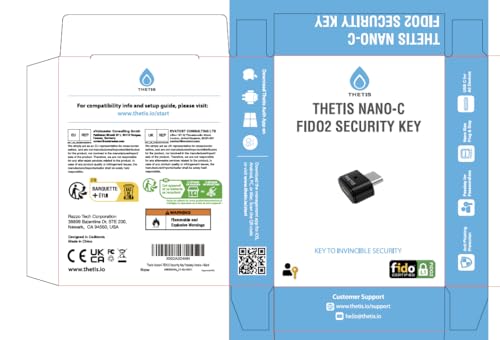
Thetis Nano-C USB-C FIDO2 Security Key Passkey


As an Amazon Associate we earn from qualifying purchases. Product prices and availability are accurate as of the date/time indicated.
Thetis MB000504 at a Glance
| Specification | Detail |
|---|---|
| Model | Thetis MB000504 (Nano-C FIDO2 Security Key) |
| Connector | USB Type-C |
| NFC Support | No |
| FIDO2 Passkey Slots | 200 |
| OATH (TOTP/HOTP) Slots | 50 |
| Key Features | FIDO2/U2F, Passwordless Passkeys, TOTP Code Storage |
| Compatible OS | Windows, macOS, iOS, Android, Linux, Chrome OS |
| Form Factor | Nano (0.73 x 0.60 x 0.30 inches) |
| Build Material | Aluminum shield |
| Notable Limitation | Initial setup requires Thetis Key Manager on PC or Mac |
Design and Build
The defining characteristic of the Thetis MB000504 is its minuscule footprint. Measuring just 0.73 by 0.60 by 0.30 inches and weighing a mere 0.04 ounces, this key is designed for a “plug-and-stay” approach in a laptop’s USB-C port or for easy carrying on a keychain. The nano form factor means it protrudes very little when inserted, reducing the risk of physical damage from accidental bumps. The housing is constructed with an aluminum shield, which provides a degree of durability for daily carry while likely aiding in heat dissipation for the internal security chip.
The design is purely functional, with no buttons, fingerprint readers, or status LEDs. Authentication is triggered simply by inserting the key and tapping a prompt on the screen, adhering to the FIDO2 standard’s user experience. The sole hardware interface is the USB Type-C port, which dictates its compatibility. This ultra-compact, single-port design prioritizes portability and simplicity over features like NFC for contactless mobile use or a secondary USB-A adapter for broader legacy device support.
Performance and Features
Security Protocols and Certification
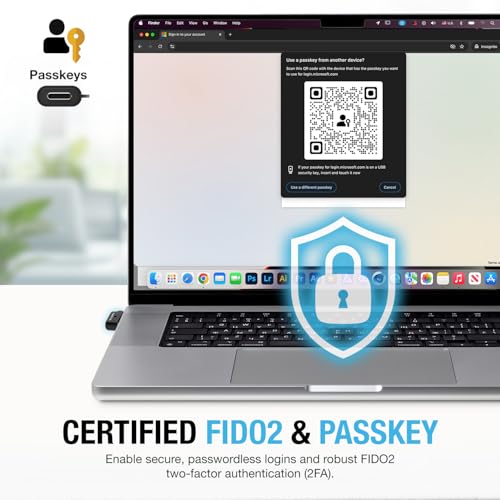
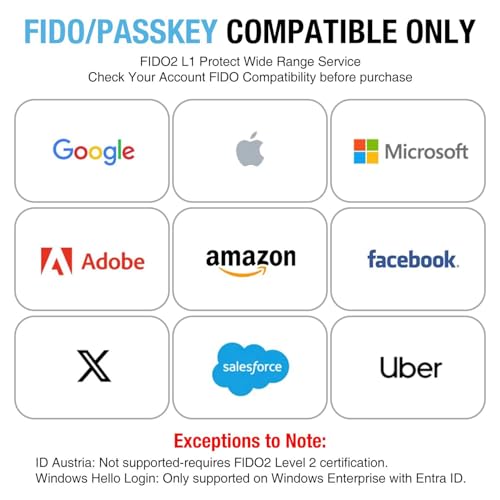
The Thetis MB000504 is a FIDO Certified security key, meaning it meets the standards set by the FIDO Alliance for phishing-resistant authentication. It supports the FIDO2, WebAuthn, and CTAP2 protocols, enabling both traditional second-factor authentication (2FA) and passwordless login via passkeys where services support it. The underlying cryptographic operations utilize algorithms including SHA256, AES, HMAC, ECDH, and ECDSA. This certification and protocol support ensure it works with major platforms like Google Accounts, Microsoft Accounts, GitHub, Dropbox, Facebook, and Instagram, among others listed by the manufacturer.
Storage Capacity and Flexibility
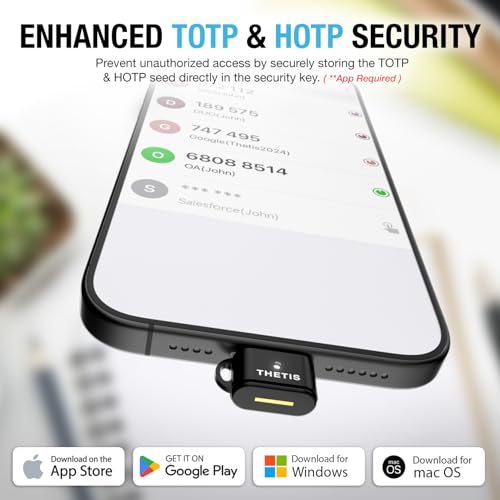
Where this key stands out is in its credential storage. With 200 slots dedicated to FIDO2 passkeys and 50 slots for OATH-TOTP (or HOTP) codes, it offers significant capacity for users with extensive online portfolios. The 200 passkey slots are notably higher than many competing keys in its class, allowing a single device to manage credentials for a vast number of websites and applications. The 50 TOTP slots enable the key to function as a hardware-based authenticator for services that haven’t yet adopted FIDO2, storing time-based codes generated by its companion app. This dual functionality provides flexible multi-factor authentication support across different authentication platforms.
Compatibility and Connectivity
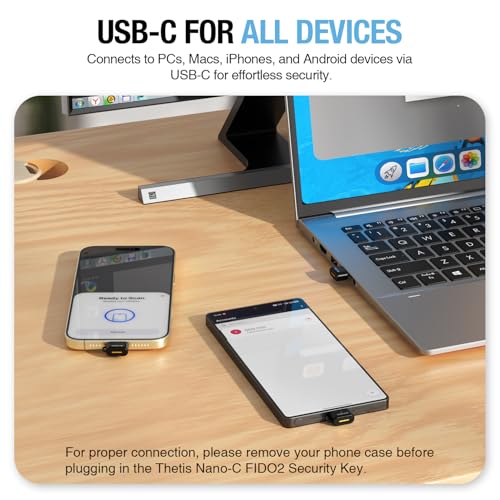
The key’s performance is tied directly to its USB Type-C interface. It is designed to work with any device featuring a USB-C port, including modern PCs, Macs, Android devices, and USB-C iPhones. The manufacturer states compatibility with Windows, macOS, iOS, Android, Linux (both Debian-based and Red Hat-based), and Chrome OS. For use, it requires a compatible browser like Chrome for account login on Windows. A key limitation is the absence of NFC, which means it cannot be used for tap-to-authenticate scenarios with smartphones or tablets that support contactless authentication. Its utility is purely through a physical USB-C connection.
Software and Management
Managing the key requires Thetis’s proprietary software. The Thetis Key Manager desktop application for PC or Mac is mandatory for the initial key setup and presumably for managing stored passkeys and TOTP seeds. For generating TOTP codes on the go, Thetis provides a mobile authenticator app. The key also lists compatibility with several premium password managers, including 1Password, Dashlane Premium, Keeper, and LastPass Premium, allowing it to integrate into broader security workflows. It’s important to note that for certain advanced functionalities like Windows Hello login, an Enterprise edition of Windows with Entra ID is required.
Setup, Support and Ownership
Ownership of the Thetis MB000504 begins with a specific setup requirement: the initial configuration must be performed using the Thetis Key Manager software on a PC or Mac. This step is crucial and may present a hurdle for users who intend to use the key exclusively with mobile devices from the outset. Once set up, daily use is straightforward, involving plugging the key into a USB-C port when prompted by a supporting website or service.
The manufacturer provides a “Standard Express Warranty,” though the specific duration and terms are not detailed in the provided data. Support appears to be channeled through the companion software and the manufacturer’s resources. There is no mention of firmware update procedures or long-term software support plans. A notable ownership consideration is a specific compatibility note: the key is listed as exclusively compatible with Bank of America’s web-based banking system and does not work with the Bank of America mobile app, highlighting the importance of verifying service compatibility for critical accounts.
What Owners Say
Overall feedback from buyers is positive, reflected in its aggregated rating. The majority of reviewers award the highest rating, indicating satisfaction with its core functionality, compact size, and value. A smaller but notable segment of reviews give the lowest rating, which often points to challenges with setup, specific service incompatibility (like the noted Bank of America app issue), or unmet expectations regarding features like NFC. The distribution suggests that while the key works well for most within its defined parameters, users should carefully review its limitations against their specific use cases to avoid frustration. For more insights on securing your digital life, explore our guide on the best resources for cybersecurity fundamentals.
Pros and Cons
Pros
- Extremely compact and portable aluminum design
- High capacity for 200 FIDO2 passkeys
- Additional storage for 50 TOTP codes
- FIDO2 certification for phishing-resistant security
- Broad OS compatibility via USB-C
- Works with major online services and password managers
Who Should Buy It (and Who Should Skip It)
The Thetis MB000504 is an excellent fit for users deeply invested in the USB-C ecosystem who need a single, pocketable key to secure a large number of online accounts. It’s ideal for professionals, developers (using platforms like GitHub), and security-conscious individuals who value the high passkey slot count and the added flexibility of TOTP storage. Students entering the field of cybersecurity may also find it a practical tool for learning about and implementing hardware-based authentication.
Conversely, users who require tap-and-go NFC authentication for use with phones or tablets should skip this key. Those whose primary devices only have USB-A ports will also find it incompatible without an adapter. Individuals who need to authenticate with the Bank of America mobile app, require FIDO2 L2 certification for services like ID Austria, or want a key that supports Windows Hello login on non-Enterprise Windows systems should look for alternatives that specifically address these needs.
Final Verdict
The Thetis MB000504 makes a compelling case as a no-frills, high-capacity hardware security key. Its standout feature is the generous allocation of 200 passkey slots, which surpasses many competitors and future-proofs it for widespread passkey adoption. The inclusion of TOTP storage adds useful versatility, and its FIDO2 certification guarantees a baseline of strong, standardized security. The nano USB-C form factor is perfect for permanent insertion in a modern laptop or discreet keychain carry.
However, these strengths come with clear trade-offs. The lack of NFC limits mobile convenience, and the USB-C-only design may necessitate dongles for some users. The mandatory initial PC/Mac setup and specific service incompatibilities, like with the Bank of America app, require careful consideration. For the right user—one with USB-C devices, many accounts to secure, and no need for contactless authentication—the Thetis MB000504 offers robust protection in a remarkably small package. It represents a focused and effective tool in the broader landscape of security tech gear.
FAQs
Does the Thetis MB000504 support NFC for wireless authentication?
No, the Thetis MB000504 does not have NFC capabilities. Authentication requires a physical connection via its USB Type-C port. It cannot be used for tap-to-authenticate scenarios with NFC-enabled smartphones, tablets, or readers.
Can I use this security key with an iPhone?
Yes, but only with iPhone models that have a USB-C port. The key plugs directly into the iPhone’s USB-C port for authentication. It is not compatible with iPhones that use a Lightning connector without an appropriate adapter, and the manufacturer’s compatibility list does not mention adapter support.
How do I set up and manage the TOTP code feature?
The TOTP codes are managed through Thetis’s software ecosystem. You must first use the Thetis Key Manager on a PC or Mac to set up the key and presumably seed it with TOTP accounts. After setup, you can use the companion Thetis Authenticator mobile app to generate the time-based codes when needed.
Is the Thetis key compatible with Bank of America?
The manufacturer specifies a critical limitation: the Thetis security key is exclusively compatible with Bank of America’s web version (accessed through a browser) and does not work with the Bank of America mobile application. Users must verify compatibility with each specific service they intend to use.
About the author

Elvis Dicki writes reviews and buying guides for CyberSecLabs.