Roam TL-WR3602BE Review: A Traveler’s Wi-Fi 7 Security Hub
The Roam TL-WR3602BE is a versatile dual-band Wi-Fi 7 travel router that excels at creating secure, private networks from public hotspots, backed by strong VPN support and flexible connectivity modes.
 By Elvis Dicki
Updated October 22, 2026
For frequent travelers, digital nomads, and remote workers, finding a reliable and secure internet connection outside the home is a constant challenge. Public Wi-Fi networks in hotels, airports, and cafes are often slow, unreliable, and pose significant security risks. The Roam TL-WR3602BE aims to solve this problem by packing the latest Wi-Fi 7 technology and robust security features into a compact, portable router designed for life on the road. It functions not just as a router but as a versatile connectivity hub that can adapt to various internet sources and create a personal, encrypted bubble for all your devices. In essence, it’s a powerful tool for anyone who needs to take their secure, high-performance network with them wherever they go.
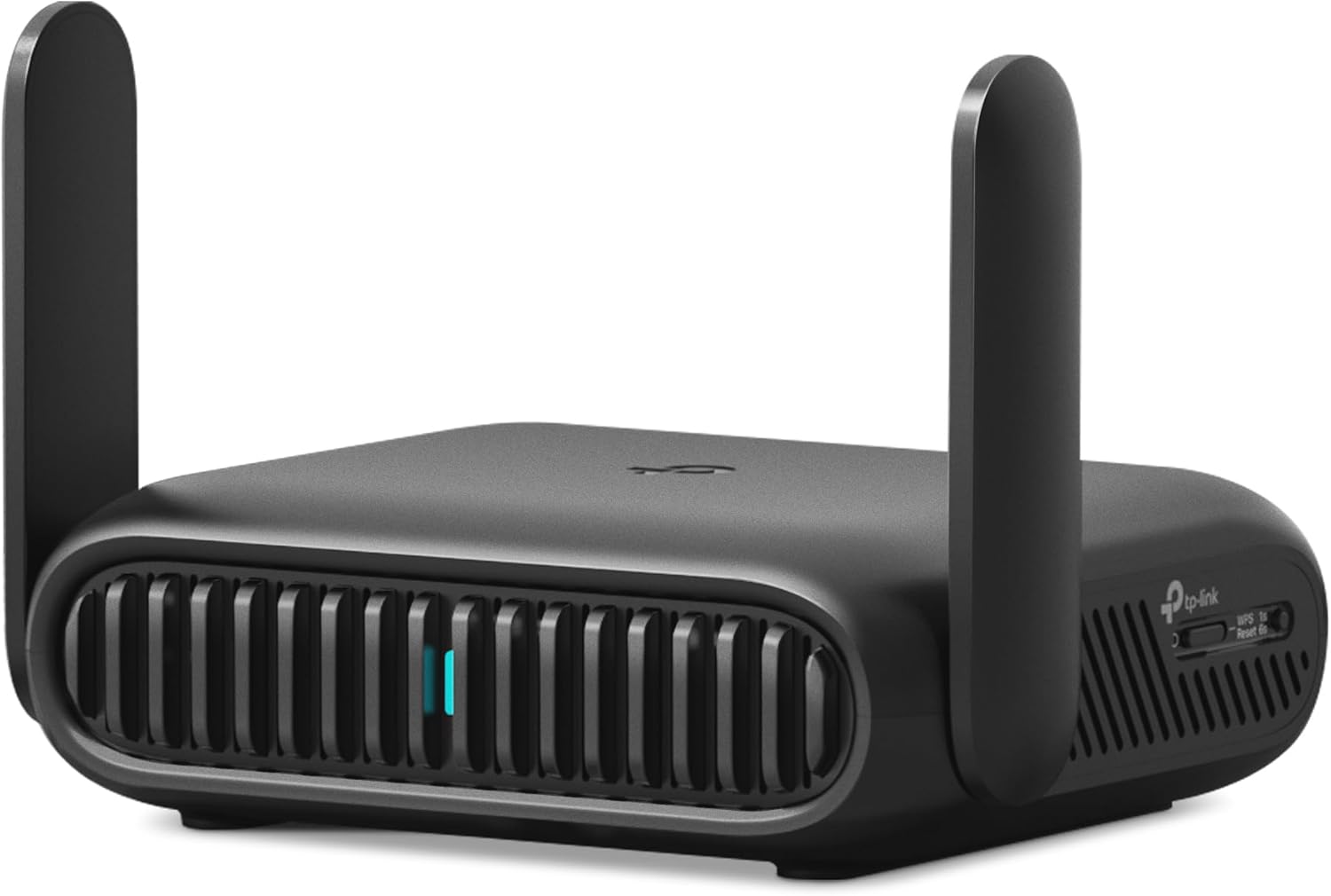
This device, also marketed as the Roam 7 BE3600 Wi-Fi 7 Portable Travel Router, distinguishes itself with a multi-mode design that supports everything from traditional Ethernet and USB tethering to acting as a secure gateway for public Wi-Fi. Its standout promise is the ability to connect to an open or captive portal hotel network once and then share that connection privately and securely with your laptop, phone, tablet, and other gadgets. With built-in support for modern VPN protocols like WireGuard and OpenVPN, it adds a critical layer of privacy. For travelers seeking a single device to manage connectivity and security across different environments, the Roam TL-WR3602BE presents a compelling, feature-rich solution.
TP-Link Roam 7 BE3600 Wi-Fi 7 Travel Router 2.5G





As an Amazon Associate we earn from qualifying purchases. Product prices and availability are accurate as of the date/time indicated.
Roam TL-WR3602BE at a Glance
| Specification | Detail |
|---|---|
| Wi-Fi Generation | Wi-Fi 7 (802.11be) |
| Frequency Bands | Dual-Band (2.4 GHz & 5 GHz) Note: Does not support 6 GHz band |
| Maximum Combined Speed | 3600 Mbps (2882 Mbps on 5 GHz, 688 Mbps on 2.4 GHz) |
| Key Ports | 1x 2.5 Gbps WAN, 1x 1 Gbps LAN, 1x USB 3.0, USB-C for power |
| Operation Modes | Router, Hotspot, Access Point, Range Extender, Client |
| VPN Support | OpenVPN & WireGuard (Client & Server), PPTP, L2TP |
| Device Support | Up to 90 devices simultaneously |
| Coverage Area | Up to 1800 square feet |
| Control Method | Tether App (iOS/Android) |
| Security Protocols | WPA3, WPA2-Enterprise, WPA-PSK |
Design and Build
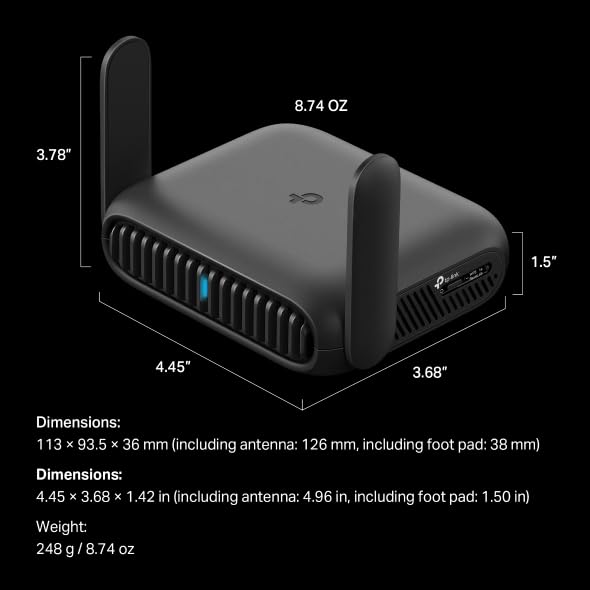
The Roam TL-WR3602BE is built with portability as a core tenet. Its compact dimensions make it easy to slip into a laptop sleeve or travel bag without adding significant bulk or weight. The construction feels solid, designed to withstand the rigors of travel, which is a point echoed in user feedback praising its durable feel for the price. The front features simple LED indicators for power and network status, while the rear houses all the physical connectivity: the high-speed 2.5 Gigabit WAN port, a 1 Gigabit LAN port, a USB 3.0 port for storage or modem connectivity, and a USB-C port for power. This clean, functional layout emphasizes its role as a tool rather than a showpiece. The lack of external antennas contributes to its sleek, pocketable profile, though the internal fixed antennas are specified to provide coverage for areas up to 1800 square feet, which is ample for most hotel rooms or small apartments.
Performance and Features
Connectivity and Ports
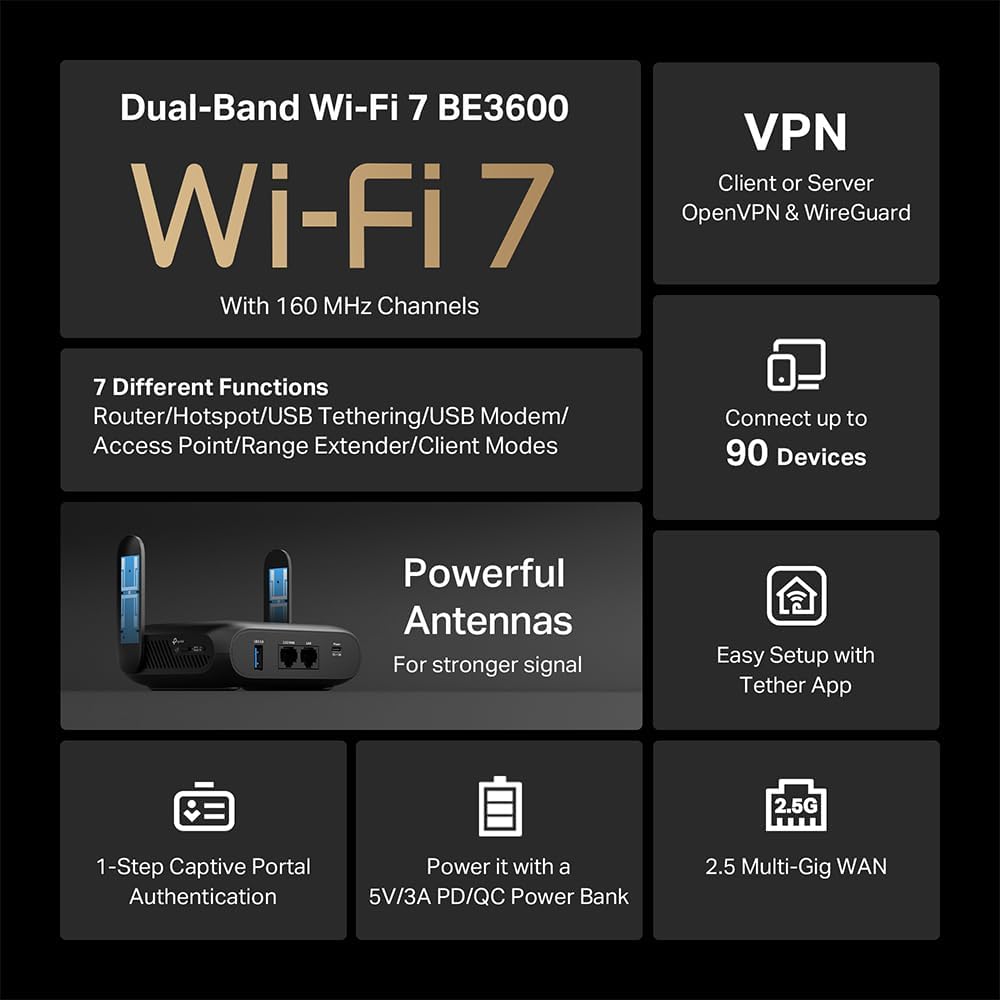
The port selection on the Roam TL-WR3602BE is a highlight, offering flexibility that exceeds many standard travel routers. The inclusion of a 2.5 Gigabit WAN port is future-proof, allowing it to handle high-speed internet connections from hotel Ethernet or a wired source without becoming a bottleneck, while the 1 Gigabit LAN port provides a fast wired connection for a device like a gaming console or laptop. The USB 3.0 port serves dual purposes: it can host a storage drive for network file sharing or backup, or it can connect a compatible 3G/4G/5G USB modem for cellular internet fallback, a crucial feature not listed as a built-in capability. Power is supplied via a ubiquitous USB-C port, which can be connected to the included adapter or, importantly, to a power bank, enabling truly cordless operation in vehicles, planes, or outdoor settings.
Wi-Fi 7 and Multi-Mode Operation
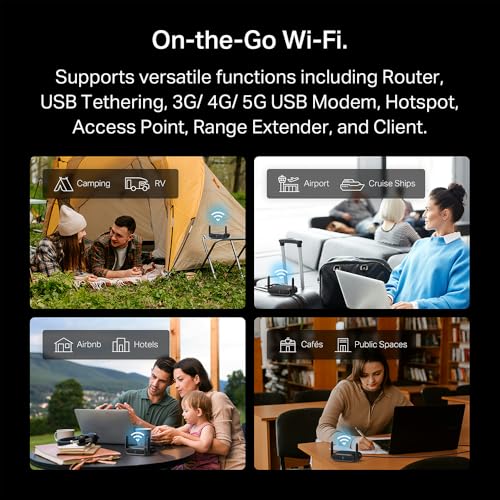
As a Wi-Fi 7 (802.11be) device, the router brings next-generation wireless features to the travel category, though it’s important to note it is a dual-band model without the 6 GHz band. Key Wi-Fi 7 benefits include 4K QAM for more efficient data encoding and Multi-Link Operation (MLO), which can combine frequency bands to enhance throughput, lower latency, and improve connection reliability. Its rated maximum speeds of 2882 Mbps on 5 GHz and 688 Mbps on 2.4 GHz are more than sufficient for demanding travel needs like 4K streaming, large file downloads, and video conferencing. The router’s true versatility lies in its multiple operation modes. In Router Mode, it uses internet from Ethernet, USB tethering from a phone, or a USB modem. Hotspot Mode is its signature travel feature, creating a private network from a public Wi-Fi source. It can also function as an Access Point, Range Extender, or Client, making it useful for home networking projects or extending coverage in a rental.
Software and Security
Security is a major selling point for this device. The manufacturer emphasizes its commitment as a signatory to the CISA Secure-by-Design pledge. The router supports the latest WPA3 security protocol for the wireless network itself. For securing traffic on untrusted networks, it has robust VPN functionality, acting as both a client and a server for OpenVPN and WireGuard, with additional support for PPTP and L2TP. This means you can configure the router to connect to your preferred VPN service, encrypting the traffic for every device on its network without installing VPN software on each one. The Tether mobile app provides the primary management interface, featuring one-step captive portal authentication that simplifies logging into hotel Wi-Fi networks. The app also provides access to TP-Link’s HomeShield service, which offers basic parental controls and security features like QoS and website filtering. It is noted that this model does not support OpenWRT for users seeking alternative firmware.
Setup, Support and Ownership
Setup is designed to be straightforward through the Tether app, with most users reporting a simple process. The included accessories—a power adapter, Ethernet cable, and USB cable—provide everything needed to get started. The device is powered by a Linux-based operating system. For long-term ownership, TP-Link offers a two-year manufacturer’s warranty. The device’s firmware can presumably be updated through the Tether app to address security vulnerabilities and add features, a critical aspect given its security-focused role. The ability to power it via a power bank greatly enhances its portability and use-case scenarios, from long flights to RV trips where AC power may be limited. As a travel-focused device, it lacks upgradeable internal components, but its versatile ports allow for the addition of external storage and cellular modems.
What Owners Say
User reviews for the Roam TL-WR3602BE are overwhelmingly positive, with a high percentage of five-star ratings. Owners frequently praise it as a “game changer” for travel, specifically highlighting its ability to create a secure, private network from public Wi-Fi on cruises, in hotels, and in rentals. Performance receives strong marks, with users noting fast, stable connections suitable for streaming and remote work, even when sharing cruise ship Wi-Fi. Several reviews commend its effectiveness in picking up and amplifying weak Wi-Fi signals. The compact, durable design and perceived value for the feature set are also commonly cited positives. The primary criticisms mentioned in lower-star reviews involve occasional hiccups with the initial app connection process during setup. The consensus from owner feedback is that it delivers on its core promises of security, versatility, and performance for the traveler.
Pros and Cons
Pros
- Creates a secure private Wi-Fi network from public hotspots
- Strong VPN support with OpenVPN and WireGuard
- Versatile multi-mode operation (Router, Hotspot, AP, Client, Extender)
- Future-proof 2.5 Gigabit WAN port and USB 3.0 connectivity
- Compact, durable design ideal for travel
- Easy power via USB-C, compatible with power banks
- Simple management through Tether app with one-click captive portal login
Cons
- Dual-band only, lacks 6 GHz band for full Wi-Fi 7 spectrum
- No built-in cellular modem (requires external USB modem)
- Does not support OpenWRT custom firmware
- Some users report minor initial app connectivity issues
Who Should Buy It (and Who Should Skip It)
The Roam TL-WR3602BE is an ideal purchase for frequent travelers, including business professionals, remote workers, and vacationers who regularly use hotel, airport, or cruise ship Wi-Fi. It’s perfect for those who prioritize security and want to easily encrypt all their devices’ traffic via a VPN at the router level. Digital nomads, RV owners, and users of short-term rentals will also benefit greatly from its flexible modes and ability to improve weak signals. It serves as an excellent compact secondary router for home labs or specific projects requiring an access point or client bridge.
This router may not be the best fit for users whose primary need is for a permanent, full-featured home router with extensive wired ports and mesh capabilities. Those specifically seeking a travel router with a built-in SIM slot for cellular connectivity should look for a model with an integrated modem. Advanced networking enthusiasts who require OpenWRT support for deep customization will also find this device limiting. For home users looking to upgrade their primary network, exploring guides on the best routers for large homes or best routers for gigabit internet would be more appropriate.
Final Verdict
The Roam TL-WR3602BE successfully carves out a strong position in the travel router market by combining next-generation Wi-Fi 7 technology with a relentless focus on security and versatility. Its ability to act as a secure gateway for public Wi-Fi is its killer feature, effectively solving a common pain point for travelers. The inclusion of a 2.5G WAN port, USB 3.0, and robust VPN client support future-proofs the device and adds significant value beyond basic travel routing needs. While the lack of a 6 GHz band means it doesn’t offer the complete Wi-Fi 7 experience, its dual-band performance is more than capable for its intended use cases.
For anyone who spends significant time away from a trusted home network, this router is a highly recommended investment. It consolidates multiple devices and functions—VPN appliance, network extender, file server, and portable hotspot—into one compact, well-built package. It empowers users to take control of their connectivity and privacy in environments where they typically have little. Compared to other portable options, its blend of modern features, strong security posture, and positive user feedback makes it a top contender. For more insights into specialized routers, consider reading about the best routers for OpenWRT or exploring other compact tech solutions in our Mini PCs section.
FAQs
Does the Roam TL-WR3602BE have a built-in battery?
No, the Roam TL-WR3602BE does not have a built-in battery. It is powered through its USB-C port. The manufacturer includes a power adapter, but a key feature is that it can also be powered by any compatible 5V PD power source, such as a laptop USB port or a portable power bank, which provides excellent mobility.
Can I use this router to add Wi-Fi to a wired-only internet connection in a hotel room?
Yes, absolutely. This is one of its primary use cases. If your hotel room has an Ethernet port, you can connect it to the router’s 2.5G WAN port. You would then set the router to its standard Router Mode. It will create a private Wi-Fi network for your devices, often with better performance and security than the hotel’s own wireless network.
What is the difference between Hotspot Mode and Router Mode on this device?
Hotspot Mode is specifically designed for connecting to public Wi-Fi networks that require a login via a captive portal (like a hotel login page). The router connects to the public Wi-Fi, you log in once through the Tether app, and it then rebroadcasts a secure, private Wi-Fi signal to your devices. Router Mode is for when you have a wired internet source (Ethernet) or are using USB tethering from a phone or a USB cellular modem.
How does the VPN feature work? Do I need a separate subscription?
The router can function as a VPN client. This means you can configure it with subscription details from a third-party VPN service provider (like NordVPN, Surfshark, etc.) that supports OpenVPN or WireGuard protocols. Once configured, all internet traffic from every device connected to the Roam router’s network is encrypted and routed through the VPN tunnel. Yes, you typically need an active subscription with a compatible VPN provider for this feature to work.
About the author

Elvis Dicki writes reviews and buying guides for CyberSecLabs.