MikroTik RB4011iGS+RM Review: Ten Gigabit Ports with SFP+
The MikroTik RB4011iGS+RM is a high-performance wired router designed for network professionals and power users who need robust routing, extensive port options, and rackmount capability.
 By Elvis Dicki
Updated October 21, 2026
By Elvis Dicki
Updated October 21, 2026
The MikroTik RB4011iGS+RM is a professional-grade wired router that stands apart from typical consumer networking gear. Built around a powerful quad-core ARM Cortex A15 CPU and equipped with ten Gigabit Ethernet ports plus a 10 Gbps SFP+ interface, it targets users who need serious routing performance, extensive configurability, and a rack-ready form factor. This device is engineered for network administrators, IT professionals, and advanced home users who require granular control over their network environment, leveraging MikroTik’s comprehensive RouterOS. In short, it’s a versatile and powerful router for those who need more than an off-the-shelf solution.

This review analyzes the RB4011iGS+RM based on its specifications, design, and aggregated user feedback. We will examine its hardware capabilities, port selection, and the software environment that defines its operation. The bottom line is that this router excels in scenarios demanding high throughput, complex firewall rules, VLAN segmentation, and VPN handling, though it requires a willingness to engage with its sophisticated software interface.
MikroTik RB4011iGS+RM 10-Port Gigabit Router



As an Amazon Associate we earn from qualifying purchases. Product prices and availability are accurate as of the date/time indicated.
MikroTik RB4011iGS+RM at a Glance
| Specification | Detail |
|---|---|
| CPU | Quad-core ARM Cortex A15 |
| RAM | 1 GB |
| Ethernet Ports | 10 x 1 Gbps |
| High-Speed Port | 1 x SFP+ (10 Gbps) |
| PoE Output | Passive PoE on port #10 |
| Enclosure | Solid metal, matte black |
| Rackmount | Included ears for 1U space |
| Dimensions | 228 x 120 x 30 mm (8.98″ x 4.72″ x 1.18″) |
| Power Consumption | Max 33 W |
| Operating System | RouterOS |
Design and Build
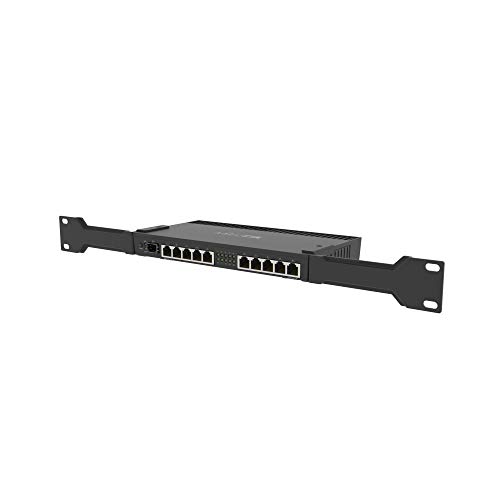
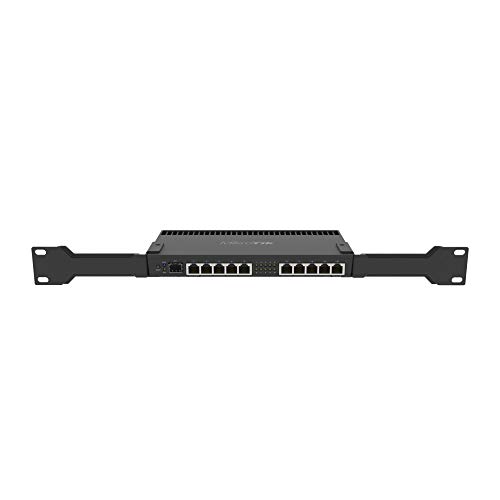
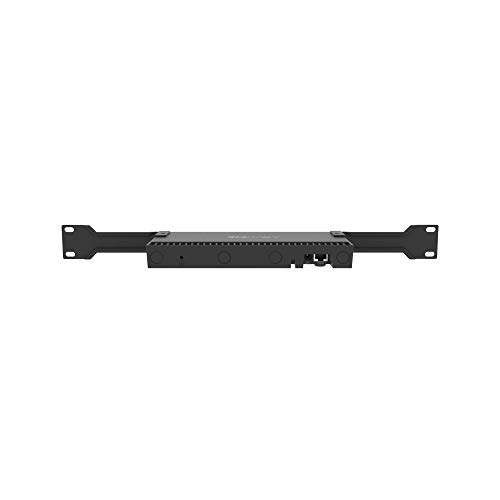
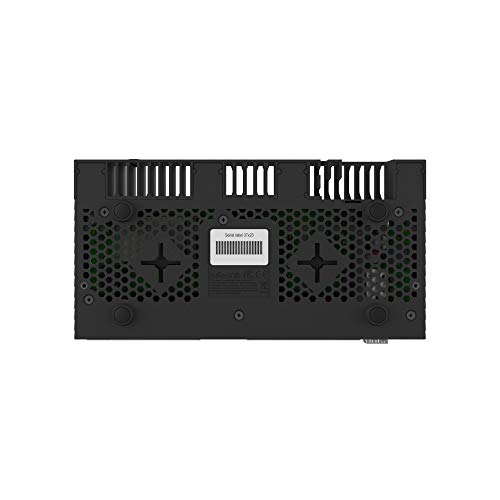
The RB4011iGS+RM presents a distinctly professional aesthetic with its compact, solid metal enclosure finished in matte black. Its design prioritizes durability and efficient use of rack space, a clear indication of its target environment. The unit includes two rackmount ears, allowing it to be securely fastened into a standard 1U rack space, making it suitable for server rooms, network closets, or even sophisticated home lab setups. The dimensions are compact for the feature set, measuring 228mm in width, 120mm in depth, and 30mm in height.
The build quality, as described in the manufacturer’s details, is robust. The all-metal construction aids in heat dissipation and provides a level of physical durability expected from professional equipment. The front panel neatly arranges the status LEDs and ports. The overall design is functional and understated, focusing on reliability and integration into existing infrastructure rather than consumer-friendly aesthetics. The included components are a 24V 1.5A power adapter, the rackmount ears, and a K-60 kit, which typically contains mounting screws and other small hardware.
Performance and Features
Processing Power and Memory
At the heart of the RB4011iGS+RM is a quad-core ARM Cortex A15 processor, the same architecture used in MikroTik’s carrier-grade RB1100AHx4 router. This provides substantial computational power for routing tasks, firewall filtering, traffic shaping, and running VPN connections. The CPU also features hardware acceleration for IPsec, which significantly improves the efficiency and throughput of VPN tunnels without overloading the main cores. Paired with 1 GB of RAM, the router can comfortably handle complex RouterOS configurations, multiple concurrent connections, and demanding network rules without performance degradation. This combination allows it to fully utilize high-speed internet connections, with users reporting it easily handles gigabit-level bandwidth.
Connectivity and Ports
Connectivity is a major strength of this device. It offers ten Gigabit Ethernet ports, providing ample wired connections for devices, switches, or segmented networks. Port #10 supports Passive PoE output, allowing it to power a compatible device like an access point directly, simplifying cable runs. The standout feature is the SFP+ cage, which supports a 10 Gbps optical or copper module (not included). This enables high-bandwidth backbone links, connections to a 10G switch, or future-proofing for faster internet services. The port arrangement offers great flexibility for creating complex network topologies, VLANs, and link aggregation.
Key Features and Software
The router runs MikroTik’s proprietary RouterOS, a full-featured network operating system known for its depth and configurability. It supports a vast array of networking protocols, advanced firewall rules with stateful inspection, QoS, hotspot management, VPN protocols (including IPsec, OpenVPN, and WireGuard), and sophisticated routing. The software is what truly unlocks the hardware’s potential, allowing for fine-grained network segmentation, traffic engineering, and security policies. As noted in user reviews, it enables complex setups like multiple segmented VLANs for IoT devices with nailed-up VPNs. Management is primarily done through WinBox (a Windows GUI application), a web interface (WebFig), or a command-line interface via SSH or serial console.
Setup, Support and Ownership
Setup of the RB4011iGS+RM is acknowledged to have a learning curve. While MikroTik offers a “getting started” wizard for basic configuration, leveraging its advanced capabilities requires networking knowledge. Users familiar with RouterOS or willing to learn will find immense power; newcomers may find the interface overwhelming compared to consumer router setups. The router does not include an SFP+ module, which must be purchased separately if the 10 Gbps port is to be used. Power consumption can reach up to 33 watts under full load, which is a consideration for always-on operation.
Support is primarily community-driven through forums and extensive online documentation, though official support channels exist. RouterOS receives regular updates from MikroTik, adding features and security patches. The durable metal construction suggests a long physical lifespan. Ownership is geared towards users who value long-term configurability and performance over plug-and-play simplicity. For more on high-performance networking setups, explore our guide to the best routers for gigabit internet.
What Owners Say
Owner feedback for the MikroTik RB4011iGS+RM is overwhelmingly positive, reflected in its high average rating. Users consistently praise its raw power and ability to handle high-speed internet connections without bottlenecking, with several noting it resolved speed issues they experienced with other routers. The versatility of the ports, especially the SFP+ for 10G connectivity, is frequently highlighted as a major benefit. Many owners appreciate the deep configurability of RouterOS for implementing complex network designs, advanced firewall rules, and VPNs.
The common theme among reviews is that this device is best suited for those with some networking expertise. Users describe it as “not for the non-techy” but “perfect” for small business needs or advanced home labs. They value the fine-grained control over segmentation, security, and performance. The rating distribution shows an exceptionally high percentage of top ratings, with very few critical reviews, indicating high satisfaction among its target user base. Those seeking powerful, customizable tech gear might also be interested in our reviews of fanless mini PCs for silent computing solutions.
Pros and Cons
Pros
- Powerful quad-core CPU with IPsec hardware acceleration
- Abundant connectivity with ten Gigabit ports and a 10G SFP+ cage
- High configurability via the extensive RouterOS feature set
- Professional, rack-mountable metal build quality
- Includes PoE output on one port for device powering
- Capable of handling complex firewall rules and VLANs at high speed
Cons
- RouterOS presents a significant learning curve for new users
- SFP+ transceiver module is not included
- Setup requires networking knowledge for advanced configurations
- Maximum power draw is relatively high for a router
- Lacks integrated wireless functionality
- Management interfaces are less intuitive than consumer-grade options
Who Should Buy It (and Who Should Skip It)
The MikroTik RB4011iGS+RM is an ideal choice for network professionals, IT administrators, and advanced home users who need a powerful, configurable wired router. It’s perfect for those running gigabit or multi-gig internet connections, operating a home lab with multiple VLANs, requiring robust VPN performance, or needing a reliable router for a small business environment. Users who enjoy having granular control over every aspect of their network and are willing to learn RouterOS will find it immensely rewarding.
This router is not a good fit for casual users seeking simple plug-and-play setup for basic home internet sharing. Individuals unfamiliar with networking concepts like subnetting, firewall rules, or VLANs will likely find it frustrating. Those who need built-in Wi-Fi should look elsewhere, as this is a purely wired device. For users needing powerful routing in a different form factor, our resource on the best routers for OpenWRT offers alternative platforms for customization.
Final Verdict
The MikroTik RB4011iGS+RM delivers exceptional wired routing performance and professional-grade features at a competitive point. Its combination of a powerful processor, ample RAM, extensive port selection including a future-proof SFP+ slot, and the deeply capable RouterOS software makes it a standout device for its intended audience. It successfully bridges the gap between expensive enterprise hardware and limited consumer gear, offering enterprise-like control and reliability in a compact, rack-mountable package.
However, its value is fully realized only when paired with the requisite knowledge to configure it. The learning curve is the most significant barrier, but for those who overcome it, the router provides a level of network control and performance that is difficult to match. If you need a powerful, versatile, and reliable wired router and are willing to engage with its software, the RB4011iGS+RM is an excellent investment that should serve demanding network needs for years to come. For broader context on networking equipment, visit our router wifi category page.
FAQs
Does the MikroTik RB4011iGS+RM have Wi-Fi?
No, the RB4011iGS+RM is a wired router only. It does not have any built-in wireless radios. To provide Wi-Fi, you would need to connect a separate wireless access point to one of its Ethernet ports. The port labeled #10 supports Passive PoE output, which could be used to power a compatible access point directly.
Is the SFP+ port ready to use out of the box?
No, the SFP+ port requires a separate SFP+ transceiver module, which is not included with the router. You must purchase a module compatible with your intended use (e.g., fiber optic for long runs or DAC cables for short switch connections) and the required data rate (1G or 10G). The router itself supports the interface, but the physical media adapter is an additional purchase.
How difficult is it to set up for someone new to MikroTik?
Setup can be challenging for newcomers. While a basic internet connection setup wizard exists, understanding and using the router’s advanced features requires learning MikroTik’s RouterOS. There is a significant learning curve compared to consumer routers. Prospective users should be prepared to study documentation, watch tutorials, or have prior networking knowledge to fully utilize the device.
Can this router handle a gigabit internet connection with VPN enabled?
Yes, based on its specifications and user feedback, the RB4011iGS+RM is capable of handling gigabit internet connections. Its quad-core CPU and dedicated IPsec hardware acceleration are specifically designed to maintain high throughput even when processing VPN encryption and decryption, a task that often cripples lesser routers. Users report achieving full line speeds while running VPNs.
About the author

Elvis Dicki writes reviews and buying guides for CyberSecLabs.