Wavlink® AC1200 Review: Outdoor Mesh Extender with Dual-Band & PoE
The Wavlink® AC1200 is a versatile, IP65-rated outdoor extender designed to create long-range WiFi coverage for large properties, offering multiple operation modes and robust connectivity for demanding environments.
 By Elvis Dicki
Updated October 22, 2026
For property owners struggling with WiFi dead zones across yards, barns, or outdoor workspaces, an indoor repeater simply won’t cut it. The Wavlink® AC1200 steps in as a purpose-built outdoor solution, designed to withstand the elements while extending network coverage over significant distances. This device functions not just as a simple repeater but as a flexible access point, repeater, or mesh node, targeting users with small businesses, farms, or expansive homesteads who need reliable connectivity for cameras, sensors, and mobile devices outside. In essence, it’s a rugged networking tool that brings robust, multi-mode wireless access to challenging outdoor locations.

This review analyzes the Wavlink AC1200’s specifications, design, and user feedback to determine if its blend of weatherproofing, long-range antennas, and operational flexibility delivers on its promises. We’ll examine its performance claims, setup process, and ideal use cases to see who can benefit most from this outdoor networking hardware.
WAVLINK AC1200 Outdoor Mesh WiFi Extender Router


As an Amazon Associate we earn from qualifying purchases. Product prices and availability are accurate as of the date/time indicated.
Wavlink® AC1200 at a Glance
| Specification | Detail |
|---|---|
| Model | WN572HP3 (AC1200) |
| Wireless Standard | 802.11a/b/g/n/ac |
| Dual-Band Speed | 2.4GHz (300Mbps) + 5GHz (867Mbps) |
| Antennas | 4 x 7dBi Detachable Omni-Directional |
| Operation Modes | Mesh Extender, Access Point (Fat/Fit), Repeater |
| Ethernet Ports | 2 x Gigabit (10/100/1000Mbps) |
| Power over Ethernet (PoE) | 54V Active/Passive Supported (Injector Included) |
| Weatherproof Rating | IP65 Enclosure |
| Operating Temperature | -20°C to 50°C |
| Security | WPA2/WPA3-MIX, WPA/WPA2-Enterprise |
Design and Build
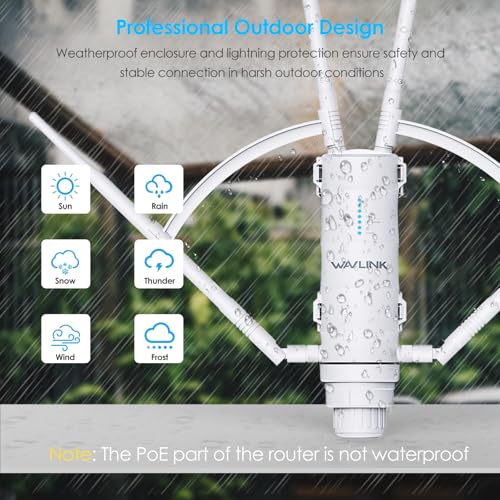
The Wavlink AC1200 is built for permanent outdoor installation. Its core feature is the IP65-rated enclosure, which certifies it as dust-tight and protected against low-pressure water jets from any direction. This makes it suitable for mounting in exposed locations where it will face rain, snow, and dust. The housing is also designed to be heat-resistant, allowing it to operate in a broad temperature range from -20°C to 50°C. For additional protection in areas prone to electrical storms, the unit includes 15KV ESD and 4KV lightning surge protection on its ports.
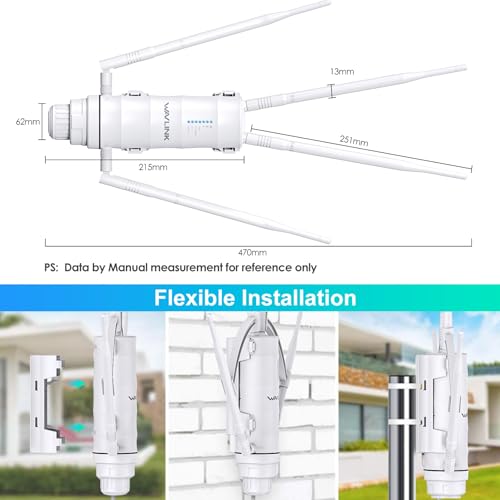
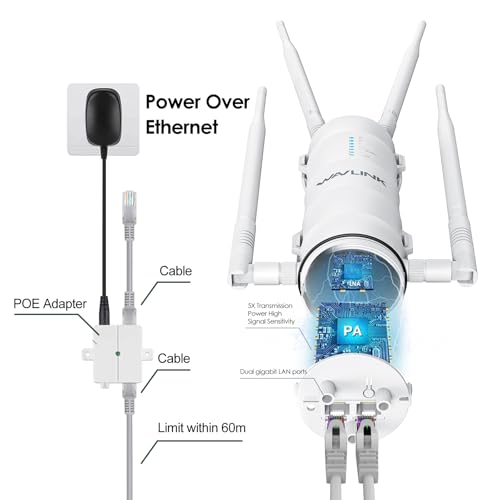
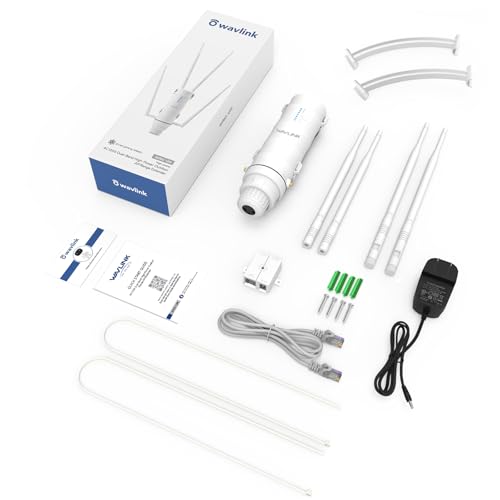
Physically, the device features four externally mounted, detachable 7dBi omni-directional antennas. These high-gain antennas are key to its long-range claims, providing 360-degree coverage. The manufacturer notes that installation height and open placement significantly impact performance, recommending a height of at least two meters above a roof or in a high, open place. The unit includes dual Gigabit Ethernet ports, providing flexibility for wired connections. A critical design note is that the included Power over Ethernet (PoE) converter is not waterproof and must be installed indoors, with a certified CAT5e or CAT6 cable connecting it to the outdoor unit.
Performance and Features
Wireless Speed and Range
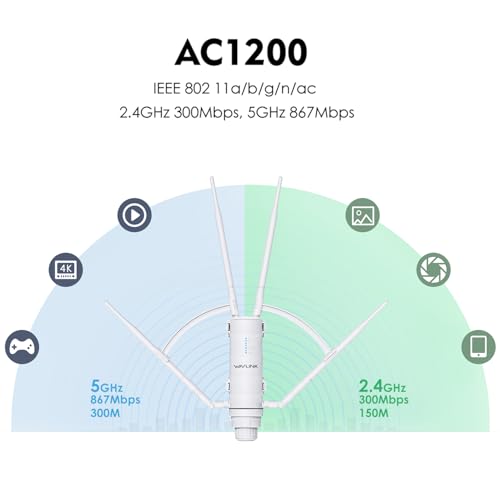
The AC1200 is a dual-band device with a combined wireless speed rating of 1200Mbps, split between a 2.4GHz band at 300Mbps and a 5GHz band at 867Mbps. According to the manufacturer, this split is designed for specific scenarios: the 5GHz band is intended for bandwidth-heavy tasks like 4K video surveillance feeds, while the 2.4GHz band is optimized to handle a large number of low-bandwidth IoT devices, such as smart sensors or RFID tags, without congestion. The advertised maximum range per unit is 300 meters, though this is noted to change with the actual environment. User testing in Access Point mode reported usable speeds at distances up to 800 feet on the 5GHz band and 500 feet on the 2.4GHz band, with signal strength and connectivity described as consistent.
Connectivity and Modes of Operation
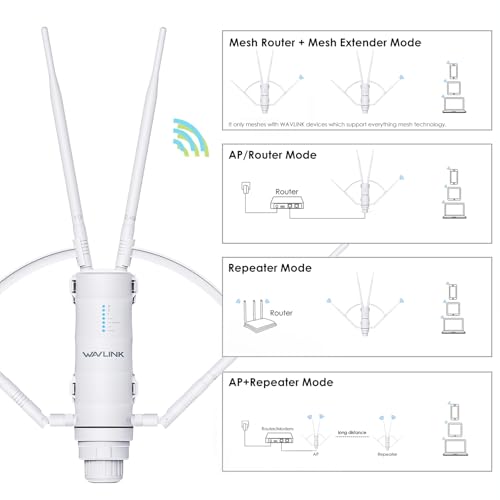
Flexibility is a central theme. The device supports three primary operation modes. In Repeater Mode, it extends the coverage of an existing wireless network. In Access Point (AP) Mode, it converts a wired network connection into a wireless one. This AP mode has two sub-modes: Fat AP, where the device operates as a standalone access point, and Fit AP, which allows for centralized management via a separate Wavlink AC Controller (sold separately), useful for large-scale deployments like multi-building properties. Finally, in Mesh Extender Mode, it can create a seamless mesh network, but this functionality is exclusive to other Wavlink devices that support the brand’s “Everything Mesh” technology.
The dual Gigabit Ethernet ports offer wired backhaul or device connections, and the 54V Active/Passive PoE support is a significant feature for installation. It allows the device to be powered via the same Ethernet cable that carries data, simplifying wiring over distances up to 100 meters from the indoor PoE injector. This eliminates the need for a separate outdoor power outlet near the installation site. The device also features MU-MIMO technology, which is designed to handle communication with multiple devices simultaneously, supporting a claimed capacity of 64 to 96 connected devices.
Security and Management
Security protocols are robust for a device in this category. It supports the modern WPA3 standard in a mixed WPA2/WPA3-MIX mode, as well as WPA/WPA2-Enterprise, which is typically used in business and organizational environments requiring individual user authentication. This enterprise-grade encryption makes it a candidate for not just home use but also for small business or agricultural applications where network security is a priority. Management is handled through a web-based interface, which one user review described as making the system easy to set up, though another noted the web address for setup could be frustrating to navigate.
Setup, Support and Ownership
Setup requires careful planning due to the outdoor nature of the product. The process involves selecting an optimal, high location with minimal obstacles, mounting the unit, and running an Ethernet cable from the indoor PoE injector. Users must ensure they use the correct cable type and note the manufacturer’s guidance that the Ethernet cable from the PoE injector to the device should be less than 60 meters for reliable operation. Some users reported that the device can take between 5 to 10 minutes to fully boot up after being powered on.
For support, Wavlink offers phone and email assistance with stated response times. The product comes with an 18-month warranty. A key ownership consideration is ecosystem dependency: to use the mesh networking feature, you must pair it with other compatible Wavlink mesh devices. Furthermore, for centralized management in Fit AP mode, a separate Wavlink AC Controller is required. For those looking to expand their network with devices that support many simultaneous connections, exploring options like the best routers for multiple devices can provide useful context for indoor networking needs.
What Owners Say
Owner reviews generally praise the product’s core strengths. Positive feedback highlights “incredible range” in farm settings, with one user reporting full signal bars at over 600 feet through timber. The range performance in AP mode was specifically validated by a user who is an antenna manufacturer, confirming good coverage and consistent signal quality. Several reviews mention that the device works as well as or better than leased equipment from internet service providers. Customer support also receives positive mentions for being responsive and helpful in resolving issues.
On the critical side, some users found the initial setup process non-intuitive. There are also specific compatibility notes: the device will not work with certain third-party PoE network switches and must use the included PoE injector. A minority of reviews indicate that the device underperformed relative to their coverage expectations. The overall rating distribution shows a majority of five-star reviews, with a smaller but notable number of one-star reviews, suggesting that while it excels in the right application, proper setup and compatibility checks are crucial for success. For users with very large homes considering their overall network strategy, insights from a guide on the best routers for large homes may be beneficial.
Pros and Cons
Pros
- Rugged IP65 weatherproof and temperature-resistant build
- Strong long-range coverage with high-gain antennas
- Flexible operation modes (Repeater, AP, Mesh Extender)
- PoE support simplifies remote installation
- Enterprise-grade security with WPA3 support
- High simultaneous device capacity with MU-MIMO
Cons
- Mesh functionality locks you into the Wavlink ecosystem
- Included PoE converter is not waterproof and must be installed indoors
- Setup process can be non-intuitive for some users
- Ethernet cable run from PoE injector has a recommended length limit
- May have compatibility issues with some third-party PoE switches
- Boot-up time can be several minutes
Who Should Buy It (and Who Should Skip It)
The Wavlink® AC1200 is an ideal solution for users with specific outdoor networking challenges. It’s perfectly suited for homeowners with large properties, yards, or outbuildings like barns and workshops who need to extend WiFi to security cameras, smart irrigation systems, or outdoor workspaces. It’s also a strong fit for small agricultural operations, rural businesses, or eco-resorts that need to blanket a wide area with reliable WiFi for IoT devices and guest access. Users who appreciate the installation flexibility offered by Power over Ethernet will find significant value here.
This product is not the best choice for everyone. Users who simply need to fix a weak signal in a single room of their home should opt for a standard indoor repeater. Those looking to build a whole-home mesh system with brands like Google Nest or Eero should skip this, as its mesh feature only works with other Wavlink devices. Individuals uncomfortable with basic network configuration or running outdoor Ethernet cable may find the setup daunting. For those focused on maximizing pure indoor speed, particularly with gigabit internet plans, resources on the best routers for gigabit internet would be more relevant.
Final Verdict
The Wavlink AC1200 Outdoor Mesh Extender/Router successfully fulfills a niche role that few consumer-grade devices can. Its ruggedized design, legitimate long-range performance, and operational flexibility make it a powerful tool for extending network coverage into outdoor and agricultural settings. The inclusion of modern security protocols and PoE support adds professional-grade utility that justifies its positioning for both serious homeowners and small businesses. While it demands careful planning for installation and has ecosystem limitations for mesh networking, its core function of delivering WiFi where it traditionally fails is executed effectively.
Potential buyers should go in with clear expectations: this is an infrastructure device, not a plug-and-play consumer gadget. Success depends on optimal placement, correct cabling, and understanding its mode-specific functions. For the user with a concrete outdoor coverage problem—whether for security cameras across a pasture, WiFi in a detached garage, or connectivity for farm IoT sensors—the Wavlink AC1200 offers a capable, durable, and feature-rich solution that stands up to the environment. As with many specialized tech gear products, such as those in our mini PCs category, its value is highest for those with a specific, matching need.
FAQs
Can I use the Wavlink AC1200 with my existing mesh system from another brand?
No, you cannot. The Mesh Extender Mode specifically requires other Wavlink devices that support the brand’s “Everything Mesh” technology. It will not seamlessly integrate with mesh systems from other manufacturers like TP-Link Deco, Netgear Orbi, or Amazon Eero. In such cases, you would need to use it in its Repeater or Access Point modes instead.
How do I power the device if I don’t have an outdoor electrical outlet?
The device supports Power over Ethernet (PoE). The package includes a PoE injector. You plug this injector into an indoor power outlet and connect it to your router or switch with an Ethernet cable. A second Ethernet cable then runs from the injector to the outdoor Wavlink unit, providing both data and power over a single cable for distances up to 100 meters. It is crucial to install the provided PoE injector indoors as it is not waterproof.
What is the difference between Fat AP and Fit AP mode?
In Fat (Autonomous) AP mode, the device operates as a standalone wireless access point. You configure it individually through its own web interface. This is ideal for simple, quick deployments. Fit (Controller-Based) AP mode allows the device to be centrally managed by a Wavlink AC Controller (sold separately). This mode is designed for large-scale installations where you need to manage settings, firmware updates, and network policies for multiple access points from a single dashboard.
Is the device really waterproof for permanent outdoor mounting?
Yes, the main unit’s enclosure has an IP65 rating. This means it is completely dust-tight and protected against water jets from any direction. It is designed for permanent outdoor installation and can withstand rain, snow, and dust. However, you must ensure all cable connectors are properly sealed, and remember that the included PoE power injector is not waterproof and must remain indoors.
About the author

Elvis Dicki writes reviews and buying guides for CyberSecLabs.