TP-Link ER7206 Review: A Durable Metal Desktop VPN Router
The TP-Link ER7206 is a multi-WAN professional wired Gigabit VPN router designed for businesses needing secure VPN connections, load balancing, and centralized network management via Omada SDN.
 By Elvis Dicki
Updated October 21, 2026
By Elvis Dicki
Updated October 21, 2026
The TP-Link ER7206 is a professional-grade, wired Gigabit VPN router engineered for demanding business environments. It sits squarely in the networking category, designed for users who need robust security, high client capacity, and the flexibility of multiple WAN connections. This router is not a typical consumer device; it targets small to medium-sized businesses, IT professionals, and advanced home users who require reliable VPN server and client functionality, extensive device support, and centralized management options. The bottom line is that the ER7206 offers a compelling blend of high-capacity VPN support, Omada SDN integration, and flexible multi-WAN configuration in a durable desktop form factor.

At its core, the TP-Link ER7206 is built to handle up to 700 concurrent clients and a staggering 150,000 associated devices, making it suitable for growing networks. Its key appeal lies in its support for a wide array of VPN protocols and its seamless integration into TP-Link’s Omada Software Defined Networking ecosystem, which allows for remote, centralized management of an entire network infrastructure. For organizations looking to move away from costly enterprise firewall subscriptions or to build a scalable, secure network without a complex rackmount setup, the ER7206 presents a viable and feature-rich alternative.
TP-Link ER7206 Multi-WAN Gigabit VPN Router




As an Amazon Associate we earn from qualifying purchases. Product prices and availability are accurate as of the date/time indicated.
TP-Link ER7206 at a Glance
| Specification | Detail |
|---|---|
| Model Name | ER7206 |
| Port Configuration | 1 GbE SFP WAN, 1 GbE WAN, 2 GbE WAN/LAN, 1 GbE LAN |
| Maximum Clients | Up to 700 |
| Maximum Associated Devices | 150,000 |
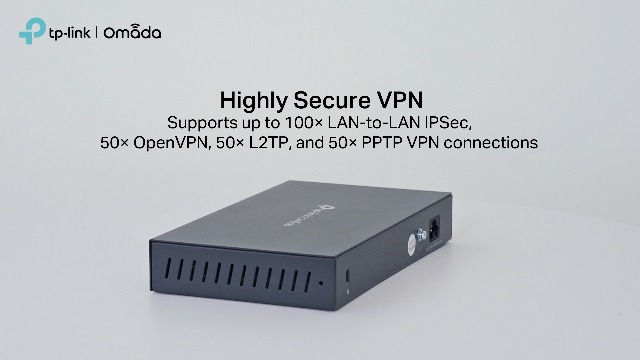
| VPN Capacity | 100x IPsec, 50x OpenVPN, 50x L2TP, 50x PPTP |
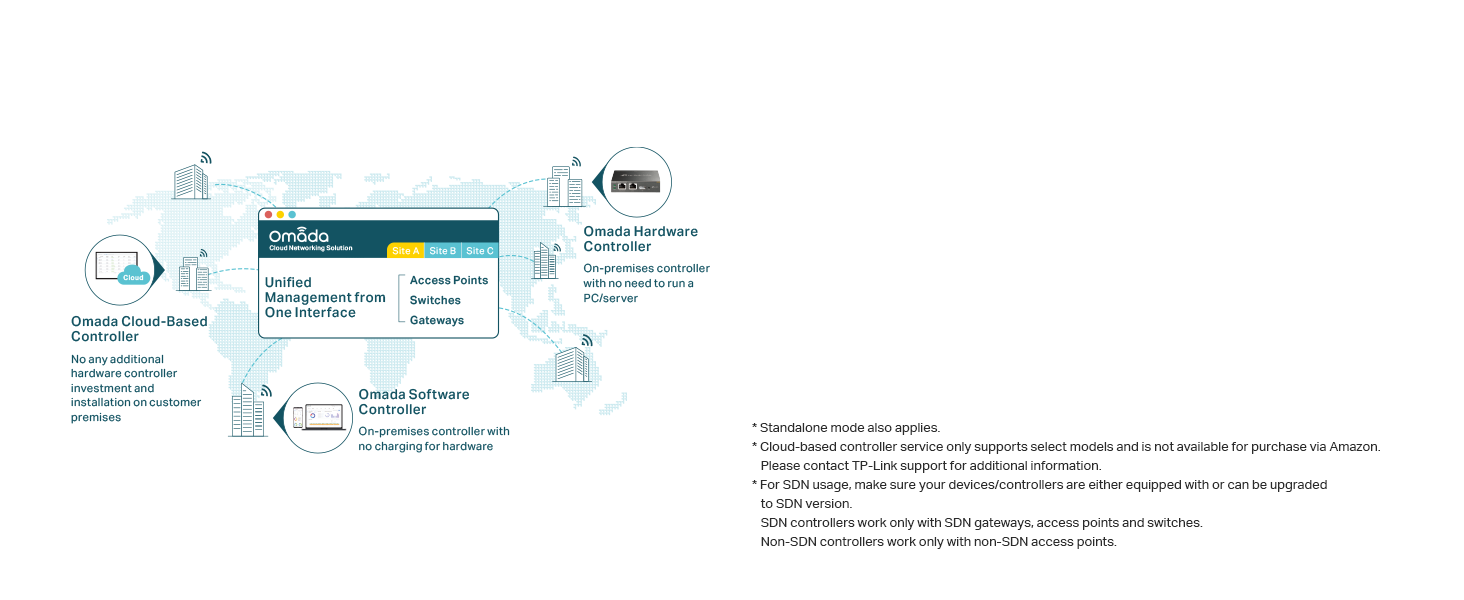
| Management | Omada SDN (Hardware/Software/Cloud Controller) & Standalone Web UI |
| Security Features | SPI Firewall, DoS Defense, IP/MAC/URL Filtering, Access Control Lists |
| RAM | 512 MB |
| Form Factor | Desktop |
| Warranty | 5-Year Manufacturer |
Design and Build
The TP-Link ER7206 adopts a compact desktop design, constructed with a durable metal casing. Its dimensions of 8.9 inches long by 5.16 inches wide by 1.38 inches high give it a substantial but space-efficient footprint suitable for various environments, from office shelves to network closets. The black finish and rectangular shape present a professional, understated aesthetic. The build quality, as noted in user feedback, contributes to reliable operation, with one owner reporting uninterrupted service for over 18 months in a climate-controlled setting. This desktop form factor is a defining characteristic; it offers robustness and stability but means the device is not designed for standard rackmount installation, which could be a consideration for some business deployments.
Performance and Features
Connectivity and Ports
The ER7206’s flexible port configuration is one of its standout hardware features. It provides a total of five Gigabit Ethernet ports: one dedicated Gigabit SFP WAN port, one dedicated Gigabit RJ45 WAN port, two configurable Gigabit WAN/LAN ports, and one dedicated Gigabit LAN port. This allows for up to four active WAN connections, enabling intelligent load balancing and failover to maximize bandwidth efficiency and connection reliability. The inclusion of an SFP port is a notable plus for connecting to fiber optic networks. All LAN ports support 10/100/1000 Mbps speeds, ensuring full Gigabit throughput for the local network.
VPN and Security Performance
As a VPN router, the ER7206 is built for capacity. It supports up to 100 LAN-to-LAN IPsec tunnels, 50 OpenVPN connections, 50 L2TP connections, and 50 PPTP connections. It is important to note that for full OpenVPN server functionality and the one-click auto IPsec feature, integration with an Omada SDN controller is required. The router’s security suite is comprehensive, featuring a Stateful Packet Inspection (SPI) firewall, Denial-of-Service (DoS) attack defense, and granular control via IP filtering, MAC filtering, URL filtering, and Access Control Lists (ACLs). These tools allow administrators to standardize user online behavior and protect the network and sensitive data.
Network Capacity and Management
The stated capacity to handle 700 clients and 150,000 associated devices indicates a router built for scale, suitable for offices, retail spaces, or other medium-density environments. Management is highly versatile. The router can operate in standalone mode using its built-in web interface, which users have praised for its clean and logically organized design. For centralized control, it integrates into the Omada SDN platform. This allows the ER7206 to be managed alongside compatible Omada access points and switches from a single pane of glass, either via an on-premises hardware/software controller or through TP-Link’s cloud-based controller (which requires a specific plan). The Omada app also enables remote cloud management from anywhere.
Traffic Control and Load Balancing
Beyond basic routing, the ER7206 offers sophisticated traffic control features. Bandwidth control and session limiting allow administrators to allocate and manage network resources optimally, preventing any single user or application from monopolizing the connection. The intelligent load balancing function can distribute data streams across multiple WAN links according to their bandwidth proportions, significantly raising the utilization rate of multi-line broadband setups. This makes the device capable of satisfying various internet requirements, from basic redundancy to aggregated bandwidth for demanding applications.
Setup, Support and Ownership
Setup experience, as reflected in user reviews, can be straightforward for basic configurations, with one user reporting internet connectivity within 20 minutes. However, leveraging its more advanced features, particularly VPN configurations and Omada SDN integration, benefits from technical networking knowledge. The router comes with a quick installation guide and is backed by a 5-year manufacturer’s warranty, which is an excellent commitment for a business product. For full SDN functionality, users need to ensure they have a compatible Omada SDN controller; the router itself does not include one. Firmware updates and device compatibility details for the SDN ecosystem are available on the TP-Link website. Some advanced monitoring features, like comprehensive SNMP data for all WAN ports, have been noted by users as having limitations.
What Owners Say
Owner feedback for the TP-Link ER7206 is overwhelmingly positive, with a high rating distribution skewing heavily toward five-star reviews. Users consistently praise its reliability, with reports of flawless, non-stop operation for periods exceeding 18 months and two years. Many highlight its value proposition, especially when replacing more expensive enterprise firewalls with costly annual support contracts. The setup process is frequently described as surprisingly quick and intuitive for the basic configuration. Positive remarks also extend to the product’s design and the clean, user-friendly web interface. Some critical feedback exists, primarily from business users who have identified specific functional limitations, such as incomplete SNMP data for certain WAN ports. It is noteworthy that several reviews mention responsive and helpful technical support from TP-Link when addressing configuration issues.
Pros and Cons
Pros
- High capacity for VPN tunnels across multiple protocols (IPsec, OpenVPN, L2TP, PPTP).
- Seamless integration with Omada SDN for centralized cloud and local management.
- Flexible port configuration supporting up to four WAN connections, including an SFP port.
- Extremely high client and device support for scalable networks.
- Comprehensive security features including SPI firewall, DoS defense, and granular filtering.
- Durable metal desktop build quality and a 5-year warranty.
Cons
- Full OpenVPN and auto-IPsec features require an additional Omada SDN controller.
- Desktop form factor is not rack-mountable, which may not suit all business deployments.
- Advanced setup and configuration benefit from technical networking expertise.
- Some advanced monitoring features (e.g., SNMP for all WAN ports) have noted limitations.
- Cloud-based controller management requires a separate plan from TP-Link.
- The product listing is shared with a hardware controller, which can cause confusion.
Who Should Buy It (and Who Should Skip It)
The TP-Link ER7206 is an ideal choice for small to medium-sized businesses, managed service providers, and tech-savvy home users who need a reliable, high-capacity VPN router without the recurring cost of enterprise firewall licenses. It is perfectly suited for environments with multiple internet connections requiring load balancing or failover, and for those investing in or already using TP-Link’s Omada ecosystem for unified network management. It also serves as a powerful router for gigabit internet connections, efficiently handling high-speed WAN links.
Conversely, individuals or businesses seeking a simple plug-and-play wireless router should look elsewhere, as the ER7206 is a wired-only device. Those who require standard 19-inch rackmount compatibility or who need out-of-the-box, controller-free OpenVPN server functionality may find better alternatives. Users with very basic networking needs who do not require VPNs, multi-WAN, or centralized management would be better served by a more basic consumer router. For those exploring other compact networking solutions, it’s worth looking at options in our Tech Gear category.
Final Verdict
The TP-Link ER7206 successfully carves out a niche as a high-value, professional wired router. It delivers on its core promises: substantial VPN capacity, robust security features, flexible multi-WAN support, and seamless integration into a scalable SDN management framework. Its performance in real-world deployments, as evidenced by owner reports of long-term reliability, speaks to its solid construction and stable firmware. For the price, it offers a feature set that challenges more expensive enterprise alternatives, particularly for organizations tired of subscription-based security models.
However, its value is maximized when used as intended—within a technically managed environment, preferably as part of the broader Omada ecosystem. The requirement for an SDN controller to unlock certain premium features adds to the total cost of ownership and should be factored into the decision. Ultimately, the TP-Link ER7206 is a compelling choice for anyone needing a powerful, secure, and manageable wired router for a business or advanced home network, offering a strong balance of capability, reliability, and cost-effectiveness over time. Its approach to handling multiple devices is particularly impressive.
FAQs
Does the TP-Link ER7206 have Wi-Fi?
No, the TP-Link ER7206 is a wired-only router. It does not have built-in wireless functionality. To create a Wi-Fi network, you would need to connect it to a separate wireless access point, such as one from TP-Link’s Omada series for integrated management.
Can I use the ER7206 without an Omada SDN controller?
Yes, the ER7206 can operate in standalone mode using its built-in web interface for configuration and management. However, features like the OpenVPN server and one-click auto IPsec VPN require an Omada SDN controller (hardware, software, or cloud-based).
What is the difference between the ER7206 and the ER605 model?
Based on owner feedback, the ER7206 offers better VPN throughput, more memory, and greater processing power compared to the TL-ER605. The ER7206 is considered a more capable device for a relatively small price increase, making it a preferred choice for users who need higher performance.
How many internet connections can the ER7206 handle?
The ER7206 can support up to four simultaneous WAN connections. Its port configuration includes one SFP WAN port, one RJ45 WAN port, and two configurable WAN/LAN ports, all of which can be set up for WAN usage to enable load balancing and failover.
About the author

Elvis Dicki writes reviews and buying guides for CyberSecLabs.